
Windows Defender Real-Time Protection - Turn On or Off

How to Turn Windows Defender Real-Time Protection On or Off in Windows 7

   Information
Windows Defender real-time spyware protection runs in the background and alerts you when spyware and other potentially unwanted software attempts to install itself or run on your computer.

This will show you how to turn real-time protection on or off in Windows 7. By default, real-time protection is turned on in Windows 7 Windows Defender.
   Note
If you installed Microsoft Security Essentials (MSE), then it will disable Window Defender and MSE will be used by default instead.

The release of the Microsoft Safety Scanner has resulted in confusion about the available anti-malware tools provided by Microsoft and questions about when they should be used.

Read more at: Understanding Microsoft Anti-Malware Software ~ Security Garden

   Warning
To help prevent spyware and other potentially unwanted software from running on your computer, it is recommended that you turn on Windows Defender real-time protection and select all real-time protection options.


Here's How:
1. If not already, turn Windows Defender on.

2. Open the Control Panel (icons view), and click on the Windows Defender icon.

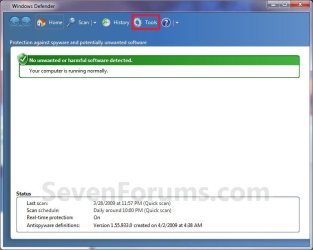
3. Click on Tools on the toolbar at the top. (See screenshot below)
Step1.jpg
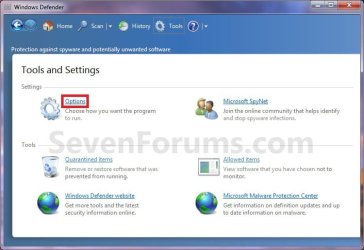
4. Under Settings, click on Options. (See screenshot below)
Step2.jpg
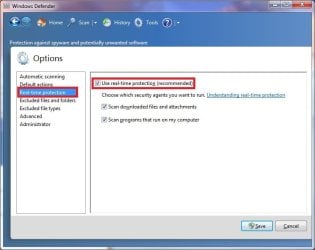
5. In the left pane, click on Real-time protection. (See screenshot below)
Real-Time_Protection.jpg
6. To Turn Off Real-time Protection
A) Uncheck the Use real-time protection box. (See screenshot above)

B) Go to step 8.
7. To Turn On Real-time Protection
A) Check the Use real-time protection box. (See screenshot below step 5)

B) Check the other real-time protection options that you would like to use. (See screenshot below step 5)

NOTE: To help protect your privacy and your computer, it is recommended that you select all of the real-time protection options.
  • Scan downloaded files and attachments - Monitors files and programs that are designed to work with web browsers. These files can be downloaded, installed, or run by the browser itself. Spyware and other potentially unwanted software can be included with these files and installed without your knowledge.
  • Scan programs that run on your computer - Monitors when programs start and any operations they perform while running. Spyware and other potentially unwanted software can use vulnerabilities in programs that you have installed to run malicious or unwanted software without your knowledge.
8. Click on the Save button. (See screenshot below step 4)

9. If prompted by UAC, then click on Yes.

10. When finished, close the Windows Defender window. (See screenshot below step 3)
That's it,
Shawn


Last edited:
Using the registry of Windows 7 SP1, how do I completely disable the real-time protection of Windows Defender?

Thanks

Bye
 

My Computer

OS
Windows 7

My Computer

Computer type
PC/Desktop
Computer Manufacturer/Model Number
Golden Mk. I.4
OS
Windows 10 Pro x64 ; Xubuntu x64
CPU
Intel i7 860 @ 2.80 GHz O/C'ed to 4.0GHz
Motherboard
Gigabyte P55A-UD3R Rev.1. Award BIOS F13
Memory
16GB Corsair Vengance DDR3 @ 661 MHz Dual Channel (9-9-9-24)
Graphics Card(s)
EVGA NVidia GTX 560 1024MB
Sound Card
Realtek Integrated
Monitor(s) Displays
Dual Samsung SyncMaster 2494HS
Screen Resolution
1920*1080 and 1920*1080
Hard Drives
1*Samsung 840 EVO 120GB SSD;
1*OCZ Vertex 2 60GB SSD;
2*Samsung F3 SpinPoint 1TB in RAID0;
1*Samsung F1 SpinPoint 1TB;
2*Western Digital 1TB External USB 3.0
1*Western Digital 500GB External USB 3.0
1*Seagate 500GB External USB 2.0
PSU
Thermaltake ToughPower QFan 750W
Case
Thermaltake Element S VK60001W2Z
Cooling
Corsair H60 Water Cooling, 2*230mm and 2*80mm case fans
Keyboard
Logitech G110
Mouse
Logitech MX518
Using the registry of Windows 7 SP1, how do I completely disable the real-time protection of Windows Defender?
Stop posting the same question in multiple locations. Already answered here:
http://www.sevenforums.com/tutorials/6397-windows-defender-turn-off-3.html#post2937669

Sorry but, in the other post, I asked how to disable Windows Defender during startup of Windows 7; whereas, in this post, I'm wondering how do I turn off the real-time protection feature using the registry of Windows 7 SP1? So, how do I do this?

Thanks

Bye
 

My Computer

OS
Windows 7
Why not just turn off real-time protection in Windows Defender as per the tutorial?
 

My Computer

Computer type
PC/Desktop
Computer Manufacturer/Model Number
Self built custom
OS
64-bit Windows 11 Pro for Workstations
CPU
Intel i7-8700K OC'd to 5 GHz
Motherboard
ASUS ROG Maximus XI Formula Z390
Memory
64 GB (4x16GB) G.SKILL TridentZ RGB DDR4 3600 MHz
Graphics Card(s)
ASUS ROG-STRIX-GTX1080TI-O11G-GAMING
Sound Card
Integrated
Monitor(s) Displays
2 x Samsung Odyssey G7 27"
Screen Resolution
2560x1440
Hard Drives
1TB Samsung 990 PRO M.2,
4TB Samsung 990 PRO PRO M.2,
TerraMaster F8 SSD Plus NAS
PSU
Seasonic Prime Titanium 850W
Case
Thermaltake Core P3
Cooling
Corsair Hydro H115i
Keyboard
Logitech wireless K800
Mouse
Logitech MX Master 4
Internet Speed
2 Gb/s Download and 100 Mb/s Upload
Antivirus
Malwarebyte Anti-Malware Premium
Browser
Google Chrome
Other Info
Logitech Z625 speaker system,
Logitech BRIO 4K Pro webcam,
HP Color LaserJet Pro MFP M477fdn,
APC SMART-UPS RT 1000 XL - SURT1000XLI,
Galaxy S23 Plus phone

My Computer

Computer type
PC/Desktop
Computer Manufacturer/Model Number
Self built custom
OS
64-bit Windows 11 Pro for Workstations
CPU
Intel i7-8700K OC'd to 5 GHz
Motherboard
ASUS ROG Maximus XI Formula Z390
Memory
64 GB (4x16GB) G.SKILL TridentZ RGB DDR4 3600 MHz
Graphics Card(s)
ASUS ROG-STRIX-GTX1080TI-O11G-GAMING
Sound Card
Integrated
Monitor(s) Displays
2 x Samsung Odyssey G7 27"
Screen Resolution
2560x1440
Hard Drives
1TB Samsung 990 PRO M.2,
4TB Samsung 990 PRO PRO M.2,
TerraMaster F8 SSD Plus NAS
PSU
Seasonic Prime Titanium 850W
Case
Thermaltake Core P3
Cooling
Corsair Hydro H115i
Keyboard
Logitech wireless K800
Mouse
Logitech MX Master 4
Internet Speed
2 Gb/s Download and 100 Mb/s Upload
Antivirus
Malwarebyte Anti-Malware Premium
Browser
Google Chrome
Other Info
Logitech Z625 speaker system,
Logitech BRIO 4K Pro webcam,
HP Color LaserJet Pro MFP M477fdn,
APC SMART-UPS RT 1000 XL - SURT1000XLI,
Galaxy S23 Plus phone
Back
Top