You have files waiting to be burned to disc - Stop Message

How to Stop "You have files waiting to be burned to disc" Message in Windows

   Information
If you have the You have files waiting to be burned to disc Notification Area balloon message at every startup or log on of Windows, or just want to stop files waiting to be burned to disc, then this will show you how to stop this by clearing the Temporary Burn Cache folder.

   Note
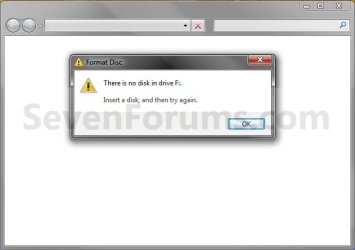
You usually will also have a blank window when you click on the To view the files now, click this balloon link.


EXAMPLE: You have files waiting to be burned to disc Notification Area balloon messageNotification.jpg EXAMPLE: To view the files now, click this balloon - Blank Window Blank_window.jpg


OPTION ONE

From Computer or This PC Window

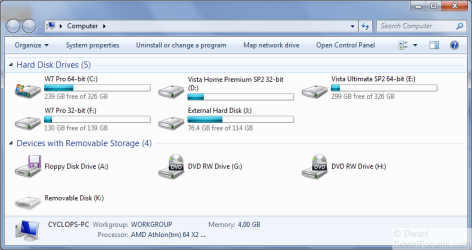
1. Open your Computer (Windows 7/8) or This PC (Windows 8.1) window.

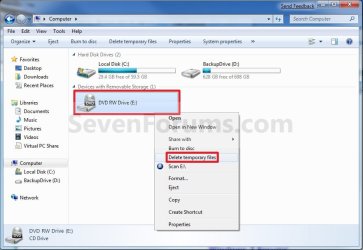
2. Right click or swipe down on the CD or DVD drive with this issue, and click/tap on Delete temporary files. (see screenshot below)Computer.jpg
3. Click/tap on Yes to confirm deletion. (see screenshot below)Confirm.jpg


OPTION TWO

From the Temporary Burn Folder

1. Do step 2, 3, or 4 below for how you would like to open the Temporary Burn Folder.

2. Press the Windows + R keys to open the Run dialog, type shell:cd burning, click/tap on OK, and go to step 5 below.

3. Open Windows Explorer (Windows 7) or File Explorer (Windows 8), copy and paste the location below into the address bar, press Enter, and go to step 5 below.

%userprofile%\AppData\Local\Microsoft\Windows\Burn\Temporary Burn Folder

4. Open Folder Options, and select (dot) Show hidden files, folders, and drives.A) Open Windows Explorer and navigate to the location below, and go to step 5 below (see screenshot below)
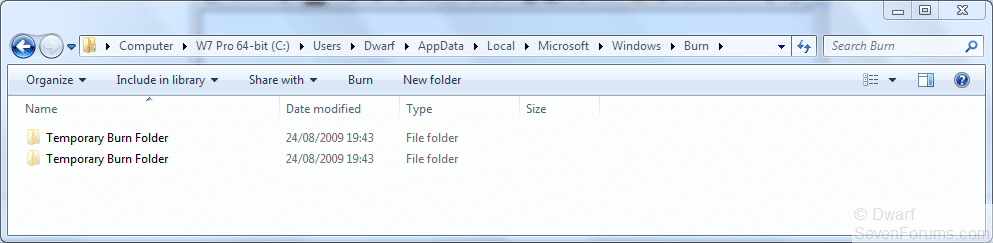
NOTE: You will have a Temporary Burn Folder for each optical drive that you have installed in your system. Connecting a U3 USB drive may add another burning folder, as well as virtual CD-Rom Emulators.

Code:
C:\Users\(user-name)\AppData\Local\Microsoft\Windows\Burn\Temporary Burn Folder
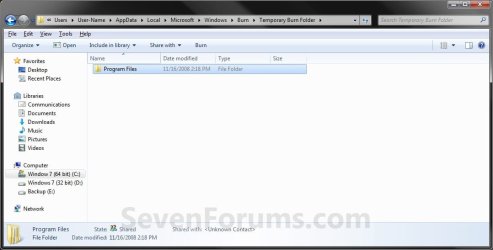
5. Delete only all contents in the Temporary Burn Folder for the optical drive and not the folder itself. (see screenshot below)
NOTE: Everything in this folder is waiting to be burned to disc for that optical drive. In this example, I have the entire contents of the Program Files folder waiting to be burned to disc that needs to be deleted to stop that pesky You have files waiting to be burned to disc message.Folder2.jpg
6. If you did step 4, then in Folder Options, select (dot) Don't Show hidden files, folders, and drives.

7. Close the Temporary Burn Folder window.
That's it,
Shawn


Attachments

  • Start_Menu_Shell.jpg
    Start_Menu_Shell.jpg
    43.1 KB · Views: 3,956
Last edited:
There are always alternatives to "skin the cat"
This is how I did it:
Start - Run - type gpedit.msc
Go to User Configuration - Administrative Templates - All Settings.
Look for "Remove CD Burning Features" and double click on it.
Choose ENABLED and apply.
You may need to reboot the computer for settings to take place.
Perhaps, Brink, you could incorporate this in the above as an alternative?
-Best check if it works for you first. Thing ain't always what they seem when we ae talking about computers!!
 
Last edited:

My Computer

Computer Manufacturer/Model Number
Three desktops and one laptop with good specs..
OS
Vista and now 7 in 32 and 64 bit.
Quicker way to Temp folder

The easiest way to get to the desired folder is:
Run...
shell:cd burning

That will take you straight there. Then just delete the files inside.
 

My Computer

Computer Manufacturer/Model Number
Self-Build
OS
Windows 7 + Windows Vista + XP +Ubuntu
CPU
AMD Dual Core
Motherboard
Gigabyte
Memory
2GB
Monitor(s) Displays
Viewsonic 19" vga
Screen Resolution
1400x900
Hard Drives
160GB Hitatchi
40GB Seagate
Case
iCute Sever style
Hello Jeketem, and welcome to Seven Forums.

Great tip. +1 rep. It has been added to the tutorial.

Thank you,
Shawn
 

My Computer

Computer type
PC/Desktop
Computer Manufacturer/Model Number
Self built custom
OS
64-bit Windows 11 Pro for Workstations
CPU
Intel i7-8700K OC'd to 5 GHz
Motherboard
ASUS ROG Maximus XI Formula Z390
Memory
64 GB (4x16GB) G.SKILL TridentZ RGB DDR4 3600 MHz
Graphics Card(s)
ASUS ROG-STRIX-GTX1080TI-O11G-GAMING
Sound Card
Integrated
Monitor(s) Displays
2 x Samsung Odyssey G7 27"
Screen Resolution
2560x1440
Hard Drives
1TB Samsung 990 PRO M.2,
4TB Samsung 990 PRO PRO M.2,
TerraMaster F8 SSD Plus NAS
PSU
Seasonic Prime Titanium 850W
Case
Thermaltake Core P3
Cooling
Corsair Hydro H115i
Keyboard
Logitech wireless K800
Mouse
Logitech MX Master 4
Internet Speed
2 Gb/s Download and 100 Mb/s Upload
Antivirus
Malwarebyte Anti-Malware Premium
Browser
Google Chrome
Other Info
Logitech Z625 speaker system,
Logitech BRIO 4K Pro webcam,
HP Color LaserJet Pro MFP M477fdn,
APC SMART-UPS RT 1000 XL - SURT1000XLI,
Galaxy S23 Plus phone
Another way

I had the same problem, I found an easier way of clearing the files (at least on my dell).

My Computer> right click on the DVD/CD Drive select "Clear Temporary Files" and then confirm deletion.

The option does not apear if you don't have files waiting.

The above ways will work too
 

My Computer

OS
Windows 7, Vista, XP
Hello Creoleiii, and welcome to Seven Forums.

That is much better and easier to do. +1 rep.

Thank you for sharing. It has been added. :)

Shawn
 

My Computer

Computer type
PC/Desktop
Computer Manufacturer/Model Number
Self built custom
OS
64-bit Windows 11 Pro for Workstations
CPU
Intel i7-8700K OC'd to 5 GHz
Motherboard
ASUS ROG Maximus XI Formula Z390
Memory
64 GB (4x16GB) G.SKILL TridentZ RGB DDR4 3600 MHz
Graphics Card(s)
ASUS ROG-STRIX-GTX1080TI-O11G-GAMING
Sound Card
Integrated
Monitor(s) Displays
2 x Samsung Odyssey G7 27"
Screen Resolution
2560x1440
Hard Drives
1TB Samsung 990 PRO M.2,
4TB Samsung 990 PRO PRO M.2,
TerraMaster F8 SSD Plus NAS
PSU
Seasonic Prime Titanium 850W
Case
Thermaltake Core P3
Cooling
Corsair Hydro H115i
Keyboard
Logitech wireless K800
Mouse
Logitech MX Master 4
Internet Speed
2 Gb/s Download and 100 Mb/s Upload
Antivirus
Malwarebyte Anti-Malware Premium
Browser
Google Chrome
Other Info
Logitech Z625 speaker system,
Logitech BRIO 4K Pro webcam,
HP Color LaserJet Pro MFP M477fdn,
APC SMART-UPS RT 1000 XL - SURT1000XLI,
Galaxy S23 Plus phone
.

How many 'Temporary Burn folders' should there be? I have (3) within my C:\Users\(user name)\AppData\Local\Microsoft\Windows\Burn\Temporary Burn Folder
 

My Computer

Computer type
PC/Desktop
Computer Manufacturer/Model Number
Custom build
OS
Windows 7 Ultimate 64bit SP1
CPU
Core i5 2500k-unclocked
Motherboard
Gigabyte GA-Z68XP-UD3 - BIOS F10
Memory
8GB G-Skill RAM
Graphics Card(s)
XFX HD Radeon 6870 GDDR-256bit 1GB
Sound Card
Sound Blaster X-Fi Gamer
Monitor(s) Displays
Westinghouse 24in LED full
Screen Resolution
1920x1080
Hard Drives
1TB Maxtor SATA-2 7200RPM 32mb
1TB Hitachi SATA-3 7200RPM 32mb
PSU
Antec 650w PSU
Case
Rosewill mid Challenger-Black
Internet Speed
Centurylink 40mbps down/5mbps up
Antivirus
Avast 8.0.1483
Browser
Firefox 19.0.2
Hello Udidwht,

You should have one hidden C:\Users\(user-name)\AppData\Local\Microsoft\Windows\Burn\Temporary Burn Folder per writable optical drive. Could you post back a screenshot of what you seeing?
 
Last edited:

My Computer

Computer type
PC/Desktop
Computer Manufacturer/Model Number
Self built custom
OS
64-bit Windows 11 Pro for Workstations
CPU
Intel i7-8700K OC'd to 5 GHz
Motherboard
ASUS ROG Maximus XI Formula Z390
Memory
64 GB (4x16GB) G.SKILL TridentZ RGB DDR4 3600 MHz
Graphics Card(s)
ASUS ROG-STRIX-GTX1080TI-O11G-GAMING
Sound Card
Integrated
Monitor(s) Displays
2 x Samsung Odyssey G7 27"
Screen Resolution
2560x1440
Hard Drives
1TB Samsung 990 PRO M.2,
4TB Samsung 990 PRO PRO M.2,
TerraMaster F8 SSD Plus NAS
PSU
Seasonic Prime Titanium 850W
Case
Thermaltake Core P3
Cooling
Corsair Hydro H115i
Keyboard
Logitech wireless K800
Mouse
Logitech MX Master 4
Internet Speed
2 Gb/s Download and 100 Mb/s Upload
Antivirus
Malwarebyte Anti-Malware Premium
Browser
Google Chrome
Other Info
Logitech Z625 speaker system,
Logitech BRIO 4K Pro webcam,
HP Color LaserJet Pro MFP M477fdn,
APC SMART-UPS RT 1000 XL - SURT1000XLI,
Galaxy S23 Plus phone
I have 2 such folders on my system, but I have 2 writeable optical drives. I suspect that it is one folder per drive. How many such drives do you have on your system? Also, some virtual disk programs such as Alcohol120% can create these folders.
 

My Computer

Computer type
PC/Desktop
Computer Manufacturer/Model Number
Dwarf Dwf/11/2012 r09/2013
OS
Windows 8.1 Pro RTM x64
CPU
Intel Core-i5-3570K 4-core @ 3.4GHz (Ivy Bridge) (OC 4.4GHz)
Motherboard
ASRock Z77 Extreme4-M
Memory
4 x 4GB DDR3-1600 Corsair Vengeance CMZ8GX3M2A1600C9B (16GB)
Graphics Card(s)
MSI GeForce GTX770 Gaming OC 2GB
Sound Card
Realtek High Definition on board solution (ALC 898)
Monitor(s) Displays
ViewSonic VA1912w Widescreen (VGA)
Screen Resolution
1440x900
Hard Drives
OCZ Agility 3 SSD 120GB SATA III x2 (RAID 0)
Samsung HD501LJ 500GB SATA II x2
Hitachi HDS721010CLA332 1TB SATA II
Iomega 1.5TB Ext USB 2.0
WD 2.0TB Ext USB 3.0
PSU
XFX Pro Series 850W Semi-Modular
Case
Gigabyte IF233
Cooling
1 x 120mm Front Inlet 1 x 120mm Rear Exhaust
Keyboard
Microsoft Comfort Curve Keyboard 3000 (USB)
Mouse
Microsoft Comfort Mouse 3000 for Business (USB)
Internet Speed
NetGear DG834Gv3 ADSL Modem/Router (Ethernet) ~4.0 Mb/s (O2)
Antivirus
Avast! 8.0.1497
Browser
IE 11
Other Info
Optical Drive: HL-DT-ST BD-RE BH10LS30 SATA Bluray
Lexmark S305 Printer/Scanner/Copier (USB)
WEI Score: 8.1/8.1/8.5/8.5/8.25
Asus Eee PC 1011PX Netbook (Windows 7 x86 Starter)
Hi Dwarf,

Are they both named the same thing, or have slight different names like with a 1 or 2 after it?
 

My Computer

Computer type
PC/Desktop
Computer Manufacturer/Model Number
Self built custom
OS
64-bit Windows 11 Pro for Workstations
CPU
Intel i7-8700K OC'd to 5 GHz
Motherboard
ASUS ROG Maximus XI Formula Z390
Memory
64 GB (4x16GB) G.SKILL TridentZ RGB DDR4 3600 MHz
Graphics Card(s)
ASUS ROG-STRIX-GTX1080TI-O11G-GAMING
Sound Card
Integrated
Monitor(s) Displays
2 x Samsung Odyssey G7 27"
Screen Resolution
2560x1440
Hard Drives
1TB Samsung 990 PRO M.2,
4TB Samsung 990 PRO PRO M.2,
TerraMaster F8 SSD Plus NAS
PSU
Seasonic Prime Titanium 850W
Case
Thermaltake Core P3
Cooling
Corsair Hydro H115i
Keyboard
Logitech wireless K800
Mouse
Logitech MX Master 4
Internet Speed
2 Gb/s Download and 100 Mb/s Upload
Antivirus
Malwarebyte Anti-Malware Premium
Browser
Google Chrome
Other Info
Logitech Z625 speaker system,
Logitech BRIO 4K Pro webcam,
HP Color LaserJet Pro MFP M477fdn,
APC SMART-UPS RT 1000 XL - SURT1000XLI,
Galaxy S23 Plus phone
The folder names are all identical with the exception of creation dates. I have two optical drives but only one is writable. I'm not using alcohol 120 or such. I do have DVD 43 installed. All the folders (3) are empty.
 

My Computer

Computer type
PC/Desktop
Computer Manufacturer/Model Number
Custom build
OS
Windows 7 Ultimate 64bit SP1
CPU
Core i5 2500k-unclocked
Motherboard
Gigabyte GA-Z68XP-UD3 - BIOS F10
Memory
8GB G-Skill RAM
Graphics Card(s)
XFX HD Radeon 6870 GDDR-256bit 1GB
Sound Card
Sound Blaster X-Fi Gamer
Monitor(s) Displays
Westinghouse 24in LED full
Screen Resolution
1920x1080
Hard Drives
1TB Maxtor SATA-2 7200RPM 32mb
1TB Hitachi SATA-3 7200RPM 32mb
PSU
Antec 650w PSU
Case
Rosewill mid Challenger-Black
Internet Speed
Centurylink 40mbps down/5mbps up
Antivirus
Avast 8.0.1483
Browser
Firefox 19.0.2
Hi Dwarf,

Are they both named the same thing, or have slight different names like with a 1 or 2 after it?
No, they are both named the same.
Capture.PNG

It is also the same for my other Administrative account. I do have 2 writeable optical drives, so I am thinking that it is one folder per drive.
Capture1.PNG

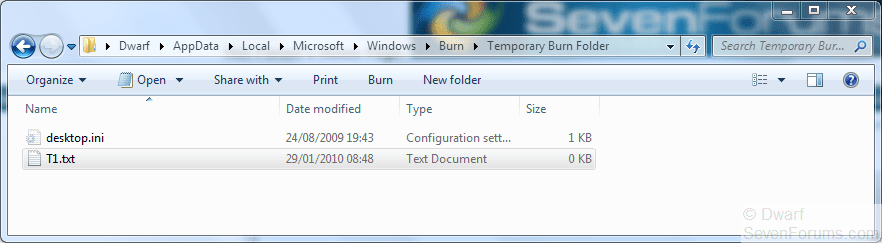
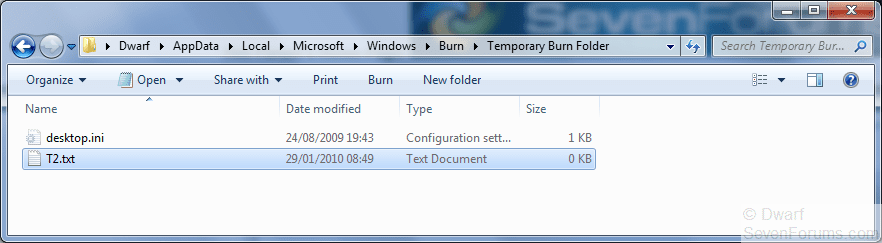
Just confirmed this. I manually created a blank text file in each folder with the names T1 and T2 respectively.
Capture2.png Capture3.PNG

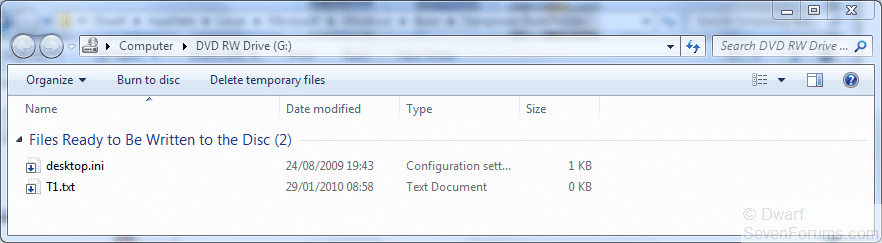
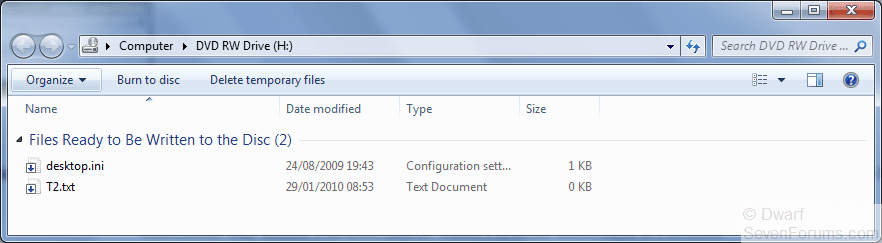
I then got the following messages about files waiting to be written.
Capture4.PNG Capture5.PNG
 

My Computer

Computer type
PC/Desktop
Computer Manufacturer/Model Number
Dwarf Dwf/11/2012 r09/2013
OS
Windows 8.1 Pro RTM x64
CPU
Intel Core-i5-3570K 4-core @ 3.4GHz (Ivy Bridge) (OC 4.4GHz)
Motherboard
ASRock Z77 Extreme4-M
Memory
4 x 4GB DDR3-1600 Corsair Vengeance CMZ8GX3M2A1600C9B (16GB)
Graphics Card(s)
MSI GeForce GTX770 Gaming OC 2GB
Sound Card
Realtek High Definition on board solution (ALC 898)
Monitor(s) Displays
ViewSonic VA1912w Widescreen (VGA)
Screen Resolution
1440x900
Hard Drives
OCZ Agility 3 SSD 120GB SATA III x2 (RAID 0)
Samsung HD501LJ 500GB SATA II x2
Hitachi HDS721010CLA332 1TB SATA II
Iomega 1.5TB Ext USB 2.0
WD 2.0TB Ext USB 3.0
PSU
XFX Pro Series 850W Semi-Modular
Case
Gigabyte IF233
Cooling
1 x 120mm Front Inlet 1 x 120mm Rear Exhaust
Keyboard
Microsoft Comfort Curve Keyboard 3000 (USB)
Mouse
Microsoft Comfort Mouse 3000 for Business (USB)
Internet Speed
NetGear DG834Gv3 ADSL Modem/Router (Ethernet) ~4.0 Mb/s (O2)
Antivirus
Avast! 8.0.1497
Browser
IE 11
Other Info
Optical Drive: HL-DT-ST BD-RE BH10LS30 SATA Bluray
Lexmark S305 Printer/Scanner/Copier (USB)
WEI Score: 8.1/8.1/8.5/8.5/8.25
Asus Eee PC 1011PX Netbook (Windows 7 x86 Starter)
Mystery solved. I only have one CD/DVD drive, so I never noticed it before. Learn something new everyday. Thanks Dwarf. :)
 

My Computer

Computer type
PC/Desktop
Computer Manufacturer/Model Number
Self built custom
OS
64-bit Windows 11 Pro for Workstations
CPU
Intel i7-8700K OC'd to 5 GHz
Motherboard
ASUS ROG Maximus XI Formula Z390
Memory
64 GB (4x16GB) G.SKILL TridentZ RGB DDR4 3600 MHz
Graphics Card(s)
ASUS ROG-STRIX-GTX1080TI-O11G-GAMING
Sound Card
Integrated
Monitor(s) Displays
2 x Samsung Odyssey G7 27"
Screen Resolution
2560x1440
Hard Drives
1TB Samsung 990 PRO M.2,
4TB Samsung 990 PRO PRO M.2,
TerraMaster F8 SSD Plus NAS
PSU
Seasonic Prime Titanium 850W
Case
Thermaltake Core P3
Cooling
Corsair Hydro H115i
Keyboard
Logitech wireless K800
Mouse
Logitech MX Master 4
Internet Speed
2 Gb/s Download and 100 Mb/s Upload
Antivirus
Malwarebyte Anti-Malware Premium
Browser
Google Chrome
Other Info
Logitech Z625 speaker system,
Logitech BRIO 4K Pro webcam,
HP Color LaserJet Pro MFP M477fdn,
APC SMART-UPS RT 1000 XL - SURT1000XLI,
Galaxy S23 Plus phone
You're welcome, Shawn. :)
 

My Computer

Computer type
PC/Desktop
Computer Manufacturer/Model Number
Dwarf Dwf/11/2012 r09/2013
OS
Windows 8.1 Pro RTM x64
CPU
Intel Core-i5-3570K 4-core @ 3.4GHz (Ivy Bridge) (OC 4.4GHz)
Motherboard
ASRock Z77 Extreme4-M
Memory
4 x 4GB DDR3-1600 Corsair Vengeance CMZ8GX3M2A1600C9B (16GB)
Graphics Card(s)
MSI GeForce GTX770 Gaming OC 2GB
Sound Card
Realtek High Definition on board solution (ALC 898)
Monitor(s) Displays
ViewSonic VA1912w Widescreen (VGA)
Screen Resolution
1440x900
Hard Drives
OCZ Agility 3 SSD 120GB SATA III x2 (RAID 0)
Samsung HD501LJ 500GB SATA II x2
Hitachi HDS721010CLA332 1TB SATA II
Iomega 1.5TB Ext USB 2.0
WD 2.0TB Ext USB 3.0
PSU
XFX Pro Series 850W Semi-Modular
Case
Gigabyte IF233
Cooling
1 x 120mm Front Inlet 1 x 120mm Rear Exhaust
Keyboard
Microsoft Comfort Curve Keyboard 3000 (USB)
Mouse
Microsoft Comfort Mouse 3000 for Business (USB)
Internet Speed
NetGear DG834Gv3 ADSL Modem/Router (Ethernet) ~4.0 Mb/s (O2)
Antivirus
Avast! 8.0.1497
Browser
IE 11
Other Info
Optical Drive: HL-DT-ST BD-RE BH10LS30 SATA Bluray
Lexmark S305 Printer/Scanner/Copier (USB)
WEI Score: 8.1/8.1/8.5/8.5/8.25
Asus Eee PC 1011PX Netbook (Windows 7 x86 Starter)
This is a little better at bringing you to the right location, without people having to substitute their username in:
Code:
%userprofile%\AppData\Local\Microsoft\Windows\Burn\Temporary Burn Folder

And plugging in one of those U3 USB drives may add another burning folder, as well as those virtual CD-Rom Emulators...

(I have 4, with 2 physical drives, a U3 USB stick in, and a virtual CD-Rom)
 

My Computer

Computer Manufacturer/Model Number
Dell Studio XPS 9000
OS
Windows 7 Home Premium 64 bit
CPU
Intel(R) Core(TM) i7 CPU 920 @ 2.67GHz
Memory
DDR3 8192 MBytes Dual Channel
Graphics Card(s)
Radeon HD 5870
Monitor(s) Displays
Dell S2209W / Viewsonic VX2433wm
Thank you Margath, and welcome to Seven Forums. :)
 

My Computer

Computer type
PC/Desktop
Computer Manufacturer/Model Number
Self built custom
OS
64-bit Windows 11 Pro for Workstations
CPU
Intel i7-8700K OC'd to 5 GHz
Motherboard
ASUS ROG Maximus XI Formula Z390
Memory
64 GB (4x16GB) G.SKILL TridentZ RGB DDR4 3600 MHz
Graphics Card(s)
ASUS ROG-STRIX-GTX1080TI-O11G-GAMING
Sound Card
Integrated
Monitor(s) Displays
2 x Samsung Odyssey G7 27"
Screen Resolution
2560x1440
Hard Drives
1TB Samsung 990 PRO M.2,
4TB Samsung 990 PRO PRO M.2,
TerraMaster F8 SSD Plus NAS
PSU
Seasonic Prime Titanium 850W
Case
Thermaltake Core P3
Cooling
Corsair Hydro H115i
Keyboard
Logitech wireless K800
Mouse
Logitech MX Master 4
Internet Speed
2 Gb/s Download and 100 Mb/s Upload
Antivirus
Malwarebyte Anti-Malware Premium
Browser
Google Chrome
Other Info
Logitech Z625 speaker system,
Logitech BRIO 4K Pro webcam,
HP Color LaserJet Pro MFP M477fdn,
APC SMART-UPS RT 1000 XL - SURT1000XLI,
Galaxy S23 Plus phone
can't kill the message - and the file...

Hello,
Like often also in this case: for every solution there seems to be a new problem.
Followed Brink's tutorial but it did not help me.
This is my situation:
1.
Seven months ago I tried to burn my outlook.pst file to disk.
2.
Ever since I get this message about the waiting files.
3.
My cd writer is a usb one, that I seldom attach to my netbook; only when really necessary. But if I do so and right click, there is no message about waiting files.
4.
In the appdata folder mentioned I find FOUR temp burn folders, all with the same name. Three of them empty. One of them contains outlook.pst
5.
I cannot delete outlook.pst there, get a message that it is in use by outlook - which is not true.
6.
I cannot unlock the outlook.pst file: the excellent free tool Unlocker does not work on my 64 bit netbook - and the alternative 64 bit tools Emco unlockIT and LockHunter BOTH say the file is not locked by any process. LockHunter gives the option to forceably delete it, but then comes with the message: cannot delete this file.

So?
How to get rid of the everlasting ghost forever?
Thanks
 

My Computer

Computer Manufacturer/Model Number
AcerAspire 1410 Netbook with external CD/DVD-RW
OS
windows 7
CPU
Genuine Intel u2300
Motherboard
?
Memory
4Gb
Graphics Card(s)
?
Sound Card
?
Monitor(s) Displays
?
Hard Drives
Hitachi HTS
various WD external hard drives
PSU
?
Case
?
Cooling
?
Hello WimYogya,

You could see if you may be able to boot the computer to the "System Recovery Options" screen and open a command prompt to delete this folder. Be sure to make note of the full path of this folder first to make it easier to enter in the command prompt at boot.

example command:
RD /S /Q "Full Path of Folder"

http://www.sevenforums.com/tutorials/55721-folder-delete-command-prompt.html

Hope this helps,
Shawn
 

My Computer

Computer type
PC/Desktop
Computer Manufacturer/Model Number
Self built custom
OS
64-bit Windows 11 Pro for Workstations
CPU
Intel i7-8700K OC'd to 5 GHz
Motherboard
ASUS ROG Maximus XI Formula Z390
Memory
64 GB (4x16GB) G.SKILL TridentZ RGB DDR4 3600 MHz
Graphics Card(s)
ASUS ROG-STRIX-GTX1080TI-O11G-GAMING
Sound Card
Integrated
Monitor(s) Displays
2 x Samsung Odyssey G7 27"
Screen Resolution
2560x1440
Hard Drives
1TB Samsung 990 PRO M.2,
4TB Samsung 990 PRO PRO M.2,
TerraMaster F8 SSD Plus NAS
PSU
Seasonic Prime Titanium 850W
Case
Thermaltake Core P3
Cooling
Corsair Hydro H115i
Keyboard
Logitech wireless K800
Mouse
Logitech MX Master 4
Internet Speed
2 Gb/s Download and 100 Mb/s Upload
Antivirus
Malwarebyte Anti-Malware Premium
Browser
Google Chrome
Other Info
Logitech Z625 speaker system,
Logitech BRIO 4K Pro webcam,
HP Color LaserJet Pro MFP M477fdn,
APC SMART-UPS RT 1000 XL - SURT1000XLI,
Galaxy S23 Plus phone
Hi Shawn,

Keeping my fingers crossed: problem SEEMS to be solved.
Must admit that I did not understand your help - but yet it was helpful: I looked for the 'system recovery option' but could not find it. Under f8-startup options I found another one (forgot the exact title) which ran in safe mode. From there I could access the path and delete the temp burn folder + content.
So: thanks, anyhow.

Wim
 

My Computer

Computer Manufacturer/Model Number
AcerAspire 1410 Netbook with external CD/DVD-RW
OS
windows 7
CPU
Genuine Intel u2300
Motherboard
?
Memory
4Gb
Graphics Card(s)
?
Sound Card
?
Monitor(s) Displays
?
Hard Drives
Hitachi HTS
various WD external hard drives
PSU
?
Case
?
Cooling
?
You're most welcome Wim. Just let me know if it's not. :)
 

My Computer

Computer type
PC/Desktop
Computer Manufacturer/Model Number
Self built custom
OS
64-bit Windows 11 Pro for Workstations
CPU
Intel i7-8700K OC'd to 5 GHz
Motherboard
ASUS ROG Maximus XI Formula Z390
Memory
64 GB (4x16GB) G.SKILL TridentZ RGB DDR4 3600 MHz
Graphics Card(s)
ASUS ROG-STRIX-GTX1080TI-O11G-GAMING
Sound Card
Integrated
Monitor(s) Displays
2 x Samsung Odyssey G7 27"
Screen Resolution
2560x1440
Hard Drives
1TB Samsung 990 PRO M.2,
4TB Samsung 990 PRO PRO M.2,
TerraMaster F8 SSD Plus NAS
PSU
Seasonic Prime Titanium 850W
Case
Thermaltake Core P3
Cooling
Corsair Hydro H115i
Keyboard
Logitech wireless K800
Mouse
Logitech MX Master 4
Internet Speed
2 Gb/s Download and 100 Mb/s Upload
Antivirus
Malwarebyte Anti-Malware Premium
Browser
Google Chrome
Other Info
Logitech Z625 speaker system,
Logitech BRIO 4K Pro webcam,
HP Color LaserJet Pro MFP M477fdn,
APC SMART-UPS RT 1000 XL - SURT1000XLI,
Galaxy S23 Plus phone
Back
Top