SATA Hard Drive - How to Install and Setup

How To install and Setup A SATA Hard Drive
1.png

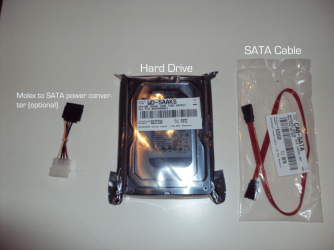
Today i'm going to show you how to install and setup a SATA Hard Drive on a desktop PC. (Parts needed is in picture above)

   Warning
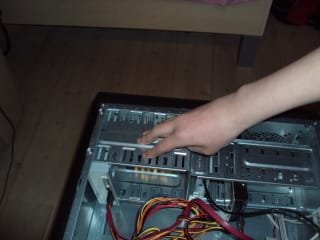
Always remember to discharge yourself before touching the HDD. This is done by touching the metal inside the case with you hands, as showed in the picture below
2.jpg


   Note
These are the things you will need:
  • Screwdriver to screw the side of your case off/on
  • SATA Cable
  • Molex to SATA Converter [Only needed if no SATA Power Cable is available]
  • A SATA Hard Drive
  • A Desktop PC (lol)

Step 1. Installing the Hard Drive into the case.
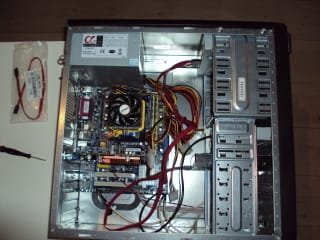
1. Take out all wires and cables from the PC. Also hit the power button located on the back of the PC where the PSU is. Unplug the mains lead from the supply.

2. Screw the side panel of the pc
3.jpg
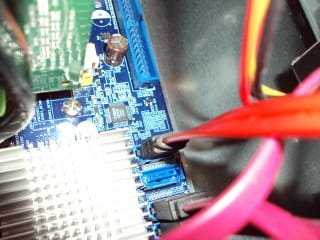
3. Connect your SATA Cable to the Motherboard
4.jpg
4. If needed connect your Molex to SATA converter

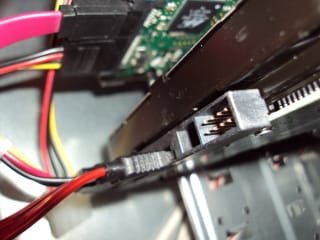
5. Put the harddrive into one of the free slots and connect the SATA power cable and the SATA Cable (Red)
5.jpg
6. Put the side panel on again, and screw in the screws

7. Connect all your cables to your PC again


Step 2. Checking if it's working
1. Turn on your PC

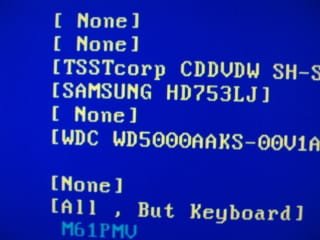
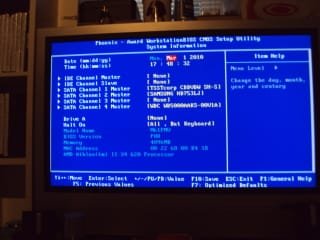
2. Go into your BIOS, and look if it shows the newly installed Hard Drive along with the rest of the system info
6.jpg
7.jpg
Step 3. Formatting and Using the Hard Drive
1. Click start menu :ar: Right click Computer in the right panel :ar: Click "Manage"

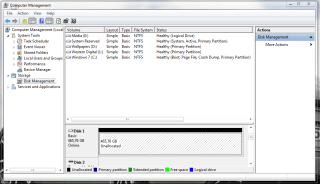
2. Enter the "Disk Management" (Look in the left pane)

3. You should now be able to see the Hard Drive in there as Unallocated space

4. Right Click the Bar in the bottom and click "New Simple Volume"
8.png
5. Follow the wizard, choose a name, amount of space the partion should have and the Drive letter.
9.png
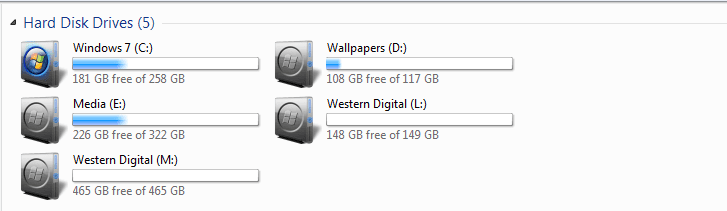
6. Now you can see your new Hard drive in "Computer" :cool:
last.png
(New HDD would be M: in this case)
Have fun, i hope this has helped you :geek:
 
Last edited by a moderator:
Nice job Sergio.
 

My Computer

Computer type
PC/Desktop
Computer Manufacturer/Model Number
Self Built
OS
Windows 10 Pro
CPU
Intel i5
Motherboard
I have a fatherboard
Memory
I'm old and lost a few chips
Graphics Card(s)
Yup
Sound Card
Yup
Monitor(s) Displays
Samsung 32" UHD
Screen Resolution
3840 x 2160
Hard Drives
Samsung 860 EVO drives
PSU
450 Watt and some fans that blow
Case
Small tower
Cooling
Yes I am cool. lol
Keyboard
Who needs a keyboard?
Mouse
Logitech Laser G7 wireless
Internet Speed
Zippy fast UP and DOWN
Antivirus
I got a shot
Browser
The new Improved EDGE 2020
Very nice job Sergio. Should be very helpful for those who have never installed a SATA drive. Fabe
 

My Computer

Computer Manufacturer/Model Number
Self Built
OS
Windows 7 ultimate 64 bit / XP Home sp3
CPU
intel Core 2 Duo E8400 3.0ghz
Motherboard
Asus P5ND bios 1401
Memory
8 gigs 1066 OCZ Fata1ty
Graphics Card(s)
EVGA GTX 580 Call of Duty Black Ops Edition
Sound Card
Creative Soundblaster Audigy 2zs
Monitor(s) Displays
Asus 24in LCD's 2MS X2
Screen Resolution
1920x1080p @60Hz
Hard Drives
WD Caviar 500 Black/ WD Caviar 200 Blue
PSU
OCZ 700W GameXtreme
Case
NZXT Apollo
Cooling
Corsair H50 CPU/120mm x3 /60mm x2 /Corsair Dominator Ram
Keyboard
Logitech Bluetooth Wireless MX5000
Mouse
Logitech Bluetooth Wireless MX1000
Internet Speed
Download 19.83 Upload 0.97
Other Info
Logitech Z2300 Speakers/ Bose Noise Cancelling Headphones/Avermedia PCI-e Hybrid TV Bravo/Epson NX415 all in one/ 4 Port Powered USB Hub/ LG 10x Bluray Burner /TSST Corp DVDRW External
Thanks Fabe :) I hope some people will find this useful ;)
 
Good tutorial Sergio! :party:
 

My Computer

Computer Manufacturer/Model Number
* BFK Customs *
OS
W 7 64-bit Ultimate
CPU
Intel Q9550 Yorkfield
Motherboard
ASUS P5Q Pro
Memory
8GB Dominator 8500C5D
Graphics Card(s)
ATI : XFX 5870
Sound Card
Realtek HD Audio 7-1
Monitor(s) Displays
1x 47" LCD HDMI & 3x 26" LCD HDMI
Screen Resolution
1920x1080P & 1920x1200
Hard Drives
1x 80GB Intel X25-M G2 SSD : 1x 500GB & 1x 640GB WD Caviar Black(s)
PSU
Corsair 620HX
Case
Cooler Master RC-690
Cooling
Tuniq Tower 120, 2x 140mm and 3x 120mm case fans
Keyboard
Microsoft 500
Mouse
Razer Diamondback 3G
Internet Speed
14 Mb/s
Other Info
1x Koutech 3Gb/s SATA HDD Hot Swap Rack
Not bad, my friend. Not bad at all!
 

My Computer

Computer type
Laptop
Computer Manufacturer/Model Number
HP ENVY 17-1150eg
OS
Windows 10 Pro x64 EN-GB
CPU
1.6 GHz Intel Core i7-720QM Processor
Memory
6 GB
Graphics Card(s)
ATI Mobility Radeon HD 5850 Graphics
Sound Card
Beats sound system with integrated subwoofer
Monitor(s) Displays
17" laptop display, 22" LED and 32" Full HD TV through HDMI
Screen Resolution
1600*900 (1), 1920*1080 (2&3)
Hard Drives
Internal: 2 x 500 GB SATA Hard Disk Drive 7200 rpm
External: 2TB for backups, 3TB USB3 network drive for media
Cooling
As Envy runs a bit warm, I have it on a Cooler Master pad
Keyboard
Logitech diNovo Media Desktop Laser (bluetooth)
Mouse
Logitech Performance Mouse MX
Internet Speed
50/10 Mbps VDSL
Antivirus
Windows Defender 4.3.9431.0
Browser
Maxthon 3.5.2., IE11
Nice! Good straight forward tutorial.
 

My Computer

Computer type
PC/Desktop
Computer Manufacturer/Model Number
Self Built
OS
Win 10 Pro x64
CPU
Intel I5-2500K @3.3GHz
Motherboard
Asrock P67 Extreme4
Memory
16GB G.Skill Ripjaws X (4x4GB)
Graphics Card(s)
EVGA GeForce 750 Ti SC 2GB
Sound Card
ASUS Xonar DG 5.1 Channels 24-bit 96KHz PCI Interface Sound
Monitor(s) Displays
auria eq2367
Screen Resolution
1920 x 1080
Hard Drives
250GB Samsung 850 EVO SSD
1TB WD Blue
1TB Hitachi
PSU
SeaSonic X 650W 80 Plus Gold
Case
Corsair Obsidian 750D
Cooling
Corsair H60, Three 140mm case fans
Keyboard
Logitech Wireless Keyboard K520
Mouse
Logitech Wireless Mouse M310
Internet Speed
Wave Broadband ~ 100 dn 5 up
Antivirus
Windows Defender, Malwarebytes Premium
Browser
Edge, IE11, Chrome
Other Info
Laptop specs: HP g7-1365dx /
CPU: AMD A6-3420M APU with Radeon(tm) HD Graphics /
RAM: Crucial 8Gb (2x4Gb) /
SSD: Crucial M4-CT128M4SSD2 ATA Device/ FW 000F /
GFX: AMD Radeon HD 6520G /
OS: Windows 10 Pro x64
Nice tutorial SG9. I'll be getting a hard drive soon and this will come in handy. My computer has a Seagate HD and I was wondering if I should get the same make ?
 

My Computer

Computer Manufacturer/Model Number
HP Pavillion- p6331-p
OS
Windows 7 (64bit)
CPU
AMD Athlon II X4 630 2.8 GHz
Motherboard
Foxconn: H-Rs780-uATX
Memory
8.00GB DDR3-SDRAM (1333 MHz) ( Max allowed-16GB)
Graphics Card(s)
ATI Radeon HD 4200
Sound Card
Realtek High Def Audio
Monitor(s) Displays
HP 20" high Def Widescreen
Screen Resolution
1600x 900
Hard Drives
Seagate ST3750528AS- 700 GB
Keyboard
Logitech EX110 Cordless
Mouse
Logitech LX Laser Cordless
Internet Speed
25/25
Hello deivasigamaniec, welcome to Seven Forums; glad we could be a help!
 

My Computer

Computer Manufacturer/Model Number
* BFK Customs *
OS
W 7 64-bit Ultimate
CPU
Intel Q9550 Yorkfield
Motherboard
ASUS P5Q Pro
Memory
8GB Dominator 8500C5D
Graphics Card(s)
ATI : XFX 5870
Sound Card
Realtek HD Audio 7-1
Monitor(s) Displays
1x 47" LCD HDMI & 3x 26" LCD HDMI
Screen Resolution
1920x1080P & 1920x1200
Hard Drives
1x 80GB Intel X25-M G2 SSD : 1x 500GB & 1x 640GB WD Caviar Black(s)
PSU
Corsair 620HX
Case
Cooler Master RC-690
Cooling
Tuniq Tower 120, 2x 140mm and 3x 120mm case fans
Keyboard
Microsoft 500
Mouse
Razer Diamondback 3G
Internet Speed
14 Mb/s
Other Info
1x Koutech 3Gb/s SATA HDD Hot Swap Rack
Hi Sergio

Just stumbled over this in my hunt for SATA advice; an instruction I will keep and use soon as I attempt to upgrade my HD
But probably can help me before I buy the HD; my unit has a Intel(R) N10/ICH7 family Serial ATA Storage Controller 27C0, but I have been told to buy a unit with the same SATA?
I'm assuming due to the age of the PC that would be a SATA2, but how do I check that is correct?

Sorry if this seems a silly question, just want to get it right

Many thanks
Richard:cry:
 

My Computer

Computer type
PC/Desktop
Computer Manufacturer/Model Number
Dell 380
OS
Windows 7 Pro 64 bit
CPU
Intel duo E7500
Motherboard
Dell
Antivirus
AVAST
Browser
Monzilla
Hi Sergio

Just stumbled over this in my hunt for SATA advice; an instruction I will keep and use soon as I attempt to upgrade my HD
But probably can help me before I buy the HD; my unit has a Intel(R) N10/ICH7 family Serial ATA Storage Controller 27C0, but I have been told to buy a unit with the same SATA?
I'm assuming due to the age of the PC that would be a SATA2, but how do I check that is correct?

Sorry if this seems a silly question, just want to get it right

Many thanks
Richard:cry:
Richard these are the specs for your machine Dell OptiPlex 380 Specs - CNET if you scroll down you will see it is 3Gbs SATA and it has DDR3 RAM so not that old mate and if I am not mistaken - I do stand to be corrected any drive that is 6Gbs capable is back compatible on that machine to your 3Gbs SATA ports.
Another ref for you
Difference between SATA I, SATA II and SATA III
 

My Computer

Computer type
PC/Desktop
Computer Manufacturer/Model Number
Own build (new) Desk1 / Asus ROG Win 7 / Desk2 1st build
OS
Desk1 7 Home Prem / Desk2 10 Pro / Main lap Asus ROG 10 Pro 2 laptop Toshiba 7 Pro Asus P2520 7 & 10
CPU
Desk1 i5 3750K / Laptop i7 GTX 860M / Desk2 i5 2500
Motherboard
Desk1 Asus P877-V / Desk2 Gigabyte H67 UD3H / Laptop ?
Memory
Desk1 8GB (1866) / Desk2 16GB (1333) / Laptop 8Gb DDR3
Graphics Card(s)
Desk 1& 2NVidia GTX 650 & Laptops on board Intel
Sound Card
Desk 1 & 2 -XONAR DG Realtek High Def audio Laptop
Monitor(s) Displays
Desk 1 Benq HD 2450 / Desk2 Philips 24" / Laptop 17.5"
Screen Resolution
1920x1080 D1 & D2 & Laptop 1
Hard Drives
Desk1 Samsung 120GB 830 SSD
Asus ROG 256GB 850 Pro SSD
Desk2 Samsung 840 256 SSD
Toshiba 120GB EVO
PSU
Desk 1 Corsair HX 1050/ Laptop ? / Desk 2 Corsair HX 650
Case
Desk 1 Cooler HAF XM ? Toshiba laptop / Desk2 Coolermaster
Cooling
Fans on all Desk1 -2 Desk2 - all Coolermasters 5 Laptop ?
Keyboard
Desk 1 MS Sidewinder X6 Desk 2 MS Sidewinder X 4
Mouse
Desk 1&2 - Gigabyte MS 900 gamer - laptop - Logitec wireless
Internet Speed
ADSL2+
Other Info
One other Desktop (tester) and spare Toshba laptop both with SSD's
Running Kaspersky 2016 ISS on all machines config'd identically
Logitec audio stereo systems on each machine (x3)
Canon MG5250MFC
Router/modem TP-Link running WPA2SK
Hey thanks for this, it's all part of the learning curve (who says you ger too old to learn)
I bought this machine second hand but it seems to be quite a well screwed together and worth playing with
as I bumble my way through

Once again many thanks
Richard:D
 

My Computer

Computer type
PC/Desktop
Computer Manufacturer/Model Number
Dell 380
OS
Windows 7 Pro 64 bit
CPU
Intel duo E7500
Motherboard
Dell
Antivirus
AVAST
Browser
Monzilla
Back
Top