Power Plan Settings - Change

How to Change Power Plan Settings in Windows 7


   Information
This will show you how to change the settings for the power plan that you have selected to reflect how you want your Windows 7 computer to manage power usage.


Here's How:1. Open the Start Menu, and type powercfg.cpl in the search box and press enter.A) Go to step 3.

OR

2. Open the Control Panel (icons view), and click on the Power Options icon.

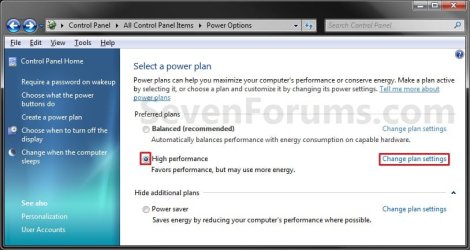
3. Click on the Change plan settings link to the right of the power plan that you want to change the settings for. (See screenshot below)
NOTE: Normally you will be changing the power plan that you have selected as your default power plan.Step1.jpg

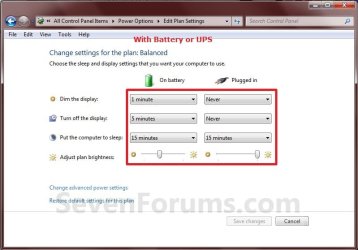
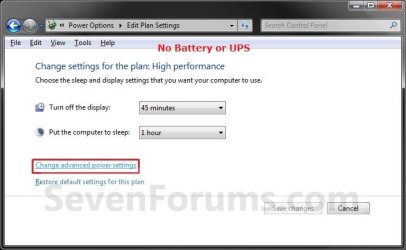
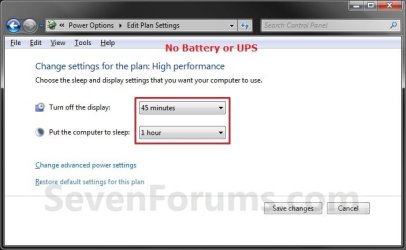
4. To Only Change the Basic Power Plan SettingsA) Choose how many minutes to wait for the Turn off display and Put the computer to sleep settings, or select never if you do not want to use a setting. (See screenshots below)
NOTE: If you have a computer with a battery (ex: notebook) or on a UPS, then you will see the right screenshot to adjust the options for when you are on battery or plugged in.Basic_Settings.jpg

Basic_Settings_Battery.jpg


B) When done, click on the Save changes button. (See screenshots above)

C) Close the Power Options window. (See screenshots below step 3)

D) You're done.

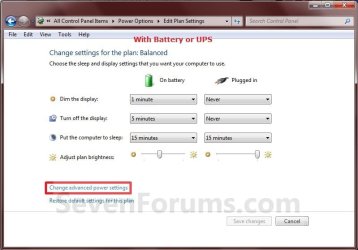
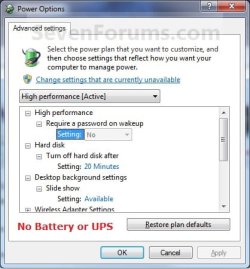
5. To Change the Advanced Power Plan SettingsA) Click on the Change advanced power settings link. (See screenshots below)Advanced_Settings.jpg

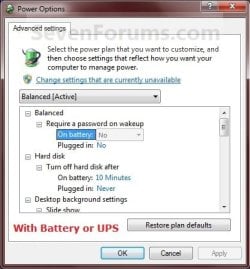
Advanced_Settings_Battery.jpg


B) Click on the Change settings that are currently unavailable link. (See screenshot below)
NOTE: You will need to be logged in as an administrator account to be able to click on this option. This option allows you to change the power plan settings that are grayed out by default.Step3.jpg

C) Make changes to the power plan settings below to suite your needs. (See screenshots below)
NOTE: If you have a computer with a battery (ex: notebook) or on a UPS, then you will see the right screenshot to adjust the options for when you are on battery or plugged in. See the tables below for some recommended settings for Sleep, Hybrid Sleep, or Hibernate. The settings that are not included in these recommendations are settings that you can set to whatever you like. These are only recommendations, you can choose to do what you want instead of course. :)step4.jpg
step4_Battery.jpg


Recommended Settings for SLEEP -
Sleep saves any open documents and programs to memory only, and then puts the computer into a low-power state. If you lose power to the computer, you will also lose what is in memory.
CATEGORYSETTINGRECOMMENDED SETTING
Hard DiskTurn off hard disk afterIf turned on, set to at least 1 minute before the computer is set to sleep.
SleepSleep afterThis is for the computer. Set to at least 1 minute after Hard disk and Display is set to turn off.
SleepAllow hybrid sleepIf listed, set to Off.
SleepHibernate afterIf listed, set to Never.
DisplayTurn off display afterIf turned on, set to at least 1 minute before the computer is set to sleep. Usually set this as the same as the Hard disk time.
Multimedia settingsWhen sharing mediaSet to Allow the computer to sleep to prevent it from waking up the computer.

Recommended Settings for HYBRID SLEEP -
Hybrid sleep saves your open documents and programs to memory and to the hard drive, and then puts the computer into a low-power state. After the Hibernate after time you set, it will then put the computer into hibernation. This requires that hibernate is enabled.
CATEGORYSETTINGRECOMMENDED SETTING
Hard DiskTurn off hard disk afterIf turned on, set to at least 1 minute before the computer is set to sleep.
SleepSleep afterThis is for the computer. Set to at least 1 minute after Hard disk and Display is set to turn off.
SleepAllow hybrid sleepSet to On.
SleepHibernate afterSet to at least 1 minute after Sleep after is set for.
DisplayTurn off display afterIf turned on, set to at least 1 minute before the computer is set to sleep. Usually set this as the same as the Hard disk time.
Multimedia settingsWhen sharing mediaSet to Allow the computer to sleep to prevent it from waking up the computer.

Recommended Settings for HIBERNATE -
Hibernation is a power-saving state that saves your open documents and programs to the hard drive and then turns off your computer. This requires that hibernate is enabled.
CATEGORYSETTINGRECOMMENDED SETTING
Hard DiskTurn off hard disk afterIf turned on, set to at least 1 minute before the computer is set to sleep.
SleepSleep afterSet to Never.
SleepAllow hybrid sleepSet to Off.
SleepHibernate afterSet it to at least 1 minute after Hard disk and Display is set to turn off.
DisplayTurn off display afterIf turned on, set to at least 1 minute before the computer is set to hibernate. Usually set this as the same as the Hard disk time.
Multimedia settingsWhen sharing mediaSet to Allow the computer to sleep to prevent it from waking up the computer.

D) When done, click on OK. (See screenshot below step 5C)

E) Close the Edit Plan Settings window. (See screenshot below step 5A)


6. Change your Start menu power button to do the action that you want it to do.
NOTE: You can choose from Switch User, Log Off, Lock, Restart, Sleep, Hibernate, or Shutdown when you click on the power button in the Start menu.


That's it,
Shawn Brink


Related Tutorials


Last edited:
Cant set sleep timers for disks independently in 7 either :thumbsdown:
 

My Computer

Computer Manufacturer/Model Number
ASUS P8P67
OS
Windows 7 x64 sp1, XP x86 sp2
CPU
i7 2600k
Memory
8Gb G.Skill
Graphics Card(s)
ASUS GTX460
Sound Card
Creative Audigy4 PCI
Screen Resolution
1680x1050
Hard Drives
Vertex 3 Raid
PSU
800Watt Fractal Design
Case
Chieftech BX01
No hibernate above 4G memory, Win 7?

That's what I've read elsewhere but just want to verify. Doesn't make sense to me since in all the years I've been sitting in front of a monitor I've never heard of having too much memory could cause a machine to malfunction?

All I know is on my new HP model p6347c which out of the box with 6G memory works great except for this one nit. I've always used hibernate instead of 'sleep' because it uses pretty close to zero power when hibernated.

What has anyone else heard?
 

My Computer

OS
Win 7
Welcome!

Hibernate doesn't use any power; it saves the state, then powers off.

There are no known bugs with hibernation above 4GB of RAM.
 

My Computer

Computer Manufacturer/Model Number
Custom
OS
Windows 7 Professional x64
CPU
Intel i7 2600K OC'd @ 4620 MHz
Motherboard
Asus P8Z68-V Pro
Memory
16GB GSkill Sniper 2133 Mhz (4x4GB)
Graphics Card(s)
EVGA GeForce GTX 480 SuperClocked+
Sound Card
Realtek High Definition Audio
Monitor(s) Displays
2x Acer S273HLbmii 27"
Screen Resolution
2 x 1920x1080
Hard Drives
64GB Crucial M4 SSD

Storage: Hitachi 1TB 5400RPM, Samsung 1.5TB 5400RPM
PSU
Corsair HW Series 750w (modular)
Case
Cooler Master HAF 932 Advanced Blue Edition
Cooling
CM Hyper 212+ CPU cooler, 3x 230mm + 1x 140mm case fans
Keyboard
Logitech MK320 (wireless)
Mouse
Logitech MK320 (wireless)
Internet Speed
30 Mb/s : 2 Mb/s
A large number of users are experiencing sleep issues due to non-compliant USB devices; some of which, ironically are various flavors of Microsoft wireless mice. The article listed how to get the report of failing devices using powercfg /energy in an elevated CMD window; but, left out the steps to fix any problem devices found. If you simply type powercfg -devicedisablewake "(the exact name of the device)"<enter> in that same CMD window for each device listed in the report, it will solve the problems of not going to sleep or sporadically waking up.

Power Options and Sleep Mode Problems - Vista Forums

I would not suggest using this on internal devices and there is a downside; the device may not be present when you wake the system up unless you unplug and replug it. It also seems counterintuitive that disabling the devices ability to wake up the system is the problem; but, it is.
 
Last edited by a moderator:

My Computer

OS
Any and all
So can a desktop hibernate?

Does the pc go into hybrid or just sleep if i select "sleep" through the option near the shut down button? I set the hybrid to on in advance setting.
 

My Computer

Computer Manufacturer/Model Number
Acer eMachines EL1850
OS
Windows 7 Home Premium 64bit
CPU
Pentium(R) Dual-Core CPU E5800 @ 3.20GHz
Motherboard
eMachines EL1850
Memory
4.00 GB
Graphics Card(s)
Intel(R) G41 Express Chipset
Sound Card
Realtek High Definition Audio
Monitor(s) Displays
Intel(R) G41 Express Chipset
Screen Resolution
1600 x 900 x 32 bits (4294967296 colors) @ 59 Hz
Hard Drives
(1) Hitachi HDS721032CLA362 ATA Device (2) Generic- Compact Flash USB Device (3) Multiple Flash Reader USB Device

My Computer

Computer type
PC/Desktop
Computer Manufacturer/Model Number
Self built custom
OS
64-bit Windows 11 Pro for Workstations
CPU
Intel i7-8700K OC'd to 5 GHz
Motherboard
ASUS ROG Maximus XI Formula Z390
Memory
64 GB (4x16GB) G.SKILL TridentZ RGB DDR4 3600 MHz
Graphics Card(s)
ASUS ROG-STRIX-GTX1080TI-O11G-GAMING
Sound Card
Integrated
Monitor(s) Displays
2 x Samsung Odyssey G7 27"
Screen Resolution
2560x1440
Hard Drives
1TB Samsung 990 PRO M.2,
4TB Samsung 990 PRO PRO M.2,
TerraMaster F8 SSD Plus NAS
PSU
Seasonic Prime Titanium 850W
Case
Thermaltake Core P3
Cooling
Corsair Hydro H115i
Keyboard
Logitech wireless K800
Mouse
Logitech MX Master 4
Internet Speed
2 Gb/s Download and 100 Mb/s Upload
Antivirus
Malwarebyte Anti-Malware Premium
Browser
Google Chrome
Other Info
Logitech Z625 speaker system,
Logitech BRIO 4K Pro webcam,
HP Color LaserJet Pro MFP M477fdn,
APC SMART-UPS RT 1000 XL - SURT1000XLI,
Galaxy S23 Plus phone
So you mean what we set above only take effect if we let the pc on into low power mode On its own? It does not affect anything when we select "sleep" through the start menu?
 

My Computer

Computer Manufacturer/Model Number
Acer eMachines EL1850
OS
Windows 7 Home Premium 64bit
CPU
Pentium(R) Dual-Core CPU E5800 @ 3.20GHz
Motherboard
eMachines EL1850
Memory
4.00 GB
Graphics Card(s)
Intel(R) G41 Express Chipset
Sound Card
Realtek High Definition Audio
Monitor(s) Displays
Intel(R) G41 Express Chipset
Screen Resolution
1600 x 900 x 32 bits (4294967296 colors) @ 59 Hz
Hard Drives
(1) Hitachi HDS721032CLA362 ATA Device (2) Generic- Compact Flash USB Device (3) Multiple Flash Reader USB Device
The computer will do what you have set above if you let it go to sleep on its own or click on "Sleep" in the Start Menu. If you click on "Hibernate" (if turned on) in the Start Menu, then the computer will go straight to hibernate.
 

My Computer

Computer type
PC/Desktop
Computer Manufacturer/Model Number
Self built custom
OS
64-bit Windows 11 Pro for Workstations
CPU
Intel i7-8700K OC'd to 5 GHz
Motherboard
ASUS ROG Maximus XI Formula Z390
Memory
64 GB (4x16GB) G.SKILL TridentZ RGB DDR4 3600 MHz
Graphics Card(s)
ASUS ROG-STRIX-GTX1080TI-O11G-GAMING
Sound Card
Integrated
Monitor(s) Displays
2 x Samsung Odyssey G7 27"
Screen Resolution
2560x1440
Hard Drives
1TB Samsung 990 PRO M.2,
4TB Samsung 990 PRO PRO M.2,
TerraMaster F8 SSD Plus NAS
PSU
Seasonic Prime Titanium 850W
Case
Thermaltake Core P3
Cooling
Corsair Hydro H115i
Keyboard
Logitech wireless K800
Mouse
Logitech MX Master 4
Internet Speed
2 Gb/s Download and 100 Mb/s Upload
Antivirus
Malwarebyte Anti-Malware Premium
Browser
Google Chrome
Other Info
Logitech Z625 speaker system,
Logitech BRIO 4K Pro webcam,
HP Color LaserJet Pro MFP M477fdn,
APC SMART-UPS RT 1000 XL - SURT1000XLI,
Galaxy S23 Plus phone
There is no hibernate in my start menu. Where is it?
 

My Computer

Computer Manufacturer/Model Number
Acer eMachines EL1850
OS
Windows 7 Home Premium 64bit
CPU
Pentium(R) Dual-Core CPU E5800 @ 3.20GHz
Motherboard
eMachines EL1850
Memory
4.00 GB
Graphics Card(s)
Intel(R) G41 Express Chipset
Sound Card
Realtek High Definition Audio
Monitor(s) Displays
Intel(R) G41 Express Chipset
Screen Resolution
1600 x 900 x 32 bits (4294967296 colors) @ 59 Hz
Hard Drives
(1) Hitachi HDS721032CLA362 ATA Device (2) Generic- Compact Flash USB Device (3) Multiple Flash Reader USB Device

My Computer

Computer type
PC/Desktop
Computer Manufacturer/Model Number
Self built custom
OS
64-bit Windows 11 Pro for Workstations
CPU
Intel i7-8700K OC'd to 5 GHz
Motherboard
ASUS ROG Maximus XI Formula Z390
Memory
64 GB (4x16GB) G.SKILL TridentZ RGB DDR4 3600 MHz
Graphics Card(s)
ASUS ROG-STRIX-GTX1080TI-O11G-GAMING
Sound Card
Integrated
Monitor(s) Displays
2 x Samsung Odyssey G7 27"
Screen Resolution
2560x1440
Hard Drives
1TB Samsung 990 PRO M.2,
4TB Samsung 990 PRO PRO M.2,
TerraMaster F8 SSD Plus NAS
PSU
Seasonic Prime Titanium 850W
Case
Thermaltake Core P3
Cooling
Corsair Hydro H115i
Keyboard
Logitech wireless K800
Mouse
Logitech MX Master 4
Internet Speed
2 Gb/s Download and 100 Mb/s Upload
Antivirus
Malwarebyte Anti-Malware Premium
Browser
Google Chrome
Other Info
Logitech Z625 speaker system,
Logitech BRIO 4K Pro webcam,
HP Color LaserJet Pro MFP M477fdn,
APC SMART-UPS RT 1000 XL - SURT1000XLI,
Galaxy S23 Plus phone
Yes but still no hibernate option.

i followed your tutorial above to turn on the hibernation but it does not seem to appear in the starts menu arrow.. what is wrong here?
 
Last edited by a moderator:

My Computer

Computer Manufacturer/Model Number
Acer eMachines EL1850
OS
Windows 7 Home Premium 64bit
CPU
Pentium(R) Dual-Core CPU E5800 @ 3.20GHz
Motherboard
eMachines EL1850
Memory
4.00 GB
Graphics Card(s)
Intel(R) G41 Express Chipset
Sound Card
Realtek High Definition Audio
Monitor(s) Displays
Intel(R) G41 Express Chipset
Screen Resolution
1600 x 900 x 32 bits (4294967296 colors) @ 59 Hz
Hard Drives
(1) Hitachi HDS721032CLA362 ATA Device (2) Generic- Compact Flash USB Device (3) Multiple Flash Reader USB Device

My Computer

Computer type
PC/Desktop
Computer Manufacturer/Model Number
Self built custom
OS
64-bit Windows 11 Pro for Workstations
CPU
Intel i7-8700K OC'd to 5 GHz
Motherboard
ASUS ROG Maximus XI Formula Z390
Memory
64 GB (4x16GB) G.SKILL TridentZ RGB DDR4 3600 MHz
Graphics Card(s)
ASUS ROG-STRIX-GTX1080TI-O11G-GAMING
Sound Card
Integrated
Monitor(s) Displays
2 x Samsung Odyssey G7 27"
Screen Resolution
2560x1440
Hard Drives
1TB Samsung 990 PRO M.2,
4TB Samsung 990 PRO PRO M.2,
TerraMaster F8 SSD Plus NAS
PSU
Seasonic Prime Titanium 850W
Case
Thermaltake Core P3
Cooling
Corsair Hydro H115i
Keyboard
Logitech wireless K800
Mouse
Logitech MX Master 4
Internet Speed
2 Gb/s Download and 100 Mb/s Upload
Antivirus
Malwarebyte Anti-Malware Premium
Browser
Google Chrome
Other Info
Logitech Z625 speaker system,
Logitech BRIO 4K Pro webcam,
HP Color LaserJet Pro MFP M477fdn,
APC SMART-UPS RT 1000 XL - SURT1000XLI,
Galaxy S23 Plus phone
Hybrid is turned on. I guess something must be wrong with it.

Regarding the above setting, so Hibernation is always +5min after hard disk is turned off correct?
 

My Computer

Computer Manufacturer/Model Number
Acer eMachines EL1850
OS
Windows 7 Home Premium 64bit
CPU
Pentium(R) Dual-Core CPU E5800 @ 3.20GHz
Motherboard
eMachines EL1850
Memory
4.00 GB
Graphics Card(s)
Intel(R) G41 Express Chipset
Sound Card
Realtek High Definition Audio
Monitor(s) Displays
Intel(R) G41 Express Chipset
Screen Resolution
1600 x 900 x 32 bits (4294967296 colors) @ 59 Hz
Hard Drives
(1) Hitachi HDS721032CLA362 ATA Device (2) Generic- Compact Flash USB Device (3) Multiple Flash Reader USB Device
LOL, you have to turn off Hybrid to see Hibernate in the Start Menu. ;)

Hibernate will be after however many minutes you set it to be in your advanced power plan settings.
 

My Computer

Computer type
PC/Desktop
Computer Manufacturer/Model Number
Self built custom
OS
64-bit Windows 11 Pro for Workstations
CPU
Intel i7-8700K OC'd to 5 GHz
Motherboard
ASUS ROG Maximus XI Formula Z390
Memory
64 GB (4x16GB) G.SKILL TridentZ RGB DDR4 3600 MHz
Graphics Card(s)
ASUS ROG-STRIX-GTX1080TI-O11G-GAMING
Sound Card
Integrated
Monitor(s) Displays
2 x Samsung Odyssey G7 27"
Screen Resolution
2560x1440
Hard Drives
1TB Samsung 990 PRO M.2,
4TB Samsung 990 PRO PRO M.2,
TerraMaster F8 SSD Plus NAS
PSU
Seasonic Prime Titanium 850W
Case
Thermaltake Core P3
Cooling
Corsair Hydro H115i
Keyboard
Logitech wireless K800
Mouse
Logitech MX Master 4
Internet Speed
2 Gb/s Download and 100 Mb/s Upload
Antivirus
Malwarebyte Anti-Malware Premium
Browser
Google Chrome
Other Info
Logitech Z625 speaker system,
Logitech BRIO 4K Pro webcam,
HP Color LaserJet Pro MFP M477fdn,
APC SMART-UPS RT 1000 XL - SURT1000XLI,
Galaxy S23 Plus phone
oh..., i will try it. By the way if i would like to go into hibernation immediately after i click on the sleep button at the start menu. So what would be the best way to set it?

Thanks
 

My Computer

Computer Manufacturer/Model Number
Acer eMachines EL1850
OS
Windows 7 Home Premium 64bit
CPU
Pentium(R) Dual-Core CPU E5800 @ 3.20GHz
Motherboard
eMachines EL1850
Memory
4.00 GB
Graphics Card(s)
Intel(R) G41 Express Chipset
Sound Card
Realtek High Definition Audio
Monitor(s) Displays
Intel(R) G41 Express Chipset
Screen Resolution
1600 x 900 x 32 bits (4294967296 colors) @ 59 Hz
Hard Drives
(1) Hitachi HDS721032CLA362 ATA Device (2) Generic- Compact Flash USB Device (3) Multiple Flash Reader USB Device
If you wanted to go immediately into hibernation, then you could just click on the hibernate option in the Start Menu instead.
 

My Computer

Computer type
PC/Desktop
Computer Manufacturer/Model Number
Self built custom
OS
64-bit Windows 11 Pro for Workstations
CPU
Intel i7-8700K OC'd to 5 GHz
Motherboard
ASUS ROG Maximus XI Formula Z390
Memory
64 GB (4x16GB) G.SKILL TridentZ RGB DDR4 3600 MHz
Graphics Card(s)
ASUS ROG-STRIX-GTX1080TI-O11G-GAMING
Sound Card
Integrated
Monitor(s) Displays
2 x Samsung Odyssey G7 27"
Screen Resolution
2560x1440
Hard Drives
1TB Samsung 990 PRO M.2,
4TB Samsung 990 PRO PRO M.2,
TerraMaster F8 SSD Plus NAS
PSU
Seasonic Prime Titanium 850W
Case
Thermaltake Core P3
Cooling
Corsair Hydro H115i
Keyboard
Logitech wireless K800
Mouse
Logitech MX Master 4
Internet Speed
2 Gb/s Download and 100 Mb/s Upload
Antivirus
Malwarebyte Anti-Malware Premium
Browser
Google Chrome
Other Info
Logitech Z625 speaker system,
Logitech BRIO 4K Pro webcam,
HP Color LaserJet Pro MFP M477fdn,
APC SMART-UPS RT 1000 XL - SURT1000XLI,
Galaxy S23 Plus phone
Which do you prefer, Hybrid sleep or Hibernation for your desktop?
 

My Computer

Computer Manufacturer/Model Number
Acer eMachines EL1850
OS
Windows 7 Home Premium 64bit
CPU
Pentium(R) Dual-Core CPU E5800 @ 3.20GHz
Motherboard
eMachines EL1850
Memory
4.00 GB
Graphics Card(s)
Intel(R) G41 Express Chipset
Sound Card
Realtek High Definition Audio
Monitor(s) Displays
Intel(R) G41 Express Chipset
Screen Resolution
1600 x 900 x 32 bits (4294967296 colors) @ 59 Hz
Hard Drives
(1) Hitachi HDS721032CLA362 ATA Device (2) Generic- Compact Flash USB Device (3) Multiple Flash Reader USB Device
I prefer sleep since I'm always using off and on at all hours of the day and night. This way it starts instantly for me.

It just depends on how and how often you use your computer and what would work best for you though.
 

My Computer

Computer type
PC/Desktop
Computer Manufacturer/Model Number
Self built custom
OS
64-bit Windows 11 Pro for Workstations
CPU
Intel i7-8700K OC'd to 5 GHz
Motherboard
ASUS ROG Maximus XI Formula Z390
Memory
64 GB (4x16GB) G.SKILL TridentZ RGB DDR4 3600 MHz
Graphics Card(s)
ASUS ROG-STRIX-GTX1080TI-O11G-GAMING
Sound Card
Integrated
Monitor(s) Displays
2 x Samsung Odyssey G7 27"
Screen Resolution
2560x1440
Hard Drives
1TB Samsung 990 PRO M.2,
4TB Samsung 990 PRO PRO M.2,
TerraMaster F8 SSD Plus NAS
PSU
Seasonic Prime Titanium 850W
Case
Thermaltake Core P3
Cooling
Corsair Hydro H115i
Keyboard
Logitech wireless K800
Mouse
Logitech MX Master 4
Internet Speed
2 Gb/s Download and 100 Mb/s Upload
Antivirus
Malwarebyte Anti-Malware Premium
Browser
Google Chrome
Other Info
Logitech Z625 speaker system,
Logitech BRIO 4K Pro webcam,
HP Color LaserJet Pro MFP M477fdn,
APC SMART-UPS RT 1000 XL - SURT1000XLI,
Galaxy S23 Plus phone
Hi brink,

Isit ok if i set "Turn off Harddisk after.." and "Sleep after.." at the same time? For example 15mins?

What is the different between Sleep and Turn off harddisk actually?
 

My Computer

Computer Manufacturer/Model Number
Acer eMachines EL1850
OS
Windows 7 Home Premium 64bit
CPU
Pentium(R) Dual-Core CPU E5800 @ 3.20GHz
Motherboard
eMachines EL1850
Memory
4.00 GB
Graphics Card(s)
Intel(R) G41 Express Chipset
Sound Card
Realtek High Definition Audio
Monitor(s) Displays
Intel(R) G41 Express Chipset
Screen Resolution
1600 x 900 x 32 bits (4294967296 colors) @ 59 Hz
Hard Drives
(1) Hitachi HDS721032CLA362 ATA Device (2) Generic- Compact Flash USB Device (3) Multiple Flash Reader USB Device
Back
Top