Audio CDs - Rip with Windows Media Player 12

How to Rip Audio CDs with WMP 12

   Note
The N and KN editions of Windows 7 have all the features that normally come with each individual Windows 7 edition, except for Windows Media Player 12 and related programs, such as Windows Media Center or Windows DVD Maker.

The N editions of Windows 7 allow you to choose your own media player and software required to manage and play CDs, DVDs, and other digital media files. If you choose to use Windows Media Player 12, downloading it, along with related software, is free. Download Media Feature Pack for Windows 7 N with Service Pack 1 and Windows 7 KN with Service Pack 1 (KB968211) from Official Microsoft Download Center


1. Insert the audio CD into the drive.

2. Open Windows Media Player. Type media player into the start menu and press enter.

3. Select your CD in the left pane.

Capture.PNG

4. Change whatever settings you need in the Rip Settings menu.
Capture1.PNG

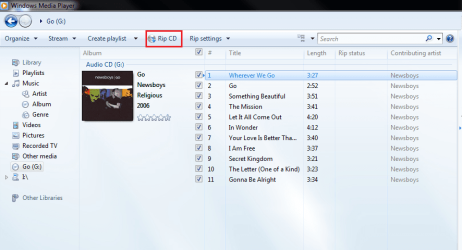
5. Click the Rip button.
Capture2.PNG

6. Wait for it to finish, and that's it!
 
Last edited by a moderator:
I don't have menu item Rip in my WMP12

Win 7 home premium..............WMP12 but no menu item that says Rip or RIP CD.
 

My Computer

Computer Manufacturer/Model Number
Acer Aspire 5738PG
OS
Win 7 Home Premium
Memory
4GB
Monitor(s) Displays
Notebook LCD

My Computer

Computer Manufacturer/Model Number
Custom
OS
Windows 7 Professional x64
CPU
Intel i7 2600K OC'd @ 4620 MHz
Motherboard
Asus P8Z68-V Pro
Memory
16GB GSkill Sniper 2133 Mhz (4x4GB)
Graphics Card(s)
EVGA GeForce GTX 480 SuperClocked+
Sound Card
Realtek High Definition Audio
Monitor(s) Displays
2x Acer S273HLbmii 27"
Screen Resolution
2 x 1920x1080
Hard Drives
64GB Crucial M4 SSD

Storage: Hitachi 1TB 5400RPM, Samsung 1.5TB 5400RPM
PSU
Corsair HW Series 750w (modular)
Case
Cooler Master HAF 932 Advanced Blue Edition
Cooling
CM Hyper 212+ CPU cooler, 3x 230mm + 1x 140mm case fans
Keyboard
Logitech MK320 (wireless)
Mouse
Logitech MK320 (wireless)
Internet Speed
30 Mb/s : 2 Mb/s
It works

If I open my WMP, it has no Rip CD menu item even after I insert a CD....... But, with my WMP closed, if I insert a CD and it starts as Auto-Play then the Rip CD (and Rip Settings) Menu item(s) appear.

Thanks for the quick reply.
 

My Computer

Computer Manufacturer/Model Number
Acer Aspire 5738PG
OS
Win 7 Home Premium
Memory
4GB
Monitor(s) Displays
Notebook LCD
Make sure you select the CD from the left pane, if you insert the CD after WMP is open,
 

My Computer

Computer Manufacturer/Model Number
Custom
OS
Windows 7 Professional x64
CPU
Intel i7 2600K OC'd @ 4620 MHz
Motherboard
Asus P8Z68-V Pro
Memory
16GB GSkill Sniper 2133 Mhz (4x4GB)
Graphics Card(s)
EVGA GeForce GTX 480 SuperClocked+
Sound Card
Realtek High Definition Audio
Monitor(s) Displays
2x Acer S273HLbmii 27"
Screen Resolution
2 x 1920x1080
Hard Drives
64GB Crucial M4 SSD

Storage: Hitachi 1TB 5400RPM, Samsung 1.5TB 5400RPM
PSU
Corsair HW Series 750w (modular)
Case
Cooler Master HAF 932 Advanced Blue Edition
Cooling
CM Hyper 212+ CPU cooler, 3x 230mm + 1x 140mm case fans
Keyboard
Logitech MK320 (wireless)
Mouse
Logitech MK320 (wireless)
Internet Speed
30 Mb/s : 2 Mb/s
Back
Top