Boot Windows 7 System Repair Disc from USB Using Grub4Dos

How to Boot Windows 7 System Repair Disc from USB Pen Drive/Hard Disk Using Grub4Dos


Requirements:

1. MultibootISO > Install Grub4Dos easily into USB Flash Drive/External Hard Disk
Get it here: Boot Multiple ISO from USB (MultiBoot USB) | USB Pen Drive Linux
or here: YUMI - Multiboot USB Creator (Windows) | USB Pen Drive Linux
2. Windows 7 System Repair Disc - How to Create Windows 7 System Repair Disc
3. Notepad++ > To edit menu.lst
Get it here:Notepad++ | Download Notepad++ software for free at SourceForge.net
or here: Download Notepad++ 5.6.8 - FileHippo.com


Lets Start

Step 1: Follow this tutorial to create a Windows 7 System Repair Disc.

Step 2: Convert the Repair Disc into an ISO file. To avoid confuse later, we rename the file as w7repairdisc.iso in this tutorial. There are many ways to convert a CD into ISO file, Google it "Convert CD to ISO". Alternatively, you can use Format Factory.

Step 3: Run MultibootISO, install MultibootISO into your USB Storage Device(ie.pendrive, External Hard Disk). This will install Grub4dos in USB Storage.

Step 4: Copy w7repairdisc.iso into your USB Storage.

Step 5: Look for the file menu.lst in your pendrive/External Hard Disk, edit it with Notepad++.
Add in the below command line:
Code:
title Windows 7 System Repair Disc
find --set-root /w7repairdisc.iso
map /w7repairdisc.iso (hd32)
map --hook
root (hd32)
chainloader (hd32)

If you have no idea where to insert the above command line, just insert it at the end of the file.

Done. The pendrive is ready to boot & run Windows 7 System Repair Disc.

If you are confused and don't know how to edit menu.lst, then, open it with Notepad++, delete all the command lines and replace by the following command lines. Save the file and exit.

Code:
timeout 30
root=(hd0,0)
color NORMAL HIGHLIGHT HELPTEXT HEADING
splashimage=(hd0,0)/splash.xpm.gz
foreground=FFFFFF
background=0066FF 
 
title Windows 7 System Repair Disc
find --set-root /w7repairdisc.iso
map /w7repairdisc.iso (hd32)
map --hook
root (hd32)
chainloader (hd32)


   Note
There are 2 types of Windows 7 Repair Disc - 32 bit & 64 bit. Windows 7 32 bit can only create 32 bit Repair Disc and too can only be used to restore 32 bit system image. This same with 64 bit System Repair Disc.


Boot from Pendrive
Restart the computer. Configure BIOS to boot from Pendrive/External Hard Disk.
A boot menu will appear. You will be able to see the boot option Windows 7 System Repair Disc.
Use arrow key on keyboard to select Windows 7 System Repair Disc and press enter.


About Menu.lst
Menu.lst is a boot menu of Grub4Dos. After install MultibootISO into pendrive/External Hard Disk, it support for booting many OS or programs. There are many entries ready made by default after installing MultibootISO. You may delete any of the entries if you don't need them.

For more info about MultiBootISO, please visit: Boot Multiple ISO from USB (MultiBoot USB) | USB Pen Drive Linux


Advantages of using Grub4Dos
By using Grub4Dos, many other bootable OS or Softwares (ie, Linux, Ubuntu, Ultimate Boot CD, Partition Wizard...) are supported in one single pendrive/External Hard Disk. To view the list of supported software, you may refer the official site of MultiBootISO. If the bootable software you owned is not listed, doesn't mean it is not supported.

For example, you can install Windows 7 within the same USB Pen Drive or External Hard Disk too (Read here). With Grub4Dos, you can make your USB become a Super System Maintenace & Emergency Rescue Tools. (i.e, recover/copy files when Windows cannot startup/lost partition/formated partition, reset or recover system/windows password, testing tools)

Below are some of the highly recommended bootable software for System Maintenance & Emergency Rescue Tools:

1. Partition Wizard - Site - Download
2. Hiren's Boot CD - Site1 - Site2 - Download
3. Ultimate Boot CD - Site - Download (scroll down at link to download from within "Mirror Sites" list)
4. AntiVirus Rescue Disk (ie, AVG, Bitdefender, Avira) - Link
5. Windows 7 Installation DVD - Tutorial


Last edited by a moderator:
This worked great for me.

It would be great if you could provide the info to use the Macrium Reflect Linux Recovery CD. I could multi boot it or the Windows 7 Recovery CD from the same thumb drive. All I need is the command line info to add to the menu list.
 

My Computer

OS
Windows 7
MultibootISO is no longer available from pendrivelinux. Alternatives require you to select a specific cd to copy to the pendrive. Howto probably needs to be updated accordingly.
 

My Computer

OS
Windows 7 Ultimate x64
I couldnt get the previous version of YUMI to multiboot but will try again with this new version.I already have the win7 installer on a USB so can access the repair console from there.

Danny
 

My Computer

Computer Manufacturer/Model Number
acer aspire 5935g
OS
Windows 7 Home Premium x64 SP1
CPU
intel(R)core(TM)2 duo CPU T6600 @ 2.20GHz
Motherboard
intel gm45/gm47 revision 07
Memory
3 gb ddr3
Graphics Card(s)
ati radeon hd4570/512mb
Monitor(s) Displays
lop156wh2-tle1 15.3 flat
Screen Resolution
1366x768
Hard Drives
OCZ-Agility3 60gig ssd
320gig external hdd
500gig external hdd
Mouse
Optical
Internet Speed
30Mbps Down/30Mbps Up
This tutorial is written for MultibootISO.exe series, which is based on Grub 1.
And MultiBootISO.exe is not supported anymore by the author.

Newer Version of Grub 2 (YUMI) is replacing MultiBootISO.exe.

If you do like to use (Grub1) MultiBootISO.exe 1.4.8 (the version describe in this tutorial), you can download it here:
MultiBootISOs-v1.4.8.exe

Additional related notes of this tutorial has been expanded in another similar (tutorial). Please visit:
http://www.sevenforums.com/tutorials/91798-install-windows-7-usb-pen-drive-using-grub4dos.html
 

My Computer

OS
Windows 7 & XP
I'm stuck on step 5

Here's my situation, my laptop has crashed and i want to use the usb recovery method. Problem is I first need to create one, I have the recovery ISO at work but cant burn it on a CD, my only option is usb. I have tried the method stated above but I'm stuck on step 5 cause the bootle usb didnt create a menu.lst file. So I'm not sure what to do next and I'm not sure what folder to place the ISO file? Any suggestions would be appreciated. Thanks in advance!!!
 

My Computer

OS
Windows 7 Home Premium 64bit
Here's my situation, my laptop has crashed and i want to use the usb recovery method. Problem is I first need to create one, I have the recovery ISO at work but cant burn it on a CD, my only option is usb. I have tried the method stated above but I'm stuck on step 5 cause the bootle usb didnt create a menu.lst file. So I'm not sure what to do next and I'm not sure what folder to place the ISO file? Any suggestions would be appreciated. Thanks in advance!!!
Try YUMI
YUMI - Multiboot USB Creator (Windows) | USB Pen Drive Linux
After running YUMI, at step 2 inside the program of YUMI,
choose the last option:
Try an Unlisted ISO
 

My Computer

OS
Windows 7 & XP
Excellent tutorial, i have gone through all the steps, booted up on my flash, but am getting a "file not found" error message.I am on win 64.tnx for any advice
 

My Computer

OS
Windows 7 64 Home,Windows 7 Ultimate
Hello yax, and welcome to Seven Forums.

Try now. :)
 

My Computer

Computer type
PC/Desktop
Computer Manufacturer/Model Number
Self built custom
OS
64-bit Windows 11 Pro for Workstations
CPU
Intel i7-8700K OC'd to 5 GHz
Motherboard
ASUS ROG Maximus XI Formula Z390
Memory
64 GB (4x16GB) G.SKILL TridentZ RGB DDR4 3600 MHz
Graphics Card(s)
ASUS ROG-STRIX-GTX1080TI-O11G-GAMING
Sound Card
Integrated
Monitor(s) Displays
2 x Samsung Odyssey G7 27"
Screen Resolution
2560x1440
Hard Drives
1TB Samsung 990 PRO M.2,
4TB Samsung 990 PRO PRO M.2,
TerraMaster F8 SSD Plus NAS
PSU
Seasonic Prime Titanium 850W
Case
Thermaltake Core P3
Cooling
Corsair Hydro H115i
Keyboard
Logitech wireless K800
Mouse
Logitech MX Master 4
Internet Speed
2 Gb/s Download and 100 Mb/s Upload
Antivirus
Malwarebyte Anti-Malware Premium
Browser
Google Chrome
Other Info
Logitech Z625 speaker system,
Logitech BRIO 4K Pro webcam,
HP Color LaserJet Pro MFP M477fdn,
APC SMART-UPS RT 1000 XL - SURT1000XLI,
Galaxy S23 Plus phone
http://www.sevenforums.com/general-...ried-multiple-solutions.html#post2381791(this has more details on my problem)
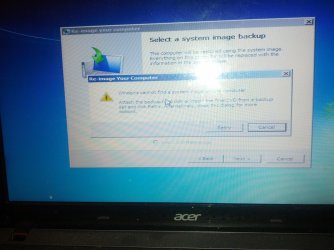
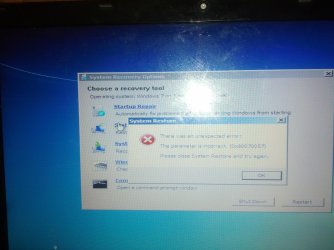
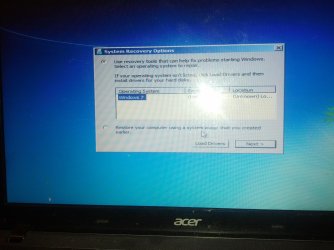
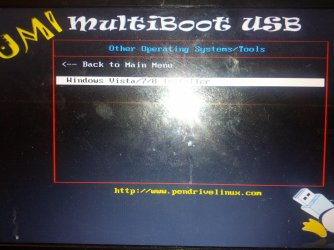
so im stuck the multi or the yummi I both installed. Now that may be my first problem i used them to install window installer onto the usb. Was there something else I was suppose to install? I have the same computer issue with not being able to load my computer. So I have yummi on the usb and connect it to the damaged computer. And go thorugh the option of windows installer. Which takes me to the startup reapir area. in one of these pictures i can get to the system restore area but nothing works. And then get asked for a dvd or final dvd. I just want to use my computer i dont care about the files please help:cry:
 

Attachments

  • IMG_20130429_153934.jpg
    IMG_20130429_153934.jpg
    402.7 KB · Views: 4,643
  • IMG_20130429_153955.jpg
    IMG_20130429_153955.jpg
    394.9 KB · Views: 4,980
  • IMG_20130429_154124.jpg
    IMG_20130429_154124.jpg
    369.5 KB · Views: 3,121
  • IMG_20130429_154032.jpg
    IMG_20130429_154032.jpg
    575.9 KB · Views: 8,299

My Computer

Computer type
Laptop
Computer Manufacturer/Model Number
Acer Aspire 5349
OS
windows 7
CPU
intel b815
Memory
4 gb
Graphics Card(s)
intel hd graphics
Hi there, this post looked like my last hope, I'm desperate!
But I don't have a CD drive on this crappy machine (Dell inspiron mini 1018, win7 starter x32), and my only other available (though in very bad shape) pc is running XP, so can't get past stage 2 of the tutorial! :(
Is there a way of getting an ISO of the repair file without first burning the CD?
I'm using the entirety of my energy to NOT throw this piece of junk against a wall and joyfully watch it smash in to a hundred little pieces, but it's not even mine, so I can't even if I want to..
Please help!
 

My Computer

Computer type
Laptop
Computer Manufacturer/Model Number
Dell Inspiron mini 1018
OS
windows 7 starter x32
Hello Nets,

Since this for a Dell computer, you should be able to log in at Dell at the link below to be able to download a Windows 7 Starter ISO file. If you do not have a Dell account, then you can sign up for one there.

http://en.community.dell.com/suppor...fficial-iso-download-links-digital-river.aspx

Afterwards, you could create a bootable Windows 7 Starter installation DVD/USB with the ISO file.

http://www.sevenforums.com/tutorials/31541-windows-7-usb-dvd-download-tool.html

Hope this helps, :)
Shawn
 

My Computer

Computer type
PC/Desktop
Computer Manufacturer/Model Number
Self built custom
OS
64-bit Windows 11 Pro for Workstations
CPU
Intel i7-8700K OC'd to 5 GHz
Motherboard
ASUS ROG Maximus XI Formula Z390
Memory
64 GB (4x16GB) G.SKILL TridentZ RGB DDR4 3600 MHz
Graphics Card(s)
ASUS ROG-STRIX-GTX1080TI-O11G-GAMING
Sound Card
Integrated
Monitor(s) Displays
2 x Samsung Odyssey G7 27"
Screen Resolution
2560x1440
Hard Drives
1TB Samsung 990 PRO M.2,
4TB Samsung 990 PRO PRO M.2,
TerraMaster F8 SSD Plus NAS
PSU
Seasonic Prime Titanium 850W
Case
Thermaltake Core P3
Cooling
Corsair Hydro H115i
Keyboard
Logitech wireless K800
Mouse
Logitech MX Master 4
Internet Speed
2 Gb/s Download and 100 Mb/s Upload
Antivirus
Malwarebyte Anti-Malware Premium
Browser
Google Chrome
Other Info
Logitech Z625 speaker system,
Logitech BRIO 4K Pro webcam,
HP Color LaserJet Pro MFP M477fdn,
APC SMART-UPS RT 1000 XL - SURT1000XLI,
Galaxy S23 Plus phone
Thanks Brink!
Unfortunately:
"Not Found: Resource Not Found
The resource you requested does not exist."
:(
Anywhere else I could find it? All I come up with are tutorials, but no file!
 

My Computer

Computer type
Laptop
Computer Manufacturer/Model Number
Dell Inspiron mini 1018
OS
windows 7 starter x32
Do you have a friend that has a 32-bit Windows 7 Starter that you could create a System Repair Disc from?

If not, then you may need to contact Dell for replacement installation media. :(
 

My Computer

Computer type
PC/Desktop
Computer Manufacturer/Model Number
Self built custom
OS
64-bit Windows 11 Pro for Workstations
CPU
Intel i7-8700K OC'd to 5 GHz
Motherboard
ASUS ROG Maximus XI Formula Z390
Memory
64 GB (4x16GB) G.SKILL TridentZ RGB DDR4 3600 MHz
Graphics Card(s)
ASUS ROG-STRIX-GTX1080TI-O11G-GAMING
Sound Card
Integrated
Monitor(s) Displays
2 x Samsung Odyssey G7 27"
Screen Resolution
2560x1440
Hard Drives
1TB Samsung 990 PRO M.2,
4TB Samsung 990 PRO PRO M.2,
TerraMaster F8 SSD Plus NAS
PSU
Seasonic Prime Titanium 850W
Case
Thermaltake Core P3
Cooling
Corsair Hydro H115i
Keyboard
Logitech wireless K800
Mouse
Logitech MX Master 4
Internet Speed
2 Gb/s Download and 100 Mb/s Upload
Antivirus
Malwarebyte Anti-Malware Premium
Browser
Google Chrome
Other Info
Logitech Z625 speaker system,
Logitech BRIO 4K Pro webcam,
HP Color LaserJet Pro MFP M477fdn,
APC SMART-UPS RT 1000 XL - SURT1000XLI,
Galaxy S23 Plus phone
Nope..
I'm borrowing this laptop from a friend, but his pc is win7 ultimate, and I don't really know anyone else in the area..
Do you know how I would go about asking Dell for help? Who do i need to speak to?

I appreciate your help, shame it's such a hassle to find!
 

My Computer

Computer type
Laptop
Computer Manufacturer/Model Number
Dell Inspiron mini 1018
OS
windows 7 starter x32

My Computer

Computer type
PC/Desktop
Computer Manufacturer/Model Number
Self built custom
OS
64-bit Windows 11 Pro for Workstations
CPU
Intel i7-8700K OC'd to 5 GHz
Motherboard
ASUS ROG Maximus XI Formula Z390
Memory
64 GB (4x16GB) G.SKILL TridentZ RGB DDR4 3600 MHz
Graphics Card(s)
ASUS ROG-STRIX-GTX1080TI-O11G-GAMING
Sound Card
Integrated
Monitor(s) Displays
2 x Samsung Odyssey G7 27"
Screen Resolution
2560x1440
Hard Drives
1TB Samsung 990 PRO M.2,
4TB Samsung 990 PRO PRO M.2,
TerraMaster F8 SSD Plus NAS
PSU
Seasonic Prime Titanium 850W
Case
Thermaltake Core P3
Cooling
Corsair Hydro H115i
Keyboard
Logitech wireless K800
Mouse
Logitech MX Master 4
Internet Speed
2 Gb/s Download and 100 Mb/s Upload
Antivirus
Malwarebyte Anti-Malware Premium
Browser
Google Chrome
Other Info
Logitech Z625 speaker system,
Logitech BRIO 4K Pro webcam,
HP Color LaserJet Pro MFP M477fdn,
APC SMART-UPS RT 1000 XL - SURT1000XLI,
Galaxy S23 Plus phone
Well, that was a bust..
Not only did I get hang up on mid-sentence by a Dell phone rep, when I called back I was told I would have to buy an OS disk from them and then go out to buy an optical drive, so I can re-install the whole thing.. So not only do I need to spend more than the stupid machine is worth (and in this case it was free!), and not even be able to just repair, but have to wipe it all and start again!

I'm so bloody aggravated!!!

recdisc.exe is there on the system, I just can't bloody get to it!!!

Any other ideas bar getting an external optical drive?

My old self build desktop is in a bad state and off-line, and am only borrowing this piece of crap so I can have some contact to the outside (am house bound).. Was going to buy a new Dell when I got the money, but after the service they just gave me, I have no interest in giving them any of my money, so stuck with this for a while longer.. :/
 

My Computer

Computer type
Laptop
Computer Manufacturer/Model Number
Dell Inspiron mini 1018
OS
windows 7 starter x32

My Computer

Computer type
PC/Desktop
Computer Manufacturer/Model Number
Self built custom
OS
64-bit Windows 11 Pro for Workstations
CPU
Intel i7-8700K OC'd to 5 GHz
Motherboard
ASUS ROG Maximus XI Formula Z390
Memory
64 GB (4x16GB) G.SKILL TridentZ RGB DDR4 3600 MHz
Graphics Card(s)
ASUS ROG-STRIX-GTX1080TI-O11G-GAMING
Sound Card
Integrated
Monitor(s) Displays
2 x Samsung Odyssey G7 27"
Screen Resolution
2560x1440
Hard Drives
1TB Samsung 990 PRO M.2,
4TB Samsung 990 PRO PRO M.2,
TerraMaster F8 SSD Plus NAS
PSU
Seasonic Prime Titanium 850W
Case
Thermaltake Core P3
Cooling
Corsair Hydro H115i
Keyboard
Logitech wireless K800
Mouse
Logitech MX Master 4
Internet Speed
2 Gb/s Download and 100 Mb/s Upload
Antivirus
Malwarebyte Anti-Malware Premium
Browser
Google Chrome
Other Info
Logitech Z625 speaker system,
Logitech BRIO 4K Pro webcam,
HP Color LaserJet Pro MFP M477fdn,
APC SMART-UPS RT 1000 XL - SURT1000XLI,
Galaxy S23 Plus phone
Sorry if it's not the right forum to ask. If I understand correctly this will only make a recovery boot media - How To Create a Windows 7 System Repair Disc

I googled for how to create a USB bootable Windows 7 desktop environment but to no avail. Is there such a tutorial on this forum? Would be appreciated.
 
Last edited by a moderator:

My Computer

Computer type
PC/Desktop
OS
Windows 7 Home Premium 32 bit
Hello xcr,

Yes, this tutorial will create the same System Repair Disc, but on a USB flash drive instead of a DVD.

You might see if this may work for running Windows 7 from a USB flash drive.


My Computer

Computer type
PC/Desktop
Computer Manufacturer/Model Number
Self built custom
OS
64-bit Windows 11 Pro for Workstations
CPU
Intel i7-8700K OC'd to 5 GHz
Motherboard
ASUS ROG Maximus XI Formula Z390
Memory
64 GB (4x16GB) G.SKILL TridentZ RGB DDR4 3600 MHz
Graphics Card(s)
ASUS ROG-STRIX-GTX1080TI-O11G-GAMING
Sound Card
Integrated
Monitor(s) Displays
2 x Samsung Odyssey G7 27"
Screen Resolution
2560x1440
Hard Drives
1TB Samsung 990 PRO M.2,
4TB Samsung 990 PRO PRO M.2,
TerraMaster F8 SSD Plus NAS
PSU
Seasonic Prime Titanium 850W
Case
Thermaltake Core P3
Cooling
Corsair Hydro H115i
Keyboard
Logitech wireless K800
Mouse
Logitech MX Master 4
Internet Speed
2 Gb/s Download and 100 Mb/s Upload
Antivirus
Malwarebyte Anti-Malware Premium
Browser
Google Chrome
Other Info
Logitech Z625 speaker system,
Logitech BRIO 4K Pro webcam,
HP Color LaserJet Pro MFP M477fdn,
APC SMART-UPS RT 1000 XL - SURT1000XLI,
Galaxy S23 Plus phone
Back
Top