Outlook 2010 - Import Windows Contacts

How to Import Windows Contacts into Outlook 2010

In order to add your current contacts from Windows 7 into your Outlook 2010 program you will need to perform the following steps:


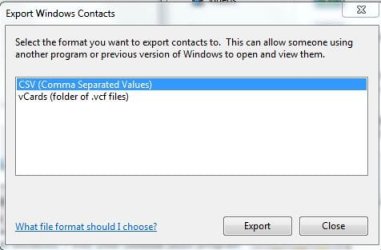
1.) Enter you Contact Folder and Select Export. Select CVS (Comma Separated Values). Store the file on your Desktop or somewhere easy to locate.
Outlook 2010 1.JPG
2.) Open Outlook 2010 and head to your Contacts section.

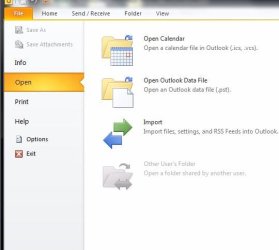
3.) Click File > Select Open > Select Import.
Outlook 2010 2.JPG
4.) Choose the fifth option down entitled "Import from another program or file"
and Select Next.
Outlook 2010 3.JPG
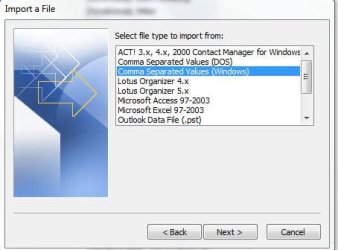
5.) Choose the third option on the list entitled " Comma Separated Values (Windows) and Select Next.
Outlook 2010 4.JPG
6.) Now locate the file you saved with your Contacts in it by using Browse option on the top-right. Select Next.
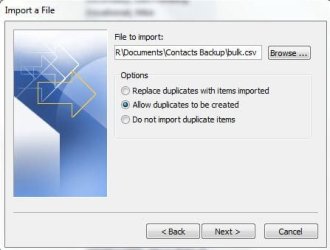
Outlook 2010 5.JPG
7.) It will ask you to choose the destination folder. Select Contacts (which on my PC was the second on the list) and Select Next.
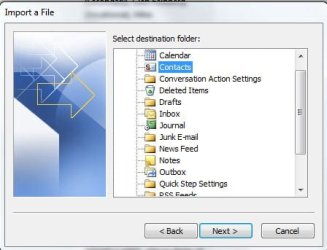
Outlook 2010 6.JPG
You are now done! This can obviously be used to import all sort of things such as Calendars, Tasks, etc. :party:

If you found this helpful, please provide me with Positive Reputation on the top-right of this Tutorial. Thank you! - BOM


Last edited by a moderator:
I am using windows 7 home and succesfully imported my contacts into the contacts folder in the users folder. My contacts appear with first name followed by family name and I cannot find any option to reverse this order ie surname first. Can anyone advise? thanks
 

My Computer

OS
32
G'day Brian - welcome to SevenForums.

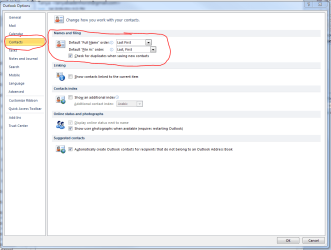
With Outlook open, click on File, then Options. On the panel that opens, click Contacts, and then change the selection as shown in the attached image.

Regards,
Golden
 

Attachments

  • Capture.PNG
    Capture.PNG
    116.3 KB · Views: 2,328

My Computer

Computer type
PC/Desktop
Computer Manufacturer/Model Number
Golden Mk. I.4
OS
Windows 10 Pro x64 ; Xubuntu x64
CPU
Intel i7 860 @ 2.80 GHz O/C'ed to 4.0GHz
Motherboard
Gigabyte P55A-UD3R Rev.1. Award BIOS F13
Memory
16GB Corsair Vengance DDR3 @ 661 MHz Dual Channel (9-9-9-24)
Graphics Card(s)
EVGA NVidia GTX 560 1024MB
Sound Card
Realtek Integrated
Monitor(s) Displays
Dual Samsung SyncMaster 2494HS
Screen Resolution
1920*1080 and 1920*1080
Hard Drives
1*Samsung 840 EVO 120GB SSD;
1*OCZ Vertex 2 60GB SSD;
2*Samsung F3 SpinPoint 1TB in RAID0;
1*Samsung F1 SpinPoint 1TB;
2*Western Digital 1TB External USB 3.0
1*Western Digital 500GB External USB 3.0
1*Seagate 500GB External USB 2.0
PSU
Thermaltake ToughPower QFan 750W
Case
Thermaltake Element S VK60001W2Z
Cooling
Corsair H60 Water Cooling, 2*230mm and 2*80mm case fans
Keyboard
Logitech G110
Mouse
Logitech MX518
Thanks for adding information Golden!
 

My Computer

Computer type
PC/Desktop
Computer Manufacturer/Model Number
Custom Desktop PC
OS
Windows 7 / Windows 8.1
CPU
Devils Canyon i7-4790K @ 4.8 GHz ~ 1.33v
Motherboard
Asus Z97 Deluxe
Memory
Corsair Vengeance Pro PC3-19200 DDR3 2400MHz
Graphics Card(s)
EVGA GeForce GTX 980 SuperClocked ACX 2.0
Sound Card
Realtek ALC1150 8 channels
Monitor(s) Displays
BenQ XL2720Z 27"
Screen Resolution
1920 x 1080 @ 144Hz
Hard Drives
SSD1: 512GB Samsung 850 Pro
SSD2: 1TB Samsung 850 EVO
SSD3: 1TB Samsung 850 EVO
HDD: 4TB Western Digital Black
Backup: Western Digital My Book Duo 8TB
PSU
Corsair HX1000i / CyberPower CP1500PFCLCD PFC Sinewave UPS 1
Case
Corsair Graphite 780T
Cooling
Custom single loop liquid; CPU delidded; Aerocool DS Fans
Keyboard
Logitech G710 Cherry MX Blue
Mouse
LogitechG502 Proteus Core
Internet Speed
Download: 119MBs /Upload 39.12MBs via Optimum 101 Ultra
Antivirus
MYOB
Browser
Firefox
Other Info
Cooling: EK-Supremecy MX Waterblock, XSPC AX360 Radiator, Swiftech MCP655 Series 12VDC D5 Pump, EK-RES x3 250 Reservoir, Primochill Ice Intensified Coolant, 11x AerocoolDS fans, Primochill Primoflex Avanced LRT Tubing
I tried these steps to import my Contacts list from Windows 7 Contacts to Outlook 2016. Everything seemed to go okay, but I cannot find them in Outlook. Is there a different process to use for importing to Outlook 2016? Maybe I don't know where to look for them, but there is nothing with I try to open the Address Book in Outlook 2016. Is there another place where I should look? Thanks!
 

My Computer

Computer type
PC/Desktop
Computer Manufacturer/Model Number
Dell XPS 8900
OS
Windows 7 Pro 64bit
Back
Top