Windows XP Mode - Modem not detected

twiggy1214

New member
Local time
5:58 PM
Messages
4
I did an anytime upgrade from Windows 7 Home to Windows 7 Professional. I setup Windows XP Mode and Windows Virtual PC. I was able to get my software installed, but I cannot get it to detect my modem. I have tried uninstalling the modem from Windows 7 and installing with the installation disc in Windows XP Mode, but my modem is still not detected. The software I installed in Faxtools ExPert 8. It receives faxes and allows me to setup mailboxes to email the faxes to certain people. Any help would be greatly appreciated.

Cheryl
 

My Computer

Computer Manufacturer/Model Number
Gateway DX4300-22
OS
Windows 7 64-bit
CPU
AMD Phenom II X4 810
Memory
6 GB DDR2
Graphics Card(s)
ATI Radeon TM HD 5450 514 MB
Sound Card
8-Channel (7.1) high-definition audio
Monitor(s) Displays
23" Wide screen display
Hard Drives
1 TB HDD
Hi Cheryl, welcome to the Seven Forums.

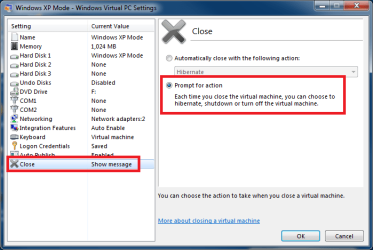
First, shut down XP Mode. By default XP Mode is only hibernated instead of shut down when you close it, so you need to go to XP Mode settings to disable automatic hibernation.

Open the XP Mode settings, select Close on the left pane and Prompt for action on right. Click OK:

XPM_Closing.png

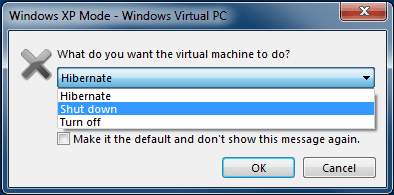
Now run XP Mode, click Close button. You are now presented with a close dialog. Choose Shut Down:

XPM_Closing_2.png

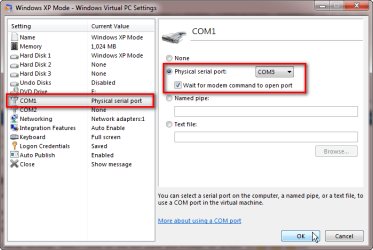
Go back to XP Mode settings when it's completely shut down, and select COM1 on the left pane. Select Physical serial port and choose the fax modem's real, physical port (which it has in Windows 7) from drop down list. Select Wait for modem command to open port. Click OK to save settings:

XPM_com_port.png

Run XP Mode and install Fax software, and modem from inside the fax program.

It should work now.

Kari
 

My Computer

Computer type
Laptop
Computer Manufacturer/Model Number
HP ENVY 17-1150eg
OS
Windows 10 Pro x64 EN-GB
CPU
1.6 GHz Intel Core i7-720QM Processor
Memory
6 GB
Graphics Card(s)
ATI Mobility Radeon HD 5850 Graphics
Sound Card
Beats sound system with integrated subwoofer
Monitor(s) Displays
17" laptop display, 22" LED and 32" Full HD TV through HDMI
Screen Resolution
1600*900 (1), 1920*1080 (2&3)
Hard Drives
Internal: 2 x 500 GB SATA Hard Disk Drive 7200 rpm
External: 2TB for backups, 3TB USB3 network drive for media
Cooling
As Envy runs a bit warm, I have it on a Cooler Master pad
Keyboard
Logitech diNovo Media Desktop Laser (bluetooth)
Mouse
Logitech Performance Mouse MX
Internet Speed
50/10 Mbps VDSL
Antivirus
Windows Defender 4.3.9431.0
Browser
Maxthon 3.5.2., IE11
Kari - Thank you so much for you reply. I have followed your instructions and everything worked as far as instructing Com1 to detect the physical port. When I go into device manager, I have a list ? other device. When I open that up, there are three yellow ? and they all say Virtual PC Integration Device. I am new to Virtual PC and as I am sure you can tell, I don't know much about it. Is there anything I should do with this?

Cheryl
 

My Computer

Computer Manufacturer/Model Number
Gateway DX4300-22
OS
Windows 7 64-bit
CPU
AMD Phenom II X4 810
Memory
6 GB DDR2
Graphics Card(s)
ATI Radeon TM HD 5450 514 MB
Sound Card
8-Channel (7.1) high-definition audio
Monitor(s) Displays
23" Wide screen display
Hard Drives
1 TB HDD

My Computer

Computer type
Laptop
Computer Manufacturer/Model Number
HP ENVY 17-1150eg
OS
Windows 10 Pro x64 EN-GB
CPU
1.6 GHz Intel Core i7-720QM Processor
Memory
6 GB
Graphics Card(s)
ATI Mobility Radeon HD 5850 Graphics
Sound Card
Beats sound system with integrated subwoofer
Monitor(s) Displays
17" laptop display, 22" LED and 32" Full HD TV through HDMI
Screen Resolution
1600*900 (1), 1920*1080 (2&3)
Hard Drives
Internal: 2 x 500 GB SATA Hard Disk Drive 7200 rpm
External: 2TB for backups, 3TB USB3 network drive for media
Cooling
As Envy runs a bit warm, I have it on a Cooler Master pad
Keyboard
Logitech diNovo Media Desktop Laser (bluetooth)
Mouse
Logitech Performance Mouse MX
Internet Speed
50/10 Mbps VDSL
Antivirus
Windows Defender 4.3.9431.0
Browser
Maxthon 3.5.2., IE11
Kari - Thank you so much for your time and help!!!! It has greatly been appreciated.

Cheryl:D
 

My Computer

Computer Manufacturer/Model Number
Gateway DX4300-22
OS
Windows 7 64-bit
CPU
AMD Phenom II X4 810
Memory
6 GB DDR2
Graphics Card(s)
ATI Radeon TM HD 5450 514 MB
Sound Card
8-Channel (7.1) high-definition audio
Monitor(s) Displays
23" Wide screen display
Hard Drives
1 TB HDD
You are welcome, Cheryl. Happy New Year :party:
 

My Computer

Computer type
Laptop
Computer Manufacturer/Model Number
HP ENVY 17-1150eg
OS
Windows 10 Pro x64 EN-GB
CPU
1.6 GHz Intel Core i7-720QM Processor
Memory
6 GB
Graphics Card(s)
ATI Mobility Radeon HD 5850 Graphics
Sound Card
Beats sound system with integrated subwoofer
Monitor(s) Displays
17" laptop display, 22" LED and 32" Full HD TV through HDMI
Screen Resolution
1600*900 (1), 1920*1080 (2&3)
Hard Drives
Internal: 2 x 500 GB SATA Hard Disk Drive 7200 rpm
External: 2TB for backups, 3TB USB3 network drive for media
Cooling
As Envy runs a bit warm, I have it on a Cooler Master pad
Keyboard
Logitech diNovo Media Desktop Laser (bluetooth)
Mouse
Logitech Performance Mouse MX
Internet Speed
50/10 Mbps VDSL
Antivirus
Windows Defender 4.3.9431.0
Browser
Maxthon 3.5.2., IE11
Happy New Year to you also!!!! :D
 

My Computer

Computer Manufacturer/Model Number
Gateway DX4300-22
OS
Windows 7 64-bit
CPU
AMD Phenom II X4 810
Memory
6 GB DDR2
Graphics Card(s)
ATI Radeon TM HD 5450 514 MB
Sound Card
8-Channel (7.1) high-definition audio
Monitor(s) Displays
23" Wide screen display
Hard Drives
1 TB HDD
Still no modem detected

I have followed the above advice yet still do not see a modem in the VPC's device manager. The system is an HP 6730s laptop, with an LSI HDA modem. I've downloaded the driver from HP and installed it in the virtual PC. The driver installation creates a folder with Conexant and an Agere folder. Selecting a .inf file during modem installation in the fax software does not provide a modem. Now what?

If I could fax from Win7 I would, but I do not have Outlook. Is there a useful, open source alternative to avoid the VPC environment? My requirement is so small it's not worth investing any $, only time.

Thanks.

George
 

My Computer

Computer type
PC/Desktop
Computer Manufacturer/Model Number
HP 6730s laptop
OS
10 Windows 7 Pro 32-bit
CPU
Intel P7370
Motherboard
Base Board 30E8; KBC Version 94.1D
Memory
4GB
Graphics Card(s)
Mobile Intel(R) 4 Series Express Chipset Family (Microsoft C
Sound Card
SoundMAX Integrated Digital HD Audio
Monitor(s) Displays
Generic PnP Monitor (per Device Manager)
Screen Resolution
1280 x 800 x 32 bits (4294967296 colors) @ 59 Hz
Hard Drives
WDC WD5000BEVT-60ZAT1 ATA Device: 465.76 GB
PSU
HP 6730s
Case
HP 6730s
Cooling
HP 6730s
Keyboard
HID Keyboard Device (per Device Manager)
Mouse
Synaptics PS/2 Port TouchPad
Internet Speed
varies
Antivirus
Norton Internet Security
Browser
Firefox 47
Other Info
Where no detailed information from SystemInfo is available HP 6730s has been entered.
Windows 7 has a fax driver: %windir%\system32\WFS.exe - windows fax and scan.

If you print from any document one of the options should be fax - which then prompts for a local phone code and destination phone number to send to. It may need to set up yuor modem the first time - there is a wizard for that.

Use MSOffice, notepad, wordpad etc. and select print.
 

My Computer

Computer Manufacturer/Model Number
Acer 7520, Packard Bell dot se, Acer travelmate 2423
OS
Win 7 Ult + Starter, XP Pro +Home, 2kAS, Linux Mint 8, SuperOS
CPU
AMD 64 Athlon X2 , Intel Atom N450, Intel Celeron M 1.50 Ghz
Motherboard
Acer Fuquene
Memory
2.5GB ; 1GB; 2GB
Graphics Card(s)
Nvidia GeForce7000m; Intel; Intel
Sound Card
Realtek AC57
Monitor(s) Displays
17" ;10.1"; 19"
Screen Resolution
1440x900;1024x600;1440x900;
Hard Drives
WD 80, WD 320;
PSU
19v
Case
Laptop
Cooling
Air
Internet Speed
9.7Mb/s down 0.99Mb/s up
Other Info
ISP VIRGINMEDIA 10M cable broadband - D-Link DIR615 wireless router, 3Com OfficeConnect ASDL router used as wireless extender switch
When I attempt to print to the Fax printer, I get the following:

The connection to Microsoft Exchange is unavailable. Outlook must be online or connected to complete this action.

I'll uninstall & reinstall fax services to see if this changes. Anything else I should know?

g
 

My Computer

Computer type
PC/Desktop
Computer Manufacturer/Model Number
HP 6730s laptop
OS
10 Windows 7 Pro 32-bit
CPU
Intel P7370
Motherboard
Base Board 30E8; KBC Version 94.1D
Memory
4GB
Graphics Card(s)
Mobile Intel(R) 4 Series Express Chipset Family (Microsoft C
Sound Card
SoundMAX Integrated Digital HD Audio
Monitor(s) Displays
Generic PnP Monitor (per Device Manager)
Screen Resolution
1280 x 800 x 32 bits (4294967296 colors) @ 59 Hz
Hard Drives
WDC WD5000BEVT-60ZAT1 ATA Device: 465.76 GB
PSU
HP 6730s
Case
HP 6730s
Cooling
HP 6730s
Keyboard
HID Keyboard Device (per Device Manager)
Mouse
Synaptics PS/2 Port TouchPad
Internet Speed
varies
Antivirus
Norton Internet Security
Browser
Firefox 47
Other Info
Where no detailed information from SystemInfo is available HP 6730s has been entered.
Solved. Because Office was installed, Exchange apparently inserts itself into the process. By eliminating profiles in the Control Panel\Mail applet I was FINALLY able to send a fax. All I needed to do was to test a wiring arrangement.

Another process made unnecessarily hard by our friends at MS.

g
 

My Computer

Computer type
PC/Desktop
Computer Manufacturer/Model Number
HP 6730s laptop
OS
10 Windows 7 Pro 32-bit
CPU
Intel P7370
Motherboard
Base Board 30E8; KBC Version 94.1D
Memory
4GB
Graphics Card(s)
Mobile Intel(R) 4 Series Express Chipset Family (Microsoft C
Sound Card
SoundMAX Integrated Digital HD Audio
Monitor(s) Displays
Generic PnP Monitor (per Device Manager)
Screen Resolution
1280 x 800 x 32 bits (4294967296 colors) @ 59 Hz
Hard Drives
WDC WD5000BEVT-60ZAT1 ATA Device: 465.76 GB
PSU
HP 6730s
Case
HP 6730s
Cooling
HP 6730s
Keyboard
HID Keyboard Device (per Device Manager)
Mouse
Synaptics PS/2 Port TouchPad
Internet Speed
varies
Antivirus
Norton Internet Security
Browser
Firefox 47
Other Info
Where no detailed information from SystemInfo is available HP 6730s has been entered.
This is probably not the best section of the forum for this - The Microsoft Office section may be the best place to sort out the Outlook error. Outlook has now been replaced by Windows Mail - I guess you may have Office 2007 or earlier. I can only guess that the fax software is looking for an address and finds that Outlook is offline.

If you click start, type: fax in the search box, and in the fax and scan dialog that appears, click the new fax button and the fax setup dialog should start, and you need to connect to a fax modem as in the following screenshot:
fax.png

Hopefully that should be easy enough to follow from there. If the outlook error continues, there may be a need to fix the registry.

PS glad you solved it.
 
Last edited:

My Computer

Computer Manufacturer/Model Number
Acer 7520, Packard Bell dot se, Acer travelmate 2423
OS
Win 7 Ult + Starter, XP Pro +Home, 2kAS, Linux Mint 8, SuperOS
CPU
AMD 64 Athlon X2 , Intel Atom N450, Intel Celeron M 1.50 Ghz
Motherboard
Acer Fuquene
Memory
2.5GB ; 1GB; 2GB
Graphics Card(s)
Nvidia GeForce7000m; Intel; Intel
Sound Card
Realtek AC57
Monitor(s) Displays
17" ;10.1"; 19"
Screen Resolution
1440x900;1024x600;1440x900;
Hard Drives
WD 80, WD 320;
PSU
19v
Case
Laptop
Cooling
Air
Internet Speed
9.7Mb/s down 0.99Mb/s up
Other Info
ISP VIRGINMEDIA 10M cable broadband - D-Link DIR615 wireless router, 3Com OfficeConnect ASDL router used as wireless extender switch
Outlook has now been replaced by Windows Mail.
I'm sorry but I find this comment very strange.

Outlook Express (should not be confused with Outlook) that came with XP was replaced by Windows Mail in Vista. Windows Mail in its turn was replaced by Windows Live Mail.

Since it's first Windows version (Outlook for Windows 3.1x) Outlook has never been replaced. Every new MsOffice release has brought a new version of Outlook, currently the latest Windows version is Outlook 2010, a part of MsOffice 2010 suite. It was released in April, 2010.

Windows Mail, or its predecessor Outlook Express or successor Windows Live Mail, is not meant to be an alternative for Outlook. Windows Mail and Windows Live Mail are light, free email clients for users who do not need and don't want to pay for a full commercial personal information manager Outlook.

Kari
 

My Computer

Computer type
Laptop
Computer Manufacturer/Model Number
HP ENVY 17-1150eg
OS
Windows 10 Pro x64 EN-GB
CPU
1.6 GHz Intel Core i7-720QM Processor
Memory
6 GB
Graphics Card(s)
ATI Mobility Radeon HD 5850 Graphics
Sound Card
Beats sound system with integrated subwoofer
Monitor(s) Displays
17" laptop display, 22" LED and 32" Full HD TV through HDMI
Screen Resolution
1600*900 (1), 1920*1080 (2&3)
Hard Drives
Internal: 2 x 500 GB SATA Hard Disk Drive 7200 rpm
External: 2TB for backups, 3TB USB3 network drive for media
Cooling
As Envy runs a bit warm, I have it on a Cooler Master pad
Keyboard
Logitech diNovo Media Desktop Laser (bluetooth)
Mouse
Logitech Performance Mouse MX
Internet Speed
50/10 Mbps VDSL
Antivirus
Windows Defender 4.3.9431.0
Browser
Maxthon 3.5.2., IE11
Of course it has - what was I thinking of?
 

My Computer

Computer Manufacturer/Model Number
Acer 7520, Packard Bell dot se, Acer travelmate 2423
OS
Win 7 Ult + Starter, XP Pro +Home, 2kAS, Linux Mint 8, SuperOS
CPU
AMD 64 Athlon X2 , Intel Atom N450, Intel Celeron M 1.50 Ghz
Motherboard
Acer Fuquene
Memory
2.5GB ; 1GB; 2GB
Graphics Card(s)
Nvidia GeForce7000m; Intel; Intel
Sound Card
Realtek AC57
Monitor(s) Displays
17" ;10.1"; 19"
Screen Resolution
1440x900;1024x600;1440x900;
Hard Drives
WD 80, WD 320;
PSU
19v
Case
Laptop
Cooling
Air
Internet Speed
9.7Mb/s down 0.99Mb/s up
Other Info
ISP VIRGINMEDIA 10M cable broadband - D-Link DIR615 wireless router, 3Com OfficeConnect ASDL router used as wireless extender switch
:D

Kari
 

My Computer

Computer type
Laptop
Computer Manufacturer/Model Number
HP ENVY 17-1150eg
OS
Windows 10 Pro x64 EN-GB
CPU
1.6 GHz Intel Core i7-720QM Processor
Memory
6 GB
Graphics Card(s)
ATI Mobility Radeon HD 5850 Graphics
Sound Card
Beats sound system with integrated subwoofer
Monitor(s) Displays
17" laptop display, 22" LED and 32" Full HD TV through HDMI
Screen Resolution
1600*900 (1), 1920*1080 (2&3)
Hard Drives
Internal: 2 x 500 GB SATA Hard Disk Drive 7200 rpm
External: 2TB for backups, 3TB USB3 network drive for media
Cooling
As Envy runs a bit warm, I have it on a Cooler Master pad
Keyboard
Logitech diNovo Media Desktop Laser (bluetooth)
Mouse
Logitech Performance Mouse MX
Internet Speed
50/10 Mbps VDSL
Antivirus
Windows Defender 4.3.9431.0
Browser
Maxthon 3.5.2., IE11
Back
Top