
I got XP mode to display 24-bit color with integration!

HughShaw

New member
I read this article and decided to try it out. I did these steps:

1. Open up the Group Policy editor in XP, by going Start --> Run and type in MMC.
2. Add the Group Policy snap-in by going File --> Add/Remove Snap-in --> Add --> Group Policy Object Editor --> Add --> Finish (Local Machine) --> Close --> Ok.
3. Now navigate in the Group Policy Object Editor from Local Computer Policy --> Computer Configuration --> Administrative Templates --> Widnows Components --> Terminal Services and double-click on the 'Limit maximum Color Depth' object.
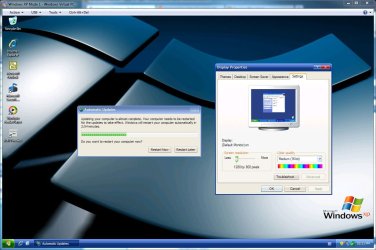
4. By default the policy is disabled and sets you to 16-bit color. Click on 'Enable' and choose either 'Client Compatible' or 24-bit to enable the highest resolution of 24-bit (True Color) to display via Remote Desktop. Options include 8-bit, 15-bit, 16-bit, and 24-bit.

Then I saved the profile and restarted, and now it's 24-bit with integration on! Looks so much better! :cool:
 

Attachments

  • 24-bit XP mode.jpg
    24-bit XP mode.jpg
    160.4 KB · Views: 2,151
Last edited:

My Computer

Computer Manufacturer/Model Number
Cyberpower, Inc.
OS
Windows 7 Professional (x64)
CPU
AMD Phenom II X4 955 Black Edition
Motherboard
Gigabyte AMD MA770T-UD3P AM3 DDR3 1666+/1333/1066
Memory
6GB (3 x 2GB) Kingston DDR3 1333 SDRAM
Graphics Card(s)
NVIDIA GeForce GTX 260
Sound Card
Onboard 7.1 Sound
Monitor(s) Displays
Samsung 24" SyncMaster 2422
Screen Resolution
1920 x 1200
Hard Drives
500GB Sata II 3.0GB 16MB 7200RPM,
Western Digital 1TB USB 2.0 External Hard Drive
PSU
Kingwin 700 Watt Power Supply
Case
Silver X-Cruiser 2 Mid No Power
Cooling
Asetek 120MM Watercooler
Keyboard
HTK-1001
Mouse
Razer Viper
Internet Speed
Incoming: 2496 kbps, Outgoing: 512 kbps
C'mon guys, 24-bit is much better than 16-bit. It won't be long until someone discovers how to get 36-bit color with integration on.
 

My Computer

Computer Manufacturer/Model Number
Cyberpower, Inc.
OS
Windows 7 Professional (x64)
CPU
AMD Phenom II X4 955 Black Edition
Motherboard
Gigabyte AMD MA770T-UD3P AM3 DDR3 1666+/1333/1066
Memory
6GB (3 x 2GB) Kingston DDR3 1333 SDRAM
Graphics Card(s)
NVIDIA GeForce GTX 260
Sound Card
Onboard 7.1 Sound
Monitor(s) Displays
Samsung 24" SyncMaster 2422
Screen Resolution
1920 x 1200
Hard Drives
500GB Sata II 3.0GB 16MB 7200RPM,
Western Digital 1TB USB 2.0 External Hard Drive
PSU
Kingwin 700 Watt Power Supply
Case
Silver X-Cruiser 2 Mid No Power
Cooling
Asetek 120MM Watercooler
Keyboard
HTK-1001
Mouse
Razer Viper
Internet Speed
Incoming: 2496 kbps, Outgoing: 512 kbps
C'mon guys, 24-bit is much better than 16-bit. It won't be long until someone discovers how to get 36-bit color with integration on.

What would be the point? The eye can't distinguish that many colors anyway. 24bit ~ 16.7million and at optimum estimates, the eye could possibly do 7 million colors/shades.
 

My Computer

OS
W7RC1
Well to me there's a big difference in some XP programs that run better with 36 bit. 16 bit is too low, but 24 bit looks a lot better. Give it a try, your icons will look smoother and especially if you added themes the colors will be noticeably better.

I have a widescreen LCD and it's almost like 36 bit...
 

My Computer

Computer Manufacturer/Model Number
Cyberpower, Inc.
OS
Windows 7 Professional (x64)
CPU
AMD Phenom II X4 955 Black Edition
Motherboard
Gigabyte AMD MA770T-UD3P AM3 DDR3 1666+/1333/1066
Memory
6GB (3 x 2GB) Kingston DDR3 1333 SDRAM
Graphics Card(s)
NVIDIA GeForce GTX 260
Sound Card
Onboard 7.1 Sound
Monitor(s) Displays
Samsung 24" SyncMaster 2422
Screen Resolution
1920 x 1200
Hard Drives
500GB Sata II 3.0GB 16MB 7200RPM,
Western Digital 1TB USB 2.0 External Hard Drive
PSU
Kingwin 700 Watt Power Supply
Case
Silver X-Cruiser 2 Mid No Power
Cooling
Asetek 120MM Watercooler
Keyboard
HTK-1001
Mouse
Razer Viper
Internet Speed
Incoming: 2496 kbps, Outgoing: 512 kbps
I'll agree there is a big difference between 16 bit (65,536) and 24 bit (16.7 million). However you can't possibly tell any different between 24 bit and 36 bit (68.7 billion).
 

My Computer

OS
W7RC1
XP Mode with 32 bit color + integration is possible!

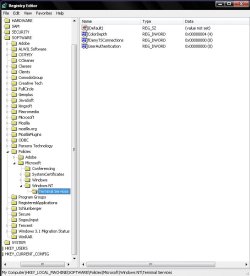
I found an easier way to get 24 bit colors with integration on here.
1. Run regedit in XP.
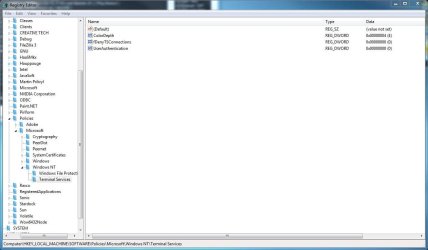
2. Navigate to [HKEY_LOCAL_MACHINE\SOFTWARE\Policies\Microsoft\Windows NT\Terminal Services].
3. Add a DWORD Value named "ColorDepth" w/o parenthesis.
4. Right-click it, modify, then put "4" in the Value data.
5. Restart XP mode.

On another note, if you clicked the link above, you'll notice that he said 32-bit color is possible with XP mode, but you'll have to make extensive changes to the RDP!
 
Last edited:

My Computer

Computer Manufacturer/Model Number
Cyberpower, Inc.
OS
Windows 7 Professional (x64)
CPU
AMD Phenom II X4 955 Black Edition
Motherboard
Gigabyte AMD MA770T-UD3P AM3 DDR3 1666+/1333/1066
Memory
6GB (3 x 2GB) Kingston DDR3 1333 SDRAM
Graphics Card(s)
NVIDIA GeForce GTX 260
Sound Card
Onboard 7.1 Sound
Monitor(s) Displays
Samsung 24" SyncMaster 2422
Screen Resolution
1920 x 1200
Hard Drives
500GB Sata II 3.0GB 16MB 7200RPM,
Western Digital 1TB USB 2.0 External Hard Drive
PSU
Kingwin 700 Watt Power Supply
Case
Silver X-Cruiser 2 Mid No Power
Cooling
Asetek 120MM Watercooler
Keyboard
HTK-1001
Mouse
Razer Viper
Internet Speed
Incoming: 2496 kbps, Outgoing: 512 kbps
I read this article and decided to try it out even though it refers to Remote Desktop. I did these steps:

1. Open up the Group Policy editor, by going Start --> Run and type in MMC.
2. Add the Group Policy snap-in by going File --> Add/Remove Snap-in --> Add --> Group Policy Object Editor --> Add --> Finish (Local Machine) --> Close --> Ok.
3. Now navigate in the Group Policy Object Editor from Local Computer Policy --> Computer Configuration --> Administrative Templates --> Widnows Components --> Terminal Services and double-click on the 'Limit maximum Color Depth' object.
4. By default the policy is disabled and sets you to 16-bit color. Click on 'Enable' and choose either 'Client Compatible' or 24-bit to enable the highest resolution of 24-bit (True Color) to display via Remote Desktop. Options include 8-bit, 15-bit, 16-bit, and 24-bit.

Then I saved the profile and restarted, and now it's 24-bit with integration on! Looks so much better! :cool:

I found an easier way to get 24 bit colors with integration on here.
1. Run regedit.
2. Navigate to [HKEY_LOCAL_MACHINE\SOFTWARE\Policies\Microsoft\Windows NT\Terminal Services].
3. Add a DWORD Value named "ColorDepth" w/o parenthesis.
4. Right-click it, modify, then put "4" in the Value data.
5. Restart XP mode.

On another note, if you clicked the link above, you'll notice that he said 32-bit color is possible with XP mode, but you'll have to make extensive changes to the RDP!


I dont have terminal services listed in either methods.
 

My Computer

Computer Manufacturer/Model Number
self built
OS
Windows 7 Professional 64-bit
CPU
Intel E8400 3GHz
Motherboard
Intel DX48BT2
Memory
Kingston PC3-10700H 4Gb
Graphics Card(s)
XFX Radeon HD 5850 BlackEd.
Sound Card
Asus Xonar DG
Monitor(s) Displays
2x Samsung SM-T220HD 22"
Screen Resolution
1680x1050 on two monitors
Hard Drives
OCZ Vertex 2 120gb 3.5" (OS)
Seagate Momentus XT 500gb
Samsung F3 1Tb (games)
2x Samsung F1 1Tb
PSU
Thermaltake ToughPower 850w
Case
Thermaltake Armor
Cooling
Scythe Mugen II
Keyboard
Microsoft Comfort Curve USB
Mouse
Razer Diamondback 3G
Internet Speed
8128/443
I'm not entirely sure why, but maybe you can go to Add/Remove Programs, click Add/Remove Windows Components tab, then make sure you have Networking Services checked. Or maybe you didn't enable integration which might automatically install it.
 
Last edited:

My Computer

Computer Manufacturer/Model Number
Cyberpower, Inc.
OS
Windows 7 Professional (x64)
CPU
AMD Phenom II X4 955 Black Edition
Motherboard
Gigabyte AMD MA770T-UD3P AM3 DDR3 1666+/1333/1066
Memory
6GB (3 x 2GB) Kingston DDR3 1333 SDRAM
Graphics Card(s)
NVIDIA GeForce GTX 260
Sound Card
Onboard 7.1 Sound
Monitor(s) Displays
Samsung 24" SyncMaster 2422
Screen Resolution
1920 x 1200
Hard Drives
500GB Sata II 3.0GB 16MB 7200RPM,
Western Digital 1TB USB 2.0 External Hard Drive
PSU
Kingwin 700 Watt Power Supply
Case
Silver X-Cruiser 2 Mid No Power
Cooling
Asetek 120MM Watercooler
Keyboard
HTK-1001
Mouse
Razer Viper
Internet Speed
Incoming: 2496 kbps, Outgoing: 512 kbps
Sorry to say but I wasnt able to find it that way either.
 

My Computer

Computer Manufacturer/Model Number
self built
OS
Windows 7 Professional 64-bit
CPU
Intel E8400 3GHz
Motherboard
Intel DX48BT2
Memory
Kingston PC3-10700H 4Gb
Graphics Card(s)
XFX Radeon HD 5850 BlackEd.
Sound Card
Asus Xonar DG
Monitor(s) Displays
2x Samsung SM-T220HD 22"
Screen Resolution
1680x1050 on two monitors
Hard Drives
OCZ Vertex 2 120gb 3.5" (OS)
Seagate Momentus XT 500gb
Samsung F3 1Tb (games)
2x Samsung F1 1Tb
PSU
Thermaltake ToughPower 850w
Case
Thermaltake Armor
Cooling
Scythe Mugen II
Keyboard
Microsoft Comfort Curve USB
Mouse
Razer Diamondback 3G
Internet Speed
8128/443
You probably disabled it when disabling unnecessary services. Open up "services.msc" find "Terminal Services" right-click it and put it on "Automatic". Also make sure you have "Remote Procedure Call" on automatic.

Edit: And if all else fails, you can just create your own Terminal Services folder and put in the required entries. I've attached a screenshot of how it should look like as well as the reg file should you need it.
 

Attachments

Last edited:

My Computer

Computer Manufacturer/Model Number
Cyberpower, Inc.
OS
Windows 7 Professional (x64)
CPU
AMD Phenom II X4 955 Black Edition
Motherboard
Gigabyte AMD MA770T-UD3P AM3 DDR3 1666+/1333/1066
Memory
6GB (3 x 2GB) Kingston DDR3 1333 SDRAM
Graphics Card(s)
NVIDIA GeForce GTX 260
Sound Card
Onboard 7.1 Sound
Monitor(s) Displays
Samsung 24" SyncMaster 2422
Screen Resolution
1920 x 1200
Hard Drives
500GB Sata II 3.0GB 16MB 7200RPM,
Western Digital 1TB USB 2.0 External Hard Drive
PSU
Kingwin 700 Watt Power Supply
Case
Silver X-Cruiser 2 Mid No Power
Cooling
Asetek 120MM Watercooler
Keyboard
HTK-1001
Mouse
Razer Viper
Internet Speed
Incoming: 2496 kbps, Outgoing: 512 kbps
The difference between 24bit color and 32bit color is the later has alpha channels. This is of course when concerning Windows or most systems for that matter.

...the term “32-bit color” is most often a misuse referring to 24-bit color images with an additional eight bits of non-color data (I.E.: alpha, Z or bump data), or sometimes even to plain 24-bit data.
 

My Computer

Computer type
PC/Desktop
Computer Manufacturer/Model Number
Alienware Aurora ALX R4
OS
Windows 10 Pro (x64)
CPU
Intel Core i7-3930K (3.2GHz - 4.5GHz)
Motherboard
Alienware Aurora-R4 x79
Memory
4x Samsung 4GB PC3-12800 DDR3 (16GB 1600MHz)
Graphics Card(s)
Nvidia Geforce GTX 690
Sound Card
SteelSeries Siberia Elite
Monitor(s) Displays
Dell UltraSharp U3011
Screen Resolution
2560x1600
Hard Drives
Samsung 850 Pro 256 GB, Seagate 1TB Desktop Hybrid HDD, 2x Western Digital 4TB Green HDD
PSU
875W Some Dell PSU <.<
Case
Alienware Aurora ALX
Cooling
Custom Liquid Cooling (EK CPU & GPU blocks) dual EK 480RAD
Keyboard
Logitech G710+ Mechanical
Mouse
Logitech G700s
Internet Speed
Verizon Fios (50 mbps average)
Other Info
Server: Intel NUC D54250WYK: i5-4250U, 16GB, 256 GB mSATA, Windows Server 2012 R2
You probably disabled it when disabling unnecessary services. Open up "services.msc" find "Terminal Services" right-click it and put it on "Automatic". Also make sure you have "Remote Procedure Call" on automatic.

Edit: And if all else fails, you can just create your own Terminal Services folder and put in the required entries. I've attached a screenshot of how it should look like as well as the reg file should you need it.

Thanks for the suggestions. I checked services and TS isnt listed there. There are two remote procedure calls services listed (RPC) and (RPC) Locator. First one is on automatic other is manual.

When I go into XP Mode, I now find only 16-bit colour option listed and Im unable to slide the resolution slider.

regedit.JPG

xpm2.JPG
 

My Computer

Computer Manufacturer/Model Number
self built
OS
Windows 7 Professional 64-bit
CPU
Intel E8400 3GHz
Motherboard
Intel DX48BT2
Memory
Kingston PC3-10700H 4Gb
Graphics Card(s)
XFX Radeon HD 5850 BlackEd.
Sound Card
Asus Xonar DG
Monitor(s) Displays
2x Samsung SM-T220HD 22"
Screen Resolution
1680x1050 on two monitors
Hard Drives
OCZ Vertex 2 120gb 3.5" (OS)
Seagate Momentus XT 500gb
Samsung F3 1Tb (games)
2x Samsung F1 1Tb
PSU
Thermaltake ToughPower 850w
Case
Thermaltake Armor
Cooling
Scythe Mugen II
Keyboard
Microsoft Comfort Curve USB
Mouse
Razer Diamondback 3G
Internet Speed
8128/443
Umm, buddy, you're opening up regedit and services.msc in Windows 7. Try opening up regedit in XP! ;)
 

My Computer

Computer Manufacturer/Model Number
Cyberpower, Inc.
OS
Windows 7 Professional (x64)
CPU
AMD Phenom II X4 955 Black Edition
Motherboard
Gigabyte AMD MA770T-UD3P AM3 DDR3 1666+/1333/1066
Memory
6GB (3 x 2GB) Kingston DDR3 1333 SDRAM
Graphics Card(s)
NVIDIA GeForce GTX 260
Sound Card
Onboard 7.1 Sound
Monitor(s) Displays
Samsung 24" SyncMaster 2422
Screen Resolution
1920 x 1200
Hard Drives
500GB Sata II 3.0GB 16MB 7200RPM,
Western Digital 1TB USB 2.0 External Hard Drive
PSU
Kingwin 700 Watt Power Supply
Case
Silver X-Cruiser 2 Mid No Power
Cooling
Asetek 120MM Watercooler
Keyboard
HTK-1001
Mouse
Razer Viper
Internet Speed
Incoming: 2496 kbps, Outgoing: 512 kbps
lol! Nowhere did anyone say it had to be the registry IN XP Mode so I naturally assumed Win7 registry.

Your hack has worked though, so thanks a lot :D Between yours and me finding cleartype, XP Mode is looking rather nice.
 

My Computer

Computer Manufacturer/Model Number
self built
OS
Windows 7 Professional 64-bit
CPU
Intel E8400 3GHz
Motherboard
Intel DX48BT2
Memory
Kingston PC3-10700H 4Gb
Graphics Card(s)
XFX Radeon HD 5850 BlackEd.
Sound Card
Asus Xonar DG
Monitor(s) Displays
2x Samsung SM-T220HD 22"
Screen Resolution
1680x1050 on two monitors
Hard Drives
OCZ Vertex 2 120gb 3.5" (OS)
Seagate Momentus XT 500gb
Samsung F3 1Tb (games)
2x Samsung F1 1Tb
PSU
Thermaltake ToughPower 850w
Case
Thermaltake Armor
Cooling
Scythe Mugen II
Keyboard
Microsoft Comfort Curve USB
Mouse
Razer Diamondback 3G
Internet Speed
8128/443
Thanks, saved me a ton of trouble, especially since the app I use needs I.E. 6 and minimum 24 bit. Saves a ton of trouble.
 

My Computer

Computer Manufacturer/Model Number
Custom
OS
7
CPU
AMD tricore forget which
Motherboard
XFXforce 8200
Memory
8 GB
Graphics Card(s)
BFGtech 9400 GTS
Hard Drives
1 TB raid 10
PSU
550 Watt antec
Glad I could help though I can't take credit. I can only share the knowledge.:)
 

My Computer

Computer Manufacturer/Model Number
Cyberpower, Inc.
OS
Windows 7 Professional (x64)
CPU
AMD Phenom II X4 955 Black Edition
Motherboard
Gigabyte AMD MA770T-UD3P AM3 DDR3 1666+/1333/1066
Memory
6GB (3 x 2GB) Kingston DDR3 1333 SDRAM
Graphics Card(s)
NVIDIA GeForce GTX 260
Sound Card
Onboard 7.1 Sound
Monitor(s) Displays
Samsung 24" SyncMaster 2422
Screen Resolution
1920 x 1200
Hard Drives
500GB Sata II 3.0GB 16MB 7200RPM,
Western Digital 1TB USB 2.0 External Hard Drive
PSU
Kingwin 700 Watt Power Supply
Case
Silver X-Cruiser 2 Mid No Power
Cooling
Asetek 120MM Watercooler
Keyboard
HTK-1001
Mouse
Razer Viper
Internet Speed
Incoming: 2496 kbps, Outgoing: 512 kbps
It works - just follow HughShaw's instructions!
You do have to click the standard - or expanded tab in the terminal window to see the command list.

Nice work!
 

My Computer

Computer Manufacturer/Model Number
Self Built
OS
Windows 7 Professional 64 Bit
CPU
Intel i7 920 DO SLBEJ 2.66 Ghz
Motherboard
Asus P6T SE
Memory
6Gb (3x2GB) CorsairXMS3 DDR3 PC3-12800
Graphics Card(s)
Ati 1GB XFX HD4890
Sound Card
Onboard HD Audio
Monitor(s) Displays
Samsung SyncMaster T240
Screen Resolution
1920 x 1200
Hard Drives
1TB Samsung HD 103UJ Spinpoint F1
250Gb Seagate
PSU
850W Corsair 850HX
Case
Antec Twelve Hundred Full Tower
Cooling
Akasa Nero AK-967
Internet Speed
20Mb
The first method worked perfectly for me and gave me 24 bit color in XPM. Thanks a lot!
 

My Computer

Computer Manufacturer/Model Number
home built
OS
64 bit Windows 7 ultimate
CPU
Intel 3.0 Ghz quad Q9650
Motherboard
Intel DG45ID
Memory
8Gb DDR-2
Graphics Card(s)
GeForce 9500GT
Sound Card
on motherboard
Monitor(s) Displays
Neovo 17" panel
Hard Drives
Super Talent UltraDrive ME SSD 128Gb SATA
Seagate 1.5Tb SATA
PSU
400W
Case
microATX cube
Cooling
Intel fan supplied with processor
I spoke too soon! Everything was fine and I had 32 bit color. Then I shut the virtual machine off, or tried. It wouldn't shut off, after about 10 minutes I hibernated it, then reset the machine. When I tried to get back into XPM it took a loooooonnnnngggg time to start the virtual machine and finally told me it could not enable integration features. It let me try again with the same result so I continued and got a small screen called Windows XP Mode Windows Virtual Machine with no desktop and a few commands Action, USB, Tools and CRT+Alt+Del. In tools all I could do was choose settings and I could not find any setting in there to put it back to 16 bits. The Integration Features in Tools was grayed out. So I cannot get into my XPM now. Any suggestions?
 

My Computer

Computer Manufacturer/Model Number
home built
OS
64 bit Windows 7 ultimate
CPU
Intel 3.0 Ghz quad Q9650
Motherboard
Intel DG45ID
Memory
8Gb DDR-2
Graphics Card(s)
GeForce 9500GT
Sound Card
on motherboard
Monitor(s) Displays
Neovo 17" panel
Hard Drives
Super Talent UltraDrive ME SSD 128Gb SATA
Seagate 1.5Tb SATA
PSU
400W
Case
microATX cube
Cooling
Intel fan supplied with processor
Well, that was interesting. Finally I got the machine to let me force a shutdown and after that, when I restarted it, it goes into my XPM screen again and I still have 24 bit colour. I tested it several times and its working again. Whew!
 

My Computer

Computer Manufacturer/Model Number
home built
OS
64 bit Windows 7 ultimate
CPU
Intel 3.0 Ghz quad Q9650
Motherboard
Intel DG45ID
Memory
8Gb DDR-2
Graphics Card(s)
GeForce 9500GT
Sound Card
on motherboard
Monitor(s) Displays
Neovo 17" panel
Hard Drives
Super Talent UltraDrive ME SSD 128Gb SATA
Seagate 1.5Tb SATA
PSU
400W
Case
microATX cube
Cooling
Intel fan supplied with processor
Back
Top