Running Windows 7 in XP mode no cd/dvd

douglasreed

New member
Local time
9:36 AM
Messages
11
Location
South Texas
I have two hard drives run in Super-Speed and two DVD burners, all on SATA. Running Asus P6T & i7 920. Running Windows 7 Pro 64 bit. When I go to xp mode everything works except the cd/dvd player just shows the virtual cd player. I go to the settings and change it to physical drive D (have tried both D and E) but I can't get the use of either physical DVD drives.
I have uninstalled both the Windows Virtual PC and XP mode and re-installed it but it never shows it. Everything works in Windows 7 and everything else works in XP mode, ie: all USB's windows 7 hard drive.
Except the cd/dvds.

Please, how can I get the CD/DVD burners to show and work in XP mode?
Thanks Doug
 
Last edited:

My Computer

Computer Manufacturer/Model Number
Self Made
OS
Windows 7
CPU
i7 920
Motherboard
P6T
Memory
6GB
Graphics Card(s)
ENGTS250
Hard Drives
WD 750 Black edition
SEA 750
Set in Raid 0 Super-Speed
Internet Speed
1.5 mbs download and 750 kbs upload
Hello Douglas, welcome to the Seven Forums.

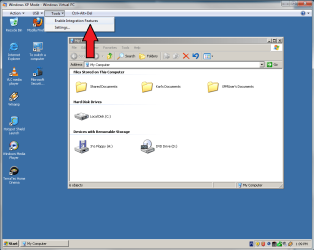
First, you have to enable integration features:

XP1.PNG

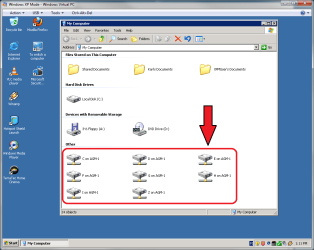
When integration is enabled, you can see and use your host's drives as network drives in XP Mode:

XP2.png

Kari
 

My Computer

Computer type
Laptop
Computer Manufacturer/Model Number
HP ENVY 17-1150eg
OS
Windows 10 Pro x64 EN-GB
CPU
1.6 GHz Intel Core i7-720QM Processor
Memory
6 GB
Graphics Card(s)
ATI Mobility Radeon HD 5850 Graphics
Sound Card
Beats sound system with integrated subwoofer
Monitor(s) Displays
17" laptop display, 22" LED and 32" Full HD TV through HDMI
Screen Resolution
1600*900 (1), 1920*1080 (2&3)
Hard Drives
Internal: 2 x 500 GB SATA Hard Disk Drive 7200 rpm
External: 2TB for backups, 3TB USB3 network drive for media
Cooling
As Envy runs a bit warm, I have it on a Cooler Master pad
Keyboard
Logitech diNovo Media Desktop Laser (bluetooth)
Mouse
Logitech Performance Mouse MX
Internet Speed
50/10 Mbps VDSL
Antivirus
Windows Defender 4.3.9431.0
Browser
Maxthon 3.5.2., IE11
Still no physical cd/dvd drives.

Hello Kari.
When I boot up to XPM and go up to tools on top it comes up in default with the option of 'disable integration features and settings. Under my computer in XPM it shows the extra drives. The USB ones show up and can use them like regular drives. But the drives D & E don't do anything. I right click them and it gives me three options, open, Explore, and create shortcut. I double click and it tells me: \\tsclient\D is not accessible. You might not have permission to use this network resource. Contact the administrator of this server to find out if you have access permissions.'

This happens even if I login to XPM as administrator.
I've tried disabling and enabling integration, going into settings and setting the physical drive to D then to E and nothing. The regular D drive under the XMP local drive is a virtual drive. I've even gone into bios and changed the settings on the sata drives from AHCI to IDE and nothing Helps. Thanks for your suggestion. HELP.:(
 

My Computer

Computer Manufacturer/Model Number
Self Made
OS
Windows 7
CPU
i7 920
Motherboard
P6T
Memory
6GB
Graphics Card(s)
ENGTS250
Hard Drives
WD 750 Black edition
SEA 750
Set in Raid 0 Super-Speed
Internet Speed
1.5 mbs download and 750 kbs upload
OK, so you had integration already enabled. Let's try to put your XP Mode to same network as your host by changing the XP Mode NIC. Short and simple Instructions here .

Do that first and come back to tell what happened.

Kari
 

My Computer

Computer type
Laptop
Computer Manufacturer/Model Number
HP ENVY 17-1150eg
OS
Windows 10 Pro x64 EN-GB
CPU
1.6 GHz Intel Core i7-720QM Processor
Memory
6 GB
Graphics Card(s)
ATI Mobility Radeon HD 5850 Graphics
Sound Card
Beats sound system with integrated subwoofer
Monitor(s) Displays
17" laptop display, 22" LED and 32" Full HD TV through HDMI
Screen Resolution
1600*900 (1), 1920*1080 (2&3)
Hard Drives
Internal: 2 x 500 GB SATA Hard Disk Drive 7200 rpm
External: 2TB for backups, 3TB USB3 network drive for media
Cooling
As Envy runs a bit warm, I have it on a Cooler Master pad
Keyboard
Logitech diNovo Media Desktop Laser (bluetooth)
Mouse
Logitech Performance Mouse MX
Internet Speed
50/10 Mbps VDSL
Antivirus
Windows Defender 4.3.9431.0
Browser
Maxthon 3.5.2., IE11
Picked your post from that other thread so we can continue here:
Hi Kari, I tried to follow you directions exactly. I had to change the settings with XPM operating. into settings, to Networking and changed it from: Shared Networking (NAT) To: Realtek PCIe GBE Family Controller
I then shut down XPM and rebooted windows 7.
When I went into XPM mode it held the Network change but made no difference in recognizing the D or E cd/dvd drives. In XPM Internet still connects, USB, works, but no physical drives..... Any Ideas?
Thanks, Doug

Basically your issue should never occur when
  • Host and XPM have joined the same workgroup
  • Integration is enabled
I'll look to this later, have to go now.

Weird!

Kari
 

My Computer

Computer type
Laptop
Computer Manufacturer/Model Number
HP ENVY 17-1150eg
OS
Windows 10 Pro x64 EN-GB
CPU
1.6 GHz Intel Core i7-720QM Processor
Memory
6 GB
Graphics Card(s)
ATI Mobility Radeon HD 5850 Graphics
Sound Card
Beats sound system with integrated subwoofer
Monitor(s) Displays
17" laptop display, 22" LED and 32" Full HD TV through HDMI
Screen Resolution
1600*900 (1), 1920*1080 (2&3)
Hard Drives
Internal: 2 x 500 GB SATA Hard Disk Drive 7200 rpm
External: 2TB for backups, 3TB USB3 network drive for media
Cooling
As Envy runs a bit warm, I have it on a Cooler Master pad
Keyboard
Logitech diNovo Media Desktop Laser (bluetooth)
Mouse
Logitech Performance Mouse MX
Internet Speed
50/10 Mbps VDSL
Antivirus
Windows Defender 4.3.9431.0
Browser
Maxthon 3.5.2., IE11
Kari, understand having to go, I'm working as I converse with you. What's confusing me is in XPM I bring up settings and hi-light DVD Drive I used to be able to change it from D to E drive, (even though it did no affect the physical drive, even though it says "You can use a CD/DVD drive connected to your computer, from the virtual machine. You can also attach an image (.iso) file to a virtual machine as a drive.), now it won't change, it stays on E drive even after I do the drop down box and switch it to D drive.
What's the use of having a Virtual machine if you can't use your CD/DVD drive?
I really appreciate you helping. Doug
 

My Computer

Computer Manufacturer/Model Number
Self Made
OS
Windows 7
CPU
i7 920
Motherboard
P6T
Memory
6GB
Graphics Card(s)
ENGTS250
Hard Drives
WD 750 Black edition
SEA 750
Set in Raid 0 Super-Speed
Internet Speed
1.5 mbs download and 750 kbs upload
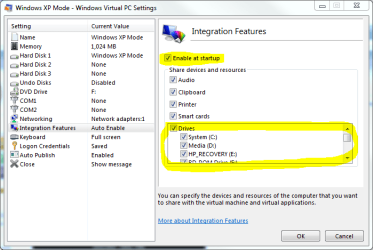
Just a thought: Check that you have enabled the drives:

IF2.PNG

(XP Mode settings)

Kari
 

My Computer

Computer type
Laptop
Computer Manufacturer/Model Number
HP ENVY 17-1150eg
OS
Windows 10 Pro x64 EN-GB
CPU
1.6 GHz Intel Core i7-720QM Processor
Memory
6 GB
Graphics Card(s)
ATI Mobility Radeon HD 5850 Graphics
Sound Card
Beats sound system with integrated subwoofer
Monitor(s) Displays
17" laptop display, 22" LED and 32" Full HD TV through HDMI
Screen Resolution
1600*900 (1), 1920*1080 (2&3)
Hard Drives
Internal: 2 x 500 GB SATA Hard Disk Drive 7200 rpm
External: 2TB for backups, 3TB USB3 network drive for media
Cooling
As Envy runs a bit warm, I have it on a Cooler Master pad
Keyboard
Logitech diNovo Media Desktop Laser (bluetooth)
Mouse
Logitech Performance Mouse MX
Internet Speed
50/10 Mbps VDSL
Antivirus
Windows Defender 4.3.9431.0
Browser
Maxthon 3.5.2., IE11
Yes, already checked that.
I'm wondering if it has anything to do with the two dvd burners being sata?
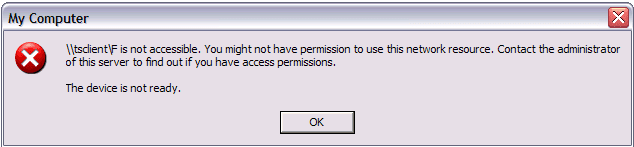
When I try and double click them or Open them I get:
\tsclient\D is not accessible. You might not have permission to use this network resource. Contact the administrator of this server to find out if you have access permissions.'

Question: normally when in XPM does a cd/dvd drive show in My Computer in the drive that listed under the local disk (C) or does it show in the in the integrated drives:
C on Doug-PC (My windows C drive works)
D on Doug-PC (dvd drive) This acts like No-permission hard drive
E on Doug-PC (dvd drive) This acts like No-permission hard drive
F on Doug-PC (USB flash Disk works)
Thanks Doug
 

My Computer

Computer Manufacturer/Model Number
Self Made
OS
Windows 7
CPU
i7 920
Motherboard
P6T
Memory
6GB
Graphics Card(s)
ENGTS250
Hard Drives
WD 750 Black edition
SEA 750
Set in Raid 0 Super-Speed
Internet Speed
1.5 mbs download and 750 kbs upload
Doug, this might be either a very stupid question, or the solution to your issue:

Do you actually have a CD or DVD in those drives you are trying to access? If not, that's precisely the error dialog you get. XP Mode can not access an empty CD/DVD/BD drive.

Kari
 

My Computer

Computer type
Laptop
Computer Manufacturer/Model Number
HP ENVY 17-1150eg
OS
Windows 10 Pro x64 EN-GB
CPU
1.6 GHz Intel Core i7-720QM Processor
Memory
6 GB
Graphics Card(s)
ATI Mobility Radeon HD 5850 Graphics
Sound Card
Beats sound system with integrated subwoofer
Monitor(s) Displays
17" laptop display, 22" LED and 32" Full HD TV through HDMI
Screen Resolution
1600*900 (1), 1920*1080 (2&3)
Hard Drives
Internal: 2 x 500 GB SATA Hard Disk Drive 7200 rpm
External: 2TB for backups, 3TB USB3 network drive for media
Cooling
As Envy runs a bit warm, I have it on a Cooler Master pad
Keyboard
Logitech diNovo Media Desktop Laser (bluetooth)
Mouse
Logitech Performance Mouse MX
Internet Speed
50/10 Mbps VDSL
Antivirus
Windows Defender 4.3.9431.0
Browser
Maxthon 3.5.2., IE11
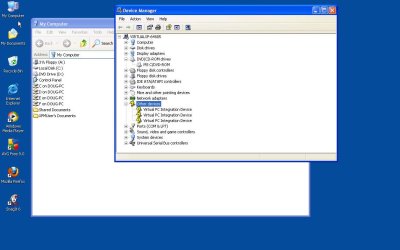
My computer&DeviceMngr.jpgHa, I do understand your concern, but I have two physical drives that work fine in Windows 7 pro just can't get them in XPM. It's funny, everything else shows up. several USB drives when I plug them in, my clipboard - copy and paste, my windows 7 hard drive.
That's why I just don't know...... That's why maybe I thought it was in the Bios but it's pretty straight forward.

I thought it was something I was overlooking?

By the way ALL suggestions appreciated. I've tried almost everything I can think of except to format and re-install windows 7 pro.

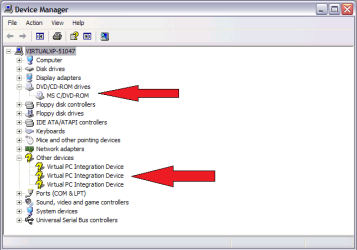
In the Device Manager in XPM the DVD/CD-Rom in properties it says MS C/DVD-Rom,
Futher down it has a yellow question mark under Other devices and when you drop it down it has
yellow question marks - Virtual PC Integration Device

(Please see attachment of Device Mngr.)

That's telling me something????
Thanks, Doug
 
Last edited:

My Computer

Computer Manufacturer/Model Number
Self Made
OS
Windows 7
CPU
i7 920
Motherboard
P6T
Memory
6GB
Graphics Card(s)
ENGTS250
Hard Drives
WD 750 Black edition
SEA 750
Set in Raid 0 Super-Speed
Internet Speed
1.5 mbs download and 750 kbs upload
Here's a screenshot from my XP Mode's Device Manager:

XPM_Hardware.png

As you can see, it's identical with your setup, so the reason for your issue is not there.

I've tried to reproduce your issue, without luck. I'll manage to get this:

XPM_error_dialog.png

but only when I first eject CD or DVD from the drive (logical: no disk = nothing to access). If there's a working disk in the drive bay, I can always access it.

I have no more ideas, but I keep looking.

Kari
 

My Computer

Computer type
Laptop
Computer Manufacturer/Model Number
HP ENVY 17-1150eg
OS
Windows 10 Pro x64 EN-GB
CPU
1.6 GHz Intel Core i7-720QM Processor
Memory
6 GB
Graphics Card(s)
ATI Mobility Radeon HD 5850 Graphics
Sound Card
Beats sound system with integrated subwoofer
Monitor(s) Displays
17" laptop display, 22" LED and 32" Full HD TV through HDMI
Screen Resolution
1600*900 (1), 1920*1080 (2&3)
Hard Drives
Internal: 2 x 500 GB SATA Hard Disk Drive 7200 rpm
External: 2TB for backups, 3TB USB3 network drive for media
Cooling
As Envy runs a bit warm, I have it on a Cooler Master pad
Keyboard
Logitech diNovo Media Desktop Laser (bluetooth)
Mouse
Logitech Performance Mouse MX
Internet Speed
50/10 Mbps VDSL
Antivirus
Windows Defender 4.3.9431.0
Browser
Maxthon 3.5.2., IE11
i am having a similar problem to OP. i am trying to use dvd43 (for legal archiving mind you) in xp mode (as its not 64bit compatible). dvd43 will not recognize that there is media in my hosts dvd player. the player is connected via sata as well. but this all worked on my previous copy of xp (same machine just upgraded last year to win7 pro). i have heard a few folks say xp mode doesnt play nice with host dvd players but have read unconfirmed reports of this program running in xp mode. and have also heard that if using an external usb dvd drive it works fine. is there a way to trick xp mode into thinkings hosts dvd player is usb? any other work arounds you can think of? other ideas? dont have the money to spend on a drive, or program such as anydvd. i just want this to work....
 

My Computer

OS
win7
Thanks Kari, I appreciate you staying on it. Driving me nuts. I've been keeping a blank DVD in both drives and occasionally open it and close it when I'm in XPM, but keep getting the same error.
Doug
 

My Computer

Computer Manufacturer/Model Number
Self Made
OS
Windows 7
CPU
i7 920
Motherboard
P6T
Memory
6GB
Graphics Card(s)
ENGTS250
Hard Drives
WD 750 Black edition
SEA 750
Set in Raid 0 Super-Speed
Internet Speed
1.5 mbs download and 750 kbs upload
Thanks Kari, I appreciate you staying on it. Driving me nuts. I've been keeping a blank DVD in both drives and occasionally open it and close it when I'm in XPM, but keep getting the same error.
Doug

WHAT? A BLANK DISK? OF COURSE YOU CAN NOT ACCESS A BLANK DISK!

OK, I have to calm down...;)

Please put some not-so-blank CD's or DVD's to those drives and try again! Music CD or an installation DVD or what ever. BUT NOT BLANK!

Kari
 

My Computer

Computer type
Laptop
Computer Manufacturer/Model Number
HP ENVY 17-1150eg
OS
Windows 10 Pro x64 EN-GB
CPU
1.6 GHz Intel Core i7-720QM Processor
Memory
6 GB
Graphics Card(s)
ATI Mobility Radeon HD 5850 Graphics
Sound Card
Beats sound system with integrated subwoofer
Monitor(s) Displays
17" laptop display, 22" LED and 32" Full HD TV through HDMI
Screen Resolution
1600*900 (1), 1920*1080 (2&3)
Hard Drives
Internal: 2 x 500 GB SATA Hard Disk Drive 7200 rpm
External: 2TB for backups, 3TB USB3 network drive for media
Cooling
As Envy runs a bit warm, I have it on a Cooler Master pad
Keyboard
Logitech diNovo Media Desktop Laser (bluetooth)
Mouse
Logitech Performance Mouse MX
Internet Speed
50/10 Mbps VDSL
Antivirus
Windows Defender 4.3.9431.0
Browser
Maxthon 3.5.2., IE11
Kari, sorry, I just put a movie dvd into the D drive and it did show to a round disk and for the first time the eject worked. (That's the only time the ejects is when it has burned media in it.) But, I couldn't get anything to play it. ie: Windows Media Player, CyberLink PowerDVD.

Plus it still wasn't recognized when I installed Nero 7511. The whole idea was to be able to run apps that couldn't run on windows 7??? If you can't get anything to work what good is it?

So I take it the only thing the CD/DVD drive is good for is playing music and installing software. Not burning or playing dvds like in a pc with XP?

I am sorry, I kept expecting it to act like a regular CD/DVD drive.
I should have stayed with XP.
Kari, thanks for all your help, I learned a lot.
Doug
 

My Computer

Computer Manufacturer/Model Number
Self Made
OS
Windows 7
CPU
i7 920
Motherboard
P6T
Memory
6GB
Graphics Card(s)
ENGTS250
Hard Drives
WD 750 Black edition
SEA 750
Set in Raid 0 Super-Speed
Internet Speed
1.5 mbs download and 750 kbs upload
OK, Doug, let's not give up yet.

I did not know you were talking about burning CD's in XP Mode. I found the same version of Nero (7.7.5.1) from my software archives, I'll install it to XP Mode and test. I'll be back when I have something to tell. Can take a while, I'm a bit sick and the doctor should come to visit me any minute now so I'll get to that after he's gone.

Kari

EDIT: I finally found out that Microsoft virtualization products (Virtual PC including XP Mode, Virtual Server, Hyper-V) only emulate CD/DVD readers. There is no ability to burn optical media. This information comes directly from Microsoft.

So we are done. Burning CD's or DVD's is not going to work in XP Mode. The best alternative is to "burn" ISO-files, transfer them to host and burn with Win 7's built-in Windows Disk Image Burner (or any third party burner).

I'm sorry to bring you the bad news.

Kari
 
Last edited:

My Computer

Computer type
Laptop
Computer Manufacturer/Model Number
HP ENVY 17-1150eg
OS
Windows 10 Pro x64 EN-GB
CPU
1.6 GHz Intel Core i7-720QM Processor
Memory
6 GB
Graphics Card(s)
ATI Mobility Radeon HD 5850 Graphics
Sound Card
Beats sound system with integrated subwoofer
Monitor(s) Displays
17" laptop display, 22" LED and 32" Full HD TV through HDMI
Screen Resolution
1600*900 (1), 1920*1080 (2&3)
Hard Drives
Internal: 2 x 500 GB SATA Hard Disk Drive 7200 rpm
External: 2TB for backups, 3TB USB3 network drive for media
Cooling
As Envy runs a bit warm, I have it on a Cooler Master pad
Keyboard
Logitech diNovo Media Desktop Laser (bluetooth)
Mouse
Logitech Performance Mouse MX
Internet Speed
50/10 Mbps VDSL
Antivirus
Windows Defender 4.3.9431.0
Browser
Maxthon 3.5.2., IE11
Kari you've been a real trooper. Thanks for all the hard work. I'm wondering if nero will recognize a USB burner so I can burn dvds in XPM? I'll try it and let you know.
Thanks, Doug
 

My Computer

Computer Manufacturer/Model Number
Self Made
OS
Windows 7
CPU
i7 920
Motherboard
P6T
Memory
6GB
Graphics Card(s)
ENGTS250
Hard Drives
WD 750 Black edition
SEA 750
Set in Raid 0 Super-Speed
Internet Speed
1.5 mbs download and 750 kbs upload
XPM burner problem

I have two hard drives run in Super-Speed and two DVD burners, all on SATA. Running Asus P6T & i7 920. Running Windows 7 Pro 64 bit. When I go to xp mode everything works except the cd/dvd player just shows the virtual cd player. I go to the settings and change it to physical drive D (have tried both D and E) but I can't get the use of either physical DVD drives.
I have uninstalled both the Windows Virtual PC and XP mode and re-installed it but it never shows it. Everything works in Windows 7 and everything else works in XP mode, ie: all USB's windows 7 hard drive.
Except the cd/dvds.

Please, how can I get the CD/DVD burners to show and work in XP mode?
Thanks Doug

Doug
I have the same identical problem as you have, and have followed the advise you have received and have failed so far as to get XPM to recognize my Samsung burner, I also tried installing my asus motherboard drivers for xp That didn’t work someone told me that XPM only as a reader will not burn. Everything work’s fine and dandy in w7
Did you get yours to working if so post it and I will try it, otherwise I’ll have to settle to transferring to a thumb drive then burn it in w7 also in XPM I found that it will not save passwords
I am running a wd 500 gig, asus m4n78 pro, 4 gigs memory Samsung tru Driect burner AMD PH X3

[FONT=&quot]Johnm32073[/FONT]
 

My Computer

Computer Manufacturer/Model Number
Custom built
OS
windows 7 Pro 64 Bit /Dual Boot vista 64 bit Ultimate
CPU
amd x3 Phenom X3 2.60 Ghz
Motherboard
asus M4N78 Pro
Memory
8 Gigs
Graphics Card(s)
GeForce 8300
Monitor(s) Displays
Viewsonic 1080p Full Hd
Hard Drives
wd 500 gigs
Case
cooler master
Hi Johnm, no in XPM it will only read on cd/dvd burners. meaning you can install & read but not burn. I solved my problem by upgrading to nero 9 instead of the nero 7. now burns great in windows 7. I really don't use XPM very much now. I've gotten all my business programs working on windows 7. I've got another dirive that I have windows XP pro 32 bit for some of my games I play that can't be played on wiindows 7. That way I boot up to which drive I'm wanting. XPM is really pretty useless. One thing I believe will work is if you have an external USB burner. Thanks for the reply but that's it. Doug
 

My Computer

Computer Manufacturer/Model Number
Self Made
OS
Windows 7
CPU
i7 920
Motherboard
P6T
Memory
6GB
Graphics Card(s)
ENGTS250
Hard Drives
WD 750 Black edition
SEA 750
Set in Raid 0 Super-Speed
Internet Speed
1.5 mbs download and 750 kbs upload
XPM

I just use xpm to play a few game with that will not play in w7.
Outside that I use 7 it's so better than XP I think
 

My Computer

Computer Manufacturer/Model Number
Custom built
OS
windows 7 Pro 64 Bit /Dual Boot vista 64 bit Ultimate
CPU
amd x3 Phenom X3 2.60 Ghz
Motherboard
asus M4N78 Pro
Memory
8 Gigs
Graphics Card(s)
GeForce 8300
Monitor(s) Displays
Viewsonic 1080p Full Hd
Hard Drives
wd 500 gigs
Case
cooler master
Back
Top