
Install XP MODE with VMlite (Home Premium)

gaz

Gaz
Member
VIP
Local time
12:23 AM
Messages
211
I wanted to use some older apps which will not run on Windows 7 so i thought i'd give XP Mode ago then realised it wont run on Windows 7 Home Premium

I thought I'd post this in case anyone else is have problems installing there version of XP in VMPlayer or Virtual Box


So I was looking for a way to install XP Mode in Windows 7 Home Premuim and came across VMLite, No need for the HAV Tool or to Install Virtual PC First

Download and install VMLite (you have to register,but thats it) then download this:-English: WindowsXPMode_en-us.exe from here-http://www.mydigitallife.info/2009/12/14/windows-7-virtual-pc-and-windows-xp-mode-official-direct-download-links/

Run the VMLIte Wizard and browse for your XP Mode File
Wait for it to Install and youre running

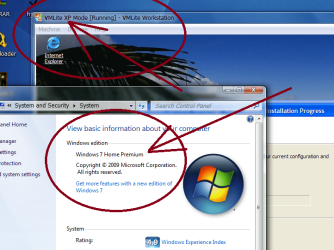
As you can see, its Home Premium
 

Attachments
  • Capture3.PNG
    Capture3.PNG
    79.6 KB · Views: 371

My Computer

Computer type
PC/Desktop
OS
Windows 7 X64 Bit
CPU
Intel(R) Core(TM)i7-4771 CPU @ 3.50GH
Motherboard
Asus Sabertooth Z87
Memory
Corsair 4x8 Vengeance (32GB)
Graphics Card(s)
NVIDIA GeForce GTX780
Monitor(s) Displays
LG
Screen Resolution
1920x1080
PSU
Corsair CX750
Case
Corsair 200 series
Cooling
H80i Liquid Cooler
Keyboard
Microsoft
Mouse
Microsoft
Internet Speed
good times-500-850 kbs bad times-50-100 kbs
I hate to burst your bubble, but according to the Microsoft XP Mode license in the XP Mode folder on your hard drive, you cannot legally install XP Mode on Home Premium.

From the VXPEULA.txt

" 1. GRANT OF LICENSE. Microsoft grants you the following rights provided that you comply with all terms and conditions of this EULA:
1.1 Installation and use. You may install, use, access, display and run one copy of the Software in a single virtual machine on a single computer, such as a workstation, terminal or other device (“Workstation Computer”), that contains a licensed copy of Windows 7 Professional, Enterprise or Ultimate edition. "

Also, The VMLite software itself may be very illegal because it violates the terms of the Virtual Box OSE GPL license it was based on. See here: http://www.sevenforums.com/virtuali...ative-windows-xp-mode-impl-16.html#post568687
 

My Computer

OS
Windows 7
I hate to burst your bubble, but according to the Microsoft XP Mode license in the XP Mode folder on your hard drive, you cannot legally install XP Mode on Home Premium.

From the VXPEULA.txt

" 1. GRANT OF LICENSE. Microsoft grants you the following rights provided that you comply with all terms and conditions of this EULA:
1.1 Installation and use. You may install, use, access, display and run one copy of the Software in a single virtual machine on a single computer, such as a workstation, terminal or other device (“Workstation Computer”), that contains a licensed copy of Windows 7 Professional, Enterprise or Ultimate edition. "

Also, The VMLite software itself may be very illegal because it violates the terms of the Virtual Box OSE GPL license it was based on. See here: http://www.sevenforums.com/virtuali...ative-windows-xp-mode-impl-16.html#post568687

You might be right, i removed it anyway,but the update "Microsoft validation tool" installed??,didnt think it would so if anyone is reading this follow DarkPheonix's words, i apologise for any trouble
 

My Computer

Computer type
PC/Desktop
OS
Windows 7 X64 Bit
CPU
Intel(R) Core(TM)i7-4771 CPU @ 3.50GH
Motherboard
Asus Sabertooth Z87
Memory
Corsair 4x8 Vengeance (32GB)
Graphics Card(s)
NVIDIA GeForce GTX780
Monitor(s) Displays
LG
Screen Resolution
1920x1080
PSU
Corsair CX750
Case
Corsair 200 series
Cooling
H80i Liquid Cooler
Keyboard
Microsoft
Mouse
Microsoft
Internet Speed
good times-500-850 kbs bad times-50-100 kbs
I hate to burst your bubble, but according to the Microsoft XP Mode license in the XP Mode folder on your hard drive, you cannot legally install XP Mode on Home Premium.

From the VXPEULA.txt

" 1. GRANT OF LICENSE. Microsoft grants you the following rights provided that you comply with all terms and conditions of this EULA:
1.1 Installation and use. You may install, use, access, display and run one copy of the Software in a single virtual machine on a single computer, such as a workstation, terminal or other device (“Workstation Computer”), that contains a licensed copy of Windows 7 Professional, Enterprise or Ultimate edition. "

Also, The VMLite software itself may be very illegal because it violates the terms of the Virtual Box OSE GPL license it was based on. See here: http://www.sevenforums.com/virtuali...ative-windows-xp-mode-impl-16.html#post568687

You might be right, i removed it anyway,but the update "Microsoft validation tool" installed??,didnt think it would so if anyone is reading this follow DarkPheonix's words, i apologise for any trouble


Hey No trouble.. you won't know unless you ask or stumble over it. I personally think that agreement is faulty. What if you did own both Pro and Home Premium, and could legally download and use XP Mode, I do not see the harm in using it for both computers.

My post above was just to let you know the score, and to say in effect that because of that you probably won't get much help running it on Home Premium, even if it did work. If you do use this on Home Premium and it works, you will do so at your own risk.

What you can do, if you have access to a valid licensed copy of XP on another machine, is you can use that to make a virtual box virtual hard drive image of XP and install that to your Home Premium virtual machine. It won't have all of the integtated features with Windows 7 that XP Mode would have but it's not too bad from what I understand.

I am still looking into the VMlite issue so don't discount the use of it yet. It may be that they are just fine and the wording of the GPL license is not clear on certain matters. I however am like a bulldog. Once I sink my teeth into something I will not let go unless I am satisfied so when you read the link I posted about VMLite, don't think too harsh of me. I am just trying to get to the bottom of the issue.
 

My Computer

OS
Windows 7
Hi there
I've posted in a similar thread the LEGAL ramifications of VMLITE

In general the argument is OK UNLESS he's incorporated proprietary / closed source into a product for which he ISN'T licensed.

Using XPMODE as an integral part of an application WITHOUT being licensed by MS is "dubious" -- but DISTRIBUTING it into a product most DEFINITELY contravenes MS'es license.

He can distribute the vmlite product PROVIDED that any "embedded" Windows system is properly licensed on the users machine and installed separately.

You can distribute "Vm appliances" (vhd images) provided also the same condition applies -- either the embedded XP system is licensed for distribution by MS or is installed separately by the end user.

The whole status of this vmlite product is "questionable" but it does seem so long as you install the guest OS yourself then it's OK.

Cheers
jimbo
 

My Computer

Computer type
PC/Desktop
Computer Manufacturer/Model Number
Custom built, several laptops HP/ASUS
OS
Linux CENTOS 7 / various Windows OS'es and servers
CPU
Intel i7 Intel i5
Memory
8GB, 16GB
Graphics Card(s)
On Motherboard
Sound Card
Realtek HD audio
Monitor(s) Displays
Apple Cinema display, Samsung LCD
Screen Resolution
1920 X 1080
Hard Drives
4 X 1TB SATA
Mouse
Toshiba wireless laser
Internet Speed
> 20MB up
I realize this post is over 1 month old. I have just downloaded and installed a means to run the XP mode with windows 7 home premium 64 bit thanks to a link I ran across. It is pretty cool as I am like running two PC's at the same time! Just with the single one PC. I have not explored what it will do yet but I can tell you I have it up and running now.

Run XP Mode on Windows 7 Machines Without Hardware Virtualization - How-To Geek

and also the main download from microsoft
Download Windows XP Mode

"select the pro version"
 

My Computer

Computer type
PC/Desktop
Computer Manufacturer/Model Number
Self made
OS
windows 7 home premium 64, and Windows 10 64 bit
CPU
I7 940
Motherboard
ASUS P6TX58D Premium- BIOS VERSION 1402
Memory
12 GB Dominator 3 channel 1600
Graphics Card(s)
Radeon R9 Fury Nitro
Sound Card
Z1
Monitor(s) Displays
50 Inch Panasonic TV
Screen Resolution
1920x1080
Hard Drives
Main drive OCZ Revodrive V2 and 8 TB multi drives
PSU
Coolermaster 1000
Case
CoolerMaster 932
Cooling
Coolermaster Dual fan
Keyboard
mx 5500 revolution
Mouse
mx 5500 revolution
Internet Speed
12 mb
Browser
Chrome
Other Info
set up for 3D Blue Ray applications with a surround room of 12 speaker Definitive Technology and multi amps, main is driven by yamaha M-65
Hi All,

I realise that I'm a little behind the times but Microsoft WILL allow you to download XP mode if you select Windows Professional or upwards, and the XP Mode will install but... just try running it... you will return an error "Windows XP Mode is not available on this edition of Windows".

I've tried VMware (I have a copy of XP) but the installer screens are blank... about to try VMLite. Will post my findings after.
 

My Computer

OS
Win 7 home premium 64 bit
Back
Top