Standalone Installer

Cheemag

New member
Member
VIP
Local time
12:01 AM
Messages
247
Location
Englandshire, Scotland
Hello,

Have reinstalled Windows 7 SP-1.

After a lot of hassle, got as far as the Servicing Stack Update and downloaded whatever file was there.

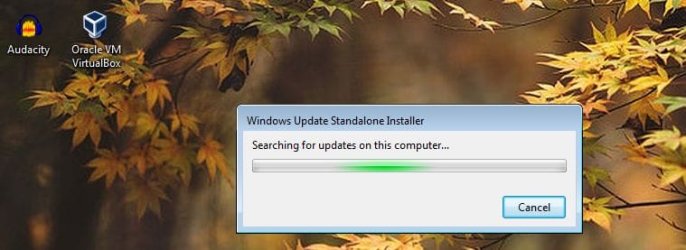
Now all I have is a small window which purports to be 'Searching for updates on this computer', of which there are none, obviously. It's been doing this for over an hour now. [Cancel] doesn't work.

Where do I go from here ?

Regards

Cheemag
 

My Computer

Computer Manufacturer/Model Number
Gigabyte
OS
Windows 7 Professional 64-bit
CPU
Intel Core 2 Duo
Motherboard
EP41T-UD3L
Memory
4 GB
Graphics Card(s)
Nvidia GE Force 9500GT
Sound Card
On-board
Monitor(s) Displays
Acer V203H
Hard Drives
Two Samsung HD103SJ 1TB
PSU
?
Case
?
Cooling
Fan
Please upload a screenshot of the window.
 

My Computers

System One System Two

Please upload a screenshot of the window.

Attached. Not much to it. On running the thing I get 'Only one instance of wusa.exe is allowed', then on closing wusa.exe in Task Manager, I get the window in my screenshot on the desktop forever.

Incidentally, going to Windows Update gets me 'Checking for updates' on the desktop forever and ever without doing anything.

MS Update Troubleshooter crashes with an unspecified numeric error.

All in all it looks like it's totally knackered and another re-install may be called for ...

Regards

Cheemag
 

Attachments

  • Clipboard02.jpg
    Clipboard02.jpg
    40.8 KB · Views: 0

My Computer

Computer Manufacturer/Model Number
Gigabyte
OS
Windows 7 Professional 64-bit
CPU
Intel Core 2 Duo
Motherboard
EP41T-UD3L
Memory
4 GB
Graphics Card(s)
Nvidia GE Force 9500GT
Sound Card
On-board
Monitor(s) Displays
Acer V203H
Hard Drives
Two Samsung HD103SJ 1TB
PSU
?
Case
?
Cooling
Fan
Suggest stopping Windows Update Service before running (downloaded Windows Update) standalone installers.

Also review this post

http://www.sevenforums.com/windows-...till-wont-update-post3237782.html#post3237782

then this one:

http://www.sevenforums.com/news/397...june-14th-2016-a-post3257289.html#post3257289

Note: Stop WU service before applying each update. Then Reconfigure WU Settings after applying each update. (Set to Notify on new updates only but not to auto download). Reboot after applying each update.
 

My Computer

Computer type
Laptop
Computer Manufacturer/Model Number
ASUS
OS
Microsoft Windows 7 Home Premium 64-bit 7601 Multiprocessor Free Service Pack 1
CPU
AMD C-60 APU with Radeon(tm) HD Graphics
Motherboard
ASUSTeK COMPUTER INC. X501U
Memory
4.00 GB
Graphics Card(s)
AMD Radeon HD 6290 Graphics
Sound Card
(1) AMD High Definition Audio Device (2) Realtek High Defi
Screen Resolution
1366 x 768 x 32 bits (4294967296 colors) @ 60 Hz
Hard Drives
Hitachi HTS545050A7E380 SATA Disk Device
Antivirus
Comodo CIS & FW, SecureAplus App Whitelisting, Threatfire
Browser
Cyberfox 64bit, Opera 64bit, Airfox
Other Info
Spy-The-Spy, HitmanPro.Alert, Norton Connect Safe, MJRegWatcher, BitDefender TrafficLight, Voodoo Shield, Zemana AntiMalware
Suggest stopping Windows Update Service before running (downloaded Windows Update) standalone installers.

Also review this post

http://www.sevenforums.com/windows-...till-wont-update-post3237782.html#post3237782

then this one:

http://www.sevenforums.com/news/397...june-14th-2016-a-post3257289.html#post3257289

These don't make a lot of sense to me, and seem to refer to downloading updates. I assumed KB3125574, which I have downloaded contained the updates. Thanks anyway.

Note: Stop WU service before applying each update. Then Reconfigure WU Settings after applying each update. (Set to Notify on new updates only but not to auto download). Reboot after applying each update.
We may be getting somewhere now. Stopping wusa.exe did nothing very much, but stopping the service with net stop WUAUSERV did. I was now able to install KB3020369 (the Servicing Stack Update).

What do I do now? Run KB3125574 ? and leave the machine running for a century or two while it updates?

I can set it not to sleep, but what if some update/s need to reboot the PC? All of which assumes the updates are contained in KB3125574.
 

My Computer

Computer Manufacturer/Model Number
Gigabyte
OS
Windows 7 Professional 64-bit
CPU
Intel Core 2 Duo
Motherboard
EP41T-UD3L
Memory
4 GB
Graphics Card(s)
Nvidia GE Force 9500GT
Sound Card
On-board
Monitor(s) Displays
Acer V203H
Hard Drives
Two Samsung HD103SJ 1TB
PSU
?
Case
?
Cooling
Fan

My Computer

Computer type
PC/Desktop
Computer Manufacturer/Model Number
Custom assembled by me :}
OS
Win-7-Pro64bit 7-H-Prem-64bit
CPU
i7-5930K 2nd i9-9940x both water blocked VRM's too
Motherboard
ASUS SABERTOOTH X99 2nd ASUS x299 Apex
Memory
Trident-z 3200C14 2nd Trident-z 3600C16
Graphics Card(s)
EVGA 1080ti ftw3 2nd Titan Xp both water blocked
Sound Card
Built-in Realtek
Monitor(s) Displays
1-AOC G2460PG 24"G-Sync 144Hz/ 2nd 1-ASUS VG248QE 24" 144Hz
Screen Resolution
1920 x 1080 144Hz
Hard Drives
2-Samsung M.2 Evo & Evo Plus
2-Samsung 850 EVO 500GB SSD's/ 3-2.5 W.D. Black 1tb-&3-1tb/3-3.5 WD Black 1tb hdd's
PSU
EVGA SuperNOVA 1000-P2 2nd 1200-P2
Case
2-Corsair Obsidian Series 450D Black ATX Mid Tower
Cooling
Custom water loops
Keyboard
Logitech G710+/ 2nd Logitech G910
Mouse
2-RedDragon M901 Perdition 16400 dpi Gaming mouse = wired
Internet Speed
Comcast Ping 19ms 89.31mbps download speed 6.12mbps upload
Antivirus
Malwarebytes Pro/ Superantispyware Pro
Browser
FireFox & Pale moon
Other Info
2nd ASUS X299 Apex/Intel i9-9940x with Custom water loop/7H-Prem-x64/Corsair 450D case/Ram Trident-z 3600C16 4x8gb / Samsung970Evo plus 500gb SSD/Dual ssd EZ swap evo/PSU EVGA SuperNova 1200w-P2 80+Platinum/GPU Titan Xp /8-ML-140 on push-pull on 2-280GTX rads
Stopping wusa.exe did nothing very much, but stopping the service with net stop WUAUSERV did. I was now able to install KB3020369 (the Servicing Stack Update).

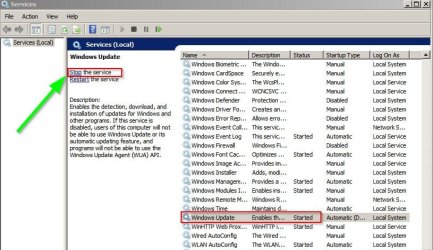
The correct way to stop Windows Update Service is via Start> Run> services.msc

Services.jpg

It will restart after a reboot. Mostly after installing updates Windows lets you know if a reboot is required to finish installing updates. Reboots are needed when replacing files that are currently in use by the system.
 

My Computer

Computer type
Laptop
Computer Manufacturer/Model Number
ASUS
OS
Microsoft Windows 7 Home Premium 64-bit 7601 Multiprocessor Free Service Pack 1
CPU
AMD C-60 APU with Radeon(tm) HD Graphics
Motherboard
ASUSTeK COMPUTER INC. X501U
Memory
4.00 GB
Graphics Card(s)
AMD Radeon HD 6290 Graphics
Sound Card
(1) AMD High Definition Audio Device (2) Realtek High Defi
Screen Resolution
1366 x 768 x 32 bits (4294967296 colors) @ 60 Hz
Hard Drives
Hitachi HTS545050A7E380 SATA Disk Device
Antivirus
Comodo CIS & FW, SecureAplus App Whitelisting, Threatfire
Browser
Cyberfox 64bit, Opera 64bit, Airfox
Other Info
Spy-The-Spy, HitmanPro.Alert, Norton Connect Safe, MJRegWatcher, BitDefender TrafficLight, Voodoo Shield, Zemana AntiMalware
RE: KB3125574

As far as I know it contains the following fixes.

KB3154228 32-bit icons can't be loaded in OleLoadPictureEx in Windows
KB3153727 Windows Installer with certain actions can't be installed on Windows Server 2012 R2 or Windows Server 2008 R2 SP1
KB3161647 Windows Update Client for Windows 7 and Windows Server 2008 R2: June 2016
KB3161897 WDS deployment fails when UEFI clients are in routed environments in Windows Server 2008 R2 SP1
KB3161639 Update to add new cipher suites to Internet Explorer and Microsoft Edge in Windows
KB3163644 Microsoft Office 2010 doesn't start when EMET is enabled in Windows 7 or Windows Server 2008 R2


EDIT: Forget the above. It's wrong!

The main thing is that after a fresh install of Windows 7 you'll be left with a faulty Windows Update Client (the original one) that's known to cause problems.

Best to get windows updates working via the methods posted then install the other updates. It might take a while.
 

My Computer

Computer type
Laptop
Computer Manufacturer/Model Number
ASUS
OS
Microsoft Windows 7 Home Premium 64-bit 7601 Multiprocessor Free Service Pack 1
CPU
AMD C-60 APU with Radeon(tm) HD Graphics
Motherboard
ASUSTeK COMPUTER INC. X501U
Memory
4.00 GB
Graphics Card(s)
AMD Radeon HD 6290 Graphics
Sound Card
(1) AMD High Definition Audio Device (2) Realtek High Defi
Screen Resolution
1366 x 768 x 32 bits (4294967296 colors) @ 60 Hz
Hard Drives
Hitachi HTS545050A7E380 SATA Disk Device
Antivirus
Comodo CIS & FW, SecureAplus App Whitelisting, Threatfire
Browser
Cyberfox 64bit, Opera 64bit, Airfox
Other Info
Spy-The-Spy, HitmanPro.Alert, Norton Connect Safe, MJRegWatcher, BitDefender TrafficLight, Voodoo Shield, Zemana AntiMalware
~~~
Now all I have is a small window which purports to be 'Searching for updates on this computer', of which there are none, obviously. It's been doing this for over an hour now. [Cancel] doesn't work.
~~~
You should be able to prevent that search by disconnecting from the Internet (e.g. disable network adapter or the like). As you noted, the window states that the search is local (on this computer), but it does check online too. It should give up on that search fairly quick (and complete the install) if there is not connection to the Internet.

For some strange reason, Microsoft lets you download a KB that might turn around and download more stuff. This is true for the IE standalone installers. If you install one while offline, you get one version of IE. If you install one while online, the install process downloads a slightly newer version.
 

My Computer

Computer type
Laptop
Computer Manufacturer/Model Number
Employer provided Dell Latitude
OS
W7 Pro SP1 64bit
CPU
i7
Memory
8GB
Graphics Card(s)
Intel HD Graphics
Hard Drives
crappy SSD
Antivirus
Employer mandated Symantec Endpoint Protection
Browser
Pale Moon 64bit, IE11 64bit & Chrome 64bit

My Computer

Computer Manufacturer/Model Number
Gigabyte
OS
Windows 7 Professional 64-bit
CPU
Intel Core 2 Duo
Motherboard
EP41T-UD3L
Memory
4 GB
Graphics Card(s)
Nvidia GE Force 9500GT
Sound Card
On-board
Monitor(s) Displays
Acer V203H
Hard Drives
Two Samsung HD103SJ 1TB
PSU
?
Case
?
Cooling
Fan
Stopping wusa.exe did nothing very much, but stopping the service with net stop WUAUSERV did. I was now able to install KB3020369 (the Servicing Stack Update).

The correct way to stop Windows Update Service is via Start> Run> services.msc

View attachment 388723

Indeed, but I rather like the command line. >net stop WUAUSERV comes to the same thing, surely?

It will restart after a reboot. Mostly after installing updates Windows lets you know if a reboot is required to finish installing updates. Reboots are needed when replacing files that are currently in use by the system.
Point taken, but if it's being done unattended, then that won't be possible. I thought I could leave it to install KB3125574 on its own, hence my query about these necessary reboots. Would it reboot on its own automatically?

(The Update Service offered me updates yesterday, but it ended up eternally checking for updates).
 

My Computer

Computer Manufacturer/Model Number
Gigabyte
OS
Windows 7 Professional 64-bit
CPU
Intel Core 2 Duo
Motherboard
EP41T-UD3L
Memory
4 GB
Graphics Card(s)
Nvidia GE Force 9500GT
Sound Card
On-board
Monitor(s) Displays
Acer V203H
Hard Drives
Two Samsung HD103SJ 1TB
PSU
?
Case
?
Cooling
Fan
Back
Top