Anything undesirable in KB3185330 or KB3188740?

SevenOfNine

New member
Member
Local time
9:19 PM
Messages
83
Do either of these Windows Updates include any telemetry or other undesirable crap?:

  • October, 2016 Security Monthly Quality Rollup for Windows 7 for x64-based Systems (KB3185330)
  • October, 2016 Security and Quality Rollup for .NET Framework 3.5.1 on Windows 7 SP1 and Windows Server 2008 R2 SP1 for x64 (KB3188740)
My understanding is that both, despite their names, contain a lot of non-security updates... but I haven't been able to find a clear explanation of whether or not either contains any telemetry or other junk.
 

My Computer My Computer

At a glance

Windows 7 64-bit
Computer type
PC/Desktop
OS
Windows 7 64-bit
Hi,
Not sure but I installed them both :)

This one says it was released today so called "quality" update
Doubt I'll load it updating is over for the month I'm not jumping and installing just because MS decides to release something out of the blue
I do second Tuesday only and Important only updates.
https://support.microsoft.com/en-us/kb/3192403
 

My Computer My Computer

At a glance

Win-7-Pro64bit 7-H-Prem-64biti7-5930K 2nd i9-9940x both water blocked VRM'...Trident-z 3200C14 2nd Trident-z 3600C16EVGA 1080ti ftw3 2nd Titan Xp both water blocked
Computer type
PC/Desktop
Computer Manufacturer/Model Number
Custom assembled by me :}
OS
Win-7-Pro64bit 7-H-Prem-64bit
CPU
i7-5930K 2nd i9-9940x both water blocked VRM's too
Motherboard
ASUS SABERTOOTH X99 2nd ASUS x299 Apex
Memory
Trident-z 3200C14 2nd Trident-z 3600C16
Graphics Card(s)
EVGA 1080ti ftw3 2nd Titan Xp both water blocked
Sound Card
Built-in Realtek
Monitor(s) Displays
1-AOC G2460PG 24"G-Sync 144Hz/ 2nd 1-ASUS VG248QE 24" 144Hz
Screen Resolution
1920 x 1080 144Hz
Hard Drives
2-Samsung M.2 Evo & Evo Plus
2-Samsung 850 EVO 500GB SSD's/ 3-2.5 W.D. Black 1tb-&3-1tb/3-3.5 WD Black 1tb hdd's
PSU
EVGA SuperNOVA 1000-P2 2nd 1200-P2
Case
2-Corsair Obsidian Series 450D Black ATX Mid Tower
Cooling
Custom water loops
Keyboard
Logitech G710+/ 2nd Logitech G910
Mouse
2-RedDragon M901 Perdition 16400 dpi Gaming mouse = wired
Internet Speed
Comcast Ping 19ms 89.31mbps download speed 6.12mbps upload
Antivirus
Malwarebytes Pro/ Superantispyware Pro
Browser
FireFox & Pale moon
Other Info
2nd ASUS X299 Apex/Intel i9-9940x with Custom water loop/7H-Prem-x64/Corsair 450D case/Ram Trident-z 3600C16 4x8gb / Samsung970Evo plus 500gb SSD/Dual ssd EZ swap evo/PSU EVGA SuperNova 1200w-P2 80+Platinum/GPU Titan Xp /8-ML-140 on push-pull on 2-280GTX rads
Hi,
Not sure but I installed them both :)

This one says it was released today so called "quality" update
Doubt I'll load it updating is over for the month I'm not jumping and installing just because MS decides to release something out of the blue
I do second Tuesday only and Important only updates.
https://support.microsoft.com/en-us/kb/3192403

Thanks. Appreciate it. Hopefully someone will know! :)

Don't want to get OT right at the beginning of this thread, but the KB you posted is so weird... it's called "October 2016 Preview of Monthly Quality Rollup...". WTH! So first they release an October 2016 rollup, then later they release an October 2016 preview rollup?!? Maybe they are really trying to say that it is a preview of the November 2016 rollup? Microsoft sure is making it confusing these days. It's like they have a donkey steering their business. :confused:
 

My Computer My Computer

At a glance

Windows 7 64-bit
Computer type
PC/Desktop
OS
Windows 7 64-bit
Do either of these Windows Updates include any telemetry or other undesirable crap?:

  • October, 2016 Security Monthly Quality Rollup for Windows 7 for x64-based Systems (KB3185330)
  • October, 2016 Security and Quality Rollup for .NET Framework 3.5.1 on Windows 7 SP1 and Windows Server 2008 R2 SP1 for x64 (KB3188740)
My understanding is that both, despite their names, contain a lot of non-security updates... but I haven't been able to find a clear explanation of whether or not either contains any telemetry or other junk.

See this: Microsoft previews telemetry push with new Win7/8.1 patches KB 3192403, 3192404 | InfoWorld

Rob
 

My Computer My Computer

At a glance

Windows 7 PRO SP1 32bitIntel Pentium E5400Crucial DDR2 | 4096 MBytesATI Radeon HD 4600 Series
Computer type
PC/Desktop
Computer Manufacturer/Model Number
Systemax
OS
Windows 7 PRO SP1 32bit
CPU
Intel Pentium E5400
Motherboard
G31TM-P21 (MS-7529) (CPU1)
Memory
Crucial DDR2 | 4096 MBytes
Graphics Card(s)
ATI Radeon HD 4600 Series
Hard Drives
ST3250318AS ATA
ST3160815A ATA
ST3160815A ATA
ST500DM002-1BD142 ATA/ External USB
Antivirus
Trend Micro Titanium Internet Security
Browser
Pale Moon 25.0.1

My Computer My Computer

At a glance

Win 7 Ultimate 64 bitIntel i7-3930KKingston HyperX Genesis 32GB Kit (8x4GB Modul...MSI R7850 Twin Frozr 2GD5/OC Radeon HD 7850 2...
Computer type
PC/Desktop
Computer Manufacturer/Model Number
Custom Build
OS
Win 7 Ultimate 64 bit
CPU
Intel i7-3930K
Motherboard
ASUS P9X79 WS
Memory
Kingston HyperX Genesis 32GB Kit (8x4GB Modules) 1600MHz DDR
Graphics Card(s)
MSI R7850 Twin Frozr 2GD5/OC Radeon HD 7850 2GB 256-bit GDDR
Sound Card
Asus Xonar Essence STX
Monitor(s) Displays
3x Asus VG248QE 24", Vizio 32" TV
Screen Resolution
1920 x 1080, ?
Hard Drives
Samsung 128GB 840 Pro SSD (1),
Samsung 4TB 850 EVO SSDs (4)
Samsung 4TB 850 EVO SSDs (16) external backup drives used in 2.5" hot swap bays in the computer.
PSU
Corsair HX750w
Case
Antec Two Hundred v2 (modified)
Cooling
Cooler Master GeminII S524 120mm (fan replaced with a 140mm)
Keyboard
Logitech G510s
Mouse
Logitech M525 (two in use)
Internet Speed
=< 32Mbps down, 8Mbps up
Antivirus
AVAST!, MBAM, SAS, Spybot S&D (all but MBAM free) Glary Util
Browser
IE11
Other Info
LSI 9211-8i HBA card (8 SATA III ports), 2.5" & 3.5" Hot Swap Bays, HooToo HT-CR001 PCI-E to USB 3.0 Internal Hub + 6 Slot Card Reader, and LG Model CH12LS28 BD-ROM Optical Drive. Also, ScanSnap S1500 ADF duplexing scanner, Canon 9000F flat bed scanner, Corsair SP2500 2.1 speakers, Samsung CLP 415nw laser color printer, Cyberpower PP2200SW UPS

My Computer My Computer

At a glance

Microsoft Windows 7 Home Premium 64-bit 7601 ...AMD C-60 APU with Radeon(tm) HD Graphics4.00 GBAMD Radeon HD 6290 Graphics
Computer type
Laptop
Computer Manufacturer/Model Number
ASUS
OS
Microsoft Windows 7 Home Premium 64-bit 7601 Multiprocessor Free Service Pack 1
CPU
AMD C-60 APU with Radeon(tm) HD Graphics
Motherboard
ASUSTeK COMPUTER INC. X501U
Memory
4.00 GB
Graphics Card(s)
AMD Radeon HD 6290 Graphics
Sound Card
(1) AMD High Definition Audio Device (2) Realtek High Defi
Screen Resolution
1366 x 768 x 32 bits (4294967296 colors) @ 60 Hz
Hard Drives
Hitachi HTS545050A7E380 SATA Disk Device
Antivirus
Comodo CIS & FW, SecureAplus App Whitelisting, Threatfire
Browser
Cyberfox 64bit, Opera 64bit, Airfox
Other Info
Spy-The-Spy, HitmanPro.Alert, Norton Connect Safe, MJRegWatcher, BitDefender TrafficLight, Voodoo Shield, Zemana AntiMalware
Hi,
Thanks :)
Yep I'm sticking with Important only/ Net framework/ Office updates only.
Not to mention System image.... well before doing anything ;)

My laptop I'm playing with a little bit and installing more stuff than my other 2 machines mostly because I rarely use it so if it gets some MS garbage.... it won't matter much :)
 

My Computer My Computer

At a glance

Win-7-Pro64bit 7-H-Prem-64biti7-5930K 2nd i9-9940x both water blocked VRM'...Trident-z 3200C14 2nd Trident-z 3600C16EVGA 1080ti ftw3 2nd Titan Xp both water blocked
Computer type
PC/Desktop
Computer Manufacturer/Model Number
Custom assembled by me :}
OS
Win-7-Pro64bit 7-H-Prem-64bit
CPU
i7-5930K 2nd i9-9940x both water blocked VRM's too
Motherboard
ASUS SABERTOOTH X99 2nd ASUS x299 Apex
Memory
Trident-z 3200C14 2nd Trident-z 3600C16
Graphics Card(s)
EVGA 1080ti ftw3 2nd Titan Xp both water blocked
Sound Card
Built-in Realtek
Monitor(s) Displays
1-AOC G2460PG 24"G-Sync 144Hz/ 2nd 1-ASUS VG248QE 24" 144Hz
Screen Resolution
1920 x 1080 144Hz
Hard Drives
2-Samsung M.2 Evo & Evo Plus
2-Samsung 850 EVO 500GB SSD's/ 3-2.5 W.D. Black 1tb-&3-1tb/3-3.5 WD Black 1tb hdd's
PSU
EVGA SuperNOVA 1000-P2 2nd 1200-P2
Case
2-Corsair Obsidian Series 450D Black ATX Mid Tower
Cooling
Custom water loops
Keyboard
Logitech G710+/ 2nd Logitech G910
Mouse
2-RedDragon M901 Perdition 16400 dpi Gaming mouse = wired
Internet Speed
Comcast Ping 19ms 89.31mbps download speed 6.12mbps upload
Antivirus
Malwarebytes Pro/ Superantispyware Pro
Browser
FireFox & Pale moon
Other Info
2nd ASUS X299 Apex/Intel i9-9940x with Custom water loop/7H-Prem-x64/Corsair 450D case/Ram Trident-z 3600C16 4x8gb / Samsung970Evo plus 500gb SSD/Dual ssd EZ swap evo/PSU EVGA SuperNova 1200w-P2 80+Platinum/GPU Titan Xp /8-ML-140 on push-pull on 2-280GTX rads
Hi,
Not sure but I installed them both :)

This one says it was released today so called "quality" update
Doubt I'll load it updating is over for the month I'm not jumping and installing just because MS decides to release something out of the blue
I do second Tuesday only and Important only updates.
https://support.microsoft.com/en-us/kb/3192403

I'm not installing that one yet either. See link in this post:

More on Windows 7 and Windows 8.1 servicing changes

Did you install KB3185330 or KB3188740?
 

My Computer My Computer

At a glance

Windows 7 64-bit
Computer type
PC/Desktop
OS
Windows 7 64-bit
Hi,
Yes on 10-16-2016 seem okay :)
 

My Computer My Computer

At a glance

Win-7-Pro64bit 7-H-Prem-64biti7-5930K 2nd i9-9940x both water blocked VRM'...Trident-z 3200C14 2nd Trident-z 3600C16EVGA 1080ti ftw3 2nd Titan Xp both water blocked
Computer type
PC/Desktop
Computer Manufacturer/Model Number
Custom assembled by me :}
OS
Win-7-Pro64bit 7-H-Prem-64bit
CPU
i7-5930K 2nd i9-9940x both water blocked VRM's too
Motherboard
ASUS SABERTOOTH X99 2nd ASUS x299 Apex
Memory
Trident-z 3200C14 2nd Trident-z 3600C16
Graphics Card(s)
EVGA 1080ti ftw3 2nd Titan Xp both water blocked
Sound Card
Built-in Realtek
Monitor(s) Displays
1-AOC G2460PG 24"G-Sync 144Hz/ 2nd 1-ASUS VG248QE 24" 144Hz
Screen Resolution
1920 x 1080 144Hz
Hard Drives
2-Samsung M.2 Evo & Evo Plus
2-Samsung 850 EVO 500GB SSD's/ 3-2.5 W.D. Black 1tb-&3-1tb/3-3.5 WD Black 1tb hdd's
PSU
EVGA SuperNOVA 1000-P2 2nd 1200-P2
Case
2-Corsair Obsidian Series 450D Black ATX Mid Tower
Cooling
Custom water loops
Keyboard
Logitech G710+/ 2nd Logitech G910
Mouse
2-RedDragon M901 Perdition 16400 dpi Gaming mouse = wired
Internet Speed
Comcast Ping 19ms 89.31mbps download speed 6.12mbps upload
Antivirus
Malwarebytes Pro/ Superantispyware Pro
Browser
FireFox & Pale moon
Other Info
2nd ASUS X299 Apex/Intel i9-9940x with Custom water loop/7H-Prem-x64/Corsair 450D case/Ram Trident-z 3600C16 4x8gb / Samsung970Evo plus 500gb SSD/Dual ssd EZ swap evo/PSU EVGA SuperNova 1200w-P2 80+Platinum/GPU Titan Xp /8-ML-140 on push-pull on 2-280GTX rads
Is there a reference list of unsavory updates to be avoided? I google every update. It does get tedious. It sure would be nice to have a site to visit that maintains a list of the ones to avoid.
 

My Computer My Computer

At a glance

windows 7 Pro 64 Biti5 4670K16GB DDR3@933mhzRadeon R9 390 8192mb
Computer type
PC/Desktop
Computer Manufacturer/Model Number
custom
OS
windows 7 Pro 64 Bit
CPU
i5 4670K
Motherboard
Asus Max Hero 1150 socket
Memory
16GB DDR3@933mhz
Graphics Card(s)
Radeon R9 390 8192mb
Monitor(s) Displays
Dell U2415 x3
Screen Resolution
1920 (5760) x 1200 x3
Hard Drives
System: Kingston 128GB SSD

Installing to Samsung 860 EVO 500GB
WD Black 2 TB & 1 TB
PSU
Corsair CX750M
Cooling
Hyper 312
Internet Speed
50mbps
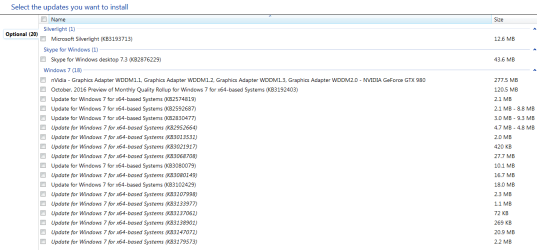
Hi,
I like many others have their avoid list :)
10-18-2016 skipped optional.PNG
 

My Computer My Computer

At a glance

Win-7-Pro64bit 7-H-Prem-64biti7-5930K 2nd i9-9940x both water blocked VRM'...Trident-z 3200C14 2nd Trident-z 3600C16EVGA 1080ti ftw3 2nd Titan Xp both water blocked
Computer type
PC/Desktop
Computer Manufacturer/Model Number
Custom assembled by me :}
OS
Win-7-Pro64bit 7-H-Prem-64bit
CPU
i7-5930K 2nd i9-9940x both water blocked VRM's too
Motherboard
ASUS SABERTOOTH X99 2nd ASUS x299 Apex
Memory
Trident-z 3200C14 2nd Trident-z 3600C16
Graphics Card(s)
EVGA 1080ti ftw3 2nd Titan Xp both water blocked
Sound Card
Built-in Realtek
Monitor(s) Displays
1-AOC G2460PG 24"G-Sync 144Hz/ 2nd 1-ASUS VG248QE 24" 144Hz
Screen Resolution
1920 x 1080 144Hz
Hard Drives
2-Samsung M.2 Evo & Evo Plus
2-Samsung 850 EVO 500GB SSD's/ 3-2.5 W.D. Black 1tb-&3-1tb/3-3.5 WD Black 1tb hdd's
PSU
EVGA SuperNOVA 1000-P2 2nd 1200-P2
Case
2-Corsair Obsidian Series 450D Black ATX Mid Tower
Cooling
Custom water loops
Keyboard
Logitech G710+/ 2nd Logitech G910
Mouse
2-RedDragon M901 Perdition 16400 dpi Gaming mouse = wired
Internet Speed
Comcast Ping 19ms 89.31mbps download speed 6.12mbps upload
Antivirus
Malwarebytes Pro/ Superantispyware Pro
Browser
FireFox & Pale moon
Other Info
2nd ASUS X299 Apex/Intel i9-9940x with Custom water loop/7H-Prem-x64/Corsair 450D case/Ram Trident-z 3600C16 4x8gb / Samsung970Evo plus 500gb SSD/Dual ssd EZ swap evo/PSU EVGA SuperNova 1200w-P2 80+Platinum/GPU Titan Xp /8-ML-140 on push-pull on 2-280GTX rads

My Computer My Computer

At a glance

windows 7 Pro 64 Biti5 4670K16GB DDR3@933mhzRadeon R9 390 8192mb
Computer type
PC/Desktop
Computer Manufacturer/Model Number
custom
OS
windows 7 Pro 64 Bit
CPU
i5 4670K
Motherboard
Asus Max Hero 1150 socket
Memory
16GB DDR3@933mhz
Graphics Card(s)
Radeon R9 390 8192mb
Monitor(s) Displays
Dell U2415 x3
Screen Resolution
1920 (5760) x 1200 x3
Hard Drives
System: Kingston 128GB SSD

Installing to Samsung 860 EVO 500GB
WD Black 2 TB & 1 TB
PSU
Corsair CX750M
Cooling
Hyper 312
Internet Speed
50mbps
Hi,
Yes I posted my personal list :)
 

My Computer My Computer

At a glance

Win-7-Pro64bit 7-H-Prem-64biti7-5930K 2nd i9-9940x both water blocked VRM'...Trident-z 3200C14 2nd Trident-z 3600C16EVGA 1080ti ftw3 2nd Titan Xp both water blocked
Computer type
PC/Desktop
Computer Manufacturer/Model Number
Custom assembled by me :}
OS
Win-7-Pro64bit 7-H-Prem-64bit
CPU
i7-5930K 2nd i9-9940x both water blocked VRM's too
Motherboard
ASUS SABERTOOTH X99 2nd ASUS x299 Apex
Memory
Trident-z 3200C14 2nd Trident-z 3600C16
Graphics Card(s)
EVGA 1080ti ftw3 2nd Titan Xp both water blocked
Sound Card
Built-in Realtek
Monitor(s) Displays
1-AOC G2460PG 24"G-Sync 144Hz/ 2nd 1-ASUS VG248QE 24" 144Hz
Screen Resolution
1920 x 1080 144Hz
Hard Drives
2-Samsung M.2 Evo & Evo Plus
2-Samsung 850 EVO 500GB SSD's/ 3-2.5 W.D. Black 1tb-&3-1tb/3-3.5 WD Black 1tb hdd's
PSU
EVGA SuperNOVA 1000-P2 2nd 1200-P2
Case
2-Corsair Obsidian Series 450D Black ATX Mid Tower
Cooling
Custom water loops
Keyboard
Logitech G710+/ 2nd Logitech G910
Mouse
2-RedDragon M901 Perdition 16400 dpi Gaming mouse = wired
Internet Speed
Comcast Ping 19ms 89.31mbps download speed 6.12mbps upload
Antivirus
Malwarebytes Pro/ Superantispyware Pro
Browser
FireFox & Pale moon
Other Info
2nd ASUS X299 Apex/Intel i9-9940x with Custom water loop/7H-Prem-x64/Corsair 450D case/Ram Trident-z 3600C16 4x8gb / Samsung970Evo plus 500gb SSD/Dual ssd EZ swap evo/PSU EVGA SuperNova 1200w-P2 80+Platinum/GPU Titan Xp /8-ML-140 on push-pull on 2-280GTX rads
Do either of these Windows Updates include any telemetry or other undesirable crap?:

  • October, 2016 Security Monthly Quality Rollup for Windows 7 for x64-based Systems (KB3185330)
  • October, 2016 Security and Quality Rollup for .NET Framework 3.5.1 on Windows 7 SP1 and Windows Server 2008 R2 SP1 for x64 (KB3188740)
My understanding is that both, despite their names, contain a lot of non-security updates... but I haven't been able to find a clear explanation of whether or not either contains any telemetry or other junk.

I have found that when installed KB3185330 will cause my system to lock up in an odd way after I restart my system. The first 30 seconds or so after boot I can load any programs but then at some point I can't load any apps that are not already loaded. I can use the apps that are loaded fine but starting a new process that launches a new window will not work.

It took me a very long time to figure out what the issue was but after a good week of trial and error my system is stable with all other patches installed but this one removed. This is the first time I have ever had to not install a windows security patch so otherwise my windows 7 64 bit is fully patches.

Because I can't find a way to download the individual components in this patch (it is an all or nothing) I don't know what one of the many fixes inside this patch are causing the issue.

Things inside this patch are!
MS16-101 Security update for Windows authentication methods
MS16-118 Cumulative security update for Internet Explorer
MS16-120 Security update for Microsoft graphics component
MS16-122 Security update for Microsoft video control
MS16-123 Security update for kernel-mode drivers
MS16-124 Security update for Windows registry
MS16-126 Security update for Microsoft Internet Messaging API

I would normally go through each one and install them individually to see what one is the issue.

I am using an i7 920 on a 2008 computer so my system is old I know but it is doing what I want.

Anyway anyone with suggestions I would love to know.

P.S. with the patch installed safe mode still works so I just uninstall it from within safe mode.
 

My Computer My Computer

At a glance

Windows 7
OS
Windows 7
Do either of these Windows Updates include any telemetry or other undesirable crap?:

  • October, 2016 Security Monthly Quality Rollup for Windows 7 for x64-based Systems (KB3185330)
  • October, 2016 Security and Quality Rollup for .NET Framework 3.5.1 on Windows 7 SP1 and Windows Server 2008 R2 SP1 for x64 (KB3188740)
My understanding is that both, despite their names, contain a lot of non-security updates... but I haven't been able to find a clear explanation of whether or not either contains any telemetry or other junk.

I'd like to add my 2 cents to the Telemetry discussion. The measures I take are:

1. I keep GWX control panel running

2. In my Hosts file, I have limited the following to to Local loopback IP 127.0.0.1:

vortex-win.data.microsoft.com
settings-win.data.microsoft.com

3. I have placed the above domains in the URL filter in my Router Firewall.

4. I employ the plus version of Windows 10 Firewall Control ($24 - works in Win7, Win8). This allows me to monitor and control all outbound traffic, including system files. It also includes the ability to block specific programs and block traffic to specific IP addresses. You can be notified via systray balloon whenever an outbound attempt is made.
W10 FC works with Windows firewall. Windows FW only blocks inbound traffic, W10 FC only blocks outbound traffic. so no need to disable windows FW.
 

My Computer My Computer

At a glance

windows 7 Pro 64 Biti5 4670K16GB DDR3@933mhzRadeon R9 390 8192mb
Computer type
PC/Desktop
Computer Manufacturer/Model Number
custom
OS
windows 7 Pro 64 Bit
CPU
i5 4670K
Motherboard
Asus Max Hero 1150 socket
Memory
16GB DDR3@933mhz
Graphics Card(s)
Radeon R9 390 8192mb
Monitor(s) Displays
Dell U2415 x3
Screen Resolution
1920 (5760) x 1200 x3
Hard Drives
System: Kingston 128GB SSD

Installing to Samsung 860 EVO 500GB
WD Black 2 TB & 1 TB
PSU
Corsair CX750M
Cooling
Hyper 312
Internet Speed
50mbps
Do either of these Windows Updates include any telemetry or other undesirable crap?:

  • October, 2016 Security Monthly Quality Rollup for Windows 7 for x64-based Systems (KB3185330)
  • October, 2016 Security and Quality Rollup for .NET Framework 3.5.1 on Windows 7 SP1 and Windows Server 2008 R2 SP1 for x64 (KB3188740)
My understanding is that both, despite their names, contain a lot of non-security updates... but I haven't been able to find a clear explanation of whether or not either contains any telemetry or other junk.

I'd like to add my 2 cents to the Telemetry discussion. The measures I take are:

1. I keep GWX control panel running

2. In my Hosts file, I have limited the following to to Local loopback IP 127.0.0.1:

vortex-win.data.microsoft.com
settings-win.data.microsoft.com

3. I have placed the above domains in the URL filter in my Router Firewall.

4. I employ the plus version of Windows 10 Firewall Control ($24 - works in Win7, Win8). This allows me to monitor and control all outbound traffic, including system files. It also includes the ability to block specific programs and block traffic to specific IP addresses. You can be notified via systray balloon whenever an outbound attempt is made.
W10 FC works with Windows firewall. Windows FW only blocks inbound traffic, W10 FC only blocks outbound traffic. so no need to disable windows FW.

Thanks. First, just a quick note. Windows Firewall can be configured to block inbound and outbound traffic.

Did you install KB3185330 and KB3188740? If so, have you logged connection attempts to:
vortex-win.data.microsoft.com
settings-win.data.microsoft.com
or any other telemetry hosts?

I'm not sure how it will show up in your W10FC logs, since you are redirecting those hosts to localhost.

Oh, and if anyone is confused, W10FC, despite it's name, can be used on Win7 too.
 

My Computer My Computer

At a glance

Windows 7 64-bit
Computer type
PC/Desktop
OS
Windows 7 64-bit
Thanks. First, just a quick note. Windows Firewall can be configured to block inbound and outbound traffic.

Yes, you can manually configure outbound rules in WFC. But W10 FC (Plus) is pre-configured to block all outbound connections except for those essential to Windows operation (The free version blocks all but system events, and system events can't be blocked).

A popup dialog allows one to make a decision as to whether the program, Event or Connection should be blocked or allowed, and if allowed, what zone of allowance should be used (again, plus version...free version allows only enable or disable). Zones are a set of rules configured to greater or lesser degrees of restriction, I.E., webrowser zone, LAN zone, etc.). Specific IPs can be blocked so that not event or program can connect.

As time goes on, the popups diminish and go away as W10 FC becomes configured by your choices. New & unconfigured events, programs and connections produce the popup.

You probably already know this, but I post it for the interest of those who don't.


Did you install KB3185330 and KB3188740? If so, have you logged connection attempts to:
vortex-win.data.microsoft.com
settings-win.data.microsoft.com
or any other telemetry hosts?
No, I've not installed either. I'm set to manually download and install updates, and, since MS has resorted to Win 10 and Telemetric sneak attacks, it has to wait until the updates have been in play long enough to be reasonably sure of their legitimacy and until I have the time to sift through the updates and to determine what I'm getting.

I'm not sure how it will show up in your W10FC logs, since you are redirecting those hosts to localhost.
It hasn't

Oh, and if anyone is confused, W10FC, despite it's name, can be used on Win7 too.
That's correct. It works great in Win 7, 8 or 10. I recommend it highly.
The free version is powerful, but the Plus version is very useful and powerful.
 

My Computer My Computer

At a glance

windows 7 Pro 64 Biti5 4670K16GB DDR3@933mhzRadeon R9 390 8192mb
Computer type
PC/Desktop
Computer Manufacturer/Model Number
custom
OS
windows 7 Pro 64 Bit
CPU
i5 4670K
Motherboard
Asus Max Hero 1150 socket
Memory
16GB DDR3@933mhz
Graphics Card(s)
Radeon R9 390 8192mb
Monitor(s) Displays
Dell U2415 x3
Screen Resolution
1920 (5760) x 1200 x3
Hard Drives
System: Kingston 128GB SSD

Installing to Samsung 860 EVO 500GB
WD Black 2 TB & 1 TB
PSU
Corsair CX750M
Cooling
Hyper 312
Internet Speed
50mbps
Is there a reference list of unsavory updates to be avoided? I google every update. It does get tedious. It sure would be nice to have a site to visit that maintains a list of the ones to avoid.

I second this question. :)

I too have also avoided installing KB3185330 and KB3188740 pending anyone stating if they do (or don't) snoop on my PC.
 

My Computer My Computer

At a glance

Windows 7 32 bit and 64 bitPhenom II X2 560 3.3GHz4GBSapphire HD 7850
Computer type
PC/Desktop
Computer Manufacturer/Model Number
Custom build
OS
Windows 7 32 bit and 64 bit
CPU
Phenom II X2 560 3.3GHz
Motherboard
M4A88TD-V_USB3 880G
Memory
4GB
Graphics Card(s)
Sapphire HD 7850
Hard Drives
1TB
Browser
Firefox
Jdawson : for some it caused problems with the audio(with updated drivers). apparently it can also affect other things :/

But it can not be that bad. Who are encouraged to say and confirm: I have installed and no problems :)
 

My Computer My Computer

At a glance

64-bit Windows 7 ProfessionalIntel i5-3450 3.1 Ghz8 GB (2x4) Corsair Vengeance Red DDR3 1600MhzASUS HD 7770 DC 1.5GB
Computer type
PC/Desktop
Computer Manufacturer/Model Number
Assembled PC
OS
64-bit Windows 7 Professional
CPU
Intel i5-3450 3.1 Ghz
Motherboard
ASUS P8H77-M PRO
Memory
8 GB (2x4) Corsair Vengeance Red DDR3 1600Mhz
Graphics Card(s)
ASUS HD 7770 DC 1.5GB
Sound Card
Realtek HD Audio / Headphones Asus Orion Pro
Monitor(s) Displays
20" Samsung S20B300N
Screen Resolution
1600x900
Hard Drives
500GB SEAGATE HDD SATA
PSU
Corsair GS600 80PLUS Bronze Gaming
Case
Cooler Master Storm Enforcer
Cooling
Cooler Master Hyper 212 EVO
Keyboard
Logitech K200 USB
Mouse
Logitech M100 USB / Logitech G500 Gaming Mouse
Antivirus
ESET
Browser
Internet Explorer
Other Info
All the hardware selected by myself. I never imagined upgrade my PC :)
Do either of these Windows Updates include any telemetry or other undesirable crap?:

  • October, 2016 Security Monthly Quality Rollup for Windows 7 for x64-based Systems (KB3185330)
  • October, 2016 Security and Quality Rollup for .NET Framework 3.5.1 on Windows 7 SP1 and Windows Server 2008 R2 SP1 for x64 (KB3188740)
My understanding is that both, despite their names, contain a lot of non-security updates... but I haven't been able to find a clear explanation of whether or not either contains any telemetry or other junk.

I'd like to add my 2 cents to the Telemetry discussion. The measures I take are:

1. I keep GWX control panel running

2. In my Hosts file, I have limited the following to to Local loopback IP 127.0.0.1:

vortex-win.data.microsoft.com
settings-win.data.microsoft.com

3. I have placed the above domains in the URL filter in my Router Firewall.

4. I employ the plus version of Windows 10 Firewall Control ($24 - works in Win7, Win8). This allows me to monitor and control all outbound traffic, including system files. It also includes the ability to block specific programs and block traffic to specific IP addresses. You can be notified via systray balloon whenever an outbound attempt is made.
W10 FC works with Windows firewall. Windows FW only blocks inbound traffic, W10 FC only blocks outbound traffic. so no need to disable windows FW.

I hate to intrude/hi-jack this thread, but I had the urge to contact you in some way or another (I cannot send you a PM or post a visitor comment on your profile).

Can you please screenshot which updates you have installed on your system? I feel as if you may have more knowledge than most of us on which updates are necessary and which aren't.

I have a list of my own, but I'm not sure it is as complete as the one you may have. (This is a list of ones that I avoid installing)

Code:
wusa /uninstall /kb:971033 /quiet /norestart
wusa /uninstall /kb:2505438 /quiet /norestart
wusa /uninstall /kb:2670838 /quiet /norestart
wusa /uninstall /kb:2882822 /quiet /norestart
wusa /uninstall /kb:2902907 /quiet /norestart
wusa /uninstall /kb:2919355 /quiet /norestart
wusa /uninstall /kb:2922324 /quiet /norestart
wusa /uninstall /kb:2952664 /quiet /norestart
wusa /uninstall /kb:2976978 /quiet /norestart
wusa /uninstall /kb:2977759 /quiet /norestart
wusa /uninstall /kb:2990214 /quiet /norestart
wusa /uninstall /kb:3012973 /quiet /norestart
wusa /uninstall /kb:3015249 /quiet /norestart
wusa /uninstall /kb:3021917 /quiet /norestart
wusa /uninstall /kb:3022345 /quiet /norestart
wusa /uninstall /kb:3035583 /quiet /norestart
wusa /uninstall /kb:3042058 /quiet /norestart
wusa /uninstall /kb:3044374 /quiet /norestart
wusa /uninstall /kb:3045999 /quiet /norestart
wusa /uninstall /kb:3050265 /quiet /norestart
wusa /uninstall /kb:3050267 /quiet /norestart
wusa /uninstall /kb:3064683 /quiet /norestart
wusa /uninstall /kb:3065987 /quiet /norestart
wusa /uninstall /kb:3065988 /quiet /norestart
wusa /uninstall /kb:3068708 /quiet /norestart
wusa /uninstall /kb:3072318 /quiet /norestart
wusa /uninstall /kb:3072630 /quiet /norestart
wusa /uninstall /kb:3074677 /quiet /norestart
wusa /uninstall /kb:3075249 /quiet /norestart
wusa /uninstall /kb:3075851 /quiet /norestart
wusa /uninstall /kb:3075853 /quiet /norestart
wusa /uninstall /kb:3080149 /quiet /norestart
wusa /uninstall /kb:3081437 /quiet /norestart
wusa /uninstall /kb:3081454 /quiet /norestart
wusa /uninstall /kb:3081954 /quiet /norestart
wusa /uninstall /kb:3083324 /quiet /norestart
wusa /uninstall /kb:3083325 /quiet /norestart
wusa /uninstall /kb:3083710 /quiet /norestart
wusa /uninstall /kb:3083711 /quiet /norestart
wusa /uninstall /kb:3086255 /quiet /norestart
wusa /uninstall /kb:3088195 /quiet /norestart
wusa /uninstall /kb:3090045 /quiet /norestart
wusa /uninstall /kb:3093513 /quiet /norestart
wusa /uninstall /kb:3093983 /quiet /norestart
wusa /uninstall /kb:3102810 /quiet /norestart
wusa /uninstall /kb:3102812 /quiet /norestart
wusa /uninstall /kb:3107998 /quiet /norestart
wusa /uninstall /kb:3112336 /quiet /norestart
wusa /uninstall /kb:3112343 /quiet /norestart
wusa /uninstall /kb:3118401 /quiet /norestart
wusa /uninstall /kb:3122649 /quiet /norestart
wusa /uninstall /kb:3123862 /quiet /norestart
wusa /uninstall /kb:3127221 /quiet /norestart
wusa /uninstall /kb:3133977 /quiet /norestart
wusa /uninstall /kb:3135445 /quiet /norestart
wusa /uninstall /kb:3135449 /quiet /norestart
wusa /uninstall /kb:3138612 /quiet /norestart
wusa /uninstall /kb:3138615 /quiet /norestart
wusa /uninstall /kb:3139929 /quiet /norestart
wusa /uninstall /kb:3146449 /quiet /norestart
wusa /uninstall /kb:3148198 /quiet /norestart
wusa /uninstall /kb:3150513 /quiet /norestart
wusa /uninstall /kb:3173040 /quiet /norestart
wusa /uninstall /kb:3184143 /quiet /norestart
wusa /uninstall /kb:3188740 /quiet /norestart
color 07
 

My Computer My Computer

At a glance

Windows 7 Ultimate x64Core i5 2500k8GB G.Skill DDR3-1600MSI GTX 760 Twin Frozr
Computer type
PC/Desktop
Computer Manufacturer/Model Number
Custom
OS
Windows 7 Ultimate x64
CPU
Core i5 2500k
Motherboard
ASRock Z77 Extreme3
Memory
8GB G.Skill DDR3-1600
Graphics Card(s)
MSI GTX 760 Twin Frozr
Hard Drives
1TB Seagate 7200.11
1TB Seagate 7200.11
60GB Patriot Pyro
Antivirus
None
Browser
Chrome
Back
Top