
Hi,
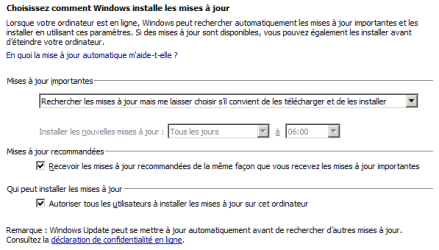
I've had my laptop since 2012. I've always had updates set to "Check for updates but let me choose whether to download and install them."
Up until 2014, I installed every update listed under "Important".
In May 2014, I installed KB2952664, it caused problems (can't remember the specifics tbh), I restored and never installed that one again.
From that point on, I started installing the security updates only. Well, that's not entirely true... Over the past few months, as Windows Update was having more and more trouble receiving the information that updates existed, I installed all the smallest updates - I figured they were less likely to create issues - in the hope of making it faster. So there was likely stuff installed out of order, which I didn't know then was apparently a big no-no? Whoops.
Anyway, now it takes a good 16 hours before it says "There are updates available", and of course all the while, there's an svchost process with about fifteen services, including wuauserv, that eats up 50 % of my CPU, and the laptop is ventilating like crazy, and it's actually a good thing the weather got colder because I was afraid it was going to end up frying!
Usually it's a pain for 2-3 days, then I manage to install the month's security updates and Malicious Software Removal Tool, and then I'm okay for a month.
In October however, with the "rollups" showing up for the first time, I had no idea what to do. So I didn't install anything.
And then the svchost/CPU problem kept bugging me all month! So I tried to do things to shut WU up, masked three updates (Russian rubble, Russian time zones and copying .mkv files to Windows Phone), and tried to pick a non-sensitive update to install. I landed on this one:

***
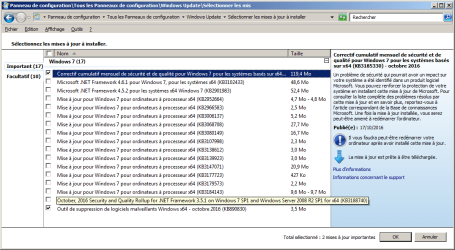
Wow, this was very long. Anyway, I'd like to fix the problem once and for all... Would installing all the old updates* do the trick? As long as they're not known for creating issues... I now have 5 from October plus 12 older ones. I'm attaching a screencap.
* all but a few, probably? The ones from Sept 2016 (that are included in the KB3185330?) plus the KB3184143 (I'm guessing I don't need it, since I don't seem to have the "Get Windows 10 app"?)
***
Or should I just... disable Windows Update completely and try to install some standalone update like Access Denied - I've never done that, it that easy? -, and then do that manually every month? Or even every three months?!
***
As I am writing this, the fan is still going nuts, and so am I! Any help will be greatly appreciated. Thanks for reading my very long post already! <3
I've had my laptop since 2012. I've always had updates set to "Check for updates but let me choose whether to download and install them."
Up until 2014, I installed every update listed under "Important".
In May 2014, I installed KB2952664, it caused problems (can't remember the specifics tbh), I restored and never installed that one again.
From that point on, I started installing the security updates only. Well, that's not entirely true... Over the past few months, as Windows Update was having more and more trouble receiving the information that updates existed, I installed all the smallest updates - I figured they were less likely to create issues - in the hope of making it faster. So there was likely stuff installed out of order, which I didn't know then was apparently a big no-no? Whoops.
Anyway, now it takes a good 16 hours before it says "There are updates available", and of course all the while, there's an svchost process with about fifteen services, including wuauserv, that eats up 50 % of my CPU, and the laptop is ventilating like crazy, and it's actually a good thing the weather got colder because I was afraid it was going to end up frying!
Usually it's a pain for 2-3 days, then I manage to install the month's security updates and Malicious Software Removal Tool, and then I'm okay for a month.
In October however, with the "rollups" showing up for the first time, I had no idea what to do. So I didn't install anything.
And then the svchost/CPU problem kept bugging me all month! So I tried to do things to shut WU up, masked three updates (Russian rubble, Russian time zones and copying .mkv files to Windows Phone), and tried to pick a non-sensitive update to install. I landed on this one:
The install worked, but WU wouldn't calm down, there was even a rdrleakdiag process launched at some point which I'm assuming was related, and so I've been leaving the laptop on most nights so it would finish searching for updates during the night and ventilate less during the day... Well, every second day, maybe.http://support.microsoft.com/kb/3092627
2.2 Mo
Sept 8, 2015
September 2015 update to fix Windows or application freezes after you install security update 3076895
***
Wow, this was very long. Anyway, I'd like to fix the problem once and for all... Would installing all the old updates* do the trick? As long as they're not known for creating issues... I now have 5 from October plus 12 older ones. I'm attaching a screencap.
* all but a few, probably? The ones from Sept 2016 (that are included in the KB3185330?) plus the KB3184143 (I'm guessing I don't need it, since I don't seem to have the "Get Windows 10 app"?)
***
Or should I just... disable Windows Update completely and try to install some standalone update like Access Denied - I've never done that, it that easy? -, and then do that manually every month? Or even every three months?!
***
As I am writing this, the fan is still going nuts, and so am I! Any help will be greatly appreciated. Thanks for reading my very long post already! <3
Attachments
Last edited:
My Computer
- Computer type
- Laptop
- Computer Manufacturer/Model Number
- HP Pavilion
- OS
- Windows 7 Home Premium 64 bits
- Antivirus
- Antivir
- Browser
- Firefox