Windows 7 Forums


Windows 7: BSOD in Windows 7 Home Premium NTOSKRNL.EXE

18 Mar 2013   #1

Windows 7 Home Premium 64bit
 
 
BSOD in Windows 7 Home Premium NTOSKRNL.EXE

A couple of weeks ago my system just started giving a BSOD. No new hardware, software or drivers were installed. I have checked all hardware and it seems. The minidump indicates the NTOSKRNL.EXE as the fault but maybe I am missing something. The BSOD happens every 10 minutes but never in Safe Mode. I am attaching the dumps and have changed the extension for upload. Please change back to .dmp to read, please help.

Attached Files
File Type: doc 031813-19609-01.dmp.doc (270.5 KB, 0 views)
File Type: doc 031813-20467-01.dmp.doc (278.0 KB, 0 views)
File Type: doc 031813-20482-01.dmp.doc (278.0 KB, 0 views)
File Type: doc 031813-19219-01.dmp.doc (264.5 KB, 0 views)
File Type: doc 031813-17347-01.dmp.doc (270.5 KB, 0 views)
My System SpecsSystem Spec

18 Mar 2013   #2

Windows 7 Home Premium 64bit
 
 
SF Tool

I had to run this in Safe Mode.
Attached Files
File Type: zip SF_18-03-2013.zip (2.81 MB, 1 views)
My System SpecsSystem Spec
19 Mar 2013   #3

Windows® 7 Home Premium SP-1


Welcome to Seven Forums.

Perform a clean boot and see if you are able to log in to windows normally:
Troubleshoot Application Conflicts by Performing a Clean Startup
And carry out the following:

Recommendations:

McAfee is a very frequent cause of BSOD's. Please remove it using its removal tool from here: Uninstallers (removal tools) for common antivirus software - ESET Knowledgebase
Code:
Start Menu\Programs\McAfee	Public:Start Menu\Programs\McAfee	Public
We recommended Microsoft Security Essentials from a strict BSOD perspective. Is most compatible & provides most stability compared to other antivirus app/Internet Security Software.
warning   Warning
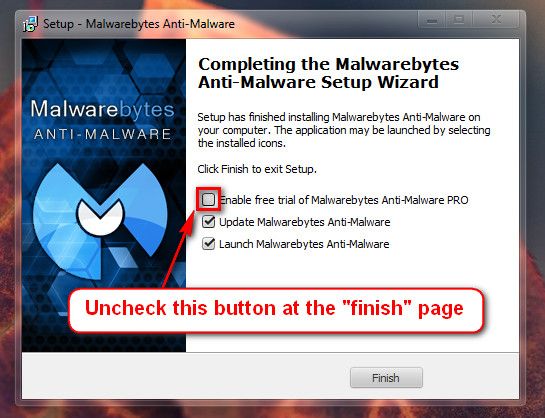
Do not start the free trial of Malware Bytes; remember to deselect that option when prompted.


Run a full scan with both (separately) once downloaded, installed and updated.

Perform a System File Check to check the integrity of all protected Windows 7:
  • Click Start Menu
  • Click All Programs
  • Click Accessories
  • Right click Command Prompt
  • Click Run as administrator
  • Type
  • Code:
    sfc /scannow
  • and press Enter
Full tutorial here:Check your hard drive(s) for errors by running chkdsk:Number down items at start-up. Keep only your anti-virus, this also improves the time for logging into windows.
  • Click on the Start button
  • Type “msconfig (without quotes), click the resulting link. It will open the System Configuration window.
  • Select the “Startup” tab.
  • Deselect all items other than the antivirus.
  • Apply > OK
  • Accept then restart.
Full tutorial:Let us know the results and further BSOD reports if any.
My System SpecsSystem Spec
.


Reply

 BSOD in Windows 7 Home Premium NTOSKRNL.EXE problems?


Thread Tools


Similar help and support threads for: BSOD in Windows 7 Home Premium NTOSKRNL.EXE
Thread Forum
BSOD Windows 7 Home Premium x 64 BSOD Help and Support
Solved BSOD after upgrading from Vista Home Premium to 7 Home Premium BSOD Help and Support
BSOD in Windows 7 Home Premium 32 bit BSOD Help and Support
BSOD on Windows 7 Home Premium x64 bit BSOD Help and Support
Windows 7 Home Premium [BSOD] BSOD Help and Support


All times are GMT -5. The time now is 05:11 AM.


Seven Forums Android App Seven Forums IOS App Follow us on Facebook

Windows 7 Forums is an independent web site and has not been authorized,
sponsored, or otherwise approved by Microsoft Corporation.
"Windows 7" and related materials are trademarks of Microsoft Corp.
© Designer Media Ltd
  

1 2 3 4 5 6 7 8 9 10 11 12 13 14 15 16 17 18 19 20 21 22 23 24 25 26 27 28 29 30 31 32