

How to Change the Width of Columns in Windows Explorer
InformationThis will show you how to change the width of columns that display details about files in a folder in Windows Explorer.
You will need to have the folder in Windows Explorer displayed with Details view to have columns displayed.
Note
- In Libraries, column width changes are applied to all included folders in the library.
- In Windows Explorer, column changes are only applied to that specific folder and the specific location it was opened from (ex: Start menu vs Windows Explorer), and will not be applied to any other folder unless Apply to Folders is used, or it is used to set a default for all folders.
OPTION ONETo Automatically Size Columns to Fit in Windows Explorer
1. In Windows Explorer, open the folder that you want to change the width of columns in.
2. To "Size Column to Fit"
NOTE: This will only adjust the width of a selected column to only be as wide as the longest text (ex: file name) in that column.
A) Right click on a specific column name and click on Size a Column to Fit. (see screenshot below)3. To "Size All Columns to Fit"
NOTE: This will adjust the width of all columns in the open folder to only be as wide as the longest text in each column.
A) Right click on the column bar and click on Size All Columns to Fit. (see screenshot above)
OPTION TWOTo Manually Enter Column Width in Pixels
NOTE: You will only be able to set the column width to a minimum of 80 (except 40 for the # column) pixels. If you enter a pixel value below 80 it will just default back to 80 (except 40 for the # column) pixels.
1. In Windows Explorer, open the folder that you want to change the width of columns in.
2. Right click on the column bar and click on More. (see screenshot below)
3. Under Details, select (highlight) a column that you want to change the width of, enter how many pixels wide you want the column to be. (see screenshot below)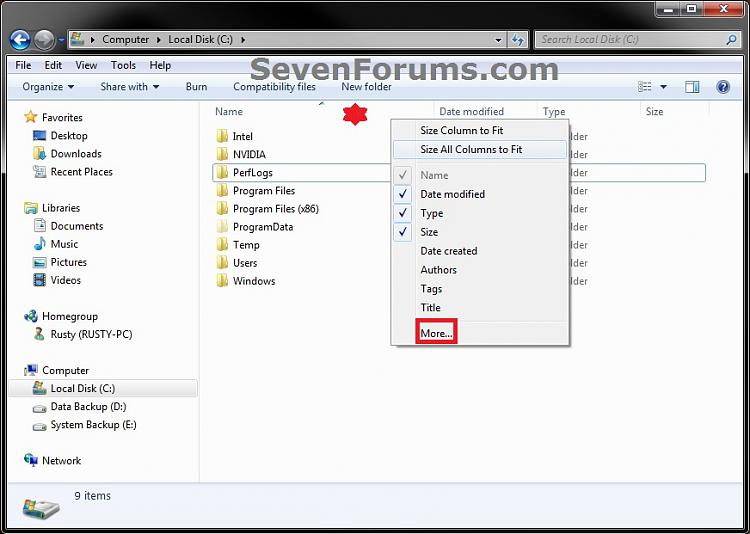
NOTE: Only the checked columns are displayed for the folder in Windows Explorer.
4. Repeat step 3 for any other columns that you want to change the width of. When finished, click on OK. (see screenshot above)
OPTION THREETo Manually Drag the Column Border to Adjust Width
1. In Windows Explorer, open the folder that you want to change the width of columns in.That's it,
2. Move and hover the mouse pointer over the border line on the column bar to the right of the column that you want to change the width of until it turns into a cross with double horizontal arrows. (see screeshot below)
3. Left click and hold, then drag the column border to the left and right to adjust it's width to what you would like it to be. Release left click when finished adjusting width.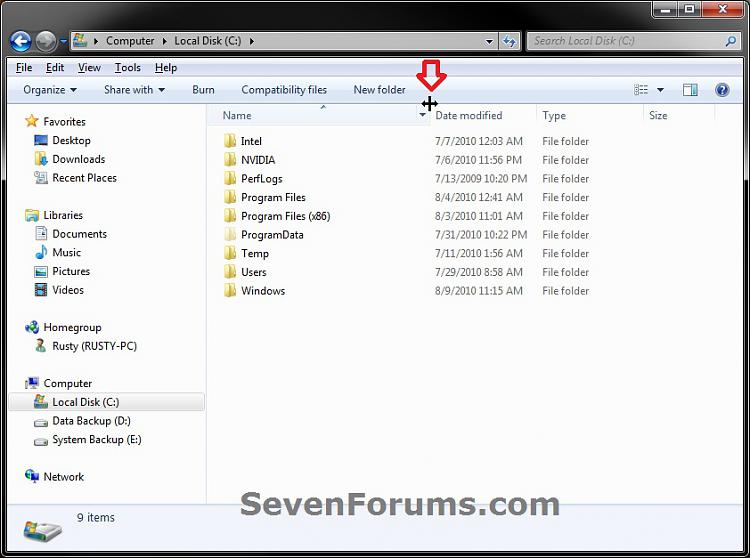
Shawn
Related Tutorials
- How to Back Up and Restore Your Folder View Settings in Vista, Windows 7, and Windows 8
- How to Add or Remove Windows Explorer Columns
- How to Change a Folder Template in Windows 7
- How to Set a Default Folder Template for All Folders in Windows 7
- How to Change the File and Folder View Arrangement in Windows 7 Explorer
- How to Change the Icon Size in a Windows 7 Explorer Window
- How to Change the Group by, Sort by, and Arrange by Folder View in Windows 7 Explorer
- How to Reset the Folder View Settings for All Folders with the Same Folder Template in Windows 7
- How to Reset All Folder View Settings to Default in Windows 7
- How to Set a Default Folder View for All Folders in Windows 7
- How to Disable Auto Arrange in Windows 7 Explorer to have Free Sorting
- How to "Apply to Folders" a Specific Folder View to All Folders with the Same Folder Template in Windows 7
- How to Add, Change, or Remove File Details Properties in Windows 7
Windows Explorer Columns - Change Width
-
New #1
Is it possible to apply that by default to ALL folders? It's a drag to do this for every folder.
-
New #2
Hello Andrey,
You could use the Apply to Folders option to apply it to all folders with the same folder template.
To apply to all folders, you could use the tutorial below to change all folders to have the same folder template, then Apply to Folders.
Folder View - Set a Default for All Folders
Hope this helps. :)
-
New #3
-
-
-
New #6
Is there a way to set up Windows Explorer in Windows 7 so that all columns are sized to fit every time? Or at least that each folder will remember what its settings are so I won't have to resize all of the columns to fit every time I switch folders?
This gets real irritating when I am switching back and fortrh between 2 or 3 folders repeatedly. It was easy to do in earlier versions of windows.
-
New #7
Hello rltomkinson, and welcome to Seven Forums.
Unfortunately, the column width settings are remembered on a per folder basis. The quickest way is to use the Size All Columns to Fit option in OPTION ONE per folder that you wanted to change the column width of. The next time you open that folder from the same location, it should be the same as when last closed it or had it opened as.
In a way this is good since each folder would most likely require different column widths. Having a universal column width for all folders might not look good in all folders.
Hope this helps some,
Shawn
-
New #8
Unfortunately, Windows is not remembering the column widths for each folder. That is what I want it to do. It was real easy in XP, but I cannot figure out how to do it in Win7.
-
New #9
If this for in a library, then all included folders in a library share the same folder view.
Folder views are also saved on a per specific location opened from as well. For example, you will have a separate folder view for when you open say your user folder from the C:\Users\(user-name) location vs from the Start Menu personal folder location.
If not, then you might see if resetting all folder views back to default to see if that may help.

Windows Explorer Columns - Change Width
How to Change the Width of Columns in Windows ExplorerPublished by Brink


 Quote
Quote
Related Discussions