File Details Properties - Add, Change, or Remove

How to Add, Change, or Remove File Details Properties in Windows 7

   Information
File properties are details about a file, such as authors, tags, date taken, etc... Some or all of these file details may be displayed in the Details pane in Windows Explorer when you select the file.

Properties make your files easier to find and organize. For example, you can search for a file by one of its properties. You can also use libraries to arrange files by a property. If you're browsing the Documents library, for example, and you want to see the most recently changed files first, you can arrange the files by the Date modified property.

This will show you how to add, change, or remove properties of a file.

   Note

  • You can't add or change the file properties of some types of files. For example, you can't add any properties to TXT or RTF files.
  • The properties that are available for a file will vary by file type. For example, you can apply a rating to a song file, but not to a text document.
  • Some file properties (such as the length of a song file) can't be modified.
  • Not all file properties of Windows 7 system files or program files may be able to be modified.
  • If you are not the owner of a file, then you may need to take ownership and "Allow" your user account "Full Control" of the file before you will be able to modify the file properties.
   Warning
Changing some properties of an JPG file like (date or comments), can also significantly change it's compression ratio.


OPTION ONE

Add, Change, or Remove File Properties in "Details Pane"


NOTE: If the file property that you want to add or change isn't available in the details pane, you can open the Properties dialog box in OPTION TWO below for a complete list of file properties.
1. Open Windows Explorer, then navigate to and select the file (ex: a picture file) that you want to modify the properties of.

2. If not already, turn on the Details pane. (see screenshots below)
NOTE: The Details pane is turned on by default in Windows 7.
Details_Pane-1.jpg

Details_Pane-2.jpg]
3. In the Details pane, hover the mouse pointer just to the left of the property (ex: Author) that you want to modify until you see a box pop-up (ex: around Corbis), then click on it. (see screenshots above)


   Note

  • If you do not see a box pop-up when you hover over a property, then it means that the property cannot be modified.
  • If you don't see the file property you're looking for, try enlarging the details pane to see more file properties. To do this, click and hold on the top edge of the details pane when the mouse pointer turns into a double arrow, then drag it upward and release the mouse button when it's the size you like.

4. To Add a Property
A) Select or type in the property, then press enter or click on Save. For example, add a author name. (see screenshots below step 2)
NOTE: To add more than one property, separate each entry with a semicolon ; . To rate a file by using the ratings property, click the star that represents the rating you want to apply.
5. To Change a Property
A) Backspace over the current property, then type in the new property and press enter or click on Save. For example, backspace over the old author name and type in a new one. (see screenshots below step 2)
6. To Remove a Property
A) Backspace over the current property, then press enter or click on Save. For example, backspace over the old author name until it's blank (Add an author) and press enter. (see screenshots below step 2)
7. Repeat steps 3 to 6 for any other properties that you want to modify for this file.


OPTION TWO

Add, Change, or Remove File Properties in "Properties dialog box"


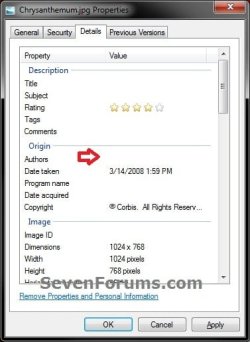
1. Right click on the file that you want to modify the properties of, then click on Properties and the Details tab.

2. Under Value, click next to the property (ex: Authors) that you want to modify until you see a box pop-up (ex: around Corbis). (see screenshots below)


   Note

  • If the section under Value appears blank, click in that spot. A box will appear.
  • Some properties can't be added or changed. In those cases, clicking next to the value won't change its appearance to see a box.
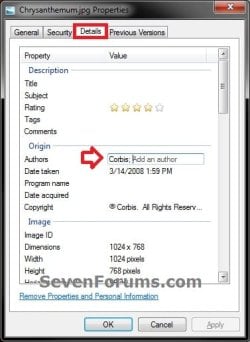
Details-1.jpgDetails-2.jpg
3. To Add a Property
A) Select or type in the property, then press enter. For example, add a author name. (see screenshots below step 2)
NOTE: To add more than one property, separate each entry with a semicolon ; . To rate a file by using the ratings property, click the star that represents the rating you want to apply.
4. To Change a Property
A) Backspace over the current property, then type in the new property and press enter. For example, backspace over the old author name and type in a new one. (see screenshots below step 2)
5. To Remove a Property under "Details" tab
A) Backspace over the current property, then press enter. For example, backspace over the old author name until it's blank (Add an author) and press enter. (see screenshots below step 2)
6. To Remove a Property in "Remove Properties" Dialog Box
NOTE: The Remove Properties dialog box only removes properties that were added using Windows. If you added properties using a different program, then you must remove those properties using that same program.
A) Click on the Remove Properties and Personal Information link. (see screenshot below)
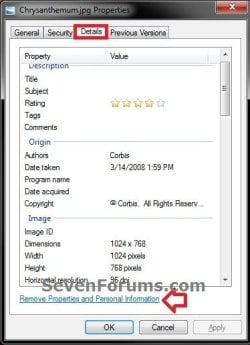
Remove-1.jpg

B) Do one of the following: (see screenshot below)
  • Select (dot) Create a copy with all possible properties removed, and then click OK.
    NOTE: This keeps the original version of the file with all of its properties, and just makes a copy of the file with all of the properties removed.
  • Select (dot) Remove the following properties from this file. Check the boxes of any properties that you want removed from the file, then click on OK.
    NOTE: This permanently removes the selected properties from the file without making a copy of the file.
Remove-2.jpg
7. Repeat steps 3 to 6 for any other properties that you want to modify for this file.

8. When finished, click on OK. (see screenshots below step 2)
That's it,
Shawn


Last edited:
.mkv properties ?

hi dear.
I have many .mkv files (Video).
I fix Ownership (as you mentioned) & Can't add any properties for that (or change).
I want to add tags to them for beter searching.
please help me.
thanks.
 

My Computer

OS
Windows 7 Ultimate x64
Hello Feizol, and welcome to Seven Forums.

It appears that .mkv files are one of those that require a 3rd party program to edit the details with. You might see if the free program MKVToolNix may work for you for this.

Hope this helps,
Shawn
 

My Computer

Computer type
PC/Desktop
Computer Manufacturer/Model Number
Self built custom
OS
64-bit Windows 11 Pro for Workstations
CPU
Intel i7-8700K OC'd to 5 GHz
Motherboard
ASUS ROG Maximus XI Formula Z390
Memory
64 GB (4x16GB) G.SKILL TridentZ RGB DDR4 3600 MHz
Graphics Card(s)
ASUS ROG-STRIX-GTX1080TI-O11G-GAMING
Sound Card
Integrated
Monitor(s) Displays
2 x Samsung Odyssey G7 27"
Screen Resolution
2560x1440
Hard Drives
1TB Samsung 990 PRO M.2,
4TB Samsung 990 PRO PRO M.2,
TerraMaster F8 SSD Plus NAS
PSU
Seasonic Prime Titanium 850W
Case
Thermaltake Core P3
Cooling
Corsair Hydro H115i
Keyboard
Logitech wireless K800
Mouse
Logitech MX Master 4
Internet Speed
2 Gb/s Download and 100 Mb/s Upload
Antivirus
Malwarebyte Anti-Malware Premium
Browser
Google Chrome
Other Info
Logitech Z625 speaker system,
Logitech BRIO 4K Pro webcam,
HP Color LaserJet Pro MFP M477fdn,
APC SMART-UPS RT 1000 XL - SURT1000XLI,
Galaxy S23 Plus phone
:)thank you

for the information ...:)
 

My Computer

OS
Windows 7 Ultimate x32 bit
Hello Feizol, and welcome to Seven Forums.
It appears that .mkv files are one of those that require a 3rd party program to edit the details with. You might see if the free program MKVToolNix may work for you for this.
Hope this helps,
Shawn
Thanks dear Brink.
I check it.
 

My Computer

OS
Windows 7 Ultimate x64
You're both welcome. :)
 

My Computer

Computer type
PC/Desktop
Computer Manufacturer/Model Number
Self built custom
OS
64-bit Windows 11 Pro for Workstations
CPU
Intel i7-8700K OC'd to 5 GHz
Motherboard
ASUS ROG Maximus XI Formula Z390
Memory
64 GB (4x16GB) G.SKILL TridentZ RGB DDR4 3600 MHz
Graphics Card(s)
ASUS ROG-STRIX-GTX1080TI-O11G-GAMING
Sound Card
Integrated
Monitor(s) Displays
2 x Samsung Odyssey G7 27"
Screen Resolution
2560x1440
Hard Drives
1TB Samsung 990 PRO M.2,
4TB Samsung 990 PRO PRO M.2,
TerraMaster F8 SSD Plus NAS
PSU
Seasonic Prime Titanium 850W
Case
Thermaltake Core P3
Cooling
Corsair Hydro H115i
Keyboard
Logitech wireless K800
Mouse
Logitech MX Master 4
Internet Speed
2 Gb/s Download and 100 Mb/s Upload
Antivirus
Malwarebyte Anti-Malware Premium
Browser
Google Chrome
Other Info
Logitech Z625 speaker system,
Logitech BRIO 4K Pro webcam,
HP Color LaserJet Pro MFP M477fdn,
APC SMART-UPS RT 1000 XL - SURT1000XLI,
Galaxy S23 Plus phone
Use Icaros_1.3.2

1) Download & install Icaros_1.3.2
2) Enable the shell extension using the Icaros Config program

You will now have properties for files with ( mkv ogm flv ) extensions.
 
Last edited:

My Computer

OS
Windows 7 Ultimate x64
i have a slight problem in so much as i cannot add any new fields to the details pane ie comments or title ,rating etc,
these fields are missing when i try to add details to a pic. and the other properties cannot be changed either,
i tried it with different file types jpeg, png but neither will allow it. i can alter the fields and change titles when its music but not for images,
any ideas?
 

My Computer

Computer Manufacturer/Model Number
Hewlett packard/p6512uk
OS
Microsoft Windows 7 Home Premium 64-bit 7600
CPU
IIx4 amd athelon 635 processor
Motherboard
FOXCONN 2AA9
Memory
2x2gb
Graphics Card(s)
ati radeon HD 5450
Sound Card
(1) Realtek High Definition Audio (2) AMD High Definition
Monitor(s) Displays
samsung lcd tv 32"
Screen Resolution
1360x 768
Hard Drives
(1) WDC WD10 01FAES-60Z2A0 SATA Disk Device (2) Maxtor OneTouch USB Device (3) ST310003 33AS USB Device (4) WD My Book 1111 USB Device
PSU
?
Cooling
air!
Keyboard
wireless hp
Mouse
wireless Hp,optical
Internet Speed
1.10mb/s
Antivirus
MSE
Browser
Firefox
Hello Julian,

If the detail properties have been modified using a 3rd party program, then that program may be preventing them from being changed unless you use the program.
 

My Computer

Computer type
PC/Desktop
Computer Manufacturer/Model Number
Self built custom
OS
64-bit Windows 11 Pro for Workstations
CPU
Intel i7-8700K OC'd to 5 GHz
Motherboard
ASUS ROG Maximus XI Formula Z390
Memory
64 GB (4x16GB) G.SKILL TridentZ RGB DDR4 3600 MHz
Graphics Card(s)
ASUS ROG-STRIX-GTX1080TI-O11G-GAMING
Sound Card
Integrated
Monitor(s) Displays
2 x Samsung Odyssey G7 27"
Screen Resolution
2560x1440
Hard Drives
1TB Samsung 990 PRO M.2,
4TB Samsung 990 PRO PRO M.2,
TerraMaster F8 SSD Plus NAS
PSU
Seasonic Prime Titanium 850W
Case
Thermaltake Core P3
Cooling
Corsair Hydro H115i
Keyboard
Logitech wireless K800
Mouse
Logitech MX Master 4
Internet Speed
2 Gb/s Download and 100 Mb/s Upload
Antivirus
Malwarebyte Anti-Malware Premium
Browser
Google Chrome
Other Info
Logitech Z625 speaker system,
Logitech BRIO 4K Pro webcam,
HP Color LaserJet Pro MFP M477fdn,
APC SMART-UPS RT 1000 XL - SURT1000XLI,
Galaxy S23 Plus phone
thanks shawn, im not aware of using a third party software to change the details, however i use several photo/image viewers.
its possible something may have interfered but i dont think i could pinpoint it.
 

My Computer

Computer Manufacturer/Model Number
Hewlett packard/p6512uk
OS
Microsoft Windows 7 Home Premium 64-bit 7600
CPU
IIx4 amd athelon 635 processor
Motherboard
FOXCONN 2AA9
Memory
2x2gb
Graphics Card(s)
ati radeon HD 5450
Sound Card
(1) Realtek High Definition Audio (2) AMD High Definition
Monitor(s) Displays
samsung lcd tv 32"
Screen Resolution
1360x 768
Hard Drives
(1) WDC WD10 01FAES-60Z2A0 SATA Disk Device (2) Maxtor OneTouch USB Device (3) ST310003 33AS USB Device (4) WD My Book 1111 USB Device
PSU
?
Cooling
air!
Keyboard
wireless hp
Mouse
wireless Hp,optical
Internet Speed
1.10mb/s
Antivirus
MSE
Browser
Firefox
I am having trouble trying to add a rating to my movie files. My files are M2TS, I have Win 7 Home Premium with Media Tab installed and I have checked I am the owner of the file. I am unable to edit any property using either option 1 or 2 above. This is such a good tutorial I doubt I have followed it incorrectly.
 

My Computer

Computer Manufacturer/Model Number
Self made
OS
Windows 7 X64
CPU
I5 2500 K
Motherboard
ASRock Extreme 4
Memory
16 gig DDR 3 1600
Graphics Card(s)
GTX 560 Ti
Sound Card
Soundblaster X-Fi Titanium
Monitor(s) Displays
LG W2452T
Hard Drives
1 x Intel 120Gb SSD
4 x Seagate 2Tb HDD
1 x Seagate 250Gb HDD (Dual Boot Win XP)
PSU
Silverstone 850W
Case
Cooler Master HAF 922
Cooling
Antec Kuhler (Water)
Hello Shag,

Since you have a 3rd party program "Media Tab" installed, it most likely is preventing you from using the normal method of editing the file details from the tutorial. I'm not familiar with "Media Tab", but double check to see if it has an option to edit the details instead. :)
 

My Computer

Computer type
PC/Desktop
Computer Manufacturer/Model Number
Self built custom
OS
64-bit Windows 11 Pro for Workstations
CPU
Intel i7-8700K OC'd to 5 GHz
Motherboard
ASUS ROG Maximus XI Formula Z390
Memory
64 GB (4x16GB) G.SKILL TridentZ RGB DDR4 3600 MHz
Graphics Card(s)
ASUS ROG-STRIX-GTX1080TI-O11G-GAMING
Sound Card
Integrated
Monitor(s) Displays
2 x Samsung Odyssey G7 27"
Screen Resolution
2560x1440
Hard Drives
1TB Samsung 990 PRO M.2,
4TB Samsung 990 PRO PRO M.2,
TerraMaster F8 SSD Plus NAS
PSU
Seasonic Prime Titanium 850W
Case
Thermaltake Core P3
Cooling
Corsair Hydro H115i
Keyboard
Logitech wireless K800
Mouse
Logitech MX Master 4
Internet Speed
2 Gb/s Download and 100 Mb/s Upload
Antivirus
Malwarebyte Anti-Malware Premium
Browser
Google Chrome
Other Info
Logitech Z625 speaker system,
Logitech BRIO 4K Pro webcam,
HP Color LaserJet Pro MFP M477fdn,
APC SMART-UPS RT 1000 XL - SURT1000XLI,
Galaxy S23 Plus phone
Media Tab just gives greater detail of media files, eg. codec, bitrate, fps etc and gives no option to edit anything, it is just a info provider.
 

My Computer

Computer Manufacturer/Model Number
Self made
OS
Windows 7 X64
CPU
I5 2500 K
Motherboard
ASRock Extreme 4
Memory
16 gig DDR 3 1600
Graphics Card(s)
GTX 560 Ti
Sound Card
Soundblaster X-Fi Titanium
Monitor(s) Displays
LG W2452T
Hard Drives
1 x Intel 120Gb SSD
4 x Seagate 2Tb HDD
1 x Seagate 250Gb HDD (Dual Boot Win XP)
PSU
Silverstone 850W
Case
Cooler Master HAF 922
Cooling
Antec Kuhler (Water)
I found this site to be just a little more informative on picture properties. Unfortunately if the picture is on a flash / jump drive it won't work.
 
Last edited by a moderator:

My Computer

Computer type
PC/Desktop
OS
Windows xp Vista and 7
Back
Top