
Index Location - Change

How to Change the Default Index Location in Windows 7 and Windows 8

   Information
The Index keeps track of the files on your computer and stores information about the files, including the file name, date modified, and properties like author, tags, and rating. The index is used to make searching for files in Windows much faster. Instead of looking through your entire hard disk for a file name or file property, Windows scans the index, which allows most results to appear in a small fraction of the time that a search without the index would take.

This tutorial will help show you how to change the default index location to be saved where you like in Windows 7 and Windows 8.

You must be logged in as an administrator to be able to do the steps in this tutorial.

   Note
The default Search index storage location is in the hidden system folder C:\ProgramData\Microsoft with the full path of:

%ProgramData%\Microsoft\Search\Data


OPTION ONE

To Change Index Location in Indexing Options


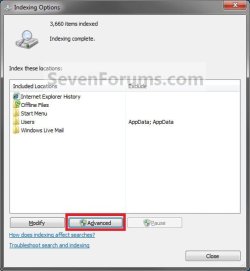
1. Open the Control Panel (icons view) in Windows 7 or Windows 8, and click/tap on the Indexing Options icon.

2. Click/tap on the Advanced button. (See screenshot below)
Step1.jpg
3. If prompted by UAC, then click/tap on Yes.

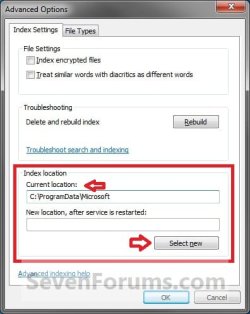
4. In the Index location box, click/tap on the Select new button. (See screenshot below)
Step2.jpg
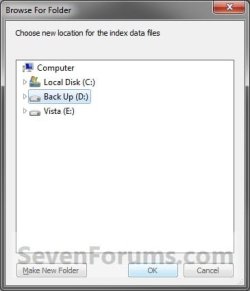
5. Select the drive or folder that you want to store the index in, and click/tap on OK. (See screenshot below)
NOTE: When you change the index location, you should choose a location on a non-removable hard disk that is formatted using the NTFS file system.
Step3.jpg
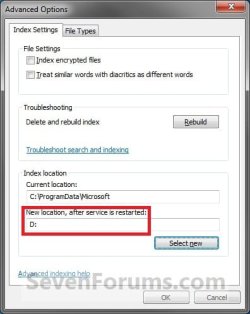
6. Click/tap on OK. (See screenshot below)
NOTE: Notice the new location that you selected should now be listed.
Step4.jpg
7. The Windows Search service will now automatically be restarted, and the change will not go into effect until the restart is complete. It should only take a short bit.
NOTE: You will notice the mouse pointer displaying the busy spinning circle over the Indexing Options windows until it is finished.

8. When it's finished, click/tap on Close. (See screenshot below)


OPTION TWO

To Change Index Location in Registry Editor


1. Press the Windows + R keys to open the Run dialog, type regedit, and click/tap on OK.

2. If prompted by UAC, then click/tap on Yes.

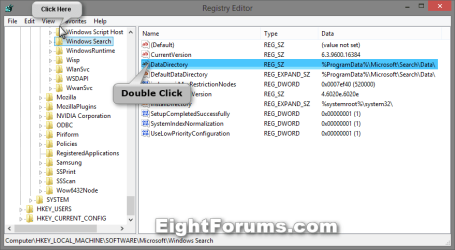
3. In Registry Editor, navigate to the location below. (see screenshot below)
HKEY_LOCAL_MACHINE\SOFTWARE\Microsoft\Windows Search

Index_Location_Registry-1.png
4. In the right pane of Windows Search, double click/tap on the DataDirectory string value to modify it. (see screenshot above)

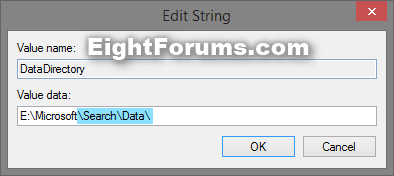
5. Type in the full path of the location (ex: E:\Microsoft) you want the index to be saved at, add \Search\Data\ to the end of your path, and click/tap on OK. (see screenshot below)

   Note
Substitute (your location full path) in the path to be the full path of any location you want to have the index saved to.

The index will always be saved into a Search\Data folder in whatever location you specify, and why it needs to be included below.


(your location full path)\Search\Data\

For example: If I wanted to change the index location to be in a Microsoft folder on my E: drive (E:\Microsoft), I would type this below exactly.
E:\Microsoft\Search\Data\


Default Index Location: %ProgramData%\Microsoft\Search\Data\
Index_Location_Registry-2.png

6. Close Registry Editor, and restart the computer to fully apply.


That's it,
Shawn


Last edited:
In registry it should be located in:

HKEY_LOCAL_MACHINE\SOFTWARE\Microsoft\Windows Search

But I'm not really sure about this. It is very useful for deployment and ssd maximum life settings, if you need the service to index other normal HDDs
 

My Computer

Computer Manufacturer/Model Number
Sony Vaio
OS
Windows 7 Home premium x64
CPU
Intel i5 520m at 2.4GHz(plus turbo mode at 2.9GHz)
Memory
4GB ddr3 1067
Graphics Card(s)
Nvidia 330m
Hello stsaerox,

Yep, the DataDirectory string value in that registry key is what holds the path of the index. I'll add this to the tutorial shortly with full details. :)

(your path)\Search\Data\

EDIT:
Ok. All added to tutorial.
 
Last edited:

My Computer

Computer type
PC/Desktop
Computer Manufacturer/Model Number
Self built custom
OS
64-bit Windows 11 Pro for Workstations
CPU
Intel i7-8700K OC'd to 5 GHz
Motherboard
ASUS ROG Maximus XI Formula Z390
Memory
64 GB (4x16GB) G.SKILL TridentZ RGB DDR4 3600 MHz
Graphics Card(s)
ASUS ROG-STRIX-GTX1080TI-O11G-GAMING
Sound Card
Integrated
Monitor(s) Displays
2 x Samsung Odyssey G7 27"
Screen Resolution
2560x1440
Hard Drives
1TB Samsung 990 PRO M.2,
4TB Samsung 990 PRO PRO M.2,
TerraMaster F8 SSD Plus NAS
PSU
Seasonic Prime Titanium 850W
Case
Thermaltake Core P3
Cooling
Corsair Hydro H115i
Keyboard
Logitech wireless K800
Mouse
Logitech MX Master 4
Internet Speed
2 Gb/s Download and 100 Mb/s Upload
Antivirus
Malwarebyte Anti-Malware Premium
Browser
Google Chrome
Other Info
Logitech Z625 speaker system,
Logitech BRIO 4K Pro webcam,
HP Color LaserJet Pro MFP M477fdn,
APC SMART-UPS RT 1000 XL - SURT1000XLI,
Galaxy S23 Plus phone
if i want move to flashdrive/sdd it written like this?
Code:
F:\Microsoft\Search\Data\
and its done moved?
 

My Computer

Computer type
Laptop
OS
Win 7 Ulitimate x86
Hello Nisilhum,

At step 4 in Option one, you can select any folder or location for the index. It doesn't matter.

However, when you change the index location, you should choose a location on a non-removable hard disk that is formatted using the NTFS file system. This way you don't have to worry about the index breaking if the flash drive got removed. Usually it's best to select to have the index on another internal hard drive.
 

My Computer

Computer type
PC/Desktop
Computer Manufacturer/Model Number
Self built custom
OS
64-bit Windows 11 Pro for Workstations
CPU
Intel i7-8700K OC'd to 5 GHz
Motherboard
ASUS ROG Maximus XI Formula Z390
Memory
64 GB (4x16GB) G.SKILL TridentZ RGB DDR4 3600 MHz
Graphics Card(s)
ASUS ROG-STRIX-GTX1080TI-O11G-GAMING
Sound Card
Integrated
Monitor(s) Displays
2 x Samsung Odyssey G7 27"
Screen Resolution
2560x1440
Hard Drives
1TB Samsung 990 PRO M.2,
4TB Samsung 990 PRO PRO M.2,
TerraMaster F8 SSD Plus NAS
PSU
Seasonic Prime Titanium 850W
Case
Thermaltake Core P3
Cooling
Corsair Hydro H115i
Keyboard
Logitech wireless K800
Mouse
Logitech MX Master 4
Internet Speed
2 Gb/s Download and 100 Mb/s Upload
Antivirus
Malwarebyte Anti-Malware Premium
Browser
Google Chrome
Other Info
Logitech Z625 speaker system,
Logitech BRIO 4K Pro webcam,
HP Color LaserJet Pro MFP M477fdn,
APC SMART-UPS RT 1000 XL - SURT1000XLI,
Galaxy S23 Plus phone
If you like, you could just disable the index to not have to worry about it, save some space on the drive, and have non-indexed search results.

Index - Enable or Disable
 

My Computer

Computer type
PC/Desktop
Computer Manufacturer/Model Number
Self built custom
OS
64-bit Windows 11 Pro for Workstations
CPU
Intel i7-8700K OC'd to 5 GHz
Motherboard
ASUS ROG Maximus XI Formula Z390
Memory
64 GB (4x16GB) G.SKILL TridentZ RGB DDR4 3600 MHz
Graphics Card(s)
ASUS ROG-STRIX-GTX1080TI-O11G-GAMING
Sound Card
Integrated
Monitor(s) Displays
2 x Samsung Odyssey G7 27"
Screen Resolution
2560x1440
Hard Drives
1TB Samsung 990 PRO M.2,
4TB Samsung 990 PRO PRO M.2,
TerraMaster F8 SSD Plus NAS
PSU
Seasonic Prime Titanium 850W
Case
Thermaltake Core P3
Cooling
Corsair Hydro H115i
Keyboard
Logitech wireless K800
Mouse
Logitech MX Master 4
Internet Speed
2 Gb/s Download and 100 Mb/s Upload
Antivirus
Malwarebyte Anti-Malware Premium
Browser
Google Chrome
Other Info
Logitech Z625 speaker system,
Logitech BRIO 4K Pro webcam,
HP Color LaserJet Pro MFP M477fdn,
APC SMART-UPS RT 1000 XL - SURT1000XLI,
Galaxy S23 Plus phone
btw brink if sucess move to eksternal drive (ssd, flashdrive.etc) i can move them all to other PC?
 

My Computer

Computer type
Laptop
OS
Win 7 Ulitimate x86
The index if enabled needs to always be available. That's one reason why it's not a good idea to have it located on a removable drive.
 

My Computer

Computer type
PC/Desktop
Computer Manufacturer/Model Number
Self built custom
OS
64-bit Windows 11 Pro for Workstations
CPU
Intel i7-8700K OC'd to 5 GHz
Motherboard
ASUS ROG Maximus XI Formula Z390
Memory
64 GB (4x16GB) G.SKILL TridentZ RGB DDR4 3600 MHz
Graphics Card(s)
ASUS ROG-STRIX-GTX1080TI-O11G-GAMING
Sound Card
Integrated
Monitor(s) Displays
2 x Samsung Odyssey G7 27"
Screen Resolution
2560x1440
Hard Drives
1TB Samsung 990 PRO M.2,
4TB Samsung 990 PRO PRO M.2,
TerraMaster F8 SSD Plus NAS
PSU
Seasonic Prime Titanium 850W
Case
Thermaltake Core P3
Cooling
Corsair Hydro H115i
Keyboard
Logitech wireless K800
Mouse
Logitech MX Master 4
Internet Speed
2 Gb/s Download and 100 Mb/s Upload
Antivirus
Malwarebyte Anti-Malware Premium
Browser
Google Chrome
Other Info
Logitech Z625 speaker system,
Logitech BRIO 4K Pro webcam,
HP Color LaserJet Pro MFP M477fdn,
APC SMART-UPS RT 1000 XL - SURT1000XLI,
Galaxy S23 Plus phone
Back
Top