Windows 7 Forums Search
Welcome to Windows 7 Forums. Our forum is dedicated to helping you find solutions with any problems, errors or issues you are experiencing with Windows 7. The Windows 7 forum also covers news and updates and has an extensive Windows 7 tutorial section that covers a wide range of tips and tricks.


Windows 7 - Firefox - Customize Orange Bar


Firefox - Customize Orange Bar

How to Customize the Orange Bar in Mozilla Firefox
Published by FredeGail
07-13-2011
Default Firefox - Customize Orange Bar

How to Customize the Orange Bar in Mozilla Firefox

information   Information
This tutorial will show you how to customize and adjust the orange bar in the left hand corner of Mozilla Firefox.

Note   Note
Requirements:
  • Mozilla Firefox v. *at least 4*
  • Notepad

Tip   Tip
You cannot only follow the pictures below as a tutorial, read carefully the text.


1) Press the Orange Bar, go to Troubleshooting Information
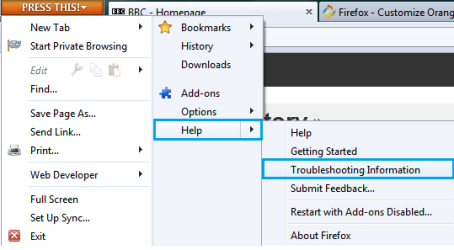
Firefox - Customize Orange Bar-orange-bar-ff.png

2) Under Application Basics, press Open Containing Folder
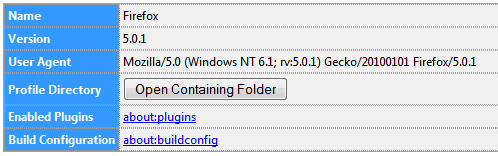
Firefox - Customize Orange Bar-application.png

3) Look for a folder called "chrome", and make sure there's a "userChrome.css" inside it - If you can find all this go to step 6), if you cannot find the folder, continue to step 4)
Firefox - Customize Orange Bar-css.png

4) Create a new folder called "chrome"
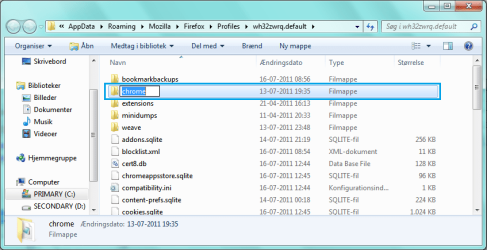
Firefox - Customize Orange Bar-rename.png

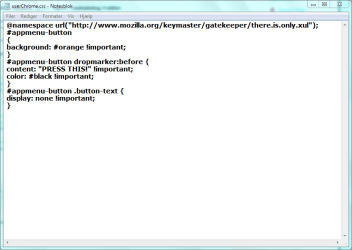
5) Get into Notepad, and copy the code below, Save it as "userChrome.css, and paste it into the chrome folder
Firefox - Customize Orange Bar-cssedit.png

Code:
@namespace url("http://www.mozilla.org/keymaster/gatekeeper/there.is.only.xul");
#appmenu-button
{
background: #orange !important;
}
#appmenu-button dropmarker:before {
content: "Firefox" !important;
color: #FFFFFF !important;
}
#appmenu-button .button-text {
display: none !important;
}
6) The code:
Code:
background: #orange !important;
.. would be the colour for our bar. Use the hex-code, or just write down the colour you'd like.

The code:
Code:
content: "Firefox" !important;
.. would be the text in the bar.

The code:
Code:
color: #FFFFFF !important;
.. would be the colour-text!

Chance it for anything you like, Save it.

warning   Warning
Remember to restart Firefox during chances


Hex Codes

Black: #000000
Red: #FF0000
Green: #00FF00
Blue: #0000FF
Yellow: #FFFF00
Cyan: #00FFFF
Pink: #FF00FF
Gray: #C0C0C0
White: #FFFFFF


Hope you liked it,
FredeGail
Published by
FredeGail's Avatar
BSoD DOCTOR
Join Date: Mar 2011
Location: Denmark
Posts: 1,285

Tutorial Tools
07-13-2011   #1
FredeGail


Microsoft Windows 7 Ultimate: x64 (SP1)


Any adds, typos, failures etc. - Please let me know!

Best Regards,
FredeGail

My System SpecsSystem Spec
07-13-2011   #2
Britton30


Windows 7 Ultimate X86 SP1


Here's a site with hex color codes and much more on CSS coding.
CSS Colors

Good job on your tut, I may have to use FF just to use it. +1
My System SpecsSystem Spec
07-14-2011   #3
FredeGail


Microsoft Windows 7 Ultimate: x64 (SP1)


Quote   Quote: Originally Posted by Britton30 View Post
Here's a site with hex color codes and much more on CSS coding.
CSS Colors

Good job on your tut, I may have to use FF just to use it. +1
Thanks Britton, hoping to do more of those in the future

Best Regards,
FredeGail
My System SpecsSystem Spec
.


07-16-2011   #4
JaidynM


Windows 7 Ultimate x64/Windows 8 Consumer Preview x64/Ubuntu 11.04


Great tutorial FredeGail! Some pictures/screenshots would be a great addition. Also, I'm pretty sure the orange bar is on the left hand side, not the right.
My System SpecsSystem Spec
07-16-2011   #5
FredeGail


Microsoft Windows 7 Ultimate: x64 (SP1)


Quote   Quote: Originally Posted by JaidynM View Post
Great tutorial FredeGail! Some pictures/screenshots would be a great addition. Also, I'm pretty sure the orange bar is on the left hand side, not the right.
Oh! Sorry about that.
Thanks for the headsup. I'm throwing some pictures in soon, I was considering it too

Best Regards,
FredeGail
My System SpecsSystem Spec
07-16-2011   #6
FredeGail


Microsoft Windows 7 Ultimate: x64 (SP1)


Tutorial updated!

Please also upload or copy/paste your .css so people will be able to use them too!

Tip   Tip
You cannot only follow the pictures below as a tutorial, read carefully the text.


Best Regards,
FredeGail
My System SpecsSystem Spec
07-16-2011   #7
Arc


windows 7 Home Premium 64 Bit SP 1


Brilliant work Frederik
My System SpecsSystem Spec
07-16-2011   #8
FredeGail


Microsoft Windows 7 Ultimate: x64 (SP1)


Quote   Quote: Originally Posted by Arc View Post
Brilliant work Frederik
Thanks Arc!!
Doing more in the future I hope so, it's great learning!
Also, I can't thank you enough for my signature

Best Regards,
FredeGail
My System SpecsSystem Spec
07-16-2011   #9
StalkeR


Windows 7 Ultimate SP1 x64


Nice one !
My System SpecsSystem Spec
Comment

 Firefox - Customize Orange Bar problems?


Tutorial Tools


Similar Threads for: Firefox - Customize Orange Bar
Windows 7 Tutorial Category
Firefox tabs below orange button Browsers & Mail
Customize Firefox 4.0’s UI to Create a Unique, Personalized Browser Browsers & Mail
Firefox customize question Browsers & Mail
Customize firefox Browsers & Mail
Customize Bookmarks sidebar in Firefox Customization


All times are GMT -5. The time now is 01:34 AM.


Windows 7 Forums is an independent web site and has not been authorized,
sponsored, or otherwise approved by Microsoft Corporation.
"Windows 7" and related materials are trademarks of Microsoft Corp.
© Designer Media Ltd
  

1 2 3 4 5 6 7 8 9 10 11 12 13 14 15 16 17 18 19 20 21 22 23 24 25 26 27 28 29 30