How to Create a Live Peppermint3 CD/DVD/USB to Backup Data When Windows 7 Will Not Boot
Information
In some instances, Windows 7 installations can become non-bootable if serious corruption of the system files have taken place, for example through the action of malware. If these corruptions are extremely severe, the installation cannot be repaired and the only course of action left is often to wipe (format) the hard disk and reinstall Windows 7 from scratch. Before you do that, however, you may wish to copy any user data (photo's, music etc.) files from the faulty installation to a backup drive.
This tutorial will show you how to do this in just a few easy steps by creating a free Live PepperMint3 Linux distribution on a bootable USB flash drive or CD.
Note
There are many free Linux distributions that can accomplish this task, but I have specifically chosen PepperMint3 because:
it is a small, lightweight distribution
it has a look & feel that will be familiar to Windows-only users
it does not require any knowledge of Linux jargon (e.g. sda1, sda2)
it is easy for novice users to understand
*** Update ***
I've decided to replace the use of the Lili USB creator originally referenced in this tutorial, with the Rufus USB creator, after some reports of problems with Lili. Special thanks to jumanji who brought this to my attention, and also suggested Rufus as an alternative.
Requirements:
In order to perform an emergency backup, you will need the following :
Hardware:-
External USB drive (to store your backed-up data)
1Gb or larger USB thumb/flash drive (to hold your bootable PepperMint3 installation)
You will need to know how to boot the troublesome computer from either a CD/DVD or USB drive. The way you do this depends largely on the make of BIOS of your computer. If you aren't sure, just ask. Step A - Creating the Live Peppermint3 USB/CD/DVD
On a working computer download Rufus and the PepperMint3 ISO from the links above. Now run Rufus by double-clicking the Rufus executable.
Replicate the settings shown in the Rufus panel below. Use the CD icon to browse to the location of the PepperMint 3 ISO, and confirm that correct ISO is selected as shown at the very bottom of the panel.
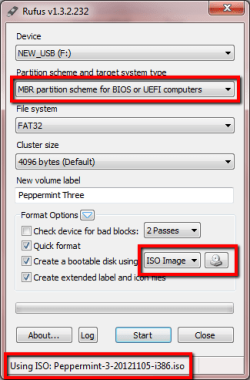
Click Start, and then OK on the warning pop-up to write the ISO and make the USB flash drive bootable. Once complete, a confirmation message is displayed, as shown below.
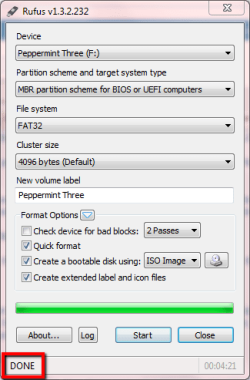
You can now close Rufus and unplug the USB flash drive. You have now created the Live PepperMint3 Linux USB. Step B - Booting from the Live Peppermint3 USB/CD/DVD
Insert the USB flash drive into a USB2 port (or insert the CD/DVD into the DVD drive) on the problem computer and boot with either device.
After a few seconds, the PepperMint3 boot screen will appear. Select Live Mode as shown below. and hit enter.
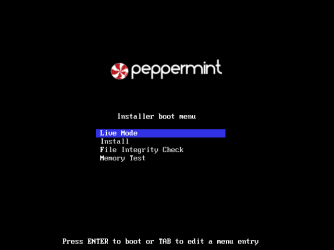
PepperMint3 will now boot to the screen shown below.

Step C - Copying user data to the external USB drive
Click Menu and then click File Manager as shown below.
Click on the File Manger that opens, and then type CTRL+N to open a duplicate File Manger Window and arrange them side-by-side.
Use the left-hand file manager window to browse for and locate the files you want to copy. Select your external USB drive in the right-hand side file manager window. Now simple click & drag the files you want to copy from the left-hand window to the one on the right. In the example shown below, I am copying my Music folder to the external USB drive.
When you are done copying, close the file manger windows, and then select the Logout option from the Menu button. Now select Shutdown as shown below.
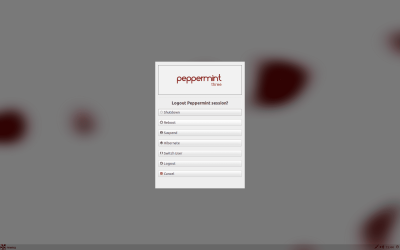
That's it - your data files are now safely copied to your external USB drive.
Computer type PC/Desktop OS Windows 7 Home Premium 64bit SP1 CPU Intel Pentium(R) E5200 @ 2.50GHz Motherboard Intel Corporation DG41WV (PROCESSOR) Memory 4096 MBytes Dual-Channel DDR3 @ 398MHz Graphics Card ATI Radeon HD 5450 (ASUStek Computer Inc) Sound Card Realtek High Definition Audio Monitor(s) Displays DELL E170S on ATI Radeon HD 5450 Screen Resolution 1280x1024 pixels
Keyboard Logitech PS/2 Keyboard Mouse A4 Tech Co Ltd/Logitech PSU 400W Case Nothing Fancy Cooling Fans Hard Drives 466GB Western Digital WDC Internet Speed 512 Kbps Antivirus Microsoft Security Essentials & Malwarebytes Browser Chrome & Internet Explorer 9 Other Info Imation 8 GB USB, 6 GB Seagate External Hard drive, ASUS DVD-E818A7T ATA Device
Computer type PC/Desktop System Manufacturer/Model Number Golden Mk. I.3 OS Windows 7 Ultimate SP1 (x64) CPU Intel i7 860 @ 2.80 GHz Motherboard Gigabyte P55A-UD3R Rev.1. Award BIOS F13 Memory 16GB Corsair Vengance DDR3 @ 661 MHz Dual Channel (9-9-9-24) Graphics Card EVGA NVidia GTX 560 1024MB Sound Card Realtek Integrated Monitor(s) Displays Dual Samsung SyncMaster 2494HS Screen Resolution 1920*1080 and 1920*1080
Keyboard Logitech G110 Mouse Logitech MX518 PSU Thermaltake ToughPower QFan 750W Case Thermaltake Element S VK60001W2Z Cooling Corsair H60 Water Cooling, 2*230mm and 2*80mm case fans Hard Drives 1*OCZ Vertex 2 60GB SSD;
2*Samsung F3 SpinPoint 1TB in RAID0;
3*Samsung F1 SpinPoint 1TB in RAID5;
1*Western Digital 500GB External USB 3.0
1*Seagate 500GB External USB 2.0 Internet Speed Not fast enough!!! Antivirus MSE and Malwarebytes Pro Browser Chrome Version 25 Other Info Laptop: ASUS X54C, Intel Core i3-2330M @ 2.0Ghz, 4GB RAM, Intel HD on-board graphics, Windows 7 Professional SP1 (x64), LinuxMint 14 (x64), PepperMint 3 (x86)
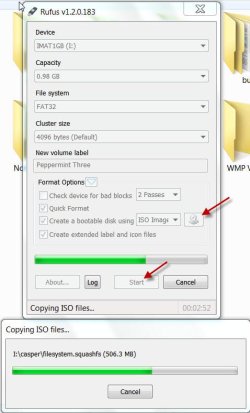
It has a no-install executable that has a familiar Windows GUI look and it is very simple to create a bootable pendrive. Just show it the location of the ISO and click start and the bootable pendrive is ready within minutes.
Well, there are many ways of doing the samething. Just wanted to share my way.
I did contemplate writing a Wary Puppy or similar, but in the end the PepperMint3 interface just looks so familiar to Windows, and that was one of the over-riding concerns : making it as easy as possible for non-Linux users. I also looked at Rufus briefly, but in the end the colourful, translucent Lili interface swayed me - I'm simple that way! hehehe.
Youre right, there are many ways to skin a cat, the more the merrier.Thanks again
Computer type PC/Desktop System Manufacturer/Model Number Golden Mk. I.3 OS Windows 7 Ultimate SP1 (x64) CPU Intel i7 860 @ 2.80 GHz Motherboard Gigabyte P55A-UD3R Rev.1. Award BIOS F13 Memory 16GB Corsair Vengance DDR3 @ 661 MHz Dual Channel (9-9-9-24) Graphics Card EVGA NVidia GTX 560 1024MB Sound Card Realtek Integrated Monitor(s) Displays Dual Samsung SyncMaster 2494HS Screen Resolution 1920*1080 and 1920*1080
Keyboard Logitech G110 Mouse Logitech MX518 PSU Thermaltake ToughPower QFan 750W Case Thermaltake Element S VK60001W2Z Cooling Corsair H60 Water Cooling, 2*230mm and 2*80mm case fans Hard Drives 1*OCZ Vertex 2 60GB SSD;
2*Samsung F3 SpinPoint 1TB in RAID0;
3*Samsung F1 SpinPoint 1TB in RAID5;
1*Western Digital 500GB External USB 3.0
1*Seagate 500GB External USB 2.0 Internet Speed Not fast enough!!! Antivirus MSE and Malwarebytes Pro Browser Chrome Version 25 Other Info Laptop: ASUS X54C, Intel Core i3-2330M @ 2.0Ghz, 4GB RAM, Intel HD on-board graphics, Windows 7 Professional SP1 (x64), LinuxMint 14 (x64), PepperMint 3 (x86)
System Manufacturer/Model Number Hewlett packard/p6512uk OS Microsoft Windows 7 Home Premium 64-bit 7600 CPU IIx4 amd athelon 635 processor Motherboard FOXCONN 2AA9 Memory 2x2gb Graphics Card ati radeon HD 5450 Sound Card (1) Realtek High Definition Audio (2) AMD High Definition Monitor(s) Displays samsung lcd tv 32" Screen Resolution 1360x 768
Keyboard wireless hp Mouse wireless Hp,optical PSU ? Cooling air! Hard Drives (1) WDC WD10 01FAES-60Z2A0 SATA Disk Device (2) Maxtor OneTouch USB Device (3) ST310003 33AS USB Device (4) WD My Book 1111 USB Device Internet Speed 1.10mb/s Antivirus MSE Browser Firefox
Computer type PC/Desktop System Manufacturer/Model Number Golden Mk. I.3 OS Windows 7 Ultimate SP1 (x64) CPU Intel i7 860 @ 2.80 GHz Motherboard Gigabyte P55A-UD3R Rev.1. Award BIOS F13 Memory 16GB Corsair Vengance DDR3 @ 661 MHz Dual Channel (9-9-9-24) Graphics Card EVGA NVidia GTX 560 1024MB Sound Card Realtek Integrated Monitor(s) Displays Dual Samsung SyncMaster 2494HS Screen Resolution 1920*1080 and 1920*1080
Keyboard Logitech G110 Mouse Logitech MX518 PSU Thermaltake ToughPower QFan 750W Case Thermaltake Element S VK60001W2Z Cooling Corsair H60 Water Cooling, 2*230mm and 2*80mm case fans Hard Drives 1*OCZ Vertex 2 60GB SSD;
2*Samsung F3 SpinPoint 1TB in RAID0;
3*Samsung F1 SpinPoint 1TB in RAID5;
1*Western Digital 500GB External USB 3.0
1*Seagate 500GB External USB 2.0 Internet Speed Not fast enough!!! Antivirus MSE and Malwarebytes Pro Browser Chrome Version 25 Other Info Laptop: ASUS X54C, Intel Core i3-2330M @ 2.0Ghz, 4GB RAM, Intel HD on-board graphics, Windows 7 Professional SP1 (x64), LinuxMint 14 (x64), PepperMint 3 (x86)
System Manufacturer/Model Number n/a OS Windows 7 Ultimate SP1 (64 bit), Windows XP SP3, Linux Mint 14 MATE (64 bit) CPU AMD Phenom II x6 1055T, 2.8 GHz Motherboard ASRock 880GMH-LE/USB3 Memory 8GB DDR3 1333 G-Skill Ares F3-1333C9D-8GAO (4GB x 2) Graphics Card ATI Radeon HD6450 Sound Card Realtek? Monitor(s) Displays Samsung S23B350 Screen Resolution 1920x1080
Mouse Wired Optical Case Tower Hard Drives Western Digital 1 TB (SATA), Western Digital 1.5 TB (SATA), Western Digital 2 TB (SATA) Internet Speed DSL Other Info Ubuntu 10.04 (64 bit) replaced with Linux Mint 14 MATE (64 bit) - 2013-01-14
RAM & Graphics Card Upgraded - 2013-01-13
Monitor Upgraded - 2012-04-20
System Upgraded - 2011-05-21, 2010-07-14
HDD Upgraded - 2010-08-11, 2011-08-24
Computer type PC/Desktop System Manufacturer/Model Number Golden Mk. I.3 OS Windows 7 Ultimate SP1 (x64) CPU Intel i7 860 @ 2.80 GHz Motherboard Gigabyte P55A-UD3R Rev.1. Award BIOS F13 Memory 16GB Corsair Vengance DDR3 @ 661 MHz Dual Channel (9-9-9-24) Graphics Card EVGA NVidia GTX 560 1024MB Sound Card Realtek Integrated Monitor(s) Displays Dual Samsung SyncMaster 2494HS Screen Resolution 1920*1080 and 1920*1080
Keyboard Logitech G110 Mouse Logitech MX518 PSU Thermaltake ToughPower QFan 750W Case Thermaltake Element S VK60001W2Z Cooling Corsair H60 Water Cooling, 2*230mm and 2*80mm case fans Hard Drives 1*OCZ Vertex 2 60GB SSD;
2*Samsung F3 SpinPoint 1TB in RAID0;
3*Samsung F1 SpinPoint 1TB in RAID5;
1*Western Digital 500GB External USB 3.0
1*Seagate 500GB External USB 2.0 Internet Speed Not fast enough!!! Antivirus MSE and Malwarebytes Pro Browser Chrome Version 25 Other Info Laptop: ASUS X54C, Intel Core i3-2330M @ 2.0Ghz, 4GB RAM, Intel HD on-board graphics, Windows 7 Professional SP1 (x64), LinuxMint 14 (x64), PepperMint 3 (x86)