


How to Save a Search in Windows 7 and Windows 8
InformationIf you often perform a search for a certain group of files, then this will show you how to save your search so you can open the saved search at anytime to see the most current search results using the same settings as the original search. When you save a search, you don't have to fine-tune the search settings and filters the next time you want to use it.
Here's How:
1. Open and perform a search in Windows Explorer (Windows 7) or File Explorer (Windows 8).That's it,
NOTE: Just for an example, searching for all .bmp files on the C: drive.
2. When search has finished, click on: (see screenshots below)In Windows 7: Save search on the toolbar.
In Windows 8: Search (Search Tools) tab, and Save Search in ribbon.3. In the File Name box, type in a name for the search that will make it easy to know what it is for, then click/tap on the Save button. (See screenshot below)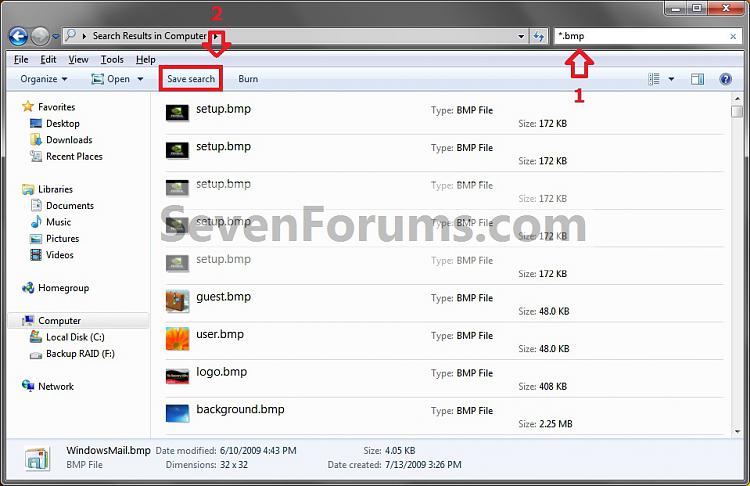
4. By default the saved search itself will be saved in the C:\Users\(user-name)\Searches folder. (See screenshots below)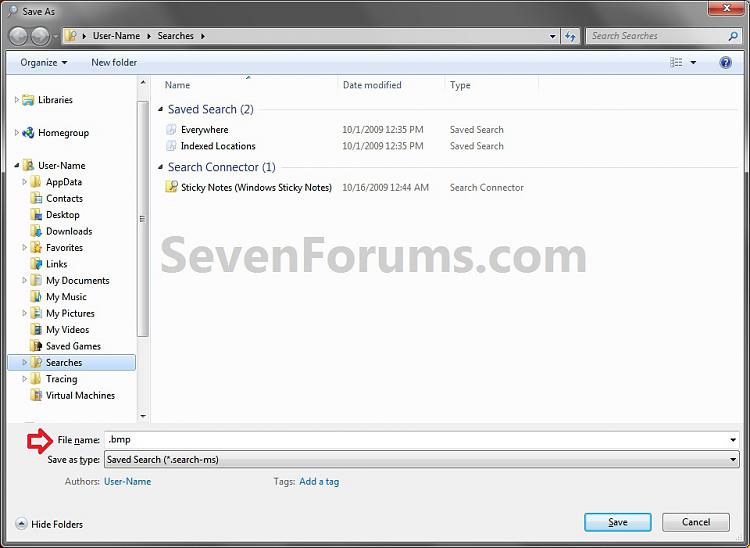
NOTE: To delete the saved search, right click on it at these locations and click/tap on Delete like any other file.5. A shortcut of the saved search will also be added to the Favorites section of the navigation pane. (See screenshot below)

NOTE: To remove the save search from the Favorites section only, right click on it and click/tap on Remove.6. You can now open the saved search from any of these locations anytime you want to perform the same search again to help make it easier.
Shawn
Related Tutorials
- How to Search in Windows 7
- How to Search for Apps, Settings, and Files in Windows 8
- How to Change or Restore the Default Windows 7 Search Options
- How to Turn Windows 7 Search On or Off
- How to Create a Search Shortcut in Windows 7
- How to Have More Accurate Search Results in Windows 7 and Vista
- How to Configure and Fully Utilize Windows 7 Search
- How to Add "Search" to "My Computer" Context Menu in Vista and Windows 7
- How to Use Windows Search Filters and Operators to get better Search Results in Windows 7
- How to Create a "Searches" Library with Correct Icon in Windows 7 and Windows 8
Save a Search
-
New #1
Ah yes....but how can I save a search to a library. For example I have done a search on all items with "niche" in them and want to add them to a library. If the results resided in just a few folders it would be straightforward to add these folders manually to the new library I have created. But is there any way I can add the results of a search to a (new) library?
Thanks
-
New #2
Hello zzzmuzz, and welcome to Seven Forums.
Yes. You can right click on the C:\Users\(user-name)\Searches folder, and click on Include in Library and Create new Library to create a new Search library with the saved searched referenced in it. This way anytime you save a search in the C:\Users\(user-name)\Searches folder, it will also be in the library automatically.
If you have saved searches in other folders, then you can include them in the new Searches library folder as well if you like.
Hope this helps,
Shawn
-
New #3
Search added to Library
Thanks Brink. I can do a work around with the info you provided, however, my search folder "Searches" has four search folders in it. I can not do an "include in library" from the relevant folder. I can do an "include in library" from the "Searches" folder but that includes ALL of the searches as a library.
Neither can I do it with an individual search folder the other way around, namely, working from the Libraries.. ie Specific Library/Properties. This will not allow the addition of a search folder.
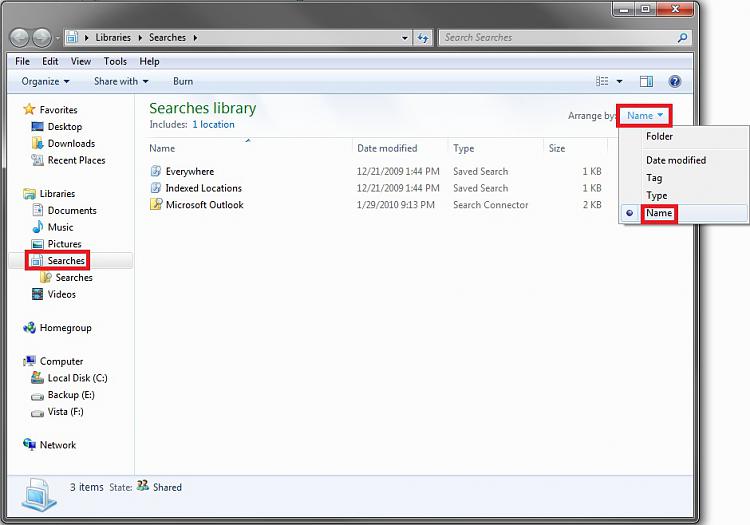
As a work around, I have done an "Include in Library" of "Searches" - and then deleted the ones I dont want. It still looks a bit odd with a Library called Searches, with a subfolder called Searches and then at the next level, my library folder, "nicheinfo"
Have I got this right?
Thanks again for your assistance.
-
New #4
You're most welcome zzzmuzz.
That sounds about right, but you can change the Arrange by to Names instead in the library to have it listed differently.


 Quote
Quote
Related Discussions