

How to Reset Windows Backup Files Configuration in Windows 7 and Windows 8
InformationThis will show you how to reset the backup user and system files current configuration back to a default unconfigured state in Windows 7 and Windows 8.
You must be logged in as an administrator to reset Windows Backup.
NoteThis can be handy if you had deleted the current User and System Backup Files, and would like to reset this back to a default unconfigured state to not have the last backup information still displayed in Backup and Restore.
TipBackup User and System Files will remain in a default unconfigured state until the next time you create a new User and System files backup.
EXAMPLE: Backup User and System Files Configured and Reset
NOTE: The left screenshot is Backup with an existing backup configuration with the backup files deleted. The right screenshot is Backup reset to the default unconfigured state.
OPTION ONETo Reset Windows Backup to Default using a Reg File Download
1. Click/tap on the download button below to download the file below.Reset_Back_Up_Files.reg2. Save the .reg file to your Desktop.
3. Double click/tap on the downloaded .reg file to merge it.
4. Click/tap on Run, Yes (UAC), Yes, and OK when prompted.
5. When done, you can delete the downloaded .reg file if you like.
6. If You Had Set an Automatic Backup Schedule
NOTE: This is to remove the automatic backup schedule from within Task Scheduler so that you will not get a "The last backup did not complete successfully" type message in Action Center.A) Press the Windows + R keys to open the Run dialog, type taskschd.msc, and press Enter.
B) If prompted by UAC, then click/tap on Yes.
C) In the left pane of Task Scheduler, double click/tap on Task Scheduler Library, Microsoft, and Windows to expand them, then select WindowsBackup. (see screenshot below)D) In the middle pane, right click/tap on only AutomaticBackup (if available), and click on Delete. (see screenshot above)
NOTE: If AutomaticBackup is not there, then you did not have a automatic backup schedule set.
E) Click/tap on OK to confirm deletion. (see screenshot below)F) Close Task Scheduler.
OPTION TWOTo Reset Windows Backup to Default in Registry Editor
1. Press the Windows + R keys to open the Run dialog,, type regedit, and press Enter.That's it,
2. If prompted by UAC, then click/tap on Yes.
3. In regedit, navigate to the location below (see screenshot below)HKEY_LOCAL_MACHINE\SOFTWARE\Microsoft\Windows\CurrentVersion\WindowsBackup4. In the right pane, right click on ValidConfig and click/tap on Delete. (see screenshot above)
5. Click/tap on Yes to confirm deletion.
6. The registry will now look like this. (see screenshot below)7. In the left pane, right click on ScheduleParams and click/tap on Delete. (see screenshot below)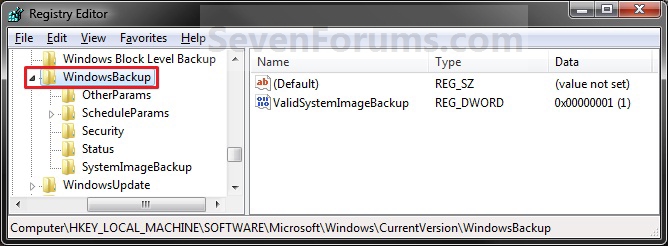 8. Click on Yes to confirm deletion.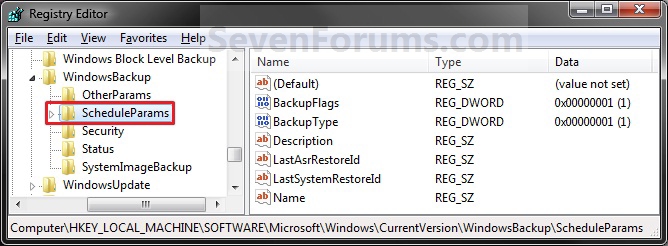
9. In the left pane, right click on Security and click/tap on Delete. (see screenshot below)10. Click/tap on Yes to confirm deletion.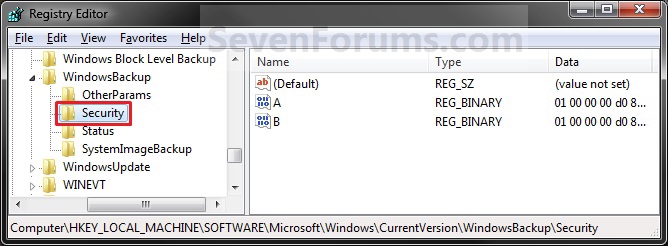
11. In the left pane, right click on Status and click/tap on Delete. (see screenshot below)12. Click/tap on Yes to confirm deletion.
13. The registry will now look like this. (2ee screenshot below)14. Close regedit.
15. If You Had Set a Automatic Backup Schedule
NOTE: This is to remove the automatic backup schedule from within Task Scheduler so that you will not get a "The last backup did not complete successfully" type message in Action Center.A) Press the Windows + R keys to open the Run dialog, type taskschd.msc, and press Enter.
B) If prompted by UAC, then click/tap on Yes if administrator or enter the administrator's password if standard user.
C) In the left pane of Task Scheduler, double click/tap on Task Scheduler Library, Microsoft, and Windows to expand them, then select WindowsBackup. (see screenshot below)D) In the middle pane, right click on only AutomaticBackup (if available), and click on Delete. (see screenshot above)
NOTE: If AutomaticBackup is not there, then you did not have a automatic backup schedule set.
E) Click/tap on OK to confirm deletion. (see screenshot below)F) Close Task Scheduler.
Shawn
Related Tutorials
- How to Back Up User and System Files in Windows 7
- How to Create or Set Up Windows Backup to Back Up Files in Windows 8
- How to Turn the Windows 7 Backup Files Schedule On or Off
- How to Delete Windows 7 User and System Backup Files
- How to Restore Backup User and System Files in Windows 7
- How to Enable or Disable to Backup Data Files in Windows 7
- How to Create a Windows 7 Backup User and System Files Shortcut
- How to Create a Windows 7 Restore Backup User and System Files Shortcut
- How to Create a Windows 7 Backup and Restore Shortcut
- How to Reset File History to Default in Windows 8
Backup User and System Files - Reset to Default Configuration
-
New #1
It's good, but I have a problem with that backup and after four days i'm stuck. Could you maybe know what to do? Except to format the drive and install windows again? Here is the picture ,so i'm open for sugesstions!!
https://www.sevenforums.com/members/kizo2703-albums-win-7-picture186-screenshot003c.pngLast edited by kizo2703; 24 Apr 2010 at 12:44.
-
New #2
Hello Kizo2703, and welcome to Seven Forums.
Are you using McAfee by chance? Folks have reported that McAfee was the cause of this for them. As a test exit out of McAfee to see if it will let you afterwards.
If not, then you can try a System Restore using a restore point dated when you knew it worked ok, or if all else fails a repair install should help.
Hope this helps,
Shawn
-
New #3
Win 7 backup
No ,now I have AVG ,and I also tested it but it's the same. System restore doesn't help because I simply don't know when did that started! Until yesterday I didn't made any backups ,but when I started it stopped on 13% without any notice! And ,of course I can't change anything!
OK ,I will try with repair and than we will see! Thanks anyway!

-
-
New #5
Hi Shawn,
Thanks for the nice walkthrough. After doing all the steps you suggested the backup information is gone from Backup and Restore applet but the last backup info and timestamp is still showing in the action center. I tried everything I could think of with no luck. I cleared the logs, messing with the registry etc, nothing did the trick. Do you have any suggestions on how can I reset the backup status in the action center?
Thanks a lot,
Alex.
-
New #6
Hello Alex, and welcome to Seven Forums.
I have not found a way to reset the Action Center for backups yet other than it being updated the next time that you do a backup. I'll keep looking into it and will update this tutorial and you if I find a way.
Sorry,
Shawn
-
New #7
Thanks for the feedback Swawn. Please keep me in the loop if you find anything. :)
Alex.
-
-

Backup User and System Files - Reset to Default Configuration
How to Reset Windows Backup Files Configuration in Windows 7 and Windows 8Published by Brink


 Quote
Quote
Related Discussions