| | Welcome to Windows 7 Forums. Our forum is dedicated to helping you find solutions with any problems, errors or issues you are experiencing with Windows 7. The Windows 7 forum also covers news and updates and has an extensive Windows 7 tutorial section that covers a wide range of tips and tricks. | Windows 7 - Memory Diagnostics Tool
Memory Diagnostics Tool How to Run the Memory Diagnostics Tool in Windows 7
Published by Brink
11-27-2008
| Memory Diagnostics Tool How to Run the Memory Diagnostics Tool in Windows 7  Information This will show you how to run the Windows Memory Diagnostic Tool to test the Random Access Memory (RAM) on your computer for errors in Windows 7. The diagnostic includes a comprehensive set of memory tests. If you are experiencing problems while running Windows, you can use the diagnostic to determine whether the problems are caused by failing hardware, such as RAM or the memory system of your motherboard. For more information, see: Microsoft Online Crash Analysis: Windows Memory Diagnostic Users Guide  Tip If you suspect memory issues, then you may also want to consider using and running Memtest86+ at boot. Memtest86+ is a comprehensive stand-alone memory diagnostic program that you boot from at startup to test your RAM. You can download a ISO file to burn to DVD to boot with, or a floppy disk package installable from Windows to a USB flash drive or floppy disk to boot with. Here's How: NOTE: Start with either step 1, 2, or 3 for how you want to start the Memory Diagnostics Tool. 1. To Start from within Windows 7A) Open the Control Panel (All Items View).
B) Click on the Administrative Tools icon, and click on Memory Diagnostics Tool.
C) Go to step 1F below. OR
D) Open the Start menu.
E) In the Start Menu search box, type mdsched and press Enter. (See screenshot below) F) Select the Restart now and check for problems option. (See screenshot below) G) Go to step 4. 2. To Start from Windows Boot Manager A) Boot into the Advanced Boot Options screen.
B) While in the Advanced Boot Options screen, press the Escape (Esc) key. (See screenshot below) C) While in the Windows Boot Manager screen, press the Tab key. (See screenshot below) D) With Windows Memory Diagnostics selected, press Enter. (See screenshot below) E) Go to step 4. 3. To Start from System Recovery OptionsA) Boot into the System Recovery Options screen.
B) Select the Windows Memory Diagnostic Tool option. (See screenshot below) C) Select the Restart now and check for problems option. (See screenshot below)
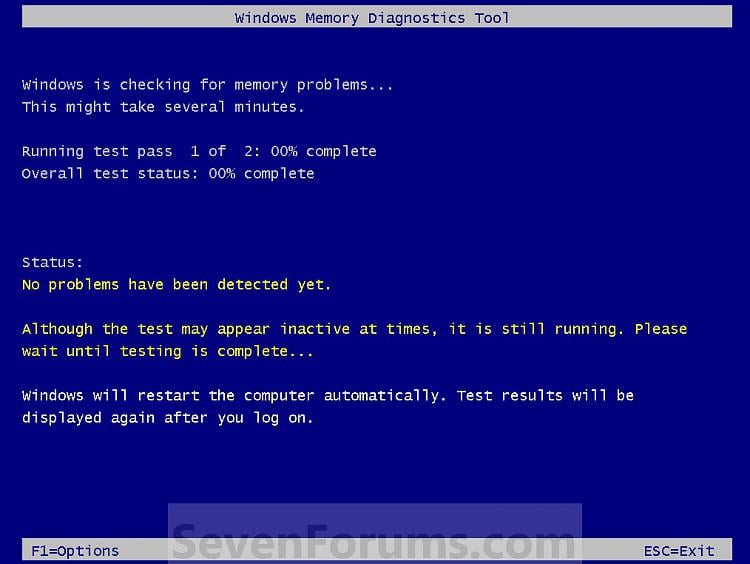
4. The computer will now restart, and you will see this screen next. (See screenshot below. NOTE: Windows Memory Diagnostic Tool will run the Standard test by default.
A) Go to step 6. 5. To Change the Memory Diagnostic Tool OptionsA) Press F1. (See screenshot above) NOTE: If you have a multimedia keyboard, then you may need to press the Function (F-Lock) key for F1 to work.
B) Press the TAB key to switch between the option categories, and use the arrow keys to select the option. (See screenshot below) C) When finished, press F10 to apply any changes you made to the options. (See screenshot above) NOTE: Press the Escape (Esc) key if you do not wish to make any changes to the options and return to the screen below step 4. 6. When the test is finished running, it will automatically restart the computer. (See screenshot below step 4) NOTE: If errors are found, the Windows Memory Diagnostics Tool will attempt to determine which particular memory module in your computer is causing these errors. If that information is available, it will be stated in the results after you log on from the restart. If bad memory is found then you will need to remove that memory and replace it. 7. You can also read the Memory Diagnostic Tool system log in Event Viewer. That's it,
Shawn |  Published by | | Administrator Join Date: Oct 2008 Location: Texas Posts: 34,499 | |
 Tutorial Tools | | | | | | | | | |
09-22-2009
|
#1 | | |
Windows Memory Diagnostics Tool Windows Memory Diagnostics Tool will not stop running been running all night and this morning still running how can i stop it. | My System Specs | | System Manufacturer/Model Number Self built OS windows 7 RC CPU Intel dual core 2.53 Motherboard ASUS Memory 4GB Graphics Card HIS Sound Card Builtin Monitor(s) Displays ACER CTR 21inch Hard Drives T1 |
09-22-2009
|
#2 | | XP_Pro, W7_7201, W7RC.vhd, SciLinux5.3, Fedora12, Fedora9_2x, OpenSolaris_09-06 |
Lower Right (on white Status bar)
Early, Am... | My System Specs | | System Manufacturer/Model Number Gateway GT5056 OS XP_Pro, W7_7201, W7RC.vhd, SciLinux5.3, Fedora12, Fedora9_2x, OpenSolaris_09-06 CPU AMD 64x2 Motherboard Yes Memory 1 gig Graphics Card Dunno Sound Card Realtek something Monitor(s) Displays Samsung SyncMaster 940MW w/TV Screen Resolution 1280x1024 Hard Drives 250 GB WD, USB Seagate Freedesk 1.5 T Internet Speed Cable modem Other Info 1 + 1 = 10b,
7 + 7 = 16o,
a + b = 15h. |
09-22-2009
|
#3 | | |
wish it worked but all that dose is stop the scan from starting for next phase
wont shut off by any of the controls | My System Specs | | System Manufacturer/Model Number Self built OS windows 7 RC CPU Intel dual core 2.53 Motherboard ASUS Memory 4GB Graphics Card HIS Sound Card Builtin Monitor(s) Displays ACER CTR 21inch Hard Drives T1 |
09-22-2009
|
#4 | | Windows 7 Ultimate x64 SP1 |
Hello Thumper, and welcome to Seven Forums.
You can just manually restart the computer by pressing the reset button on your computer's case to stop it. | My System Specs | | System Manufacturer/Model Number Self built custom OS Windows 7 Ultimate x64 SP1 CPU Intel i7-980X 3.3 Ghz (3.48 Ghz OC'd) Motherboard ASUS P6X58D Premium Memory 12 GB (2GBx6) DDR3 PC3-16000 2000 MHz Kingston HyperX Graphics Card Sapphire HD5870 Eyefinity 6 2GB Sound Card Realtek HD Audio ALC889 Integrated Chip Monitor(s) Displays 3x 27" Asus VE278Q Screen Resolution 1920x1080 Keyboard Logitech Cordless Desktop MX 5500 Revolution Mouse Logitech Cordless Desktop MX 5500 Revolution PSU OCZ Series Gold OCZZ1000M 1000W Case Corsair Obsidian 800D Cooling Thermalright Ultra 120 Extreme Copper CPU heat sink w/120 MM Hard Drives 160GB OCZ RevoDrive X2
** 2 x 1TB Samsung HDD HD154UI SATA Internet Speed 50 Mb/s Download and 2 Mb/s Upload Other Info Microsoft LifeCam Cinema
** Lite-On iHBS212 12x BD Writer
** Samsung CLX-3175FW Printer
** Netgear WNDR3800 Router
** Motorola SBG6580 Cable Modem
** 2x APC Back-UPS XS 1500 |
09-22-2009
|
#5 | | |

Quote: Originally Posted by Brink Hello Thumper, and welcome to Seven Forums.
You can just manually restart the computer by pressing the reset button on your computer's case to stop it.  How about Task Manager. Pull's me out sometimes. | My System Specs | | System Manufacturer/Model Number Brand X OS win 7 X64 Ultimate SP1 CPU I7950 Motherboard Asus P6X58D Premium Memory Corsair Dominator (6X2) CMD12GX3M6A1600C8 Graphics Card NVIDIA GeForce GTX460 Sound Card Realtek HD 5.1 (MOB) Monitor(s) Displays Asus VW224T (1) Screen Resolution 1680x1050 Keyboard MS Wireless 3000 V2 Mouse MS Wireless 3000 V2 PSU CoolerMaster 1000 Watt Case CoolerMaster HAF X Cooling CPU -- CoolerMaster 520N Hard Drives SATA
Corsair Perform3 2.5" 120GB (System)
OCZSSD2-2SLD120G 2.5" 120GB SATA II
WD3200AAKS Storage
WD3200AAKS Storage
WDC5000AACS (Internal)
WD15EARS (External) Internet Speed Cable Other Info AMI Bios 1501
OC'd 13% |
09-22-2009
|
#6 | | Windows 7 Ultimate x64 SP1 |

Quote: Originally Posted by HammerHead 
Quote: Originally Posted by Brink Hello Thumper, and welcome to Seven Forums.
You can just manually restart the computer by pressing the reset button on your computer's case to stop it.  How about Task Manager. Pull's me out sometimes. Sorry HammerHead, but this is running at boot before Windows 7 starts. You would not have the Task Manager as an option. Only after Windows 7 starts up you would. | My System Specs | | System Manufacturer/Model Number Self built custom OS Windows 7 Ultimate x64 SP1 CPU Intel i7-980X 3.3 Ghz (3.48 Ghz OC'd) Motherboard ASUS P6X58D Premium Memory 12 GB (2GBx6) DDR3 PC3-16000 2000 MHz Kingston HyperX Graphics Card Sapphire HD5870 Eyefinity 6 2GB Sound Card Realtek HD Audio ALC889 Integrated Chip Monitor(s) Displays 3x 27" Asus VE278Q Screen Resolution 1920x1080 Keyboard Logitech Cordless Desktop MX 5500 Revolution Mouse Logitech Cordless Desktop MX 5500 Revolution PSU OCZ Series Gold OCZZ1000M 1000W Case Corsair Obsidian 800D Cooling Thermalright Ultra 120 Extreme Copper CPU heat sink w/120 MM Hard Drives 160GB OCZ RevoDrive X2
** 2 x 1TB Samsung HDD HD154UI SATA Internet Speed 50 Mb/s Download and 2 Mb/s Upload Other Info Microsoft LifeCam Cinema
** Lite-On iHBS212 12x BD Writer
** Samsung CLX-3175FW Printer
** Netgear WNDR3800 Router
** Motorola SBG6580 Cable Modem
** 2x APC Back-UPS XS 1500 |
09-22-2009
|
#7 | | |
And i thank you all for your help but none of the above answers helped i had to remove the ram from both slot's to get it to reboot nothing else worked.some how it locked in that Memory Diagnostics Tool .so maybe this answer will help someone else in the further | My System Specs | | System Manufacturer/Model Number Self built OS windows 7 RC CPU Intel dual core 2.53 Motherboard ASUS Memory 4GB Graphics Card HIS Sound Card Builtin Monitor(s) Displays ACER CTR 21inch Hard Drives T1 |
09-22-2009
|
#8 | | Windows 7 Ultimate x64 SP1 |
Thumper, I'm happy to hear that you got it sorted. Thank you for posting back with your found solution. | My System Specs | | System Manufacturer/Model Number Self built custom OS Windows 7 Ultimate x64 SP1 CPU Intel i7-980X 3.3 Ghz (3.48 Ghz OC'd) Motherboard ASUS P6X58D Premium Memory 12 GB (2GBx6) DDR3 PC3-16000 2000 MHz Kingston HyperX Graphics Card Sapphire HD5870 Eyefinity 6 2GB Sound Card Realtek HD Audio ALC889 Integrated Chip Monitor(s) Displays 3x 27" Asus VE278Q Screen Resolution 1920x1080 Keyboard Logitech Cordless Desktop MX 5500 Revolution Mouse Logitech Cordless Desktop MX 5500 Revolution PSU OCZ Series Gold OCZZ1000M 1000W Case Corsair Obsidian 800D Cooling Thermalright Ultra 120 Extreme Copper CPU heat sink w/120 MM Hard Drives 160GB OCZ RevoDrive X2
** 2 x 1TB Samsung HDD HD154UI SATA Internet Speed 50 Mb/s Download and 2 Mb/s Upload Other Info Microsoft LifeCam Cinema
** Lite-On iHBS212 12x BD Writer
** Samsung CLX-3175FW Printer
** Netgear WNDR3800 Router
** Motorola SBG6580 Cable Modem
** 2x APC Back-UPS XS 1500 |
09-22-2009
|
#9 | | XP_Pro, W7_7201, W7RC.vhd, SciLinux5.3, Fedora12, Fedora9_2x, OpenSolaris_09-06 |

Quote: Originally Posted by thumper And i thank you all for your help but none of the above answers helped i had to remove the ram from both slot's to get it to reboot nothing else worked.some how it locked in that Memory Diagnostics Tool .so maybe this answer will help someone else in the further Did you hit it a second time,
after the first 'Esc' stopped the 'scan-in-progress'?
Did you have computer power 'on' when you yanked the memory boards?
Certainly, with mainframe power off, the box is ready to boot from anywhere,
when power is reapplied... | My System Specs | | System Manufacturer/Model Number Gateway GT5056 OS XP_Pro, W7_7201, W7RC.vhd, SciLinux5.3, Fedora12, Fedora9_2x, OpenSolaris_09-06 CPU AMD 64x2 Motherboard Yes Memory 1 gig Graphics Card Dunno Sound Card Realtek something Monitor(s) Displays Samsung SyncMaster 940MW w/TV Screen Resolution 1280x1024 Hard Drives 250 GB WD, USB Seagate Freedesk 1.5 T Internet Speed Cable modem Other Info 1 + 1 = 10b,
7 + 7 = 16o,
a + b = 15h. Memory Diagnostics Tool problems? All times are GMT -5. The time now is 05:36 AM. |  |