

How to Add or Remove the Customize Tab from Properties in Vista, Windows 7, and Windows 8
InformationThis will show you how to add or remove the Customize tab in the Properties window and the Cutomize this folder context menu item of folders and drives for all users in Vista, Windows 7, and Windows 8.
If the Customize tab is removed, all users will not be able to change the folder template, folder icon, or drive and folder pictures to show on icon.
NoteBy default, shell folders such as Desktop, Contact, Windows, Program Files, and system hard drives (ex: C: ) do not have the Customize tab in their Properties window and cannot have it added to them.
EXAMPLE: Customize Tab Added (default) and Removed from Properties
NOTE: This is in non system folders and drives when you right click on them and click on Properties.EXAMPLE: Customize Tab Added (default) and Removed from Context Menu
NOTE: This is in non system folders and drives when you open them in Windows Explorer, then right click on a empty space to open the context menu to see Customize this folder.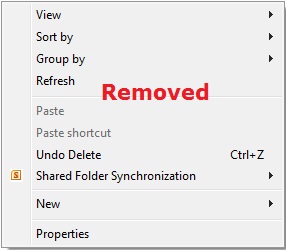
Here's How:1. Do step 2 or 3 below for what you would like to do.
2. To Add or Restore the Customize Tab
NOTE: This is the default setting.A) Click/tap on the Download button below to download the file below, and go to step 4 below.Restore_Customize_Tab.reg3. To Remove the Customize TabThat's it,A) Click on the Download button below to download the file below, and go to step 4 below.4. Save the .reg file to your desktop.Remove_Customize_Tab.reg
5. Double click/tap on the downloaded .reg file to merge it.
6. If prompted, click/tap on Run, Yes (UAC Windows 7/8) or Continue (UAC Vista), Yes, and OK.
7. When finished, you can delete the downloaded .reg file if you like.
Shawn
Related Tutorials
- How to Add or Remove the "Security" Tab from Properties in Vista, Windows 7, and Windows 8
- How to Add or Remove the "Hardware" Tab from Properties in Vista, Windows 7, and Windows 8
- How to Change a Folder Template in Windows 7
- How to Set a Default Folder Template for All Folders in Windows 7
- How to Add or Remove "Previous Versions" Tab from Properties in Vista, Windows 7, and Windows 8
- How to Add or Remove "Details" Tab in File Properties in Vista, Windows 7, and Windows 8
- How to Add or Remove "Compatibility" Tab in Properties Page in Vista, Windows 7, and Windows 8
Customize Tab - Add or Remove from Properties
-
-
New #2
It works! Thanks man :)
-
New #3
It didn't work for me. Any suggestions?
I downloaded the .reg file to restore the missing "customize this folder" and the "customize tab", and ran it, responding to the several messages that is required. No joy.
I'd really like to get it to work, so any other suggestions would be appreciated.
-
New #4
Hello Charley, and welcome to Seven Forums.
In that case, download and merge the .reg files for the listed Folder and Drive options in the tutorial below to restore their default associations and registry entries to hopefully fix this for you. :)
Default File Type Associations - Restore
-
New #5
Stubborn bugger
That still didn't restore the context menu or the tab to the properties dialog. How did I lose them in the first place?
-
New #6
As a test see if you may have it for your "C:\Users\(user-name)\Documents" folder to help see if it's all folders or just certain types.
If this just happened recently, then you could do a system restore using a restore point dated before it happened to undo it.
-
New #7
No joy
I thought maybe it was that I hadn't rebooted Win7 after the merging of the .reg files. But rebooting didn't help.
At C:/Users/Charley/ there is no Documents folder. There is a My Documents, and it does not have a "customize this folder" context option, and the property dialog does not have a customize tag.
In my navigation pane, I have "Libraries" and "Documents" under that. If I right click that entry, it does not have "customize this folder" but it does have properties. It has only one tab titled "Libraries". In that dialog, it has a pull down for Optimize this library for: and it has the different view that I want to select for, but I don't want to apply this option to all subdirectories of this folder.
-
-
New #9
I've probably been "in Libraries" since I upgraded from Vista to Win7. Is there a way to get out of "libraries"?
Customize Tab - Add or Remove from Properties
How to Add or Remove the Customize Tab from Properties in Vista, Windows 7, and Windows 8Published by Brink


 Quote
Quote
Related Discussions