

| Windows 7: Cookies - Delete Cookies - Delete How to Delete Cookies in Windows 7 and Vista
Published 28 Jun 2010
|  Published by | | |
 Featured Tutorial | | | How to Delete Cookies in Windows 7 and Vista  Information Cookies are small .txt (text) files that websites put on your computer to store information about you and your preferences, such as your name, site login password, preferences, shopping cart info, and more.
This will show you different ways on how to delete cookies in Windows 7 and Vista.
 OPTION ONE 
To Delete Cookies Using CCleaner
1. If you have not already, you will need to download and install the free CCleaner. 2. Run CCleaner, then make sure that Cookies is checked and click on the Analyze button. (see screenshot below) 3. Click on the Run Cleaner button to delete everything checked in step 2 above. (see screenshot below) 4. When finished, you can close CCleaner.
 OPTION TWO 
To Delete Cookies through Windows Explorer
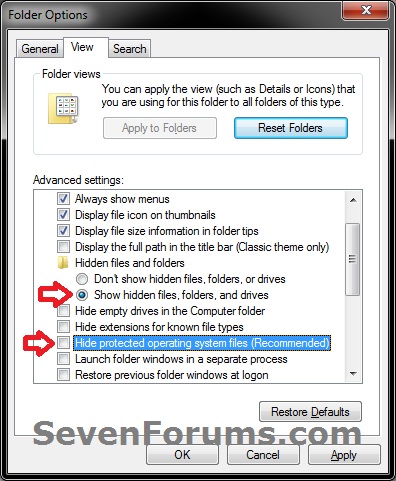
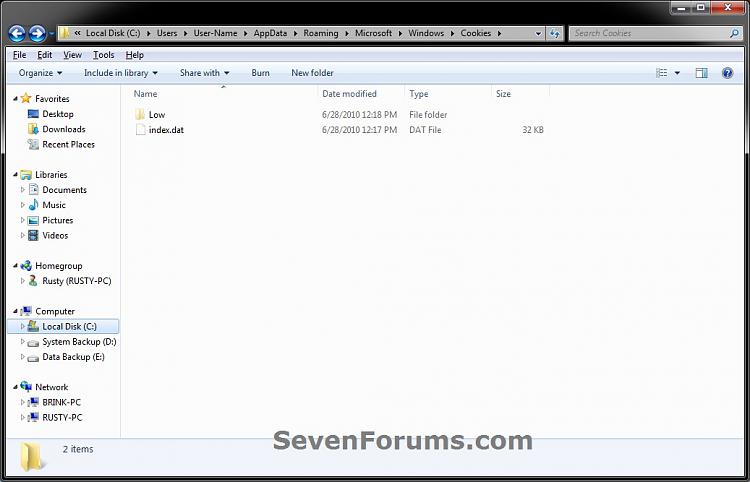
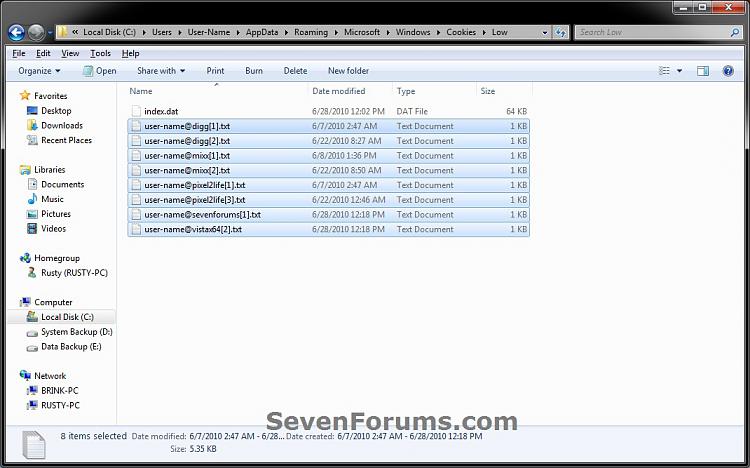
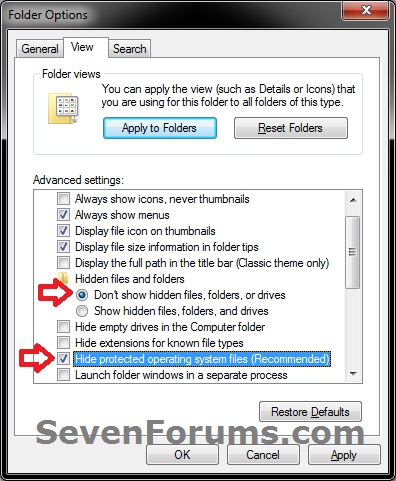
1. Open Folder Options, and select (dot) Show hidden files, folders, and drives and uncheck the Hide protected operating system files box. (see screenshot below) 2. In Windows Explorer, navigate to the hidden folder location below. Select and only Delete any listed .txt files (cookies) that you want to delete. (see screenshot below) NOTE: You can also just type shell:cookies in the Start Menu search box and press enter to open to this location without having to mess with Folder Options (step 1 and step 4). Code: C:\Users\(User-Name)\AppData\Roaming\Microsoft\Windows\Cookies 3. In Windows Explorer, navigate to the hidden folder location below. Select and only Delete any listed .txt files (cookies) that you want to delete. (see screenshot below) NOTE: You can also just type shell:cookies\Low in the Start Menu search box and press enter to open to this location without having to mess with Folder Options (step 1 and step 4). Code: C:\Users\(User-Name)\AppData\Roaming\Microsoft\Windows\Cookies\Low 4. Open Folder Options, and select (dot) Don't Show hidden files, folders, and drives and check the Hide protected operating system files box. (see screenshot below) 5. When finished, you can close Windows Explorer.
 OPTION THREE 
To Delete Cookies through Internet Explorer
1. Open the Control Panel (All Icons view), and click on Internet Options. A) Close the Control Panel.
B) Go to step 3. OR 2. Open Internet Explorer, then click on Tools and Internet Options (see screenshots below) 3. Under Browsing history in the General tab, click on the Delete button. (see screenshot below) 4. Check Cookies, and click on the Delete button. (see screenshot below) 5. Click on OK. (see screenshot below step 3) 6. When finished, you can close Internet Explorer.
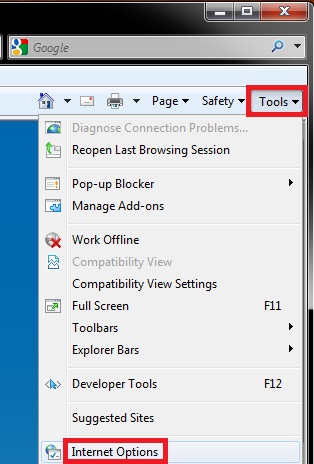
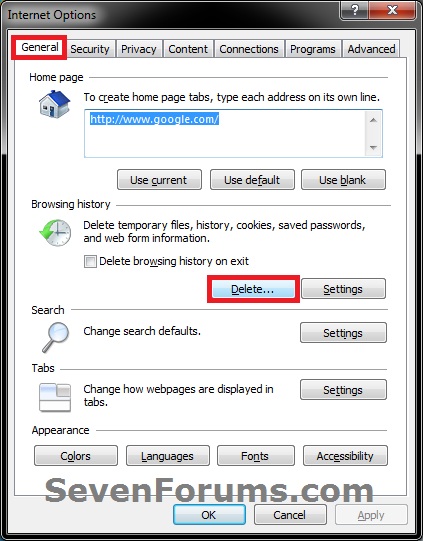
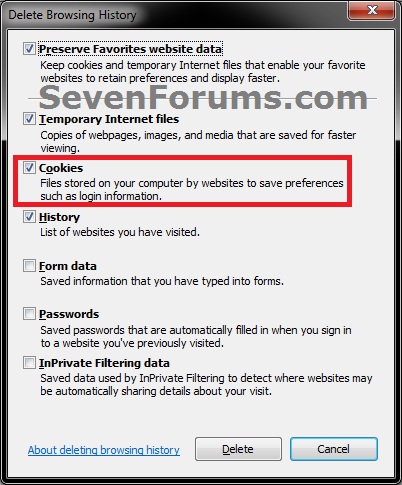
 OPTION FOUR 
To Delete Cookies through Firefox
1. If you have not already, you will need to download and install the free Firefox. 2. Open Firefox, then click on Tools and Options. (see screenshot below) 3. Click on the Privacy option icon, then click on the Show Cookies button. (see screenshot below) 4. To Only Delete a Selected CookieA) Select on or more cookies or cookie folders, then click on the Remove Cookie button. When done, click on Close. (see screenshot below)
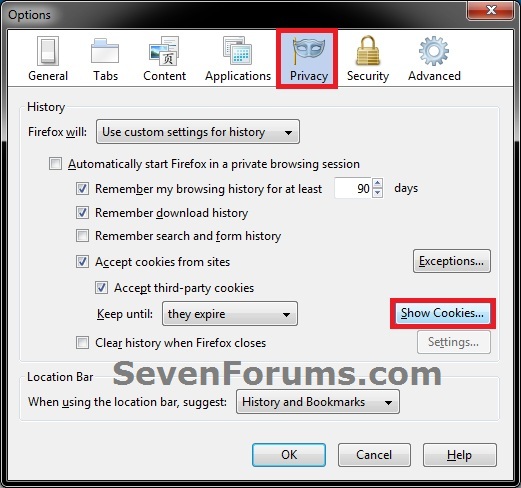
5. To Delete All CookiesA) Click on the Remove All Cookies button, and click on Close. (see screenshot above) 6. Click on OK. (see screenshot below step 3) 7. When finished, you can close Firefox. That's it,
Shawn | | | Need more help? Try searching our extensive help and support site.
Loading | |
28 Jun 2010
|
#1 | | |
Great idea for a tut. This is a question that comes up very often and there were a multitude of answers. This is now part of my favs, to give to those who want to delete their cookies. | My System Specs |
| System Manufacturer/Model Number Dell XPS 420 OS Windows 7 Home Premium SP1, clean install, upgrade disc CPU Intel Core2 processsor Q8200(2.33Ghz 1333FSB) Quad Core Tech Motherboard Dell Memory 6 gb Graphics Card ATI Radeon 256MB HD3650 Sound Card Intergrated 7.1 Channel Audio Monitor(s) Displays Dell SP2009W 20" Keyboard Dell USB Keyboard Mouse Dell Premium Optical USB Cooling Fan Hard Drives 640 GB Serial ATA Hard drive Internet Speed DSL 2.85 |
28 Jun 2010
|
#2 | | |
Thank you Richard. | My System Specs | | Computer type PC/Desktop System Manufacturer/Model Number Self built custom OS 64-bit Windows 7 Ultimate SP1 & Windows 8 Enterprise CPU Intel i7-3930K 3.2 Ghz (O/C 4 Ghz) Motherboard ASRock X79 Extreme11 Memory 32 GB (8GBx4) G.SKILL DDR3 Quad PC3-19200 2400MHz Graphics Card Sapphire HD5870 Eyefinity 6 2GB Sound Card SB Recon 3Di Integrated Chip Monitor(s) Displays 3x 27" Asus VE278Q Screen Resolution 1920x1080 Keyboard Logitech Cordless Desktop MX 5500 Revolution Mouse Logitech Cordless Desktop MX 5500 Revolution PSU OCZ Series Gold OCZZ1000M 1000W Case Thermaltake Level 10 GT Snow Edition Cooling Corsair Hydro H100 Hard Drives 256GB OCZ Vector
160GB OCZ RevoDrive X2
2 x 1TB Samsung HDD HD154UI SATA Internet Speed 50 Mb/s Download and 2 Mb/s Upload Other Info Microsoft LifeCam Cinema
Lite-On iHBS212 12x BD Writer
Samsung CLX-3175FW Printer
Netgear WNDR3800 Router
Motorola SBG6580 Cable Modem
2x APC Back-UPS XS 1500 |
28 Jun 2010
|
#3 | | |
One more option: Type shell:cookies into start/search and hit Enter. That brings up the cookies folder where you can delete them all or selectively. | My System Specs | | System Manufacturer/Model Number HP, Dell, Gateway, Toshiba - 4 laptops and 2 desktops OS Vista, Windows7, Mint Mate, Zorin, Windows 8 CPU from 1.6GHz Duo to i7 Monitor(s) Displays 2x HP w2207 Keyboard with trackball - no mices Mouse Trackball mice Hard Drives 5x HDD, 7x SSD, 12x Externals Internet Speed DSL 6000 |
28 Jun 2010
|
#4 | | |
Thank you for the reminder WHS. It has been added under step 3 and 4 in OPTION TWO. | My System Specs | | Computer type PC/Desktop System Manufacturer/Model Number Self built custom OS 64-bit Windows 7 Ultimate SP1 & Windows 8 Enterprise CPU Intel i7-3930K 3.2 Ghz (O/C 4 Ghz) Motherboard ASRock X79 Extreme11 Memory 32 GB (8GBx4) G.SKILL DDR3 Quad PC3-19200 2400MHz Graphics Card Sapphire HD5870 Eyefinity 6 2GB Sound Card SB Recon 3Di Integrated Chip Monitor(s) Displays 3x 27" Asus VE278Q Screen Resolution 1920x1080 Keyboard Logitech Cordless Desktop MX 5500 Revolution Mouse Logitech Cordless Desktop MX 5500 Revolution PSU OCZ Series Gold OCZZ1000M 1000W Case Thermaltake Level 10 GT Snow Edition Cooling Corsair Hydro H100 Hard Drives 256GB OCZ Vector
160GB OCZ RevoDrive X2
2 x 1TB Samsung HDD HD154UI SATA Internet Speed 50 Mb/s Download and 2 Mb/s Upload Other Info Microsoft LifeCam Cinema
Lite-On iHBS212 12x BD Writer
Samsung CLX-3175FW Printer
Netgear WNDR3800 Router
Motorola SBG6580 Cable Modem
2x APC Back-UPS XS 1500 |
28 Jun 2010
|
#5 | | |
Shawn, now you got me. What is the difference with or without the \low? The 2 folders seem to have different properties in terms of # of files. | My System Specs | | System Manufacturer/Model Number HP, Dell, Gateway, Toshiba - 4 laptops and 2 desktops OS Vista, Windows7, Mint Mate, Zorin, Windows 8 CPU from 1.6GHz Duo to i7 Monitor(s) Displays 2x HP w2207 Keyboard with trackball - no mices Mouse Trackball mice Hard Drives 5x HDD, 7x SSD, 12x Externals Internet Speed DSL 6000 |
28 Jun 2010
|
#6 | | |
WHS,
They are just two different locations that cookies are saved at. You'll find that most cookies are usually saved in the Low folder (subfolder in Cookies folder). | My System Specs | | Computer type PC/Desktop System Manufacturer/Model Number Self built custom OS 64-bit Windows 7 Ultimate SP1 & Windows 8 Enterprise CPU Intel i7-3930K 3.2 Ghz (O/C 4 Ghz) Motherboard ASRock X79 Extreme11 Memory 32 GB (8GBx4) G.SKILL DDR3 Quad PC3-19200 2400MHz Graphics Card Sapphire HD5870 Eyefinity 6 2GB Sound Card SB Recon 3Di Integrated Chip Monitor(s) Displays 3x 27" Asus VE278Q Screen Resolution 1920x1080 Keyboard Logitech Cordless Desktop MX 5500 Revolution Mouse Logitech Cordless Desktop MX 5500 Revolution PSU OCZ Series Gold OCZZ1000M 1000W Case Thermaltake Level 10 GT Snow Edition Cooling Corsair Hydro H100 Hard Drives 256GB OCZ Vector
160GB OCZ RevoDrive X2
2 x 1TB Samsung HDD HD154UI SATA Internet Speed 50 Mb/s Download and 2 Mb/s Upload Other Info Microsoft LifeCam Cinema
Lite-On iHBS212 12x BD Writer
Samsung CLX-3175FW Printer
Netgear WNDR3800 Router
Motorola SBG6580 Cable Modem
2x APC Back-UPS XS 1500 System Manufacturer/Model Number HP, Dell, Gateway, Toshiba - 4 laptops and 2 desktops OS Vista, Windows7, Mint Mate, Zorin, Windows 8 CPU from 1.6GHz Duo to i7 Monitor(s) Displays 2x HP w2207 Keyboard with trackball - no mices Mouse Trackball mice Hard Drives 5x HDD, 7x SSD, 12x Externals Internet Speed DSL 6000 Cookies - Delete problems? All times are GMT -5. The time now is 11:13 AM. | |