
How to Import and Export Internet Explorer Cookies Per Site Privacy Actions
Information
With Internet Explorer Per Site Privacy Actions, you can specify which websites are always or never allowed to use cookies, regardless of their privacy setting.
This tutorial will show you how to import and export all of your personal Per Site Privacy Actions for cookies in Internet Explorer in Vista, Windows 7, and Windows 8.
This tutorial will show you how to import and export all of your personal Per Site Privacy Actions for cookies in Internet Explorer in Vista, Windows 7, and Windows 8.
Note
It can be handy to backup your Internet Explorer Per Site Privacy Actions by exporting them to a REG file so that you can use it to easily import your settings back, say after a clean install of Windows or after resetting Internet Explorer.
EXAMPLE: Internet Explorer Per Site Privacy Actions

OPTION ONE
To Export Internet Explorer Cookies Per Site Privacy Actions
1. Press the Windows + R keys to open the Run dialog, type regedit, and press Enter.
2. If prompted by UAC, then click on Yes (Windows 7/8) or Continue (Vista).
3. In regedit, navigate to the location below. (see screenshot below)
Code:
HKEY_CURRENT_USER\Software\Microsoft\Windows\CurrentVersion\Internet Settings\P3P 4. In the left pane, right click or press and hold on the P3P key,and click/tap on Export. (see screenshot above)
5. Navigate to your Desktop, then type in a name (ex: IE_Per_Site_Privacy_Actions) you want for this REG file, and click/tap on Save.
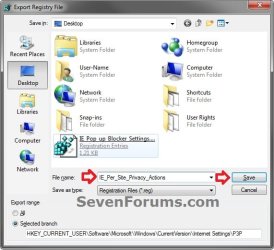 6. Now move this exported REG file to where you like to keep it at as a backup of all of your personal Internet Explorer cookies Per Site Privacy Actions.
 OPTION TWO
To Import Internet Explorer Cookies Per Site Privacy Actions
2. If prompted, click/tap on Run, Yes (UAC Windows 7/8) or Continue (UAC Vista), Yes, and OK to approve the merge.
3. Close and reopen Internet Explorer (if open) to apply.
That's it,
Shawn
Related Tutorials
- How to Allow or Block Cookies in Internet Explorer in Vista and Windows 7
- How to Allow or Block Cookies in IE10 and IE11 in Windows 8 and 8.1
- How to Delete Cookies in Windows 7 and Vista
- How to Enable or Disable DOM Storage "Cookies" in Internet Explorer and Firefox
- How to Import and Export Internet Explorer Pop-up Blocker Settings
- How to Import and Export RSS Feeds in Internet Explorer
- How to Import and Export Favorites in Internet Explorer
- How to Import and Export Cookies in Internet Explorer
- How to View the Webpage Privacy Report in Internet Explorer
- How to Import and Export Compatibility View Websites in Internet Explorer
Last edited:


