
Windows 7 Forums Search
Welcome to Windows 7 Forums. Our forum is dedicated to helping you find solutions with any problems, errors or issues you are experiencing with Windows 7. The Windows 7 forum also covers news and updates and has an extensive Windows 7 tutorial section that covers a wide range of tips and tricks.


Windows 7 - Windows Anytime Upgrade - How to


Windows Anytime Upgrade - How to

Hw to Do a Windows Anytime Upgrade in Windows 7
Published by theog
07-06-2010
Default Windows Anytime Upgrade - How to

How to Do a Windows Anytime Upgrade in Windows 7

information   Information
This method will allow you to upgrade your edition of Windows 7 and still keep your current programs, files, and settings intact.
Note   Note
You can use Windows Anytime Upgrade to upgrade a 32-bit version to a 32-bit version or from a 64-bit version to a 64-bit version of Windows 7. However, Windows Anytime Upgrade can't upgrade a 32-bit version to a 64-bit version of Windows 7 or a 64-bit version to a 32-bit version of Windows 7.

From Windows 7Anytime Upgrade to Windows 7
StarterHome Premium, Professional, Ultimate
Home BasicHome Premium, Professional, Ultimate
Home PremiumProfessional, Ultimate
ProfessionalUltimate

Windows Anytime Upgrade is only available for online purchase in Australia, Belgium, Canada, Germany, France, Italy, Japan, the Netherlands, Spain, Sweden, Switzerland, the United Kingdom, and the United States.


1) Click on Windows Anytime Upgrade
Windows Anytime Upgrade - How to-capture1.png
2) Click on Enter an upgrade key


Windows Anytime Upgrade - How to-capture2.png


3) Enter Upgrade key
Windows Anytime Upgrade - How to-capture3.png
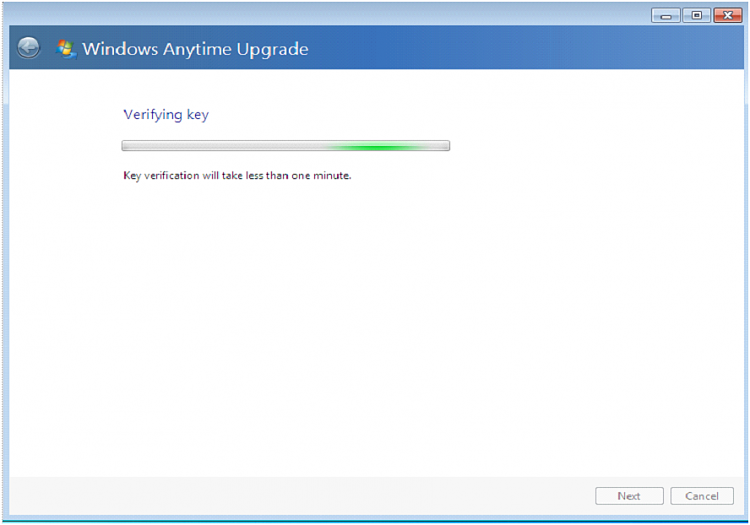
4) Click on I accept
Windows Anytime Upgrade - How to-capture4.png Windows Anytime Upgrade - How to-capture5.png
5) Click on Close.
Windows Anytime Upgrade - How to-capture6.png Windows Anytime Upgrade - How to-capture7.png
NOTE: When using Anytime Upgrade with SP1 installed, you may receive a message.
Upgrade was not successful.
First make sure, your Windows updates are up to date.
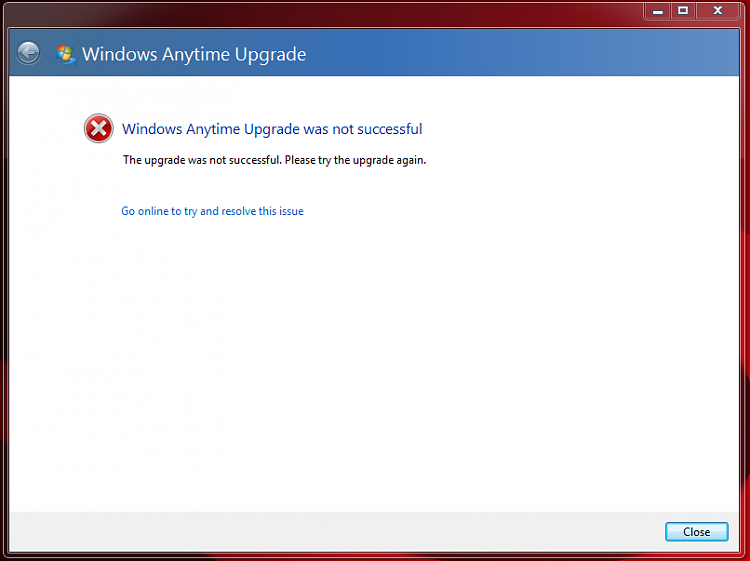
Windows Anytime Upgrade - How to-sp1.png

Close Window.

Name:  2011-02-24_140414.png
Views: 11524
Size:  17.8 KB

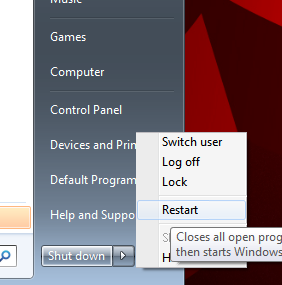
Manually RESTART your PC, & Upgrade will continue.


Published by
theog's Avatar
Senior Member


Join Date: Aug 2009
Location: uk Hampshire
Posts: 9,287

Tutorial Tools
07-06-2010   #1
Lomai


Win7 HP (x64)/Win7 Ultimate (x64)


Thanks for this

My System SpecsSystem Spec
07-06-2010   #2
theog


ME/XP/Vista/Win7


Quote   Quote: Originally Posted by Lomai View Post
Thanks for this
You are welcome.
My System SpecsSystem Spec
07-06-2010   #3
Bare Foot Kid


W 7 64-bit Ultimate


Nicely done Ray, thanks!
My System SpecsSystem Spec
.


07-06-2010   #4
theog


ME/XP/Vista/Win7


Thank you, BFK.
My System SpecsSystem Spec
08-03-2010   #5
chris4259


Windows 7 Home Premium


Just seen your How To Do An Upgrade. I have just got a new pre-installed Acer PC so when it says it keeps all programs, files and settings does it affect any of the manufacturers programs that were on the PC in addition to the windows programs
My System SpecsSystem Spec
08-03-2010   #6
theog


ME/XP/Vista/Win7


Quote   Quote: Originally Posted by chris4259 View Post
Just seen your How To Do An Upgrade. I have just got a new pre-installed Acer PC so when it says it keeps all programs, files and settings does it affect any of the manufacturers programs that were on the PC in addition to the windows programs
Anytime upgrade only adds-on the Programs & Features from version to version.
My System SpecsSystem Spec
08-03-2010   #7
chris4259


Windows 7 Home Premium


Many thanks
My System SpecsSystem Spec
08-03-2010   #8
theog


ME/XP/Vista/Win7


Quote   Quote: Originally Posted by chris4259 View Post
Many thanks
You are welcome, we are 24/7 to help.

Good luck with your upgrade. We love 7.
My System SpecsSystem Spec
02-12-2011   #9
bhavirisetty


windows 7 professional x86


Windows anytime upgarde problem

I am using windows 7 x86 professional (genuine activated via online with serial key),
and i have anytime upgrade key, by using this key i successfully upgraded to windows 7 ultimate.

Till now everything fine, But now the problem is windows 7 ultimate shows 30days trial version,

So how can i resolve this problem.

Thanks for consideration...
My System SpecsSystem Spec
Comment

 Windows Anytime Upgrade - How to problems?


Tutorial Tools


Similar Threads for: Windows Anytime Upgrade - How to
Windows 7 Tutorial Category
Question about Windows Anytime Upgrade ? General Discussion
need help! Windows 7 anytime upgrade. Windows Updates & Activation
Windows Anytime Upgrade. Risks? General Discussion
windows anytime upgrade Installation & Setup
Use DigitalRiver Pro key for windows anytime upgrade Installation & Setup


All times are GMT -5. The time now is 03:45 AM.


Windows 7 Forums is an independent web site and has not been authorized,
sponsored, or otherwise approved by Microsoft Corporation.
"Windows 7" and related materials are trademarks of Microsoft Corp.
© Designer Media Ltd
  

1 2 3 4 5 6 7 8 9 10 11 12 13 14 15 16 17 18 19 20 21 22 23 24 25 26 27 28 29 30