

How to Install a Driver in Device Manager
InformationNoteNOTE: for this example, I am using Windows XP Drivers.
You can use Vista, Windows 7 drivers, or (Windows 8 drivers on Windows 8)
PART ONEUsing Windows XP drivers
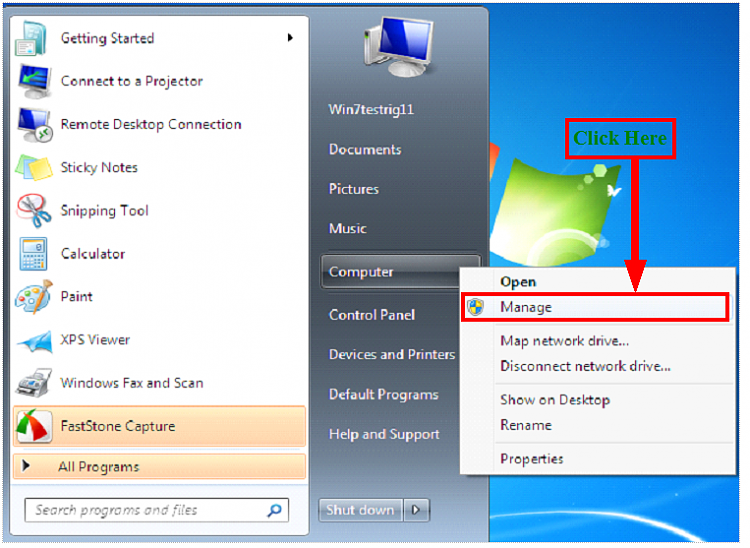 1) Click on Manage2) Click on Device Manager3) Click on Update Driver Software
4) Click on Browse my computer for drivers software5) Click on Browse6) Click on Drivers & OK7) From download, make sure you unzip the dowloaded file first.
NOTE: You can download 7zip from here: Download8) Click on next9) Click on Close.
10) Restart your PC
PART TWOUpdating the Windows XP drivers to Windows 7
1) Click on Update Driver Software2) Click on Search automatically for update driver software
3) Click on Close.
4) Restart your PC
Related Tutorials
- Device Manager Shortcut - Create
- Device Manager - Finding Unknown Devices
- Device Manager : Hidden Devices
- Hardware Identification
- Device Manager - Access During Windows 7 Installation
- Device Installation Settings
- Devices and Printers - Device Stage
- Drivers - Turn Off Automatic Driver Installation
- Devices and Printers Troubleshoot Shortcut - Create
- Devices and Printers Shortcut - Create
- Driver selection for your Hardware devices.
- Device Manager - Roll Back Driver - Vista Forums
- How to Install a Driver in Add Hardware Wizard
- How to Install a Driver in Add Printer Wizard
- How to Uninstall a Device and Device Driver in Vista and Windows 7
- How to Roll Back a Device Driver in Device Manager
Driver Install - Device Manager
-
-
New #2
Hey theog
thank you very much, but I think this not for all drivers will be fineLast edited by dew1; 16 Jul 2010 at 07:07. Reason: there is mistake
-
New #3
-
New #4
Ray if you're motivated, perhaps this is the place to show how to use the other driver Update features, including Search from List for already installed drivers, Roll Back, Search from Hardware type list, etc.
As you add to it and others add suggestions, it could eventually cover every way to update driver in Device Manager, some of which are still obscure to me, e.g updating using the Hardware-type list, forcing driver using Browse disk rather than browse file choice, etc.
-
-
New #6
Theog,
If you want, I can work with you to expand this to include searching for drivers using the Vendor IDs and the Windows Update Catalog site to download and install drivers.
I just went through this trying to install drivers for an unknown device on my system.
Basically, in the Device Manager, I had 2 unknown devices. Windows update was not picking up what these were. I went into the device properties and pulled the Hardware ID values. (They look like PCI\VEN_1180&DEV_0843&SUBSYS_C02F144D&REV_00). I did a web search and found out they were Ricoh codes. My laptop has a 8 in 1 card reader. I then searched the Update Catalog for the device info and was able to install the drivers.
-
New #7
-
New #8
So what happened?
(Deleted-meant for another thread)


 Quote
Quote
Related Discussions