Realtek, Windows 7 64RTM Crackle/static/popping

I'm pretty much ready to give up and switch to a dedicated sound card... I've upgraded everything and nothing is working.

Does anyone else happen to have a PCI based wireless NIC in their system as well?

Me Actually. Some Edimax or another (not at home right, can't check for the exact model).
But that's an interesting point... Anybody else here has a Wireless NIC?
 

My Computer My Computer

At a glance

Windows 7 64bit RTMIntel Core2 Quad CPU @ Q8400 @ 2.664GB (2*2GB)nVidia 9800GT
Computer Manufacturer/Model Number
Gigabyte
OS
Windows 7 64bit RTM
CPU
Intel Core2 Quad CPU @ Q8400 @ 2.66
Motherboard
EP43-US3L (F6 BIOS)
Memory
4GB (2*2GB)
Graphics Card(s)
nVidia 9800GT
Sound Card
Realtek ALC888 (Onboard)
hi, i am following this thread almost from the beginning because i had the same problem of all of you, and obviously noone of these "temporary solutions" worked on me...

but now that i fixed the problem i registered to the forum cause maybe it can be useful for other ppl too: it's not a realtek fault, but a svga driver one, nvidia in my case.
I saw that the audio problem comes when the svga clock changes due to the nvidia Power Mizer function.
You can disable this function with some utilities like
Powermizer Switch.rar - File Shared from Box.net - Free Online File Storage
and reboot...all worked here, hope you can fix too:D
 
Last edited:

My Computer My Computer

At a glance

Windows 7
OS
Windows 7
Win 7 (Build 7600) EVGA 750i FTW

Wow, I can't believe that i'm not alone on this issue. It is the one and only thing that is "at this moment" bugging me. I never had an issue with Win 7 RC, but now when i use iTunes or Media player i get a random loud buzz, and sometimes the volume lowers or audio stops coming out of the left speakers. iTunes is much worse than Win Media player. Hope we can get a fix for this soon.
 

My Computer My Computer

At a glance

Windows 7 Ver 6.1 (Build 7600)Lapped q6600 G0 OC Stable @ 3.6Ghz4GB Ballistix CrucialNx 8800gts Sli
Computer Manufacturer/Model Number
Zer0
OS
Windows 7 Ver 6.1 (Build 7600)
CPU
Lapped q6600 G0 OC Stable @ 3.6Ghz
Motherboard
EVGA 750i Ftw
Memory
4GB Ballistix Crucial
Graphics Card(s)
Nx 8800gts Sli
Sound Card
On board (Really Buggy Right Now)
Monitor(s) Displays
Acer H243H
Screen Resolution
1920 x 1080
Hard Drives
1TB WD Caviar Black
PSU
Corsair 750
Case
DD Torture Rack
Cooling
Cooler Master V8
Keyboard
Microsoft
Mouse
Microsoft
Internet Speed
Slow
Other Info
Sony MEX-2500 Head Unit
@Palaz

@Palaz, I do not have an Nvidia card, I have an ATI Radeon. my built-in nvidia card is disabled automatically when a card is inserted into the PCI-E slot.
 

My Computer My Computer

At a glance

Windows 7 Enterprise x64AMD Athlon 64 X2 4800+ @ 2.5GHzRadeon 4850 1GB
Computer Manufacturer/Model Number
Acer Aspire ASE380-ED480A
OS
Windows 7 Enterprise x64
CPU
AMD Athlon 64 X2 4800+ @ 2.5GHz
Graphics Card(s)
Radeon 4850 1GB
Sound Card
Realtek
Monitor(s) Displays
Sony Bravia 52"
Screen Resolution
1920x1080
PSU
Nexus 650
Internet Speed
20/5mbps FiOS

My Computer My Computer

At a glance

Windows 7
OS
Windows 7
Hello everyone. This is my post in sevenforums.com.

This issue has been driving me mad ever since I tried the beta (build 7100) in my asus laptop. Now I have installed Windows 7 pro x64 (build 7600 RTM) and I still experience this annoying crackling with my realtek hd audio ALC663 codec.

I have tried several versions of the realtek drivers with no sucess. So far, I only know three ways to get rid of crackling and popping all together:

1- use realtek vista drivers <1.81.
2- use WASAPI output in foobar2000.
3- set the bit/sample rate to 16/24 bit 44100 hz and disable all audio effects.

Unfortunately,enabling any dsp (equalizer, echo,dolby expander/natural bass) brings back the popping/crackling. Also, I don't think this is a graphic card issue, since disabling Nvidia Powermizer issue does not get rid of the problem.

I have tried everything (using HDMI output, bios updates, newer drivers) but the crackling is still there.
 

My Computer My Computer

At a glance

Windows 7 Professional (x64)Intel core 2 duo T94004 GBNvidia Geforce GT120M
Computer Manufacturer/Model Number
Asus X61SV
OS
Windows 7 Professional (x64)
CPU
Intel core 2 duo T9400
Motherboard
F50SV
Memory
4 GB
Graphics Card(s)
Nvidia Geforce GT120M
Sound Card
Realtek HD Audio ALC663
Hard Drives
Seagate ST9320320AS (320 GB)
Mouse
Microsoft Explorer blutrack
Internet Speed
6 mb/s (DSL)
Can you change your power settings to "Performance" and report back?
 

My Computer My Computer

At a glance

Multi
OS
Multi
I changed my power plan to "High perfomance" , but crackling still persists with the latest drivers (2.36)

This must be a driver issue, since the 1.81 releases works just fine, even with DSP effects enabled. Still, I miss dolby headphone & bass enhancement support from the newer ones :-(
 

My Computer My Computer

At a glance

Windows 7 Professional (x64)Intel core 2 duo T94004 GBNvidia Geforce GT120M
Computer Manufacturer/Model Number
Asus X61SV
OS
Windows 7 Professional (x64)
CPU
Intel core 2 duo T9400
Motherboard
F50SV
Memory
4 GB
Graphics Card(s)
Nvidia Geforce GT120M
Sound Card
Realtek HD Audio ALC663
Hard Drives
Seagate ST9320320AS (320 GB)
Mouse
Microsoft Explorer blutrack
Internet Speed
6 mb/s (DSL)
SOLUTION

I GOT IT

Let Windows 7 install its recommended driver

OR

Download the new driver from realtek

Now go to te sounds option under control panel

Select the speakers and click on properties

then go to levels
and reduce all levels to 50 %

install your latest k-lite codecs etc and your problem is sorted

recommended to recude mic volume and mute it and lin in volume and mute it/

cheers all
 

My Computer My Computer

At a glance

Windows 7Intel centrino2.5GBATi x700 64MB
Computer Manufacturer/Model Number
Acer Aspire 5500
OS
Windows 7
CPU
Intel centrino
Motherboard
Acer
Memory
2.5GB
Graphics Card(s)
ATi x700 64MB
Sound Card
Realtek AC 97
Monitor(s) Displays
Default
Hard Drives
80gb
PSU
liteon-it
Case
NA
Cooling
NA
that didn't work for me. I still experience crackling at sampling rates other than 44100 hz or when I enable audio enhacements. Perhaps it's the shared mode resampling engine the one that causes so much trouble.
 

My Computer My Computer

At a glance

Windows 7 Professional (x64)Intel core 2 duo T94004 GBNvidia Geforce GT120M
Computer Manufacturer/Model Number
Asus X61SV
OS
Windows 7 Professional (x64)
CPU
Intel core 2 duo T9400
Motherboard
F50SV
Memory
4 GB
Graphics Card(s)
Nvidia Geforce GT120M
Sound Card
Realtek HD Audio ALC663
Hard Drives
Seagate ST9320320AS (320 GB)
Mouse
Microsoft Explorer blutrack
Internet Speed
6 mb/s (DSL)
I had to sign up and share my frustration. None of the fixes I've tried here have worked. One odd thing I've noticed though is that AC3 over s/pdif works fine. LPCM over the same s/pdif does not. I used ffdshow to the same source file and re-encoded the audio on the fly with ffdshow to 640kbps AC3 and it played fine but pops quite noticeably when decoded and sent to my receiver as LPCM.

Hopefully this will get fixed soon enough. I can plug my old Siig audio card in but was hoping to use the 192KHz on-board audio until I can afford a HT|Omega.
 

My Computer My Computer

At a glance

Windows 7 Ultimate x64AMD Phenom II X4 965 Black Edition Deneb 3.4GHz4GB (2x2GB) G.Skill SDRAM DDR3 1600 Dual ChannelSPARKLE SX96GT2048D2-HP GeForce 9600 GT 2GB 2...
OS
Windows 7 Ultimate x64
CPU
AMD Phenom II X4 965 Black Edition Deneb 3.4GHz
Motherboard
GIGABYTE GA-MA770T-UD3P
Memory
4GB (2x2GB) G.Skill SDRAM DDR3 1600 Dual Channel
Graphics Card(s)
SPARKLE SX96GT2048D2-HP GeForce 9600 GT 2GB 256-bit GDDR2
PSU
Rosewill Green Series RG530-2 530W 80 PLUS
Heya i don't know if anyone has suggested this..
but i played around with sound manager and found a fix.. (not all static is gone but most is)

1. Go to sound in control panel
2. click properties on the speakers your using
3. click the dolby tab, untick "natrual bass" - less static
4. now click the advanced tab, click the drop down arrow and reduce bit rate to lowest (16 bit, 44100hz CD Quality)

NOTE this doesn't completely eliminate the static, but it gets rid of most of it.

Hope this helped..
 

My Computer My Computer

At a glance

Win 7 64 bit
OS
Win 7 64 bit
Alright so after a days or so Googling a fix trying almost everything, i came upon a fix so Stupid yet ever more practical.

There's currently a problem with SB cards/nforce chipset/ and 4 gb of ram causing the snap/crackle/pop some people have it some people don't, for those who do try this as it worked for me!

Click start> Accessories>Run.... type msconfig

Select Boot tab>click advanced and set maximum memory to 3990mb.

Reboot and have fun.
 

My Computer My Computer

At a glance

Windows 7 64 bitAMD 64X2 5000+ Black edition2x 2 gigs kingston DDr2 pc2 6400Foxconn 8800GTS
OS
Windows 7 64 bit
CPU
AMD 64X2 5000+ Black edition
Motherboard
M2N-Plus sli Vista edition
Memory
2x 2 gigs kingston DDr2 pc2 6400
Graphics Card(s)
Foxconn 8800GTS
Sound Card
XFi Xtreme Gamer
Monitor(s) Displays
LG 22'' widescreen
Hard Drives
WD sata 80 gig 320gig WD Ide
PSU
600 noname
I have this problem too, tried all the methods and they didn't work :( I'm on high performance, disabled all sound effects, running on 16-bit 44100 hz, disabled powerplay, etc.

What I can verify is that the problem completely goes away in older versions of the driver, but I have reason to believe that I NEED a newer driver because it fixes a bsod that I'm having.

What is also strange is that I have the same sound card and OS on my desktop computer and the sound is perfectly fine without having to tweak any settings. This means no disabled all sound effects, and when I tried to look for powerplay in CCC, it wasn't there (the card is HD3850, so it does support powerplay).

Finally, my laptop originally came with Vista and the sound was perfectly fine there too. Only until upgrading to 7 do the problems start with the latest drivers
 

My Computer My Computer

At a glance

Windows 7 Ultimate 32-bitIntel Core 2 Duo P73502 GBMobility Radeon 3470
Computer Manufacturer/Model Number
ASUS X82S
OS
Windows 7 Ultimate 32-bit
CPU
Intel Core 2 Duo P7350
Memory
2 GB
Graphics Card(s)
Mobility Radeon 3470
Sound Card
Realtek HD Audio ALC662
Monitor(s) Displays
14.1" WXGA
Hard Drives
250 GB
i still have the sound problem..
actually mine is not so serious, just some short (0.5 seconds) Crackle/popping happen randomly..not only while playing music in WMP..but also watching youtube video, system sound .etc..

after install and uninstall the Realtek driver (Audio and also NIC just in case it got conflict).. also reinstalled Windows 7 few times (tried x86 and x64..both got same problem).. still no perfect fixes for me..

the best driver for me now is R2.22 (which is the latest realtek HD Audio driver for Vista).. i found out 1 thg.. the driver is dx10.. now i'm thinking that dx11 is the cause of my problem.. realtek driver not really support dx11 completely i guess..

looking forward for future release.. hopefully can fix it..

Used this solution as a temporary fix. I do believe the DX10 theory sounds like the most probable reason. Maybe there is some way to force the newest drivers (2.36, etc.) to render in DX10, just like you can with games?
 

My Computer My Computer

At a glance

Windows 7 Ultimate 32-bitIntel Core 2 Duo P73502 GBMobility Radeon 3470
Computer Manufacturer/Model Number
ASUS X82S
OS
Windows 7 Ultimate 32-bit
CPU
Intel Core 2 Duo P7350
Memory
2 GB
Graphics Card(s)
Mobility Radeon 3470
Sound Card
Realtek HD Audio ALC662
Monitor(s) Displays
14.1" WXGA
Hard Drives
250 GB
Heya i don't know if anyone has suggested this..
but i played around with sound manager and found a fix.. (not all static is gone but most is)

1. Go to sound in control panel
2. click properties on the speakers your using
3. click the dolby tab, untick "natrual bass" - less static
4. now click the advanced tab, click the drop down arrow and reduce bit rate to lowest (16 bit, 44100hz CD Quality)
I already tried that. In fact, you supress all the crackling by disabling all sound effects + dolby.

AS this issue is still not fixed, I have contacted realtek Taiwan PC support . They have asked me to dump my audio device data using their internal realtek dump utility. If you can, email [email protected] and tell them about this issue. The more device dumps they get, the more information they'll have for fixing the problem.
 

My Computer My Computer

At a glance

Windows 7 Professional (x64)Intel core 2 duo T94004 GBNvidia Geforce GT120M
Computer Manufacturer/Model Number
Asus X61SV
OS
Windows 7 Professional (x64)
CPU
Intel core 2 duo T9400
Motherboard
F50SV
Memory
4 GB
Graphics Card(s)
Nvidia Geforce GT120M
Sound Card
Realtek HD Audio ALC663
Hard Drives
Seagate ST9320320AS (320 GB)
Mouse
Microsoft Explorer blutrack
Internet Speed
6 mb/s (DSL)
this may be obvious, but it seems the problem really shows up when mixing sounds. with newest drivers i have minor crackling when playing music in itunes. as i add sound sources (eg, games, youtube, IM/windows sounds) the problem becomes exponentially worse.
with the older drivers (2.22), i have no problem with a single audio source at all, itunes plays clearly, but again, as i start a game or recieve an IM the sound crackles.
just my 2c.

ps: im on windows 7 ultimate, 32bit.
 

My Computer My Computer

At a glance

Windows 7Q66002GB8800GT
OS
Windows 7
CPU
Q6600
Motherboard
ECS 671T-M
Memory
2GB
Graphics Card(s)
8800GT
Sound Card
RealTek HDA
I think this worked

I think this worked! It may be too soon to tell, but I'm playing my music just fine right now and for the first time....no popping. Here's hoping that it stays gone.


Before anyone tries to blame hardware, my same hardware config worked fine under Vista Home Premium x86.

I notice the popping and clicking THE MOST when I turn on iTunes visualization but it happens when iTunes is not even open, like playing through Napster (flash player). The default MS drivers were crackling like hell, I put up for it for weeks and finally did something about it today.

I just downloaded the 2.33 driver from Realtek today, it helped but did not improve.

Someone mentioned an obscure setting further up in this thread so I went poking around in the Control Panel > Sound area.

Under Control Panel > Sound > Playback Devices > Properties on Speakers > Enhancements:

I tried checking "Disable all sound effects", this seemed to help but not fully resolve the pops and clicks.

Next, in the same place I checked "Immediate mode" and it seems to have cleared up all the popping... does this help anyone else? So far so good, I just hope it doesn't come back again, like has happened to everyone else... :sarc:

I am still using the 2.33 driver.
 

My Computer My Computer

At a glance

Windows 7 64bit and Windows XPAMD Phenom II x4 9554GBATI HD4770
OS
Windows 7 64bit and Windows XP
CPU
AMD Phenom II x4 955
Motherboard
Gigabyte 790GPT3UDH
Memory
4GB
Graphics Card(s)
ATI HD4770
Sound Card
onboard realtek
PSU
Antec
Case
Antec Sonata III
Realtek PC support has confirmed that the crackling issue is caused by the SiS 671DX+968. chipset present in my laptop. According to them, their drivers are generic, but they cannot guarantee that they work on all systems. Still, they have suggested that I should download a newer beta release (5898), which unfortunately will take a lot of time at 4 KB/s:cry:.

I'll report my results as soon as I have them installed in my system.
 

My Computer My Computer

At a glance

Windows 7 Professional (x64)Intel core 2 duo T94004 GBNvidia Geforce GT120M
Computer Manufacturer/Model Number
Asus X61SV
OS
Windows 7 Professional (x64)
CPU
Intel core 2 duo T9400
Motherboard
F50SV
Memory
4 GB
Graphics Card(s)
Nvidia Geforce GT120M
Sound Card
Realtek HD Audio ALC663
Hard Drives
Seagate ST9320320AS (320 GB)
Mouse
Microsoft Explorer blutrack
Internet Speed
6 mb/s (DSL)
guys, i haven't read all post.

but what came to mind when i saw words: crackle and realtek.

I had this problem before, that annoying crackling noise.

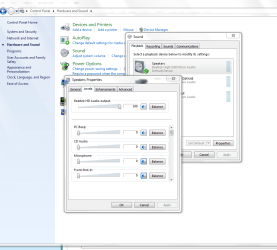
Fix by low the PC beep volume to 0. (see screenshot below) or just mute it.

for some reason it doesn't crackling anymore.

I know the pc needs the beeping noise when booting up, but it could be the bug realtek is working on.

I hope this fix your crackling problems.
 

Attachments

  • s.PNG
    s.PNG
    55.7 KB · Views: 1,179

My Computer My Computer

At a glance

Windows 7 Pro x64Intel Core 2 Quad Q6600 [2.4Ghz] OC speeds 3....Kingston HyperX KHX8500D2K2-4G 1066Mhz 8GB (2...ASUS GeForce GTX 550 Ti
OS
Windows 7 Pro x64
CPU
Intel Core 2 Quad Q6600 [2.4Ghz] OC speeds 3.2Ghz
Motherboard
ASUS P5QL-E
Memory
Kingston HyperX KHX8500D2K2-4G 1066Mhz 8GB (2GB*4)
Graphics Card(s)
ASUS GeForce GTX 550 Ti
Sound Card
OnBoard
Monitor(s) Displays
Samsung SyncMaster T220
Screen Resolution
1680*1050
Hard Drives
Intel SSD 320 Series 80GB
PSU
Corsair TX750W
Case
CM 690 II
Cooling
Cooler Master Hyper 212+
Keyboard
Logitech G510
Mouse
Logitech G400
Internet Speed
50Mb :D
Back
Top