How to get restore points back??

oceano

Banned
Local time
8:08 AM
Messages
27
win7 64 bit is a pile of junk
yet again ie 32bit stopped working - the 64 bit does work.
I went to control panel
-internet options
-advanced tab
-then clicked reset button.
still does not work- restart - still does not work

now all the restore ponts have vanished.
can ANYONE tell me how to get them back?
i don't have any exotic software on this computer

thanks all
 

Attachments

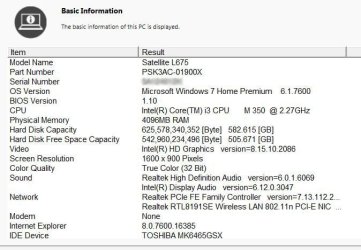
  • t-17 specs2.jpg
    t-17 specs2.jpg
    82.9 KB · Views: 18
Last edited:

My Computer My Computer

OS
7 64

My Computer My Computer

Computer Manufacturer/Model Number
Hopalong/ Godzilla
OS
Windows7 Pro 64bit SP-1; Windows XP Pro 32bit
CPU
Intel Core i7-870 Lynnfield 2.93GHz LGA 1156 95W Quad-Core
Motherboard
ASUS P7P55D-E PRO
Memory
8GB@1400MHz Crucial Ballistix DDR3-1600 4x2GB
Graphics Card(s)
ASUS ENGTX460 DirectCU/2DI/1GD5 1GB 256-bit GDDR5
Sound Card
VIA Onboard
Monitor(s) Displays
Asus VS248H-P 24"; Samsung SyncMaster 941BW 19"ws
Screen Resolution
1920x1080; 1440x900
Hard Drives
Samsung 830 120GB SSD
Intel 320 120GB SSD
Western Digital Caviar Black WD7501AALS 750GB 7200 RPM SATA 3.0Gb/s
Western Digital Caviar Black WD6401AALS 640GB 7200 RPM SATA 3.0Gb/s
PSU
COOLER MASTER Silent Pro RS850-AMBAJ3-US 850W Modular
Case
COOLER MASTER HAF 932 RC-932-KKN5-GP Black
Cooling
Scythe "Mugen-2 Rev.B" (2 ScytheKaze-Jyuni PWM fans)
Keyboard
Logitech K-320
Mouse
Kensington
Antivirus
Avast Inernet Suite
Browser
IE 9 ; Chrome
thanks, but of course i don't get that far!
i even assigned lots of space for them.
there were lots of them
when i make a restore point to get to that page, there are no others.
see attached
 

Attachments

  • systemrestore.jpg
    systemrestore.jpg
    36.9 KB · Views: 15

My Computer My Computer

OS
7 64
Looks like you have none. There is nothing you can do. In the future, do imaging. Then you control the action.

PS: 99% of system problems are user error.
 

My Computer My Computer

Computer Manufacturer/Model Number
HP, Dell, Gateway, Toshiba - 4 laptops and 2 desktops
OS
Vista, Windows7, Mint Mate, Zorin, Windows 8
CPU
from 1.6GHz Duo to i7
Monitor(s) Displays
2x HP w2207
Hard Drives
5x HDD, 7x SSD, 12x Externals
Keyboard
with trackball - no mices
Mouse
Trackball mice
Internet Speed
DSL 6000
Looks like you have none. There is nothing you can do. In the future, do imaging. Then you control the action.

PS: 99% of system problems are user error.

99% of system problems are user error -you wish!
it should not be that easy to ruin, under normal use.

i suspect the restore points are on the system, just not being found.
please explain about "imaging"
i have back up copies of the registry if that helps.
there is nothing exotic or unusual on this computer which is used for email, news, forums and thats about it!
thanks
 

My Computer My Computer

OS
7 64
1. To check for restore point run the following command foolowed by Enter in elevated Command prompt:

vssadmin list shadows

That will show all the shadows (restore points).

2. For imaging, watch one of my tutorials: http://www.sevenforums.com/tutorials/73828-imaging-free-macrium.html?ltr=I

3. You have definitely made a false maneuver somewhere. Restore points do not disappear out of the blue. Maybe you made a disk cleanup or a similar operation.
 

My Computer My Computer

Computer Manufacturer/Model Number
HP, Dell, Gateway, Toshiba - 4 laptops and 2 desktops
OS
Vista, Windows7, Mint Mate, Zorin, Windows 8
CPU
from 1.6GHz Duo to i7
Monitor(s) Displays
2x HP w2207
Hard Drives
5x HDD, 7x SSD, 12x Externals
Keyboard
with trackball - no mices
Mouse
Trackball mice
Internet Speed
DSL 6000
1. To check for restore point run the following command foolowed by Enter in elevated Command prompt:

vssadmin list shadows

That will show all the shadows (restore points).

2. For imaging, watch one of my tutorials: http://www.sevenforums.com/tutorials/73828-imaging-free-macrium.html?ltr=I

3. You have definitely made a false maneuver somewhere. Restore points do not disappear out of the blue. Maybe you made a disk cleanup or a similar operation.

AHA yes i did a disk clean up, but it did NOT mention i was removing restore point. more MSoft problems!
thanks
 

My Computer My Computer

OS
7 64
You did not pay attention - as I said, 99% are user errors.

In the Disk Cleanup Options dialog box, choose whether you want to clean up ... Prompts you to delete all but the most recent restore point on the disk.
 

My Computer My Computer

Computer Manufacturer/Model Number
HP, Dell, Gateway, Toshiba - 4 laptops and 2 desktops
OS
Vista, Windows7, Mint Mate, Zorin, Windows 8
CPU
from 1.6GHz Duo to i7
Monitor(s) Displays
2x HP w2207
Hard Drives
5x HDD, 7x SSD, 12x Externals
Keyboard
with trackball - no mices
Mouse
Trackball mice
Internet Speed
DSL 6000
what obvious thing did i not pay attention to?
or is win7 just for experts like yourself
thanks
 

My Computer My Computer

OS
7 64
what obvious thing did i not pay attention to?
or is win7 just for experts like yourself
thanks

the Disk Cleanup Options dialog box
 

My Computer My Computer

Computer Manufacturer/Model Number
HP, Dell, Gateway, Toshiba - 4 laptops and 2 desktops
OS
Vista, Windows7, Mint Mate, Zorin, Windows 8
CPU
from 1.6GHz Duo to i7
Monitor(s) Displays
2x HP w2207
Hard Drives
5x HDD, 7x SSD, 12x Externals
Keyboard
with trackball - no mices
Mouse
Trackball mice
Internet Speed
DSL 6000
sadly it did NOT list restore points as an option to delete.
I just examined my own Restore Points, on my Win7 "reinstalled from scratch" system that I just rebuilt two weekends ago. This was built on a brand new completely empty hard drive, from scratch.

Remarkably, I was presented with exactly the same [unexpected] message that said I had NO restore points to restore from!! Amazing, actually, since I've had this newly reinstall Win7 operating for several weeks now.


Sure enough, when I checked Control Panel -> System -> Advanced System Settings -> System Protection tab, and examined the Protection Settings, when I scrolled down to the C drive area I strangely saw TWO relevant items: one was for the "C (system)" drive with protection shown as ON, and one was for "C (missing)" drive with protection shown as OFF. Surprising again, actually.

At first I was confused and thought the first C item pertained to the 100MB reserved special reserved system partition created on my empty drive by the Win7 install, for the Boot Manager files. And I assumed the second C item pertained to my true C partition where Win7 etc. lives. But eventually I came to think that I had these backwards and that it was in fact the genuine Win7 C partition that theoretically was marked as ON and the 100MB reserved system partition also shown as C (missing) which was marked as OFF.

But I agree with your similar surprise when seeing that you had NO Restore Points to select from if you wanted to. With WinXP (where there was no "special reserved system partition", but where the Boot Manager files were in the one-and-only C partition itself), the genuine WinXP C partition was installed as automatically enabled for Protection Settings active, and you automatically had a non-zero max percentage of hard drive allocated to these periodic Restore Points that were taken, with the oldest ones automatically deleted when the max disk usage limit got reached.

This seems to have been done as well for Win7 in that first C item, but mysteriously there was the second C (missing) item that was set as OFF, and that I think is what is causing the suppression of Restore Points for the real Win7 C partition (at least in my initial post-install state that I'm examining).


Anyway, I was now suspicious that the reason I myself also showed NO RESTORE POINTS even after two weeks was because of the second/last C item that showed "OFF", even though the first item showed "ON".

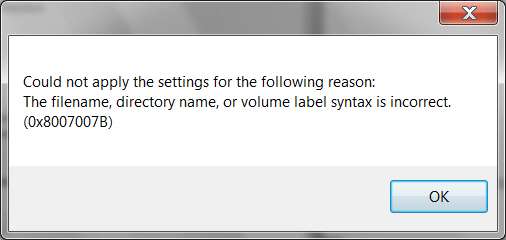
Investigating further, when I selected the second C ("missing"???) item and pushed the Configure button, sure enough the disk usage slider was sitting at 0%. I moved that over to 8% and pushed OK. I assumed this would "activate" Protection (and Restore Points)... but got an error message, complaining that the volume label (on the drive) was unacceptable. Furthermore, there was no disk space approximation shown (to equate to the 8% mark), further confirming my hunch that this was really 8% of 100MB, and that I was looking at the wrong so-called C partition.

protecterror.jpg


I tried pushing the OK button but got another seeming error response, pushed OK again (I think) and/or had to cancel this dialog. Can't recall exactly now. But I suspect this all had to do with the C item I'd selected, which now I believe was probably for that 100MB special system reserved partition and not the first C item ("System") which probably was the real Win7 C partition.

Somehow, for some reason, when I backed out of everything and started all over again from the beginning, when I tried to repeat the process just to be sure I hadn't done anything wrong, now miraculously I no longer see TWO items for drive C! Instead I only see ONE item... for the "C (System)" drive!!! Just like with WinXP! Just one C! And its "active" (i.e. ON) for protection.

Furthermore, when I selected that now one-and-only C and pushed the Configure button, sure enough the disk space slider is sitting at the 8% mark (where I'd put it, but for the other C partition!).


Anyway, I think I'm now in business (quite by this accident really, trying to research my own system because of your post and question). It looks like I have one and only one C item shown, it has protection "ON", and it has 8% disk space shown on the slider. And, there was about 3GB of disk space allocated as the max utilization limit, again confirming my expectation that I was now dealing with my true Win7 C partition.

I am going to speculate that this will now really and truly activate system protection for my Win7 system C drive (which probably was NOT enabled for real until now, because of the two C items shown with the second one, probably for the 100MB system partition, set as OFF). I am going to speculate that System Restore points will now be automatically produced each night (or at least periodically), and that I will be able to select any of them for restoring from, and that I will be able to clean them out (all but the most recent) using Disk Cleanup.

Hope this helps you.

 

My Computer My Computer

Computer type
PC/Desktop
Computer Manufacturer/Model Number
Home-built, two systems (1) and (2)
OS
Windows 7 Pro x64 (1), Win7 Pro X64 (2)
CPU
i5-3350p 3.1Ghz/6MB-cache (1); E8400 3.0Ghz/6MB-cache (2)
Motherboard
ASUS P8Z77-V Pro (1); ASUS P5Q3 (2)
Memory
8GB PC3-12800 DDR3 (1); 4GB PC3-10600 DDR3 (2)
Graphics Card(s)
ATI HD7750 (1), (see TV cards); ATI R7 250 (2)
Sound Card
Realtek ALC892 HD Audio (1); Realtek ALC1200 HD Audio (2)
Monitor(s) Displays
Eizo HD2441W LCD, Eizo S2433W (1); Eizo 24" S2433W (2)
Screen Resolution
1920x1200, 1920x1200 (1); 1920x1200 (2)
Hard Drives
(1) 1TB SATA-II (7200RPM), 2x2TB SATA-III (7200RPM), 250GB SATA-III (10000RPM) for OS; 2x2TB external USB 3.0

(2) 320GB SATA-II (7200RPM), 750GB SATA-II (7200RPM), 150GB SATA-II (10000RPM) for OS; 2TB external USB 3.0
PSU
Nesteq ECS-6001 600W (1); Nesteq ECS-5001 500W (2)
Case
Acousti-Case 360 (1) and (2)
Cooling
Noctua NH-U12P SE2 for CPU, 2x120mm case fans (1) and (2)
Keyboard
IBM PS/2 (1) and (2)
Mouse
Logitech MX Revolution wireless (1); Microsoft wired (2)
Internet Speed
100mbps down / 10mbps up
Antivirus
Microsoft Security Essentials; Malwarebyte Anti-Malware Pro
Browser
Firefox
Other Info
Ceton InfiniTV 4-tuner cablecard-enabled TV card as well as Hauppauge HVR-2250 OTA/ATSC 2-tuner TV card in (1), running under Win7 WMC
sadly it did NOT list restore points as an option to delete.
The option to delete all-but-the-last restore point is on the "More Options" tab, and is initiated by pushing the CLEANUP button on that tab.

The "Disk Cleanup" tab only shows the individual categories of files which will be deleted if you push the OK button on that tab.

Purging of Restore Points other than the most recent is not automatic. It can only be triggered by pushing the CLEANUP button on the More Options tab, and if you don't do that then the automatically created Restore Points will just keep accumulating until the disk usage limit point (set through Control Panel -> System and Security -> System -> Advanced System Settings, System Protection tab, select the C drive from the list of drives and then push the Configure button) is reached. At that max utilization point, the oldest Restore Point is automatically deleted so that the newest Restore Point can now be created.
 

My Computer My Computer

Computer type
PC/Desktop
Computer Manufacturer/Model Number
Home-built, two systems (1) and (2)
OS
Windows 7 Pro x64 (1), Win7 Pro X64 (2)
CPU
i5-3350p 3.1Ghz/6MB-cache (1); E8400 3.0Ghz/6MB-cache (2)
Motherboard
ASUS P8Z77-V Pro (1); ASUS P5Q3 (2)
Memory
8GB PC3-12800 DDR3 (1); 4GB PC3-10600 DDR3 (2)
Graphics Card(s)
ATI HD7750 (1), (see TV cards); ATI R7 250 (2)
Sound Card
Realtek ALC892 HD Audio (1); Realtek ALC1200 HD Audio (2)
Monitor(s) Displays
Eizo HD2441W LCD, Eizo S2433W (1); Eizo 24" S2433W (2)
Screen Resolution
1920x1200, 1920x1200 (1); 1920x1200 (2)
Hard Drives
(1) 1TB SATA-II (7200RPM), 2x2TB SATA-III (7200RPM), 250GB SATA-III (10000RPM) for OS; 2x2TB external USB 3.0

(2) 320GB SATA-II (7200RPM), 750GB SATA-II (7200RPM), 150GB SATA-II (10000RPM) for OS; 2TB external USB 3.0
PSU
Nesteq ECS-6001 600W (1); Nesteq ECS-5001 500W (2)
Case
Acousti-Case 360 (1) and (2)
Cooling
Noctua NH-U12P SE2 for CPU, 2x120mm case fans (1) and (2)
Keyboard
IBM PS/2 (1) and (2)
Mouse
Logitech MX Revolution wireless (1); Microsoft wired (2)
Internet Speed
100mbps down / 10mbps up
Antivirus
Microsoft Security Essentials; Malwarebyte Anti-Malware Pro
Browser
Firefox
Other Info
Ceton InfiniTV 4-tuner cablecard-enabled TV card as well as Hauppauge HVR-2250 OTA/ATSC 2-tuner TV card in (1), running under Win7 WMC
+1 desperber

Just looked you have to intentionally go extra steps to delete them through Disk Cleanup.;)

Mike
 

My Computer My Computer

Computer Manufacturer/Model Number
Hopalong/ Godzilla
OS
Windows7 Pro 64bit SP-1; Windows XP Pro 32bit
CPU
Intel Core i7-870 Lynnfield 2.93GHz LGA 1156 95W Quad-Core
Motherboard
ASUS P7P55D-E PRO
Memory
8GB@1400MHz Crucial Ballistix DDR3-1600 4x2GB
Graphics Card(s)
ASUS ENGTX460 DirectCU/2DI/1GD5 1GB 256-bit GDDR5
Sound Card
VIA Onboard
Monitor(s) Displays
Asus VS248H-P 24"; Samsung SyncMaster 941BW 19"ws
Screen Resolution
1920x1080; 1440x900
Hard Drives
Samsung 830 120GB SSD
Intel 320 120GB SSD
Western Digital Caviar Black WD7501AALS 750GB 7200 RPM SATA 3.0Gb/s
Western Digital Caviar Black WD6401AALS 640GB 7200 RPM SATA 3.0Gb/s
PSU
COOLER MASTER Silent Pro RS850-AMBAJ3-US 850W Modular
Case
COOLER MASTER HAF 932 RC-932-KKN5-GP Black
Cooling
Scythe "Mugen-2 Rev.B" (2 ScytheKaze-Jyuni PWM fans)
Keyboard
Logitech K-320
Mouse
Kensington
Antivirus
Avast Inernet Suite
Browser
IE 9 ; Chrome
desperber, you deserve some reps, you worked sooo hard at this.
 

My Computer My Computer

Computer Manufacturer/Model Number
HP, Dell, Gateway, Toshiba - 4 laptops and 2 desktops
OS
Vista, Windows7, Mint Mate, Zorin, Windows 8
CPU
from 1.6GHz Duo to i7
Monitor(s) Displays
2x HP w2207
Hard Drives
5x HDD, 7x SSD, 12x Externals
Keyboard
with trackball - no mices
Mouse
Trackball mice
Internet Speed
DSL 6000
Are you doing any disk defragmenting with a third-party defragmenter? Some defragmenters don;t play well with Volume Shadow Copy (VSS) and will end up eating up your shadow space and hence deleting your restore points.

- Gene
 

My Computer My Computer

Computer type
PC/Desktop
Computer Manufacturer/Model Number
Home built (GeneO industries)/Model 4
OS
Windows 10 Pro. EFI boot partition, full EFI boot
CPU
i7 4770k 4.4GHz (44-44-43-43 turbo) @ 1.248V
Motherboard
ASUS Maximus VI Hero
Memory
16GB (8GBx2) @2200 MHz G.skill Sniper 10-11-10-30-1, 1.6V
Graphics Card(s)
MSI GTX 970 Gaming 4G
Sound Card
Onboard SupremeFX Audio
Monitor(s) Displays
NEC Spectraview 2490WUXi-SV
Screen Resolution
1920 x 1200
Hard Drives
Samsung 850 Pro 256GB (OS), Samsung 2x 128GB 840 Pro SSD in RAID0, 3x WD Blue 6Gb/s 1TB RAID0, WD 2TB Black external USB 3.0, 2TB WD20EARS Green external USB 3.0, 2x 500GB Seagate and 1 750 GB external USB, 1x 350GB external USB3
PSU
Seasonic X-850 (2012 KM3 model)
Case
Fractal Design Define R4
Cooling
NH-D14, NF-F12, NF-A15; NF-P14, NF-P12,NF-A14, S12A PWM
Keyboard
Cooler Master Storm Quickfire Rapid - Brown
Mouse
Logitech G602
Internet Speed
126.4 Mb/s down, 24.3 Mb/s up
Other Info
USB 3.0 x8 , SATA III x8, eSATA, USB 2.0 x6. Samsung DVD R/W drive.

WEI: CPU 7.8, Memory 7.9, Graphics 7.9, Disk 7.9
no third party anything = except pctools and malwarebytes.
the computer is only used for internet - forums, news/weather and email and any downloads from legitamate sites.. i use another computer for photos and other software.
i made a backup of the registry before all this.
if i import??? the old registry from its file will that do any harm ?
i wont get the restore points back but maybe ie8 32 bit might work again.
thanks all
 

My Computer My Computer

OS
7 64
I am going to speculate that this will now really and truly activate system protection for my Win7 system C drive (which probably was NOT enabled for real until now, because of the two C items shown with the second one, probably for the 100MB system partition, set as OFF). I am going to speculate that System Restore points will now be automatically produced each night (or at least periodically), and that I will be able to select any of them for restoring from, and that I will be able to clean them out (all but the most recent) using Disk Cleanup.
Sure enough, just as predicted... last night at midnight my Win7 produced its first "automatic restore point".

So the trick, for me, was to overcome the double-C drive entries shown in drives eligible for protection, resulting in just a single "C (system)" which was my true Win7 system boot drive, showing ON for protection and 8% for disk space limit. The second one, i.e. the "C (missing)" item, was for the extraneous 100MB system reserved partition, and it's now gone from the list.

Case closed (for me, anyway).
 

My Computer My Computer

Computer type
PC/Desktop
Computer Manufacturer/Model Number
Home-built, two systems (1) and (2)
OS
Windows 7 Pro x64 (1), Win7 Pro X64 (2)
CPU
i5-3350p 3.1Ghz/6MB-cache (1); E8400 3.0Ghz/6MB-cache (2)
Motherboard
ASUS P8Z77-V Pro (1); ASUS P5Q3 (2)
Memory
8GB PC3-12800 DDR3 (1); 4GB PC3-10600 DDR3 (2)
Graphics Card(s)
ATI HD7750 (1), (see TV cards); ATI R7 250 (2)
Sound Card
Realtek ALC892 HD Audio (1); Realtek ALC1200 HD Audio (2)
Monitor(s) Displays
Eizo HD2441W LCD, Eizo S2433W (1); Eizo 24" S2433W (2)
Screen Resolution
1920x1200, 1920x1200 (1); 1920x1200 (2)
Hard Drives
(1) 1TB SATA-II (7200RPM), 2x2TB SATA-III (7200RPM), 250GB SATA-III (10000RPM) for OS; 2x2TB external USB 3.0

(2) 320GB SATA-II (7200RPM), 750GB SATA-II (7200RPM), 150GB SATA-II (10000RPM) for OS; 2TB external USB 3.0
PSU
Nesteq ECS-6001 600W (1); Nesteq ECS-5001 500W (2)
Case
Acousti-Case 360 (1) and (2)
Cooling
Noctua NH-U12P SE2 for CPU, 2x120mm case fans (1) and (2)
Keyboard
IBM PS/2 (1) and (2)
Mouse
Logitech MX Revolution wireless (1); Microsoft wired (2)
Internet Speed
100mbps down / 10mbps up
Antivirus
Microsoft Security Essentials; Malwarebyte Anti-Malware Pro
Browser
Firefox
Other Info
Ceton InfiniTV 4-tuner cablecard-enabled TV card as well as Hauppauge HVR-2250 OTA/ATSC 2-tuner TV card in (1), running under Win7 WMC
dsperber

Glad you got that fixed.

Mike
 

My Computer My Computer

Computer Manufacturer/Model Number
Hopalong/ Godzilla
OS
Windows7 Pro 64bit SP-1; Windows XP Pro 32bit
CPU
Intel Core i7-870 Lynnfield 2.93GHz LGA 1156 95W Quad-Core
Motherboard
ASUS P7P55D-E PRO
Memory
8GB@1400MHz Crucial Ballistix DDR3-1600 4x2GB
Graphics Card(s)
ASUS ENGTX460 DirectCU/2DI/1GD5 1GB 256-bit GDDR5
Sound Card
VIA Onboard
Monitor(s) Displays
Asus VS248H-P 24"; Samsung SyncMaster 941BW 19"ws
Screen Resolution
1920x1080; 1440x900
Hard Drives
Samsung 830 120GB SSD
Intel 320 120GB SSD
Western Digital Caviar Black WD7501AALS 750GB 7200 RPM SATA 3.0Gb/s
Western Digital Caviar Black WD6401AALS 640GB 7200 RPM SATA 3.0Gb/s
PSU
COOLER MASTER Silent Pro RS850-AMBAJ3-US 850W Modular
Case
COOLER MASTER HAF 932 RC-932-KKN5-GP Black
Cooling
Scythe "Mugen-2 Rev.B" (2 ScytheKaze-Jyuni PWM fans)
Keyboard
Logitech K-320
Mouse
Kensington
Antivirus
Avast Inernet Suite
Browser
IE 9 ; Chrome
Back
Top