Solved software to use instead of Win 7 system restore cuz restore not workin

suspect008

New member
Member
VIP
Local time
7:36 PM
Messages
192
Location
Colombo
Hi all,

here is the thing, I'm not looking for a backup software which backup entire hard and takes whole lot of space. just I need something like system restore which only takes small portion to create a restore point. I'm not sure about which backup software got these facilities and I found Acronis True Image and Farstone's Restore IT as results from Google. but not sure about whether they have abilities that I seek for.

Here's what happened with my restore:(,

every time I tried to restore windows it comes up with a window says restore didn't complete due to antivirus or fire wall. but I have deactivated both of them before I run restore. then I tried with Recovery menu at the boot by pressing F11 but answer was no good. then tried with rescue disk and result was same. due to this problem I have reformated my system too. and then also follwed the same routine after a fresh installation. result was also the same. and also in both times, tried in safe mode too.screen shot attached.

Note: I have disabled and changed the startup of some services in win 7 but volume shadow copy service is in automatic and it does load with the startup.

this is because why I need something like system restore. I do not need to clone or take a entire copy of my hard as a backup. just want something like restore does which replaces files and settings to a good configuration if I had messed with system. thanks you.

Sys restore error.PNG
 

My Computer My Computer

At a glance

Windows 7 Ultimate x64Core I5 - 24306GB DDR3 1333Intel HD 3000 with ATI Radeon HD 6470
Computer Manufacturer/Model Number
HP Pavilion G6
OS
Windows 7 Ultimate x64
CPU
Core I5 - 2430
Memory
6GB DDR3 1333
Graphics Card(s)
Intel HD 3000 with ATI Radeon HD 6470
Monitor(s) Displays
HP BrightView LED
Screen Resolution
1366x768
Hard Drives
Hitachi 5400RPM 640GB
Cooling
Sitting on custom made laptop cooler
Internet Speed
21mbps downlink, 2mbps uplink
yet no answer. here is some additional info and any suggestion would be much appreciated guys.

here is my system info if you guys could help me,
HP pavilion G6 notebook with 1TB hard and 6gb ram on Win 7 ultimate x64.
<div>After a clean installation of windows and drivers, I have changed my services according to this, but not some because I want them like network services, volume shadow copy....etc....

Black Viper’s Windows 7 Service Pack 1 Service Configurations | Black Viper | www.blackviper.com


system protection is on for every drive for settings and files.(10gb on C:, 20gb on each D: and E:)
Then its running Avast and zonealarm and tuneup utilities as primary softwares and as 3rd party apps which loads on startup are, except for above,
*Raxco Perfect Disk - which used to defrag my hard and startup files
*FolderLock
*youcam service
*nokia connectivity which identifies when I connect any nokia
and If you are interested, because I dont know what it does but just installed cuz its from HP site, Intel Rapid Storage Driver.

And as sytem apps which came with drivers, there is Catalyst control centre, Synaptic touchpad, IDT Audio.

Even with these it worked until the time I again tried to install comodo firewall which cause me to do a re-format of C. It made my system unstable and it was the beginning of the chaos. and the strange thing I happened to notice is that on my 3rd installation of windows, I did not wanted to change any service properties. they were the same as I have changed them before. then I used for sometime till I happened to realize that my restore isn't working and then formated again bcuz of this and now even just after a clean installation, my restore isn't working. I tried it just after installing drivers and tested with the installation of Adobe Reader. Im desperate here and like everybody, I hate formating re-installing all the crap and configure cuz nearly it would take two days. help me guys, any suggestion would be appreciated.

I just need something to roll-back if my system goes down. I consider disk imaging but im not having a external hard drive and theres almost 700gb filled. thats why Im staying away with imaging things. I wonder is it possible to just image only my C: (200gb volume and 110gb filled) and expect that no data would be lost when in the restoration time due to connection with the other partitions? I mean like if I had taken the image today and then I worked for month and I save files in D:(eg: photoshop creations. autocad drawings) and then I rollback after a month time. would it corrupt or delete(just precaution, i know deleting isnt possible but corrupting I afraid) these files I had saved on D:?? all my games are installed in E: and If I do this I guess I definitly have to re-install them. Correct me if m wrong and If you could give me any Idea, much appreciated and consider about the way Im planning on doing. about that only imaging C: :(:(:(
 

My Computer My Computer

At a glance

Windows 7 Ultimate x64Core I5 - 24306GB DDR3 1333Intel HD 3000 with ATI Radeon HD 6470
Computer Manufacturer/Model Number
HP Pavilion G6
OS
Windows 7 Ultimate x64
CPU
Core I5 - 2430
Memory
6GB DDR3 1333
Graphics Card(s)
Intel HD 3000 with ATI Radeon HD 6470
Monitor(s) Displays
HP BrightView LED
Screen Resolution
1366x768
Hard Drives
Hitachi 5400RPM 640GB
Cooling
Sitting on custom made laptop cooler
Internet Speed
21mbps downlink, 2mbps uplink
The Windows restore functions work only on odd Sundays - another way of saying:' Don't use them'

Good alternatives are free Macrium and free Paragon. The difference is:

Macrium is very easy to use and fast. But it always writes full images (which I prefer because they are easy to manage).

Paragon can make differential images (which take less space) but is a bit more difficult to use. It is also slower than Macrium. And getting a key for the free version is a bit cumbersome.

Here is a tutorial to get started with free Macrium. Try it, you may like it: http://www.sevenforums.com/tutorials/73828-imaging-free-macrium.html?ltr=I

PS: Images are always compressed. Figure 55 to 60% of the original data depending on the nature of the data. The size of the partition does not matter.
 

My Computer My Computer

At a glance

Vista, Windows7, Mint Mate, Zorin, Windows 8from 1.6GHz Duo to i7
Computer Manufacturer/Model Number
HP, Dell, Gateway, Toshiba - 4 laptops and 2 desktops
OS
Vista, Windows7, Mint Mate, Zorin, Windows 8
CPU
from 1.6GHz Duo to i7
Monitor(s) Displays
2x HP w2207
Hard Drives
5x HDD, 7x SSD, 12x Externals
Keyboard
with trackball - no mices
Mouse
Trackball mice
Internet Speed
DSL 6000
thank you WHS, I'm gonna purchase Acronis True Image. Suggested by lot after I asked. Guess this system is gonna stay like this for ever. but its okay. just wanna be sure about a thing or two.

I expect only to image C: drive. lets if I had done this now. after a month I'm gonna restore with this image. when I do that would I lose every software I have installed right now? in short and sweet, would I have to re-install them to work?
And after the restoration, would it cause any data corruption or data lost in drive D and E. I know I will be losing system updates and those kinda stuff. just wanna to be sure would it make incompatibilities with the work I have done and saved in D: after the restore process. eg: after making the image today, tomorrow I will do a autocad project and save it on D: and would it work just like before after I have restored my system back to the yesterday's image after a month? this is the only question I have. and thanks again WHS.
 

My Computer My Computer

At a glance

Windows 7 Ultimate x64Core I5 - 24306GB DDR3 1333Intel HD 3000 with ATI Radeon HD 6470
Computer Manufacturer/Model Number
HP Pavilion G6
OS
Windows 7 Ultimate x64
CPU
Core I5 - 2430
Memory
6GB DDR3 1333
Graphics Card(s)
Intel HD 3000 with ATI Radeon HD 6470
Monitor(s) Displays
HP BrightView LED
Screen Resolution
1366x768
Hard Drives
Hitachi 5400RPM 640GB
Cooling
Sitting on custom made laptop cooler
Internet Speed
21mbps downlink, 2mbps uplink
If you make an image of C on Feb 12 and restore it on Feb 20, you would lose ALL changes made to C after the Feb 12 image was made. That would include any changes in applications installed on C. Changes to D or E should not be affected.

You have to consider the possibility that the image will not restore--for whatever reason. It usually works, but fails at times.

For what it is worth, Acronis seems to have more issues on this forum than Macrium. And Acronis's own support site rarely gets rave reviews.
 

My Computer My Computer

At a glance

Windows 7 Home Premium SP1, 64-bitIntel Skylake i5-6600K, not overclocked8 GB HyperX DDR4-2666 (2 x 4 GB)none; graphics are integrated on CPU
Computer type
PC/Desktop
Computer Manufacturer/Model Number
Ignatz Special; 4 speed manual gearbox; factory air conditioning; one of one
OS
Windows 7 Home Premium SP1, 64-bit
CPU
Intel Skylake i5-6600K, not overclocked
Motherboard
AsRock Z170M Extreme 4, micro ATX
Memory
8 GB HyperX DDR4-2666 (2 x 4 GB)
Graphics Card(s)
none; graphics are integrated on CPU
Sound Card
onboard: Realtek ALC1150; external: USB Behringer UF0-202
Monitor(s) Displays
Dell S2340M 23 inch IPS
Screen Resolution
1600 x 900
Hard Drives
System: Crucial MX100 series SSD, 128 GB;
Data: Samsung Spinpoint 103SJ, 1 TB;
Backup: WD Caviar Green WD30EZRX-00D8PB0, 3 TB
PSU
Rosewill SilentNight 500 watt fanless, semi-modular
Case
Antec Solo II
Cooling
Noctua NH-U12S; Noctua F12 intake, Noctua S12A exhaust
Keyboard
Microsoft 200 6JH-00001 USB
Mouse
Dell or Microsoft optical wired; USB
Antivirus
Microsoft Security Essentials and Malwarebytes Premium
Browser
Pale Moon
Other Info
All fans PWM; speeds at idle: CPU circa 500 rpm; intake circa 600 rpm; exhaust circa 600 rpm; CPU temps 27 idle and 47 C load in a warm room (27 C/81 F) when running Intel Extreme Tuning Utility stress test.
I agree with ignatsatsonic on Acronis. Think twice before buying it. Do some more research. Go through Acronis forum. Take your time and then decide.

On System Restore, I still rely on it in my day to day tasks. Before installing a new program, I always create a manual restore point and after trying out the program if I decide to do away with it, I restore my system back. It has never failed me so far. ( In the event it fails, I will call upon Revo uninstaller but that has never happened)

If System Restore fails at anytime, I will try to regain it rather than looking for alternatives. :)

If anyother program eats it, I would rather dump that program than losing System Restore functionality.
 

My Computer My Computer

At a glance

Windows 7 Home Premium 32 bit
OS
Windows 7 Home Premium 32 bit
Thank you jumanji and ignatsatsonic
I read on acronis forum as you guys suggested. and yeah it seems to be pretty much tough decision to make. I considered about Macrium. with all do respect it is a great product as you guys told.but it image out the whole disk each time. isn't it? Its little bit time consuming. think of it like this, when I want to install a new software I usually make a restore point(right now its not working, but I was used to do like that :)). right now when I use Macrium, its gonna take while for create that image for me. so, I decided I need something that do incremental backup and thats why I chose Acronis. but right now seems its not a good decision after all. I have also found a soft named Farastone's Restore IT which does the same job. what do you guys think of it? please suggest me if there's more better one.

And yet, no body gave me a answer on the main thing I'm more concern. After I restore my system with a Image crated earlier, would I have to re-install all my softwares? would they just work like now(Like just they were working before the restoration)?

Jumanji - yes I also rather dump that program which eats my system. but as you can see here, I tried almost everything I know to make things correct. It wasn't even working after a clean installation of windows. thats why Im yielding for a software which can do me the favor as system restore.

thank you all. and plese tell me about my final request.
 

My Computer My Computer

At a glance

Windows 7 Ultimate x64Core I5 - 24306GB DDR3 1333Intel HD 3000 with ATI Radeon HD 6470
Computer Manufacturer/Model Number
HP Pavilion G6
OS
Windows 7 Ultimate x64
CPU
Core I5 - 2430
Memory
6GB DDR3 1333
Graphics Card(s)
Intel HD 3000 with ATI Radeon HD 6470
Monitor(s) Displays
HP BrightView LED
Screen Resolution
1366x768
Hard Drives
Hitachi 5400RPM 640GB
Cooling
Sitting on custom made laptop cooler
Internet Speed
21mbps downlink, 2mbps uplink
You are mistaken on some points.

Macrium does NOT necessarily image an entire disc. It images entire partitions, as does Acronis.

For instance, suppose a disc has 3 partitions, C, D, and E. You could make an image of C alone, D alone, E alone, or any combination of partitions. Or you could make one image containing all 3 partitions. Your choice entirely.

Your question about having to re-install software WAS answered in my post #5. The answer is no unless you are referring to software installed AFTER the image was made.

Another possibility for you to consider is EaseUS TODO Backup. It is a free download and as simple to use as Macrium.

I'd advise you to avoid incremental images if at all possible. They just add more complication.
 

My Computer My Computer

At a glance

Windows 7 Home Premium SP1, 64-bitIntel Skylake i5-6600K, not overclocked8 GB HyperX DDR4-2666 (2 x 4 GB)none; graphics are integrated on CPU
Computer type
PC/Desktop
Computer Manufacturer/Model Number
Ignatz Special; 4 speed manual gearbox; factory air conditioning; one of one
OS
Windows 7 Home Premium SP1, 64-bit
CPU
Intel Skylake i5-6600K, not overclocked
Motherboard
AsRock Z170M Extreme 4, micro ATX
Memory
8 GB HyperX DDR4-2666 (2 x 4 GB)
Graphics Card(s)
none; graphics are integrated on CPU
Sound Card
onboard: Realtek ALC1150; external: USB Behringer UF0-202
Monitor(s) Displays
Dell S2340M 23 inch IPS
Screen Resolution
1600 x 900
Hard Drives
System: Crucial MX100 series SSD, 128 GB;
Data: Samsung Spinpoint 103SJ, 1 TB;
Backup: WD Caviar Green WD30EZRX-00D8PB0, 3 TB
PSU
Rosewill SilentNight 500 watt fanless, semi-modular
Case
Antec Solo II
Cooling
Noctua NH-U12S; Noctua F12 intake, Noctua S12A exhaust
Keyboard
Microsoft 200 6JH-00001 USB
Mouse
Dell or Microsoft optical wired; USB
Antivirus
Microsoft Security Essentials and Malwarebytes Premium
Browser
Pale Moon
Other Info
All fans PWM; speeds at idle: CPU circa 500 rpm; intake circa 600 rpm; exhaust circa 600 rpm; CPU temps 27 idle and 47 C load in a warm room (27 C/81 F) when running Intel Extreme Tuning Utility stress test.
I'm gonna purchase Acronis True Image
You must have a lot of money if you spend it for a product that is more troublesome than some of the free options. Macrium is rock solid and if you have problems, there are a lot of people here that know it and can help you.
Its little bit time consuming
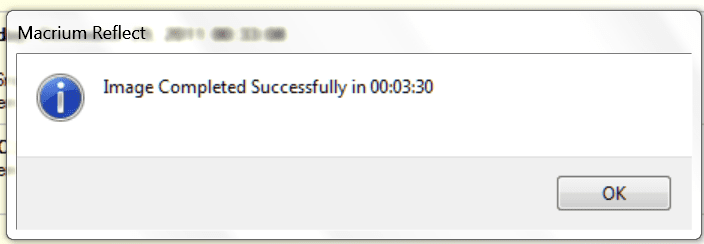
This was a full C partition (without user data) - from M4 Sata3 to HDD Sata2:
 

Attachments

  • Image.PNG
    Image.PNG
    11.9 KB · Views: 4

My Computer My Computer

At a glance

Vista, Windows7, Mint Mate, Zorin, Windows 8from 1.6GHz Duo to i7
Computer Manufacturer/Model Number
HP, Dell, Gateway, Toshiba - 4 laptops and 2 desktops
OS
Vista, Windows7, Mint Mate, Zorin, Windows 8
CPU
from 1.6GHz Duo to i7
Monitor(s) Displays
2x HP w2207
Hard Drives
5x HDD, 7x SSD, 12x Externals
Keyboard
with trackball - no mices
Mouse
Trackball mice
Internet Speed
DSL 6000
^+1 - it is indeed rock-solid. Why not give Macrium a try and see if you like it? It won't cost you anything except an hour or two.

Regards,
Golden
 

My Computer My Computer

At a glance

Windows 10 Pro x64 ; Xubuntu x64Intel i7 860 @ 2.80 GHz O/C'ed to 4.0GHz16GB Corsair Vengance DDR3 @ 661 MHz Dual Cha...EVGA NVidia GTX 560 1024MB
Computer type
PC/Desktop
Computer Manufacturer/Model Number
Golden Mk. I.4
OS
Windows 10 Pro x64 ; Xubuntu x64
CPU
Intel i7 860 @ 2.80 GHz O/C'ed to 4.0GHz
Motherboard
Gigabyte P55A-UD3R Rev.1. Award BIOS F13
Memory
16GB Corsair Vengance DDR3 @ 661 MHz Dual Channel (9-9-9-24)
Graphics Card(s)
EVGA NVidia GTX 560 1024MB
Sound Card
Realtek Integrated
Monitor(s) Displays
Dual Samsung SyncMaster 2494HS
Screen Resolution
1920*1080 and 1920*1080
Hard Drives
1*Samsung 840 EVO 120GB SSD;
1*OCZ Vertex 2 60GB SSD;
2*Samsung F3 SpinPoint 1TB in RAID0;
1*Samsung F1 SpinPoint 1TB;
2*Western Digital 1TB External USB 3.0
1*Western Digital 500GB External USB 3.0
1*Seagate 500GB External USB 2.0
PSU
Thermaltake ToughPower QFan 750W
Case
Thermaltake Element S VK60001W2Z
Cooling
Corsair H60 Water Cooling, 2*230mm and 2*80mm case fans
Keyboard
Logitech G110
Mouse
Logitech MX518

My Computer My Computer

At a glance

Vista, Windows7, Mint Mate, Zorin, Windows 8from 1.6GHz Duo to i7
Computer Manufacturer/Model Number
HP, Dell, Gateway, Toshiba - 4 laptops and 2 desktops
OS
Vista, Windows7, Mint Mate, Zorin, Windows 8
CPU
from 1.6GHz Duo to i7
Monitor(s) Displays
2x HP w2207
Hard Drives
5x HDD, 7x SSD, 12x Externals
Keyboard
with trackball - no mices
Mouse
Trackball mice
Internet Speed
DSL 6000
thanks a lot guys. Yes I will give a try out for Macrium. and hell no I dont have loadz of money :) I decided to go with it just because it was the name came up most of the forums and each of term I googled. never knew that it brings up trouble more than a solution.
And how about the Farastone Restore IT? It is a another name that keeps popping out.

and I just have to search little bit more than except for google. theres hell lot free good utilities out there ha :)

and sorry for my bad spelling ignatzatsonic, by using the term disc I also meant about the partition. Can you give me a approximate it would consume to image 110gb of my C:?

and again thank you WHS, ignatzatsonic, Jumanji, Golden
 

My Computer My Computer

At a glance

Windows 7 Ultimate x64Core I5 - 24306GB DDR3 1333Intel HD 3000 with ATI Radeon HD 6470
Computer Manufacturer/Model Number
HP Pavilion G6
OS
Windows 7 Ultimate x64
CPU
Core I5 - 2430
Memory
6GB DDR3 1333
Graphics Card(s)
Intel HD 3000 with ATI Radeon HD 6470
Monitor(s) Displays
HP BrightView LED
Screen Resolution
1366x768
Hard Drives
Hitachi 5400RPM 640GB
Cooling
Sitting on custom made laptop cooler
Internet Speed
21mbps downlink, 2mbps uplink
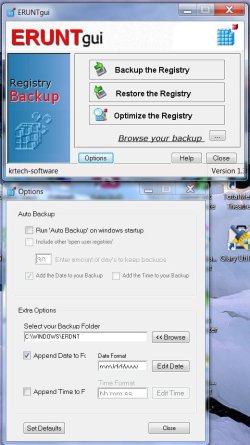
Yep, ERUNT GUI is not a substitute for a full system backup.

But everytime we want to try a new program, we may not do a full backup and then restore which is gonna be time consuming.

If my System Restore is not working, I will do a registry backup before I install a program and then restore the registry after uninstalling it. That I would believe is as good as or as near as a System Restore. ( Correct me if I am wrong. )
 

My Computer My Computer

At a glance

Windows 7 Home Premium 32 bit
OS
Windows 7 Home Premium 32 bit
Can you give me a approximate it would consume to image 110gb of my C:?

Macrium takes less than 10 minutes to make an image of 30 GB of occupied space on my C partition. Six or seven minutes, if I recall correctly.

For 110 gigs, I'd guess it would take perhaps 30 minutes. The resulting image file would take up somewhere around 50 or 60 GB. You'd have to store it on another partition of course.
 

My Computer My Computer

At a glance

Windows 7 Home Premium SP1, 64-bitIntel Skylake i5-6600K, not overclocked8 GB HyperX DDR4-2666 (2 x 4 GB)none; graphics are integrated on CPU
Computer type
PC/Desktop
Computer Manufacturer/Model Number
Ignatz Special; 4 speed manual gearbox; factory air conditioning; one of one
OS
Windows 7 Home Premium SP1, 64-bit
CPU
Intel Skylake i5-6600K, not overclocked
Motherboard
AsRock Z170M Extreme 4, micro ATX
Memory
8 GB HyperX DDR4-2666 (2 x 4 GB)
Graphics Card(s)
none; graphics are integrated on CPU
Sound Card
onboard: Realtek ALC1150; external: USB Behringer UF0-202
Monitor(s) Displays
Dell S2340M 23 inch IPS
Screen Resolution
1600 x 900
Hard Drives
System: Crucial MX100 series SSD, 128 GB;
Data: Samsung Spinpoint 103SJ, 1 TB;
Backup: WD Caviar Green WD30EZRX-00D8PB0, 3 TB
PSU
Rosewill SilentNight 500 watt fanless, semi-modular
Case
Antec Solo II
Cooling
Noctua NH-U12S; Noctua F12 intake, Noctua S12A exhaust
Keyboard
Microsoft 200 6JH-00001 USB
Mouse
Dell or Microsoft optical wired; USB
Antivirus
Microsoft Security Essentials and Malwarebytes Premium
Browser
Pale Moon
Other Info
All fans PWM; speeds at idle: CPU circa 500 rpm; intake circa 600 rpm; exhaust circa 600 rpm; CPU temps 27 idle and 47 C load in a warm room (27 C/81 F) when running Intel Extreme Tuning Utility stress test.
thank you guys a lot.
 
Last edited:

My Computer My Computer

At a glance

Windows 7 Ultimate x64Core I5 - 24306GB DDR3 1333Intel HD 3000 with ATI Radeon HD 6470
Computer Manufacturer/Model Number
HP Pavilion G6
OS
Windows 7 Ultimate x64
CPU
Core I5 - 2430
Memory
6GB DDR3 1333
Graphics Card(s)
Intel HD 3000 with ATI Radeon HD 6470
Monitor(s) Displays
HP BrightView LED
Screen Resolution
1366x768
Hard Drives
Hitachi 5400RPM 640GB
Cooling
Sitting on custom made laptop cooler
Internet Speed
21mbps downlink, 2mbps uplink
Can you give me a approximate it would consume to image 110gb of my C:?


For 110 gigs, I'd guess it would take perhaps 30 minutes. The resulting image file would take up somewhere around 50 or 60 GB. You'd have to store it on another partition of course.

wow thats a hell of a time when I thought of creating an image every time I install something :D:D:shock: and thats why I was concern about incremental backups which image out only differences. not as much as simple like system restore ah :) how bad is it using these incremental backups as you have told before?
and not to worry about that 60gigs. I have enough space on my E: like 400gb :D
 

My Computer My Computer

At a glance

Windows 7 Ultimate x64Core I5 - 24306GB DDR3 1333Intel HD 3000 with ATI Radeon HD 6470
Computer Manufacturer/Model Number
HP Pavilion G6
OS
Windows 7 Ultimate x64
CPU
Core I5 - 2430
Memory
6GB DDR3 1333
Graphics Card(s)
Intel HD 3000 with ATI Radeon HD 6470
Monitor(s) Displays
HP BrightView LED
Screen Resolution
1366x768
Hard Drives
Hitachi 5400RPM 640GB
Cooling
Sitting on custom made laptop cooler
Internet Speed
21mbps downlink, 2mbps uplink
Why in the world would you make a new image just because you were going to install something?

I make an image once a month. Some do it weekly. Some quarterly.

Those who do it for every program installation are few and far between and enjoy imaging for its own sake.
 

My Computer My Computer

At a glance

Windows 7 Home Premium SP1, 64-bitIntel Skylake i5-6600K, not overclocked8 GB HyperX DDR4-2666 (2 x 4 GB)none; graphics are integrated on CPU
Computer type
PC/Desktop
Computer Manufacturer/Model Number
Ignatz Special; 4 speed manual gearbox; factory air conditioning; one of one
OS
Windows 7 Home Premium SP1, 64-bit
CPU
Intel Skylake i5-6600K, not overclocked
Motherboard
AsRock Z170M Extreme 4, micro ATX
Memory
8 GB HyperX DDR4-2666 (2 x 4 GB)
Graphics Card(s)
none; graphics are integrated on CPU
Sound Card
onboard: Realtek ALC1150; external: USB Behringer UF0-202
Monitor(s) Displays
Dell S2340M 23 inch IPS
Screen Resolution
1600 x 900
Hard Drives
System: Crucial MX100 series SSD, 128 GB;
Data: Samsung Spinpoint 103SJ, 1 TB;
Backup: WD Caviar Green WD30EZRX-00D8PB0, 3 TB
PSU
Rosewill SilentNight 500 watt fanless, semi-modular
Case
Antec Solo II
Cooling
Noctua NH-U12S; Noctua F12 intake, Noctua S12A exhaust
Keyboard
Microsoft 200 6JH-00001 USB
Mouse
Dell or Microsoft optical wired; USB
Antivirus
Microsoft Security Essentials and Malwarebytes Premium
Browser
Pale Moon
Other Info
All fans PWM; speeds at idle: CPU circa 500 rpm; intake circa 600 rpm; exhaust circa 600 rpm; CPU temps 27 idle and 47 C load in a warm room (27 C/81 F) when running Intel Extreme Tuning Utility stress test.
approximate it would consume to image 110gb of my C:?
If that is 110GB of data, it takes about 65GB for the image. But if that is the size of the partition, figure 55 to 60% of the data will be the image size.

And unlike Ignartz, I image 3 times per week and to at least on 2 different disk (one is always disconnecet when not in use). I hate to lose too much work when I have to restore an image.
 

My Computer My Computer

At a glance

Vista, Windows7, Mint Mate, Zorin, Windows 8from 1.6GHz Duo to i7
Computer Manufacturer/Model Number
HP, Dell, Gateway, Toshiba - 4 laptops and 2 desktops
OS
Vista, Windows7, Mint Mate, Zorin, Windows 8
CPU
from 1.6GHz Duo to i7
Monitor(s) Displays
2x HP w2207
Hard Drives
5x HDD, 7x SSD, 12x Externals
Keyboard
with trackball - no mices
Mouse
Trackball mice
Internet Speed
DSL 6000
it is the amount of data in the partition. partition size is 200gb and its filled 110gb. I guess my problem is solved here. When I install something Im gonna use ERUNT GUI and I think Imaging Once a week would be enough not to lose much. Im gonna make this thread as resolved. yet Im asking, guys do you know about Farastone's Restore IT? its a another one came up with google and rich with many features incl. repair disks etc.
 

My Computer My Computer

At a glance

Windows 7 Ultimate x64Core I5 - 24306GB DDR3 1333Intel HD 3000 with ATI Radeon HD 6470
Computer Manufacturer/Model Number
HP Pavilion G6
OS
Windows 7 Ultimate x64
CPU
Core I5 - 2430
Memory
6GB DDR3 1333
Graphics Card(s)
Intel HD 3000 with ATI Radeon HD 6470
Monitor(s) Displays
HP BrightView LED
Screen Resolution
1366x768
Hard Drives
Hitachi 5400RPM 640GB
Cooling
Sitting on custom made laptop cooler
Internet Speed
21mbps downlink, 2mbps uplink
Back
Top