Ginger FeCr
New member
- Local time
- 12:40 AM
- Messages
- 3
System Reboots after "Starting Windows" screen, self repair ain't work
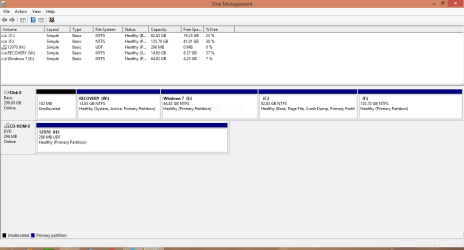
Henlo! I have a Windows 7 laptop that simply won't boot. Lemee explain. It's an Inspiron 1570 with the OEM Win7 install, but since tri-booted with Win 8.1 and 10. Idk why. Was just cleaning up some stuff. Can't quite remember what the last thing I did was, but now when try to boot, it gets to the "Starting Windows" screen, but then the machine just reboots. Win10 doesn't work either, it at least gives me an error screen. I've tried a bunch of the built in repair options, none of them seem to work. I tired the system restore discs, no cigar. Say's there is an issue with the recovery partition. Tried to run sfc on the Win7 partition, while running Win8.1. Gave a whole list of broken crap, beyond my comprehension. Tried to run the DISM but no luck getting that to work. While reinstalling fresh and losing everything I've had since 8th grade, I wouldn't mind trying to fix this. I'm very out of practice on tech nerding and wouldn't mind picking it back up as a hobby. Sorry I don't remember more of the exact steps and details i've taken, been interrupted by two broken cars.
- - - Updated - - -
Forgot to mention, I do have another laptop with a working Win7 install should I need to copy any bad files or anything.
- - - Updated - - -
Also forgot, I've tried to use the "uninstall Updates" and "Command Prompt" and such from the boot menu, but it keeps telling me my password is wrong. It shows the admin name from my Win 10 account, but it doesn't like that or my Win 7 password.
Henlo! I have a Windows 7 laptop that simply won't boot. Lemee explain. It's an Inspiron 1570 with the OEM Win7 install, but since tri-booted with Win 8.1 and 10. Idk why. Was just cleaning up some stuff. Can't quite remember what the last thing I did was, but now when try to boot, it gets to the "Starting Windows" screen, but then the machine just reboots. Win10 doesn't work either, it at least gives me an error screen. I've tried a bunch of the built in repair options, none of them seem to work. I tired the system restore discs, no cigar. Say's there is an issue with the recovery partition. Tried to run sfc on the Win7 partition, while running Win8.1. Gave a whole list of broken crap, beyond my comprehension. Tried to run the DISM but no luck getting that to work. While reinstalling fresh and losing everything I've had since 8th grade, I wouldn't mind trying to fix this. I'm very out of practice on tech nerding and wouldn't mind picking it back up as a hobby. Sorry I don't remember more of the exact steps and details i've taken, been interrupted by two broken cars.
- - - Updated - - -
Forgot to mention, I do have another laptop with a working Win7 install should I need to copy any bad files or anything.
- - - Updated - - -
Also forgot, I've tried to use the "uninstall Updates" and "Command Prompt" and such from the boot menu, but it keeps telling me my password is wrong. It shows the admin name from my Win 10 account, but it doesn't like that or my Win 7 password.
My Computers
-
At a glance
Windows 7 Home Premium x64Intel Pentium U4100DDR3 1067 MHz 3GBMobile Intel GMA 4500HD- Computer type
- Laptop
- Computer Manufacturer/Model Number
- Dell Inspiron 1570
- OS
- Windows 7 Home Premium x64
- CPU
- Intel Pentium U4100
- Memory
- DDR3 1067 MHz 3GB
- Graphics Card(s)
- Mobile Intel GMA 4500HD
- Sound Card
- Realtek High Definition Audio
- Screen Resolution
- 1366 x 768
- Hard Drives
- Toshiba MK3261GSYN 320GB
- Internet Speed
- Slow
- Antivirus
- Trend Micro maybe?
- Browser
- Microsoft Edge
-
- Computer type
- PC/Desktop