Possible to covert a plain system part. copy to ISO and make bootable?

already done the reg unload command? succeeded?
 

My Computer My Computer

At a glance

Microsoft Windows 7 Home Premium 64-bits 7601...Intel(R) Core(TM) i3 CPU M 370 @ 2.40GHz4,00 GBATI Mobility Radeon HD 5400 Series
Computer type
Laptop
Computer Manufacturer/Model Number
ACER ASPIRE 5742G
OS
Microsoft Windows 7 Home Premium 64-bits 7601 Multiprocessor Free Service Pack 1
CPU
Intel(R) Core(TM) i3 CPU M 370 @ 2.40GHz
Motherboard
Acer Aspire 5742G
Memory
4,00 GB
Graphics Card(s)
ATI Mobility Radeon HD 5400 Series
Sound Card
(1) AMD High Definition Audio Device (2) Realtek High Defi
Screen Resolution
1366 x 768 x 32 bits (4294967296 colors) @ 60 Hz
Hard Drives
WDC WD5000BEVT-22ZAT0
Code:
D:
CD  \windows\system32
bcdedit /store  d:\boot\bcd
Don't know if that works from within winxp. Readable output?
 

My Computer My Computer

At a glance

Microsoft Windows 7 Home Premium 64-bits 7601...Intel(R) Core(TM) i3 CPU M 370 @ 2.40GHz4,00 GBATI Mobility Radeon HD 5400 Series
Computer type
Laptop
Computer Manufacturer/Model Number
ACER ASPIRE 5742G
OS
Microsoft Windows 7 Home Premium 64-bits 7601 Multiprocessor Free Service Pack 1
CPU
Intel(R) Core(TM) i3 CPU M 370 @ 2.40GHz
Motherboard
Acer Aspire 5742G
Memory
4,00 GB
Graphics Card(s)
ATI Mobility Radeon HD 5400 Series
Sound Card
(1) AMD High Definition Audio Device (2) Realtek High Defi
Screen Resolution
1366 x 768 x 32 bits (4294967296 colors) @ 60 Hz
Hard Drives
WDC WD5000BEVT-22ZAT0
Already downloaded Windows 7 Professional SP1-U ISO
Swedish x86: X17-59271.iso ??
Do it!
 

My Computer My Computer

At a glance

Microsoft Windows 7 Home Premium 64-bits 7601...Intel(R) Core(TM) i3 CPU M 370 @ 2.40GHz4,00 GBATI Mobility Radeon HD 5400 Series
Computer type
Laptop
Computer Manufacturer/Model Number
ACER ASPIRE 5742G
OS
Microsoft Windows 7 Home Premium 64-bits 7601 Multiprocessor Free Service Pack 1
CPU
Intel(R) Core(TM) i3 CPU M 370 @ 2.40GHz
Motherboard
Acer Aspire 5742G
Memory
4,00 GB
Graphics Card(s)
ATI Mobility Radeon HD 5400 Series
Sound Card
(1) AMD High Definition Audio Device (2) Realtek High Defi
Screen Resolution
1366 x 768 x 32 bits (4294967296 colors) @ 60 Hz
Hard Drives
WDC WD5000BEVT-22ZAT0
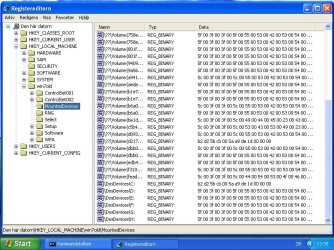
hklm\system\mounteddevices \DosDevices\D:
and
hklm\win7old\mounteddevices \DosDevices\C:

have exact same values now... doublecheck please. After that:

Code:
reg  unload  hklm\win7old

A problem again: The two command lines above i. e. hklm\system\.....

and hklm\win7old\......

do not work, I get the message "Path cannot be found" on both of them. Next step?
 

My Computer My Computer

At a glance

Windows 7 Home Premium
OS
Windows 7 Home Premium
start REGEDIT
goto hkey_local_machine\system\mounteddevices . Look at right side at value of DosDevices\D
goto hkey_local_machine\win7old\mounteddevices . Look at right side at value of DosDevices\C

Same value? sure?
If so
Code:
reg  unload  hklm\win7old
succeed succesfully?
 

My Computer My Computer

At a glance

Microsoft Windows 7 Home Premium 64-bits 7601...Intel(R) Core(TM) i3 CPU M 370 @ 2.40GHz4,00 GBATI Mobility Radeon HD 5400 Series
Computer type
Laptop
Computer Manufacturer/Model Number
ACER ASPIRE 5742G
OS
Microsoft Windows 7 Home Premium 64-bits 7601 Multiprocessor Free Service Pack 1
CPU
Intel(R) Core(TM) i3 CPU M 370 @ 2.40GHz
Motherboard
Acer Aspire 5742G
Memory
4,00 GB
Graphics Card(s)
ATI Mobility Radeon HD 5400 Series
Sound Card
(1) AMD High Definition Audio Device (2) Realtek High Defi
Screen Resolution
1366 x 768 x 32 bits (4294967296 colors) @ 60 Hz
Hard Drives
WDC WD5000BEVT-22ZAT0
start REGEDIT
goto hkey_local_machine\system\mounteddevices . Look at right side at value of DosDevices\D
goto hkey_local_machine\win7old\mounteddevices . Look at right side at value of DosDevices\C

Same value? sure?
If so
Code:
reg  unload  hklm\win7old
succeed succesfully?

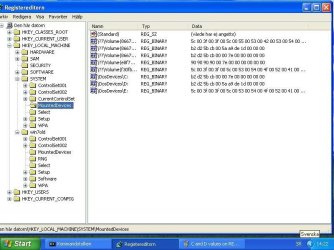
C and D values on REGEDIT.JPG


Here´s the screenshot of REGEDIT, the C and D values are completely different as you can see.
 

My Computer My Computer

At a glance

Windows 7 Home Premium
OS
Windows 7 Home Premium
pfffff. Why don't you read????
goto hkey_local_machine\system\mounteddevices . Look at right side at value of DosDevices\D
goto hkey_local_machine\win7old\mounteddevices . Look at right side at value of DosDevices\C
 

My Computer My Computer

At a glance

Microsoft Windows 7 Home Premium 64-bits 7601...Intel(R) Core(TM) i3 CPU M 370 @ 2.40GHz4,00 GBATI Mobility Radeon HD 5400 Series
Computer type
Laptop
Computer Manufacturer/Model Number
ACER ASPIRE 5742G
OS
Microsoft Windows 7 Home Premium 64-bits 7601 Multiprocessor Free Service Pack 1
CPU
Intel(R) Core(TM) i3 CPU M 370 @ 2.40GHz
Motherboard
Acer Aspire 5742G
Memory
4,00 GB
Graphics Card(s)
ATI Mobility Radeon HD 5400 Series
Sound Card
(1) AMD High Definition Audio Device (2) Realtek High Defi
Screen Resolution
1366 x 768 x 32 bits (4294967296 colors) @ 60 Hz
Hard Drives
WDC WD5000BEVT-22ZAT0
reg unload hklm\win7old

afterwards
 

My Computer My Computer

At a glance

Microsoft Windows 7 Home Premium 64-bits 7601...Intel(R) Core(TM) i3 CPU M 370 @ 2.40GHz4,00 GBATI Mobility Radeon HD 5400 Series
Computer type
Laptop
Computer Manufacturer/Model Number
ACER ASPIRE 5742G
OS
Microsoft Windows 7 Home Premium 64-bits 7601 Multiprocessor Free Service Pack 1
CPU
Intel(R) Core(TM) i3 CPU M 370 @ 2.40GHz
Motherboard
Acer Aspire 5742G
Memory
4,00 GB
Graphics Card(s)
ATI Mobility Radeon HD 5400 Series
Sound Card
(1) AMD High Definition Audio Device (2) Realtek High Defi
Screen Resolution
1366 x 768 x 32 bits (4294967296 colors) @ 60 Hz
Hard Drives
WDC WD5000BEVT-22ZAT0
pfffff. Why don't you read????
goto hkey_local_machine\system\mounteddevices . Look at right side at value of DosDevices\D
goto hkey_local_machine\win7old\mounteddevices . Look at right side at value of DosDevices\C

Sorry for the error, MEA CULPA, I´ll have to obtain better spectacle. Jokes aside, the values are still different. Shall I post the two screenshots?
 

My Computer My Computer

At a glance

Windows 7 Home Premium
OS
Windows 7 Home Premium
pfffff. Why don't you read????
goto hkey_local_machine\system\mounteddevices . Look at right side at value of DosDevices\D
goto hkey_local_machine\win7old\mounteddevices . Look at right side at value of DosDevices\C

Sorry for the error, MEA CULPA, I´ll have to obtain better spectacle. Jokes aside, the values are still different. Shall I post the two screenshots?
hkey_local_machine\win7old\mounteddevices you already posted. post the other one
 

My Computer My Computer

At a glance

Microsoft Windows 7 Home Premium 64-bits 7601...Intel(R) Core(TM) i3 CPU M 370 @ 2.40GHz4,00 GBATI Mobility Radeon HD 5400 Series
Computer type
Laptop
Computer Manufacturer/Model Number
ACER ASPIRE 5742G
OS
Microsoft Windows 7 Home Premium 64-bits 7601 Multiprocessor Free Service Pack 1
CPU
Intel(R) Core(TM) i3 CPU M 370 @ 2.40GHz
Motherboard
Acer Aspire 5742G
Memory
4,00 GB
Graphics Card(s)
ATI Mobility Radeon HD 5400 Series
Sound Card
(1) AMD High Definition Audio Device (2) Realtek High Defi
Screen Resolution
1366 x 768 x 32 bits (4294967296 colors) @ 60 Hz
Hard Drives
WDC WD5000BEVT-22ZAT0
They should be the same otherwise you gave me wrong information (AGAIN)
 

My Computer My Computer

At a glance

Microsoft Windows 7 Home Premium 64-bits 7601...Intel(R) Core(TM) i3 CPU M 370 @ 2.40GHz4,00 GBATI Mobility Radeon HD 5400 Series
Computer type
Laptop
Computer Manufacturer/Model Number
ACER ASPIRE 5742G
OS
Microsoft Windows 7 Home Premium 64-bits 7601 Multiprocessor Free Service Pack 1
CPU
Intel(R) Core(TM) i3 CPU M 370 @ 2.40GHz
Motherboard
Acer Aspire 5742G
Memory
4,00 GB
Graphics Card(s)
ATI Mobility Radeon HD 5400 Series
Sound Card
(1) AMD High Definition Audio Device (2) Realtek High Defi
Screen Resolution
1366 x 768 x 32 bits (4294967296 colors) @ 60 Hz
Hard Drives
WDC WD5000BEVT-22ZAT0
pfffff. Why don't you read????
Goto hkey_local_machine\system\mounteddevices . Look at right side at value of dosdevices\d
goto hkey_local_machine\win7old\mounteddevices . Look at right side at value of dosdevices\c

sorry for the error, mea culpa, i´ll have to obtain better spectacle. Jokes aside, the values are still different. Shall i post the two screenshots?
hkey_local_machine\win7old\mounteddevices you already posted. Post the other one

They seem to be the same now, I must have made another mistake, sorry about that, and for taking too much time unnecessarily, I do hope you will have some more patience with me, I am a soon 7o yrs old grandpa with limited computer literacy and no command line work since 18 yrs ago - so a mistake occurs now and then.

I´d like to make sure what to do next - unload first as you said before?


system mounted devices.JPG
 

My Computer My Computer

At a glance

Windows 7 Home Premium
OS
Windows 7 Home Premium
Answer #62

And do also:
Code:
reg   unload  hklm\win7old
reg unload succeeds?

I don't need screenshots... just confirmation
 

My Computer My Computer

At a glance

Microsoft Windows 7 Home Premium 64-bits 7601...Intel(R) Core(TM) i3 CPU M 370 @ 2.40GHz4,00 GBATI Mobility Radeon HD 5400 Series
Computer type
Laptop
Computer Manufacturer/Model Number
ACER ASPIRE 5742G
OS
Microsoft Windows 7 Home Premium 64-bits 7601 Multiprocessor Free Service Pack 1
CPU
Intel(R) Core(TM) i3 CPU M 370 @ 2.40GHz
Motherboard
Acer Aspire 5742G
Memory
4,00 GB
Graphics Card(s)
ATI Mobility Radeon HD 5400 Series
Sound Card
(1) AMD High Definition Audio Device (2) Realtek High Defi
Screen Resolution
1366 x 768 x 32 bits (4294967296 colors) @ 60 Hz
Hard Drives
WDC WD5000BEVT-22ZAT0
Answer #62

And do also:
Code:
reg   unload  hklm\win7old
reg unload succeeds?

I don't need screenshots... just confirmation

Yes, command task carried out is the message.
 

My Computer My Computer

At a glance

Windows 7 Home Premium
OS
Windows 7 Home Premium

My Computer My Computer

At a glance

Microsoft Windows 7 Home Premium 64-bits 7601...Intel(R) Core(TM) i3 CPU M 370 @ 2.40GHz4,00 GBATI Mobility Radeon HD 5400 Series
Computer type
Laptop
Computer Manufacturer/Model Number
ACER ASPIRE 5742G
OS
Microsoft Windows 7 Home Premium 64-bits 7601 Multiprocessor Free Service Pack 1
CPU
Intel(R) Core(TM) i3 CPU M 370 @ 2.40GHz
Motherboard
Acer Aspire 5742G
Memory
4,00 GB
Graphics Card(s)
ATI Mobility Radeon HD 5400 Series
Sound Card
(1) AMD High Definition Audio Device (2) Realtek High Defi
Screen Resolution
1366 x 768 x 32 bits (4294967296 colors) @ 60 Hz
Hard Drives
WDC WD5000BEVT-22ZAT0
What we did is:
  • We had a look at the special number of \dosdevices\D . The number is actually the disk signature+ start sector of partition
  • That number was already in win7 registry but was called A. you changed it to C.
If win7 boots it knows where to find C.
Next thing to do is change the boot manager. That's why I'm waiting for answer on post #62
 

My Computer My Computer

At a glance

Microsoft Windows 7 Home Premium 64-bits 7601...Intel(R) Core(TM) i3 CPU M 370 @ 2.40GHz4,00 GBATI Mobility Radeon HD 5400 Series
Computer type
Laptop
Computer Manufacturer/Model Number
ACER ASPIRE 5742G
OS
Microsoft Windows 7 Home Premium 64-bits 7601 Multiprocessor Free Service Pack 1
CPU
Intel(R) Core(TM) i3 CPU M 370 @ 2.40GHz
Motherboard
Acer Aspire 5742G
Memory
4,00 GB
Graphics Card(s)
ATI Mobility Radeon HD 5400 Series
Sound Card
(1) AMD High Definition Audio Device (2) Realtek High Defi
Screen Resolution
1366 x 768 x 32 bits (4294967296 colors) @ 60 Hz
Hard Drives
WDC WD5000BEVT-22ZAT0
Code:
D:
CD  \windows\system32
bcdedit /store  d:\boot\bcd
Don't know if that works from within winxp. Readable output?

Change directory worked of course, ,but on the next line I get: "bcedit is not an internal command, external command, program or system file".

I do not know if this depends on WIN XP, I haven´t downloaded the swedish win7 as per your recommendation,in #63, I get download time of 9hours 40minutes, which is too long, so if I have to do the WIN7 download, I`ll do it at a place where I still occasionally work, it will be tomorrow, they have very fast connection.
 

My Computer My Computer

At a glance

Windows 7 Home Premium
OS
Windows 7 Home Premium
Change directory worked of course, ,but on the next line I get: "bcedit is not an internal command, external command, program or system file".

Try bcdedit
 

My Computer My Computer

At a glance

Windows 10 Pro x64 ; Xubuntu x64Intel i7 860 @ 2.80 GHz O/C'ed to 4.0GHz16GB Corsair Vengance DDR3 @ 661 MHz Dual Cha...EVGA NVidia GTX 560 1024MB
Computer type
PC/Desktop
Computer Manufacturer/Model Number
Golden Mk. I.4
OS
Windows 10 Pro x64 ; Xubuntu x64
CPU
Intel i7 860 @ 2.80 GHz O/C'ed to 4.0GHz
Motherboard
Gigabyte P55A-UD3R Rev.1. Award BIOS F13
Memory
16GB Corsair Vengance DDR3 @ 661 MHz Dual Channel (9-9-9-24)
Graphics Card(s)
EVGA NVidia GTX 560 1024MB
Sound Card
Realtek Integrated
Monitor(s) Displays
Dual Samsung SyncMaster 2494HS
Screen Resolution
1920*1080 and 1920*1080
Hard Drives
1*Samsung 840 EVO 120GB SSD;
1*OCZ Vertex 2 60GB SSD;
2*Samsung F3 SpinPoint 1TB in RAID0;
1*Samsung F1 SpinPoint 1TB;
2*Western Digital 1TB External USB 3.0
1*Western Digital 500GB External USB 3.0
1*Seagate 500GB External USB 2.0
PSU
Thermaltake ToughPower QFan 750W
Case
Thermaltake Element S VK60001W2Z
Cooling
Corsair H60 Water Cooling, 2*230mm and 2*80mm case fans
Keyboard
Logitech G110
Mouse
Logitech MX518
If it works, then do:
Code:
d:
cd \windows\system32
bcdedit  /store  d:\boot\bcd  /set  {bootmgr}  device  partition=d:
bcdedit  /store  d:\boot\bcd  /set  {default}  device  partition=d:
bcdedit  /store  d:\boot\bcd  /set  {default}  osdevice  partition=d:
type carefully!! press up arrow key to recall last command. So you don't have to type as much!
This fixes most important part of bootmenu. Not win7 recovery environment, windows resume, windows memory diagnostics. But these are not important now.

Tell me if all commands were succesfully.
 

My Computer My Computer

At a glance

Microsoft Windows 7 Home Premium 64-bits 7601...Intel(R) Core(TM) i3 CPU M 370 @ 2.40GHz4,00 GBATI Mobility Radeon HD 5400 Series
Computer type
Laptop
Computer Manufacturer/Model Number
ACER ASPIRE 5742G
OS
Microsoft Windows 7 Home Premium 64-bits 7601 Multiprocessor Free Service Pack 1
CPU
Intel(R) Core(TM) i3 CPU M 370 @ 2.40GHz
Motherboard
Acer Aspire 5742G
Memory
4,00 GB
Graphics Card(s)
ATI Mobility Radeon HD 5400 Series
Sound Card
(1) AMD High Definition Audio Device (2) Realtek High Defi
Screen Resolution
1366 x 768 x 32 bits (4294967296 colors) @ 60 Hz
Hard Drives
WDC WD5000BEVT-22ZAT0
If it works, then do:
Code:
d:
cd \windows\system32
bcdedit  /store  d:\boot\bcd  /set  {bootmgr}  device  partition=d:
bcdedit  /store  d:\boot\bcd  /set  {default}  device  partition=d:
bcdedit  /store  d:\boot\bcd  /set  {default}  osdevice  partition=d:
type carefully!! press up arrow key to recall last command. So you don't have to type as much!
This fixes most important part of bootmenu. Not win7 recovery environment, windows resume, windows memory diagnostics. But these are not important now.

Tell me if all commands were succesfully.

Yes, done now, all commands have been carried through.
 

My Computer My Computer

At a glance

Windows 7 Home Premium
OS
Windows 7 Home Premium
Back
Top