Possible to covert a plain system part. copy to ISO and make bootable?

You have win7 home premium? 32 bits or 64bits and what language? Do you have win7 install DVD? Have a win7 system repair disk? Other win7 machines in house?
You don't need recover DVD at all!! If all attempts fail... you can do a clean install

I think you're Swedish.. right?
If so:

Windows 7 Professional SP1-U ISO
Swedish x86: X17-59271.iso
Swedish x64: X17-59273.iso

So if you have 32bit win7 download the first one, otherwise the second one. You can unlock all versions (so also Home Premium) using
Create Windows 7 Universal ISO With All Editions Selection On Install with ei.cfg Removal Utility « My Digital Life

After that burn the ISO using The Official ImgBurn Website to DVD.

Thanks a lot, yes, if all atempts fail I`ll use the clean install procedure you advice. By the way, we have another PC (desktop) at home with WIN7 professional, but it is 64 bit, wheras my Asus Eee is 32 bit. The Asus did not come with any installation media, as I wrote before. I have a system recovery DVD as well as System Reparation DVD for my stationary, but since it is 62bit,it´s of no use on my Asus.
 

My Computer My Computer

At a glance

Windows 7 Home Premium
OS
Windows 7 Home Premium
Code:
reg   query  hklm\system\mounteddevices
Does work?
 

My Computer My Computer

At a glance

Microsoft Windows 7 Home Premium 64-bits 7601...Intel(R) Core(TM) i3 CPU M 370 @ 2.40GHz4,00 GBATI Mobility Radeon HD 5400 Series
Computer type
Laptop
Computer Manufacturer/Model Number
ACER ASPIRE 5742G
OS
Microsoft Windows 7 Home Premium 64-bits 7601 Multiprocessor Free Service Pack 1
CPU
Intel(R) Core(TM) i3 CPU M 370 @ 2.40GHz
Motherboard
Acer Aspire 5742G
Memory
4,00 GB
Graphics Card(s)
ATI Mobility Radeon HD 5400 Series
Sound Card
(1) AMD High Definition Audio Device (2) Realtek High Defi
Screen Resolution
1366 x 768 x 32 bits (4294967296 colors) @ 60 Hz
Hard Drives
WDC WD5000BEVT-22ZAT0
You have win7 home premium? 32 bits or 64bits and what language? Do you have win7 install DVD? Have a win7 system repair disk? Other win7 machines in house?
You don't need recover DVD at all!! If all attempts fail... you can do a clean install

I think you're Swedish.. right?
If so:

Windows 7 Professional SP1-U ISO
Swedish x86: X17-59271.iso
Swedish x64: X17-59273.iso

So if you have 32bit win7 download the first one, otherwise the second one. You can unlock all versions (so also Home Premium) using
Create Windows 7 Universal ISO With All Editions Selection On Install with ei.cfg Removal Utility « My Digital Life

After that burn the ISO using The Official ImgBurn Website to DVD.

Thanks a lot, yes, if all atempts fail I`ll use the clean install procedure you advice. By the way, we have another PC (desktop) at home with WIN7 professional, but it is 64 bit, wheras my Asus Eee is 32 bit. The Asus did not come with any installation media, as I wrote before. I have a system recovery DVD as well as System Reparation DVD for my stationary, but since it is 62bit,it´s of no use on my Asus.
System Reparation DVD??? You mean system repair disk?
http://www.sevenforums.com/tutorials/2083-system-repair-disc-create.html
Do you have it?
 

My Computer My Computer

At a glance

Microsoft Windows 7 Home Premium 64-bits 7601...Intel(R) Core(TM) i3 CPU M 370 @ 2.40GHz4,00 GBATI Mobility Radeon HD 5400 Series
Computer type
Laptop
Computer Manufacturer/Model Number
ACER ASPIRE 5742G
OS
Microsoft Windows 7 Home Premium 64-bits 7601 Multiprocessor Free Service Pack 1
CPU
Intel(R) Core(TM) i3 CPU M 370 @ 2.40GHz
Motherboard
Acer Aspire 5742G
Memory
4,00 GB
Graphics Card(s)
ATI Mobility Radeon HD 5400 Series
Sound Card
(1) AMD High Definition Audio Device (2) Realtek High Defi
Screen Resolution
1366 x 768 x 32 bits (4294967296 colors) @ 60 Hz
Hard Drives
WDC WD5000BEVT-22ZAT0
Code:
reg   query  hklm\system\mounteddevices
Does work?

Yes, it worked, the two numbers are different, for D it reads B2D25BCB005AA9DE1D000000


for C
B2D25BCB00007E0000000000
 

My Computer My Computer

At a glance

Windows 7 Home Premium
OS
Windows 7 Home Premium
reg query hklm\system\mounteddevices

What is listed at DosDevices\D ?
 

My Computer My Computer

At a glance

Microsoft Windows 7 Home Premium 64-bits 7601...Intel(R) Core(TM) i3 CPU M 370 @ 2.40GHz4,00 GBATI Mobility Radeon HD 5400 Series
Computer type
Laptop
Computer Manufacturer/Model Number
ACER ASPIRE 5742G
OS
Microsoft Windows 7 Home Premium 64-bits 7601 Multiprocessor Free Service Pack 1
CPU
Intel(R) Core(TM) i3 CPU M 370 @ 2.40GHz
Motherboard
Acer Aspire 5742G
Memory
4,00 GB
Graphics Card(s)
ATI Mobility Radeon HD 5400 Series
Sound Card
(1) AMD High Definition Audio Device (2) Realtek High Defi
Screen Resolution
1366 x 768 x 32 bits (4294967296 colors) @ 60 Hz
Hard Drives
WDC WD5000BEVT-22ZAT0
Code:
reg  load hklm\win7old  D:\windows\system32\config\system
reg  query  hklm\win7old\mounteddevices
What is listed at DosDevices\C ?
 
Last edited:

My Computer My Computer

At a glance

Microsoft Windows 7 Home Premium 64-bits 7601...Intel(R) Core(TM) i3 CPU M 370 @ 2.40GHz4,00 GBATI Mobility Radeon HD 5400 Series
Computer type
Laptop
Computer Manufacturer/Model Number
ACER ASPIRE 5742G
OS
Microsoft Windows 7 Home Premium 64-bits 7601 Multiprocessor Free Service Pack 1
CPU
Intel(R) Core(TM) i3 CPU M 370 @ 2.40GHz
Motherboard
Acer Aspire 5742G
Memory
4,00 GB
Graphics Card(s)
ATI Mobility Radeon HD 5400 Series
Sound Card
(1) AMD High Definition Audio Device (2) Realtek High Defi
Screen Resolution
1366 x 768 x 32 bits (4294967296 colors) @ 60 Hz
Hard Drives
WDC WD5000BEVT-22ZAT0
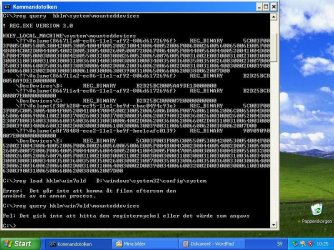
reg query hklm\system\mounteddevices

What is listed at DosDevices\D ?

There is a myriad of various numbers, I think the best will be for me to make a screenshot and post it here, but it will have to wait until tomorrow. Good night and hopefully "see you" tomorrow.
 

My Computer My Computer

At a glance

Windows 7 Home Premium
OS
Windows 7 Home Premium
reg query hklm\system\mounteddevices

What is listed at DosDevices\D ?

There is a myriad of various numbers, I think the best will be for me to make a screenshot and post it here, but it will have to wait until tomorrow. Good night and hopefully "see you" tomorrow.
I think it's B2D25BCB005AA9DE1D000000 ??
 

My Computer My Computer

At a glance

Microsoft Windows 7 Home Premium 64-bits 7601...Intel(R) Core(TM) i3 CPU M 370 @ 2.40GHz4,00 GBATI Mobility Radeon HD 5400 Series
Computer type
Laptop
Computer Manufacturer/Model Number
ACER ASPIRE 5742G
OS
Microsoft Windows 7 Home Premium 64-bits 7601 Multiprocessor Free Service Pack 1
CPU
Intel(R) Core(TM) i3 CPU M 370 @ 2.40GHz
Motherboard
Acer Aspire 5742G
Memory
4,00 GB
Graphics Card(s)
ATI Mobility Radeon HD 5400 Series
Sound Card
(1) AMD High Definition Audio Device (2) Realtek High Defi
Screen Resolution
1366 x 768 x 32 bits (4294967296 colors) @ 60 Hz
Hard Drives
WDC WD5000BEVT-22ZAT0
Code:
reg  load hklm\win7old  D:\windows\sytem32\config\system
reg  query  hklm\win7old\mounteddevices
What is listed at DosDevices\C ?
Do you see value B2D25BCB005AA9DE1D000000 as well in output?

I'm not interested in lines starting with \??\Volume{
 
Last edited:

My Computer My Computer

At a glance

Microsoft Windows 7 Home Premium 64-bits 7601...Intel(R) Core(TM) i3 CPU M 370 @ 2.40GHz4,00 GBATI Mobility Radeon HD 5400 Series
Computer type
Laptop
Computer Manufacturer/Model Number
ACER ASPIRE 5742G
OS
Microsoft Windows 7 Home Premium 64-bits 7601 Multiprocessor Free Service Pack 1
CPU
Intel(R) Core(TM) i3 CPU M 370 @ 2.40GHz
Motherboard
Acer Aspire 5742G
Memory
4,00 GB
Graphics Card(s)
ATI Mobility Radeon HD 5400 Series
Sound Card
(1) AMD High Definition Audio Device (2) Realtek High Defi
Screen Resolution
1366 x 768 x 32 bits (4294967296 colors) @ 60 Hz
Hard Drives
WDC WD5000BEVT-22ZAT0
reg query hklm\system\mounteddevices

What is listed at DosDevices\D ?

Screenshot command line.JPG

Good Morning Kaktussoft, here´s the command line screenshot, down at the shot you will see that I tried to work the two lines you asked for, but no way, the first of the two says "File inaccessible as it is used by another process" and the second line: It was impossible to find the registerkey or the value that was given". Any ideas how to go around this?
 

My Computer My Computer

At a glance

Windows 7 Home Premium
OS
Windows 7 Home Premium
Code:
reg  unload hklm\win7old
Works? If so.. it was already loaded!! So load it again:
Code:
reg  load hklm\win7old  D:\windows\system32\config\system
 

My Computer My Computer

At a glance

Microsoft Windows 7 Home Premium 64-bits 7601...Intel(R) Core(TM) i3 CPU M 370 @ 2.40GHz4,00 GBATI Mobility Radeon HD 5400 Series
Computer type
Laptop
Computer Manufacturer/Model Number
ACER ASPIRE 5742G
OS
Microsoft Windows 7 Home Premium 64-bits 7601 Multiprocessor Free Service Pack 1
CPU
Intel(R) Core(TM) i3 CPU M 370 @ 2.40GHz
Motherboard
Acer Aspire 5742G
Memory
4,00 GB
Graphics Card(s)
ATI Mobility Radeon HD 5400 Series
Sound Card
(1) AMD High Definition Audio Device (2) Realtek High Defi
Screen Resolution
1366 x 768 x 32 bits (4294967296 colors) @ 60 Hz
Hard Drives
WDC WD5000BEVT-22ZAT0
Start REGEDIT
open branch HKEY_LOCAL_MACHINE. Now you see SAM,SECURITY,SOFTWARE... Only a few keys.
win7old is one of them?
 

My Computer My Computer

At a glance

Microsoft Windows 7 Home Premium 64-bits 7601...Intel(R) Core(TM) i3 CPU M 370 @ 2.40GHz4,00 GBATI Mobility Radeon HD 5400 Series
Computer type
Laptop
Computer Manufacturer/Model Number
ACER ASPIRE 5742G
OS
Microsoft Windows 7 Home Premium 64-bits 7601 Multiprocessor Free Service Pack 1
CPU
Intel(R) Core(TM) i3 CPU M 370 @ 2.40GHz
Motherboard
Acer Aspire 5742G
Memory
4,00 GB
Graphics Card(s)
ATI Mobility Radeon HD 5400 Series
Sound Card
(1) AMD High Definition Audio Device (2) Realtek High Defi
Screen Resolution
1366 x 768 x 32 bits (4294967296 colors) @ 60 Hz
Hard Drives
WDC WD5000BEVT-22ZAT0
Sorry I made a typo!! Right command is:
Code:
reg  load  hklm\win7old  D:\windows\system32\config\system
 

My Computer My Computer

At a glance

Microsoft Windows 7 Home Premium 64-bits 7601...Intel(R) Core(TM) i3 CPU M 370 @ 2.40GHz4,00 GBATI Mobility Radeon HD 5400 Series
Computer type
Laptop
Computer Manufacturer/Model Number
ACER ASPIRE 5742G
OS
Microsoft Windows 7 Home Premium 64-bits 7601 Multiprocessor Free Service Pack 1
CPU
Intel(R) Core(TM) i3 CPU M 370 @ 2.40GHz
Motherboard
Acer Aspire 5742G
Memory
4,00 GB
Graphics Card(s)
ATI Mobility Radeon HD 5400 Series
Sound Card
(1) AMD High Definition Audio Device (2) Realtek High Defi
Screen Resolution
1366 x 768 x 32 bits (4294967296 colors) @ 60 Hz
Hard Drives
WDC WD5000BEVT-22ZAT0
Start REGEDIT
open branch HKEY_LOCAL_MACHINE. Now you see SAM,SECURITY,SOFTWARE... Only a few keys.
win7old is one of them?

Yes, win7old is one of them, the last one on the list: Hardware, SAM, Security, Software, system and then win7old.
 

My Computer My Computer

At a glance

Windows 7 Home Premium
OS
Windows 7 Home Premium
Start REGEDIT
open branch HKEY_LOCAL_MACHINE. Now you see SAM,SECURITY,SOFTWARE... Only a few keys.
win7old is one of them?

Yes, win7old is one of them, the last one on the list: Hardware, SAM, Security, Software, system and then win7old.
Open win7old there. Does it have a subkey called Mounteddevices? If so open that key. In the right part you see many keys named \DosDevices\

Is B2 D2 5B CB 00 5A A9 DE 1D 00 00 00 one of the values after \DosDevices?
If so... is it \DosDevices\C or D or E or....?
 

My Computer My Computer

At a glance

Microsoft Windows 7 Home Premium 64-bits 7601...Intel(R) Core(TM) i3 CPU M 370 @ 2.40GHz4,00 GBATI Mobility Radeon HD 5400 Series
Computer type
Laptop
Computer Manufacturer/Model Number
ACER ASPIRE 5742G
OS
Microsoft Windows 7 Home Premium 64-bits 7601 Multiprocessor Free Service Pack 1
CPU
Intel(R) Core(TM) i3 CPU M 370 @ 2.40GHz
Motherboard
Acer Aspire 5742G
Memory
4,00 GB
Graphics Card(s)
ATI Mobility Radeon HD 5400 Series
Sound Card
(1) AMD High Definition Audio Device (2) Realtek High Defi
Screen Resolution
1366 x 768 x 32 bits (4294967296 colors) @ 60 Hz
Hard Drives
WDC WD5000BEVT-22ZAT0
Start REGEDIT
open branch HKEY_LOCAL_MACHINE. Now you see SAM,SECURITY,SOFTWARE... Only a few keys.
win7old is one of them?

Yes, win7old is one of them, the last one on the list: Hardware, SAM, Security, Software, system and then win7old.
Open win7old there. Does it have a subkey called Mounteddevices? If so open that key. In the right part you see many keys named \DosDevices\

Is B2 D2 5B CB 00 5A A9 DE 1D 00 00 00 one of the values after \DosDevices?
If so... is it \DosDevices\C or D or E or....?

I am afraid it is neither C or D or E, it is A! There are 7 DOS devices listed: A, C, D, E, F, G and H. So, are we back to square ONE?
 

My Computer My Computer

At a glance

Windows 7 Home Premium
OS
Windows 7 Home Premium
So hklm\win7old\mounteddevices has a key \DosDevices\A: with exact value B2 D2 5B CB 00 5A A9 DE 1D 00 00 00 ?
That's not back to square one!! It's a great step forwards. If so:


Be sure you are in hklm\win7old\mounteddevices
rightclick on \DosDevices\C: and click "delete". Ignore the warning
rightclick on \DosDevices\A: and click "rename". Rename it to \DosDevices\C: so actually modifying only 1 character. Press enter.

\DosDevices\A: is gone now
\DosDevices\C: has the value we're talking about all the time (what is D now). But in win7 it's called C now... if it will ever boot ;-)

Please confirm you changed it.
 

My Computer My Computer

At a glance

Microsoft Windows 7 Home Premium 64-bits 7601...Intel(R) Core(TM) i3 CPU M 370 @ 2.40GHz4,00 GBATI Mobility Radeon HD 5400 Series
Computer type
Laptop
Computer Manufacturer/Model Number
ACER ASPIRE 5742G
OS
Microsoft Windows 7 Home Premium 64-bits 7601 Multiprocessor Free Service Pack 1
CPU
Intel(R) Core(TM) i3 CPU M 370 @ 2.40GHz
Motherboard
Acer Aspire 5742G
Memory
4,00 GB
Graphics Card(s)
ATI Mobility Radeon HD 5400 Series
Sound Card
(1) AMD High Definition Audio Device (2) Realtek High Defi
Screen Resolution
1366 x 768 x 32 bits (4294967296 colors) @ 60 Hz
Hard Drives
WDC WD5000BEVT-22ZAT0
hklm\system\mounteddevices \DosDevices\D:
and
hklm\win7old\mounteddevices \DosDevices\C:

have exact same values now... doublecheck please. After that:

Code:
reg  unload  hklm\win7old
 

My Computer My Computer

At a glance

Microsoft Windows 7 Home Premium 64-bits 7601...Intel(R) Core(TM) i3 CPU M 370 @ 2.40GHz4,00 GBATI Mobility Radeon HD 5400 Series
Computer type
Laptop
Computer Manufacturer/Model Number
ACER ASPIRE 5742G
OS
Microsoft Windows 7 Home Premium 64-bits 7601 Multiprocessor Free Service Pack 1
CPU
Intel(R) Core(TM) i3 CPU M 370 @ 2.40GHz
Motherboard
Acer Aspire 5742G
Memory
4,00 GB
Graphics Card(s)
ATI Mobility Radeon HD 5400 Series
Sound Card
(1) AMD High Definition Audio Device (2) Realtek High Defi
Screen Resolution
1366 x 768 x 32 bits (4294967296 colors) @ 60 Hz
Hard Drives
WDC WD5000BEVT-22ZAT0
So hklm\win7old\mounteddevices has a key \DosDevices\A: with exact value B2 D2 5B CB 00 5A A9 DE 1D 00 00 00 ?
That's not back to square one!! It's a great step forwards. If so:


Be sure you are in hklm\win7old\mounteddevices
rightclick on \DosDevices\C: and click "delete". Ignore the warning
rightclick on \DosDevices\A: and click "rename". Rename it to \DosDevices\C: so actually modifying only 1 character. Press enter.

\DosDevices\A: is gone now
\DosDevices\C: has the value we're talking about all the time (what is D now). But in win7 it's called C now... if it will ever boot ;-)

Please confirm you changed it.

Yes, C deleted and A renamed (changed) to A. Looking forward to the next step.
 

My Computer My Computer

At a glance

Windows 7 Home Premium
OS
Windows 7 Home Premium
So hklm\win7old\mounteddevices has a key \DosDevices\A: with exact value B2 D2 5B CB 00 5A A9 DE 1D 00 00 00 ?
That's not back to square one!! It's a great step forwards. If so:


Be sure you are in hklm\win7old\mounteddevices
rightclick on \DosDevices\C: and click "delete". Ignore the warning
rightclick on \DosDevices\A: and click "rename". Rename it to \DosDevices\C: so actually modifying only 1 character. Press enter.

\DosDevices\A: is gone now
\DosDevices\C: has the value we're talking about all the time (what is D now). But in win7 it's called C now... if it will ever boot ;-)

Please confirm you changed it.

Yes, C deleted and A renamed (changed) to A. Looking forward to the next step.

Sorry for the typo ,A is of course changed(renamed) to C:.
 

My Computer My Computer

At a glance

Windows 7 Home Premium
OS
Windows 7 Home Premium
Back
Top