
Recover data from a diskpart > clean command

lonewolfs

New member
Local time
4:31 AM
Messages
42
This must be my one time blunder but I did manage to clean my 2TB backup external HDD in an attempt to clean a pendrive to make a bootable pendrive for installing Windows 8.

Now the help file for the diskpart > clean command says only the MBR partitioning information and hidden sector information are overwritten. And I was able to realize what i did exactly after hitting the enter key on the clean command.

On master boot record (MBR) disks, only the MBR partitioning information and hidden sector information are overwritten. On GUID partition table (GPT) disks, the GPT partitioning information, including the Protective MBR, is overwritten. If the ALL parameter is not used, the first 1MB and the last 1MB of the disk are zeroed. This erases any disk formatting that had been previously applied to the disk. The disk's state after cleaning the disk is 'UNINITIALIZED'.

While I am aware of the fact that any data recovery is not 100%, still I am looking for a sure-shot way to recover the data as I don't have any other drive clone the disk as a way of backing it up. So I am in need of a way which has maximum chances of recovering the data.
Some facts about the state of the drive are as under

  • I stopped exactly after hitting the clean command and no operation has been performed on the HDD after that.
  • The HDD has no partitions on it i.e. its a 2TB single partition.
  • I am running Windows 8.1 Pro
Is there any way I can recover my data?
 

My Computer

Computer type
PC/Desktop
Computer Manufacturer/Model Number
Custom build
OS
Windows 10 Pro (64-bit)
CPU
Intel Core i7 - 4790K (4.0 GHz)
Motherboard
ASUS Z97 Sabertooth Mark 1
Memory
32GB Corsair Vengeance Pro 1600 MHz DDR3 RAM (Dual Channel)
Graphics Card(s)
ASUS 1GB DDR5 450GTS
Screen Resolution
2048x1152
Hard Drives
480GB OCZ Vector 150 SSD (Internal) -Primary OS Drive
160GB Segate x 2 (Internal)
2TB Seagate External USB 2.0
PSU
Corsair 850W
Case
Corsair Obsidian 900D
Cooling
Fan cooling
Keyboard
Logitech Flat Keyboard
Mouse
Razer Ouroboros Lazer Mouse
Antivirus
BitDefender Total Security 2015
Browser
All browsers
Other Info
Razer Kraken 7.1 Headset
Creative 7.1 Speaker System
You did diskpart->clean? So not "clean all". So If the ALL parameter is not used, the first 1MB and the last 1MB of the disk are zeroed.

Was the 2TB partition originally created within win7/8?
The last 1MB is not a huge problem. Most likely it's free space. Or used by one useless file.

Where did the 2TB partition start? I mean what was the first sector of that partition? If it was below the 1MB boundary.... you're out of luck... it's overwritten with zeroes.

"To work around this issue specify a starting offset of 2,048 sectors (1 megabyte). A starting offset of 2,048 sectors covers most stripe unit size scenarios. This is the default for windows Vista and windows 7 and also adds support for GPT (guid partition tables)"
Win7/vista creates partitions starting at the 1MB boundary by default.
 

My Computer

Computer type
Laptop
Computer Manufacturer/Model Number
ACER ASPIRE 5742G
OS
Microsoft Windows 7 Home Premium 64-bits 7601 Multiprocessor Free Service Pack 1
CPU
Intel(R) Core(TM) i3 CPU M 370 @ 2.40GHz
Motherboard
Acer Aspire 5742G
Memory
4,00 GB
Graphics Card(s)
ATI Mobility Radeon HD 5400 Series
Sound Card
(1) AMD High Definition Audio Device (2) Realtek High Defi
Screen Resolution
1366 x 768 x 32 bits (4294967296 colors) @ 60 Hz
Hard Drives
WDC WD5000BEVT-22ZAT0
Its not a system boot disk but rather an external disk where I keep important files. And no It wasn't formatted by the Windows 7/8 setup. It was pre-formatted when I opened the box so my best guess is that it started from the beginning and extended up to the end of the drive. Its a Seagate GoFlex Desktop 2TB External USB 2.0 Drive
 

My Computer

Computer type
PC/Desktop
Computer Manufacturer/Model Number
Custom build
OS
Windows 10 Pro (64-bit)
CPU
Intel Core i7 - 4790K (4.0 GHz)
Motherboard
ASUS Z97 Sabertooth Mark 1
Memory
32GB Corsair Vengeance Pro 1600 MHz DDR3 RAM (Dual Channel)
Graphics Card(s)
ASUS 1GB DDR5 450GTS
Screen Resolution
2048x1152
Hard Drives
480GB OCZ Vector 150 SSD (Internal) -Primary OS Drive
160GB Segate x 2 (Internal)
2TB Seagate External USB 2.0
PSU
Corsair 850W
Case
Corsair Obsidian 900D
Cooling
Fan cooling
Keyboard
Logitech Flat Keyboard
Mouse
Razer Ouroboros Lazer Mouse
Antivirus
BitDefender Total Security 2015
Browser
All browsers
Other Info
Razer Kraken 7.1 Headset
Creative 7.1 Speaker System

My Computer

Computer type
Laptop
Computer Manufacturer/Model Number
ACER ASPIRE 5742G
OS
Microsoft Windows 7 Home Premium 64-bits 7601 Multiprocessor Free Service Pack 1
CPU
Intel(R) Core(TM) i3 CPU M 370 @ 2.40GHz
Motherboard
Acer Aspire 5742G
Memory
4,00 GB
Graphics Card(s)
ATI Mobility Radeon HD 5400 Series
Sound Card
(1) AMD High Definition Audio Device (2) Realtek High Defi
Screen Resolution
1366 x 768 x 32 bits (4294967296 colors) @ 60 Hz
Hard Drives
WDC WD5000BEVT-22ZAT0
Its not a system boot disk but rather an external disk where I keep important files. And no It wasn't formatted by the Windows 7/8 setup. It was pre-formatted when I opened the box so my best guess is that it started from the beginning and extended up to the end of the drive. Its a Seagate GoFlex Desktop 2TB External USB 2.0 Drive
Preformatted as NTFS or FAT32?
 

My Computer

Computer type
Laptop
Computer Manufacturer/Model Number
ACER ASPIRE 5742G
OS
Microsoft Windows 7 Home Premium 64-bits 7601 Multiprocessor Free Service Pack 1
CPU
Intel(R) Core(TM) i3 CPU M 370 @ 2.40GHz
Motherboard
Acer Aspire 5742G
Memory
4,00 GB
Graphics Card(s)
ATI Mobility Radeon HD 5400 Series
Sound Card
(1) AMD High Definition Audio Device (2) Realtek High Defi
Screen Resolution
1366 x 768 x 32 bits (4294967296 colors) @ 60 Hz
Hard Drives
WDC WD5000BEVT-22ZAT0
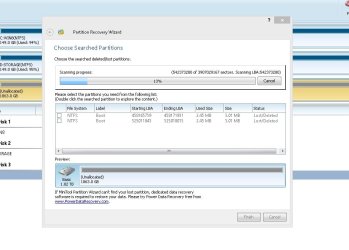
It was pre formatted NTFS and quick scan by Partition Recovery Wizard didn't find anything quickly but rather its scanning the whole drive i am at 8% yet so it will take sometime.
 

My Computer

Computer type
PC/Desktop
Computer Manufacturer/Model Number
Custom build
OS
Windows 10 Pro (64-bit)
CPU
Intel Core i7 - 4790K (4.0 GHz)
Motherboard
ASUS Z97 Sabertooth Mark 1
Memory
32GB Corsair Vengeance Pro 1600 MHz DDR3 RAM (Dual Channel)
Graphics Card(s)
ASUS 1GB DDR5 450GTS
Screen Resolution
2048x1152
Hard Drives
480GB OCZ Vector 150 SSD (Internal) -Primary OS Drive
160GB Segate x 2 (Internal)
2TB Seagate External USB 2.0
PSU
Corsair 850W
Case
Corsair Obsidian 900D
Cooling
Fan cooling
Keyboard
Logitech Flat Keyboard
Mouse
Razer Ouroboros Lazer Mouse
Antivirus
BitDefender Total Security 2015
Browser
All browsers
Other Info
Razer Kraken 7.1 Headset
Creative 7.1 Speaker System
My Computer

Computer type
Laptop
Computer Manufacturer/Model Number
ACER ASPIRE 5742G
OS
Microsoft Windows 7 Home Premium 64-bits 7601 Multiprocessor Free Service Pack 1
CPU
Intel(R) Core(TM) i3 CPU M 370 @ 2.40GHz
Motherboard
Acer Aspire 5742G
Memory
4,00 GB
Graphics Card(s)
ATI Mobility Radeon HD 5400 Series
Sound Card
(1) AMD High Definition Audio Device (2) Realtek High Defi
Screen Resolution
1366 x 768 x 32 bits (4294967296 colors) @ 60 Hz
Hard Drives
WDC WD5000BEVT-22ZAT0
So most probably everything is lost? I'd still continue the scan and check if it can recover anything.
 

My Computer

Computer type
PC/Desktop
Computer Manufacturer/Model Number
Custom build
OS
Windows 10 Pro (64-bit)
CPU
Intel Core i7 - 4790K (4.0 GHz)
Motherboard
ASUS Z97 Sabertooth Mark 1
Memory
32GB Corsair Vengeance Pro 1600 MHz DDR3 RAM (Dual Channel)
Graphics Card(s)
ASUS 1GB DDR5 450GTS
Screen Resolution
2048x1152
Hard Drives
480GB OCZ Vector 150 SSD (Internal) -Primary OS Drive
160GB Segate x 2 (Internal)
2TB Seagate External USB 2.0
PSU
Corsair 850W
Case
Corsair Obsidian 900D
Cooling
Fan cooling
Keyboard
Logitech Flat Keyboard
Mouse
Razer Ouroboros Lazer Mouse
Antivirus
BitDefender Total Security 2015
Browser
All browsers
Other Info
Razer Kraken 7.1 Headset
Creative 7.1 Speaker System
So most probably everything is lost? I'd still continue the scan and check if it can recover anything.
Try TESTDISK .... very good software. But be carefull what you do!! cgsecurity.org ? View topic - Partitions, Filesystem, MFT all corrupt? explains a lot. Try to recover a partition that starts at sector 63 and is very large and is type NTFS. Use "Deeper search" if it isn't found.

Post camshot of results please.

After partition has been recovered you can do "Repair MFT" (also in manual). [if needed]
After that "Repais BS (boot sector)". [if needed]

Also usefull information http://www.sevenforums.com/software/190430-regain-lost-drive-using-test-disk-illustrated-guide.html
 

My Computer

Computer type
Laptop
Computer Manufacturer/Model Number
ACER ASPIRE 5742G
OS
Microsoft Windows 7 Home Premium 64-bits 7601 Multiprocessor Free Service Pack 1
CPU
Intel(R) Core(TM) i3 CPU M 370 @ 2.40GHz
Motherboard
Acer Aspire 5742G
Memory
4,00 GB
Graphics Card(s)
ATI Mobility Radeon HD 5400 Series
Sound Card
(1) AMD High Definition Audio Device (2) Realtek High Defi
Screen Resolution
1366 x 768 x 32 bits (4294967296 colors) @ 60 Hz
Hard Drives
WDC WD5000BEVT-22ZAT0
While it is still scanning it found 2 lost/deleted partitions which I don't suppose I had on my drive. Am I going the wrong way?

scan.jpg
 

My Computer

Computer type
PC/Desktop
Computer Manufacturer/Model Number
Custom build
OS
Windows 10 Pro (64-bit)
CPU
Intel Core i7 - 4790K (4.0 GHz)
Motherboard
ASUS Z97 Sabertooth Mark 1
Memory
32GB Corsair Vengeance Pro 1600 MHz DDR3 RAM (Dual Channel)
Graphics Card(s)
ASUS 1GB DDR5 450GTS
Screen Resolution
2048x1152
Hard Drives
480GB OCZ Vector 150 SSD (Internal) -Primary OS Drive
160GB Segate x 2 (Internal)
2TB Seagate External USB 2.0
PSU
Corsair 850W
Case
Corsair Obsidian 900D
Cooling
Fan cooling
Keyboard
Logitech Flat Keyboard
Mouse
Razer Ouroboros Lazer Mouse
Antivirus
BitDefender Total Security 2015
Browser
All browsers
Other Info
Razer Kraken 7.1 Headset
Creative 7.1 Speaker System
While it is still scanning it found 2 lost/deleted partitions which I don't suppose I had on my drive. Am I going the wrong way?

View attachment 320295
3MB partitions are found a lot of times.... all fake stuff. It's trying to find all kind of remains of what is "possibly" a partition. You won't find anything usefull. You did overwrite start of partition!!

Try test disk instead. It's the best partition recoverer I know of.
 

My Computer

Computer type
Laptop
Computer Manufacturer/Model Number
ACER ASPIRE 5742G
OS
Microsoft Windows 7 Home Premium 64-bits 7601 Multiprocessor Free Service Pack 1
CPU
Intel(R) Core(TM) i3 CPU M 370 @ 2.40GHz
Motherboard
Acer Aspire 5742G
Memory
4,00 GB
Graphics Card(s)
ATI Mobility Radeon HD 5400 Series
Sound Card
(1) AMD High Definition Audio Device (2) Realtek High Defi
Screen Resolution
1366 x 768 x 32 bits (4294967296 colors) @ 60 Hz
Hard Drives
WDC WD5000BEVT-22ZAT0
So I should abort the scan and scan using Testdisk? Cuz this is taking a lot of time and I am hoping that it scans the main big partition later on during scan?

Should i continue or abort and jump on testdisk?
 

My Computer

Computer type
PC/Desktop
Computer Manufacturer/Model Number
Custom build
OS
Windows 10 Pro (64-bit)
CPU
Intel Core i7 - 4790K (4.0 GHz)
Motherboard
ASUS Z97 Sabertooth Mark 1
Memory
32GB Corsair Vengeance Pro 1600 MHz DDR3 RAM (Dual Channel)
Graphics Card(s)
ASUS 1GB DDR5 450GTS
Screen Resolution
2048x1152
Hard Drives
480GB OCZ Vector 150 SSD (Internal) -Primary OS Drive
160GB Segate x 2 (Internal)
2TB Seagate External USB 2.0
PSU
Corsair 850W
Case
Corsair Obsidian 900D
Cooling
Fan cooling
Keyboard
Logitech Flat Keyboard
Mouse
Razer Ouroboros Lazer Mouse
Antivirus
BitDefender Total Security 2015
Browser
All browsers
Other Info
Razer Kraken 7.1 Headset
Creative 7.1 Speaker System
So I should abort the scan and scan using Testdisk? Cuz this is taking a lot of time and I am hoping that it scans the main big partition later on during scan?

Should i continue or abort and jump on testdisk?
Jump to testdisk. Just scan for lost partitions. Eventually use "deeper scan" later. Don't actually write back to disk!! First inform me, so I can confirm you're doing it correct!
 

My Computer

Computer type
Laptop
Computer Manufacturer/Model Number
ACER ASPIRE 5742G
OS
Microsoft Windows 7 Home Premium 64-bits 7601 Multiprocessor Free Service Pack 1
CPU
Intel(R) Core(TM) i3 CPU M 370 @ 2.40GHz
Motherboard
Acer Aspire 5742G
Memory
4,00 GB
Graphics Card(s)
ATI Mobility Radeon HD 5400 Series
Sound Card
(1) AMD High Definition Audio Device (2) Realtek High Defi
Screen Resolution
1366 x 768 x 32 bits (4294967296 colors) @ 60 Hz
Hard Drives
WDC WD5000BEVT-22ZAT0
That's the Analyse option on testdisk no? Just want to be sure as I don't want to do another command line mistake hehe
 

My Computer

Computer type
PC/Desktop
Computer Manufacturer/Model Number
Custom build
OS
Windows 10 Pro (64-bit)
CPU
Intel Core i7 - 4790K (4.0 GHz)
Motherboard
ASUS Z97 Sabertooth Mark 1
Memory
32GB Corsair Vengeance Pro 1600 MHz DDR3 RAM (Dual Channel)
Graphics Card(s)
ASUS 1GB DDR5 450GTS
Screen Resolution
2048x1152
Hard Drives
480GB OCZ Vector 150 SSD (Internal) -Primary OS Drive
160GB Segate x 2 (Internal)
2TB Seagate External USB 2.0
PSU
Corsair 850W
Case
Corsair Obsidian 900D
Cooling
Fan cooling
Keyboard
Logitech Flat Keyboard
Mouse
Razer Ouroboros Lazer Mouse
Antivirus
BitDefender Total Security 2015
Browser
All browsers
Other Info
Razer Kraken 7.1 Headset
Creative 7.1 Speaker System
That's the Analyse option on testdisk no? Just want to be sure as I don't want to do another command line mistake hehe
1st screen: creat log file. So you can post it later.
2nd screen: select the external disk you want to analyse (the 2TB disk). It will be listed as about 1852GiB.
3rd screen: Partition table type selection: Intel
then Analyse and "quick search". Post screenshot of results

We are doing TestDisk Step By Step - CGSecurity btw. Once again.... don't write any modifications to disk yet!
 

My Computer

Computer type
Laptop
Computer Manufacturer/Model Number
ACER ASPIRE 5742G
OS
Microsoft Windows 7 Home Premium 64-bits 7601 Multiprocessor Free Service Pack 1
CPU
Intel(R) Core(TM) i3 CPU M 370 @ 2.40GHz
Motherboard
Acer Aspire 5742G
Memory
4,00 GB
Graphics Card(s)
ATI Mobility Radeon HD 5400 Series
Sound Card
(1) AMD High Definition Audio Device (2) Realtek High Defi
Screen Resolution
1366 x 768 x 32 bits (4294967296 colors) @ 60 Hz
Hard Drives
WDC WD5000BEVT-22ZAT0
"Quick scan" is running? Anything found yet? Any messages?
 

My Computer

Computer type
Laptop
Computer Manufacturer/Model Number
ACER ASPIRE 5742G
OS
Microsoft Windows 7 Home Premium 64-bits 7601 Multiprocessor Free Service Pack 1
CPU
Intel(R) Core(TM) i3 CPU M 370 @ 2.40GHz
Motherboard
Acer Aspire 5742G
Memory
4,00 GB
Graphics Card(s)
ATI Mobility Radeon HD 5400 Series
Sound Card
(1) AMD High Definition Audio Device (2) Realtek High Defi
Screen Resolution
1366 x 768 x 32 bits (4294967296 colors) @ 60 Hz
Hard Drives
WDC WD5000BEVT-22ZAT0
Yes it is running I just started it 10 mins back and it will take sometime. No messages yet and ill paste a snap once its done.

Again thanks a lot for your inputs really appreciate it.
 

My Computer

Computer type
PC/Desktop
Computer Manufacturer/Model Number
Custom build
OS
Windows 10 Pro (64-bit)
CPU
Intel Core i7 - 4790K (4.0 GHz)
Motherboard
ASUS Z97 Sabertooth Mark 1
Memory
32GB Corsair Vengeance Pro 1600 MHz DDR3 RAM (Dual Channel)
Graphics Card(s)
ASUS 1GB DDR5 450GTS
Screen Resolution
2048x1152
Hard Drives
480GB OCZ Vector 150 SSD (Internal) -Primary OS Drive
160GB Segate x 2 (Internal)
2TB Seagate External USB 2.0
PSU
Corsair 850W
Case
Corsair Obsidian 900D
Cooling
Fan cooling
Keyboard
Logitech Flat Keyboard
Mouse
Razer Ouroboros Lazer Mouse
Antivirus
BitDefender Total Security 2015
Browser
All browsers
Other Info
Razer Kraken 7.1 Headset
Creative 7.1 Speaker System
Did you run a Partition Wizard Partition Recovery Wizard Quick Scan as suggested? You would have known in seconds if it could piece back together your partition table.

I've never seen PW Partition Recovery not work for a simple undelete of Diskpart Clean, no matter the sizes or position of partition. This is all taken into account by the calculations.
 
@GREG: On master boot record (MBR) disks, only the MBR partitioning information and hidden sector information are overwritten. On GUID partition table (GPT) disks, the GPT partitioning information, including the Protective MBR, is overwritten. If the ALL parameter is not used, the first 1MB and the last 1MB of the disk are zeroed. This erases any disk formatting that had been previously applied to the disk. The disk's state after cleaning the disk is 'UNINITIALIZED'.


What if first partition's start sector was 63 instead of 2048? Answer: Sector 63 to 2048 are zeroed by the diskpart "clean" command.
 

My Computer

Computer type
Laptop
Computer Manufacturer/Model Number
ACER ASPIRE 5742G
OS
Microsoft Windows 7 Home Premium 64-bits 7601 Multiprocessor Free Service Pack 1
CPU
Intel(R) Core(TM) i3 CPU M 370 @ 2.40GHz
Motherboard
Acer Aspire 5742G
Memory
4,00 GB
Graphics Card(s)
ATI Mobility Radeon HD 5400 Series
Sound Card
(1) AMD High Definition Audio Device (2) Realtek High Defi
Screen Resolution
1366 x 768 x 32 bits (4294967296 colors) @ 60 Hz
Hard Drives
WDC WD5000BEVT-22ZAT0
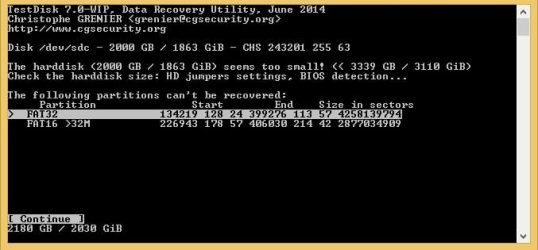
Well the scan finished and this is the result what should I do now

afterscan.jpg
 

My Computer

Computer type
PC/Desktop
Computer Manufacturer/Model Number
Custom build
OS
Windows 10 Pro (64-bit)
CPU
Intel Core i7 - 4790K (4.0 GHz)
Motherboard
ASUS Z97 Sabertooth Mark 1
Memory
32GB Corsair Vengeance Pro 1600 MHz DDR3 RAM (Dual Channel)
Graphics Card(s)
ASUS 1GB DDR5 450GTS
Screen Resolution
2048x1152
Hard Drives
480GB OCZ Vector 150 SSD (Internal) -Primary OS Drive
160GB Segate x 2 (Internal)
2TB Seagate External USB 2.0
PSU
Corsair 850W
Case
Corsair Obsidian 900D
Cooling
Fan cooling
Keyboard
Logitech Flat Keyboard
Mouse
Razer Ouroboros Lazer Mouse
Antivirus
BitDefender Total Security 2015
Browser
All browsers
Other Info
Razer Kraken 7.1 Headset
Creative 7.1 Speaker System
Back
Top