Solved Macrium Reflect How Do I Use It?

Is that no where on that diagram do you see (visually or otherwise) the mysterious "F" Drive (I assume its your external HDD somewhere) that all of this is going to !
My [F] drive is turned off at the moment, I only turn it on when I'm backing up or restoring.

I wish it had a summary screen with more clarity (Like I saw in v 4 no longer available).
If it will make this easier for you, you can get v4 from FileHippo
Macrium Reflect 4.2.3775
FileHippo keeps a lot of old versions of many programs.
 

My Computer

Computer type
PC/Desktop
Computer Manufacturer/Model Number
home built
OS
Multi-Boot W7_Pro_x64 W8.1_Pro_x64 W10_Pro_x64 +Linux_VMs +Chromium_VM
CPU
AMD Athlon II x4 620
Motherboard
Gigabyte GA-MA785G-UD3H
Memory
6GB GSkill DDR2 800
Graphics Card(s)
AMD 4670 GPU + AMD 4200 IGP
Sound Card
on board Realtek ALC889A
Monitor(s) Displays
RCA 40" LCD TV, Insignia 32" LCD TV, HP 15" LCD monitor
Screen Resolution
1680 x 1050
Hard Drives
OCZ Vertex 3 120GB,
Samsung F3 1TB (3),
Several others - WD, Seagate, Hitachi, ...
PSU
Corsair 500 W
Case
Rosewill mid tower
Cooling
CM 90mm rifle
Keyboard
Gyration wireless, Logitech wireless, Dell USB wired
Mouse
Gyration wireless, Logitech wireless, V7 USB wired
Internet Speed
Spectrum - 100Mbps D / 10Mbps U
Antivirus
Avast, MBAM3, EMET, WinPatrol
Browser
Pale Moon, Firefox, IE
Other Info
2 multi-boot PC's
Mainly HTPC/Office/Gen purpose (no gaming).
Trendnet USB KVM.
LG DVD burner/Blue Ray Player.
Tray system for removable SATA backup drives.

Not currently OCd, under-volted.
I use Hybrid sleep, rarely re-boot or shutdown.

Hauppauge HD-PVR, Avermedia PCIe TV Tuner, Hauppauge PCI TV Tuner.
Added complications if I do v4

Hi DavidE:

I appreciate your post!

I know you mean well and everything and I should not complain each time there is a new posting..... but I just thought of the following.... right or wrong it keeps me from doing these things (which I knew about before I wrote my original "Need a new backup program" thread here....)

You said:

I wish it had a summary screen with more clarity (Like I saw in v 4 no longer available).
If it will make this easier for you, you can get v4 from FileHippo
Macrium Reflect 4.2.3775
FileHippo keeps a lot of old versions of many programs.

When the others (Or was it you) here mentioned safe web sites to get programs from, there was of course "File Hippo" which I have used in past..... I think it was only v4 there as other one is still too new...

I read (of course) the comments and instructions on Macrium website about "if you have v4, before you transfer to v5, what you must do) and Just did not want to load in the free v4 off that site to avoid the advertisements, only to have to later on someday, transfer up to v5 and that becomes a headache..

[Don't worry, I'm certain I'll be back here when what you said earlier about needing v6 and paying for it comes to pass----I'm certain they did not make the transfer any easier from v5 to v6 BUT!!! thanks to everyone's help here and given a few months (year or more I hope) before v6 comes out I should have enough experience to trust myself in doing that type of hard transfer of all files saved from v5 to v6]
And of course... File Hippo has the Norton Ghost 15 I lost on it... but unfortunately it would not have the same Product Key as the one I purchased legitimately, so I'm certain (from prior File Hippo downloads) that phone etc help from the company is not available for these unauthorized downloads.. So I use the ones I need to use and avoid complications (as in title of this post) with downloading the non-standard ones...

Thanks again DavidE for thinking of me...and my problems!
 

My Computer

Computer type
Laptop
Computer Manufacturer/Model Number
SONY VAIO VPCS111FM
OS
Windows7 Professional 64bit
CPU
Intel(R) Core (TM) i5 CPU M 430 @2.27 Ghz
Memory
8.0 GB
Hard Drives
Seagate 500GB Momentus
Cooling
Internal fan
Mouse
Logitech bluetooth trackball
Browser
Pale Moon Browser for x64
Thanks! Thanks! and more Thanks!

Hi Everyone!!

I wish to thank all who posted and helped me to get this far.

Summary of where I am:

1. Discussions on what types of Backup Programs work the best, settled on two: Macrium Reflex and AOEMI Backerupper as the best to choose.

2. Recommendation from all was to have not just one type of backup program, but two in case one fails, as they are only software and prone to all the trouble third party software can have.

3. Downloaded and Installed Macrium, but it did not work due to problems with VSS system on this laptop.

4. Thanks to the assistance here, I got AOMEI Backerupper to work and successfully made a backup using its own VSS "shadow copy" system

5. Confident I had at least "one" backup recently, we then Fixed/Repaired the problem on Windows 7 Registry about broken/taken over VSS System.

6. I then was able to use Macrium Reflect I purchased to make a second backup copy (first for Macrium that works!) using the native, repaired Windows 7 VSS system.

7. I then was able to get "free!!!" a permanent, successfully registered Professional copy of the AOMEI Backupper ver. 2.2 and it works so everything is ok there...


So in honor of all these accomplishments I'm closing most of the open threads that had problems with getting /obtaining/ installing/ using the various Backup systems we discussed here.

Now I'm going around to distribute as promised, some reps to those who helped me the most to succeed in this complicated backup jungle out there....

One final item left over.....

I started a new thread....... about AOMEI and getting its rescue boot disk downloaded... I got a few replies here: http://www.sevenforums.com/backup-r...o-search-no-find-inmythreads.html#post3007195
but I think I still have the questions in "red" numbers not answered, unless I read the items wrong

-----------

(Remember I lost a bunch of Word Pad documents---explained in another thread.... http://www.sevenforums.com/general-discussion/349469-welcome-seven-forums-6-a-23.html ((at post # 227))

........ and Opera history where I stored the pages I got from everyone here and opened them up for easy reference all vanished.... http://www.sevenforums.com/browsers...hk-deleted-all-opera-history.html#post3001691 .

..............so I will return to those threads to solve those problems now that I have backups current (and of course I'll do another backup before playing with Registry etc if that is needed to fix any of these new problems).

Thanks for all your help in this complicated (at least to me!!!) issue.

XP VM USER
 

My Computer

Computer type
Laptop
Computer Manufacturer/Model Number
SONY VAIO VPCS111FM
OS
Windows7 Professional 64bit
CPU
Intel(R) Core (TM) i5 CPU M 430 @2.27 Ghz
Memory
8.0 GB
Hard Drives
Seagate 500GB Momentus
Cooling
Internal fan
Mouse
Logitech bluetooth trackball
Browser
Pale Moon Browser for x64
Why did not never fix the provider issue with VSS. I gave you the ptocdure a long time ago.
 

My Computer

Computer Manufacturer/Model Number
HP, Dell, Gateway, Toshiba - 4 laptops and 2 desktops
OS
Vista, Windows7, Mint Mate, Zorin, Windows 8
CPU
from 1.6GHz Duo to i7
Monitor(s) Displays
2x HP w2207
Hard Drives
5x HDD, 7x SSD, 12x Externals
Keyboard
with trackball - no mices
Mouse
Trackball mice
Internet Speed
DSL 6000
It says it (VSS) was fixed--thanks to you and others!

Hi whs:

Maybe I wrote too short....

This is why I write long sentences..... my short ones ALWAYS get misunderstood..
to clarify this:

I wrote:
5. Confident I had at least "one" backup recently, we then Fixed/Repaired the problem on Windows 7 Registry about broken/taken over VSS System.

6. I then was able to use Macrium Reflect I purchased to make a second backup copy (first for Macrium that works!) using the native, repaired Windows 7 VSS system.

Hope you get my correct meaning now..... sorry I had to write longer to explain my shorter sentences... (not something you can help me with here---I need a live-in grammarian!)

Thanks for reading this!
 

My Computer

Computer type
Laptop
Computer Manufacturer/Model Number
SONY VAIO VPCS111FM
OS
Windows7 Professional 64bit
CPU
Intel(R) Core (TM) i5 CPU M 430 @2.27 Ghz
Memory
8.0 GB
Hard Drives
Seagate 500GB Momentus
Cooling
Internal fan
Mouse
Logitech bluetooth trackball
Browser
Pale Moon Browser for x64
So your Macrium works now - is that right.
 

My Computer

Computer Manufacturer/Model Number
HP, Dell, Gateway, Toshiba - 4 laptops and 2 desktops
OS
Vista, Windows7, Mint Mate, Zorin, Windows 8
CPU
from 1.6GHz Duo to i7
Monitor(s) Displays
2x HP w2207
Hard Drives
5x HDD, 7x SSD, 12x Externals
Keyboard
with trackball - no mices
Mouse
Trackball mice
Internet Speed
DSL 6000
Yes!

Hi whs:

simple answer: Yes!

Thanks!
 

My Computer

Computer type
Laptop
Computer Manufacturer/Model Number
SONY VAIO VPCS111FM
OS
Windows7 Professional 64bit
CPU
Intel(R) Core (TM) i5 CPU M 430 @2.27 Ghz
Memory
8.0 GB
Hard Drives
Seagate 500GB Momentus
Cooling
Internal fan
Mouse
Logitech bluetooth trackball
Browser
Pale Moon Browser for x64
Hi whs:

simple answer: Yes!

Thanks!
Very good. This is the kind of posting I like, LOL. For one I now know your problem is fixed and I did not have to read a saga to find that out.
 

My Computer

Computer Manufacturer/Model Number
HP, Dell, Gateway, Toshiba - 4 laptops and 2 desktops
OS
Vista, Windows7, Mint Mate, Zorin, Windows 8
CPU
from 1.6GHz Duo to i7
Monitor(s) Displays
2x HP w2207
Hard Drives
5x HDD, 7x SSD, 12x Externals
Keyboard
with trackball - no mices
Mouse
Trackball mice
Internet Speed
DSL 6000
Informative Announcement

Hi Everyone!

Thanks again for all your assistance with these backup questions.

I was uncertain if I should just add this to one of the many Macrium threads I had begun, or make a new one. I'll leave it for someone to tell me what to do after reading this:

For those who are using Macrium Version 5:

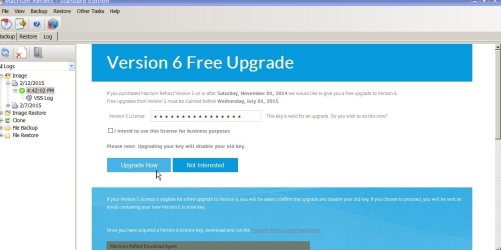
I received a "free Macrium upgrade" (on March 10, 2015) notice when turning on Macrium that day.
In order to do the upgrade I had to first cancel the Version 5 Product Key.

Then, and only then, would the site let me download Version 6 and install it. Its good to know that the site connected directly through the Macrium program does not contain any "blotware" PUP's etc, just the Program itself.

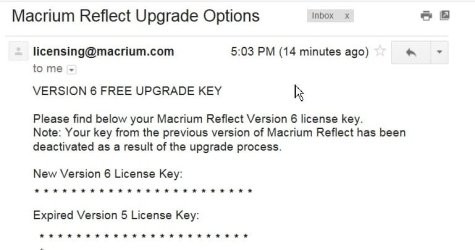
They then sent me a new key to activate my Version 6.

I have used it and its a bit more snazzy graphics/colors than the Version 5, but still has not solved the missing clearer information that Version 4 (thanks Lady Fitzgerald for posting older whs' s thread on that so I knew) presented which seemed closer to my missing Norton Ghost.

The one caution I can't know for certain, but raise in my post here, is if any of you are using this Version 5 for free, I am not certain that deleting "first" your Product Code before installing the Version 6 will let you continue to use Version 5 for free. (Without then being forced to purchase Version 6) . After all, I did decide to purchase my version of the Macrium and got its product code upon purchase from the clean web/download site.

So I thought I should post this information in case others with free versions are getting the offer, to know about the erasing of the old Product Code Ver. 5 from the computer first, before they let you download Version 6.

If someone in future does this and finds out they can post it here too.

Thanks for reading a long explanation!

As pictures are "worth a 1000 words" here are two that show what I just typed:

W7 Macrium Free Upgrade to V6 1 PS18300.jpg

---------------------------------

W7 Macrium Free Upgrade to V6 2 PS18304.jpg

XP VM USER
 

My Computer

Computer type
Laptop
Computer Manufacturer/Model Number
SONY VAIO VPCS111FM
OS
Windows7 Professional 64bit
CPU
Intel(R) Core (TM) i5 CPU M 430 @2.27 Ghz
Memory
8.0 GB
Hard Drives
Seagate 500GB Momentus
Cooling
Internal fan
Mouse
Logitech bluetooth trackball
Browser
Pale Moon Browser for x64
Back
Top