Solved Cloned drive won't boot.

Davy

New member
Cloned drives before with ease using Macrium 8.... this time have great difficulty I just can't and won't boot, the SSD's hold the same data. First time I use a SATA adapter to USB then I tried hooking to an internal SATA drive umpteen times and alway's get the same result 0xc000000e error.
A windows start up disc don't wanna know?

Just like the working 'Reserve' drive it doesn't show the files when given a drive letter but indicates loaded, my guess theres something awry in the boot department. Has anyone any ideas??

Thanks Dave.
 

My Computer

Computer type
PC/Desktop
Computer Manufacturer/Model Number
custom build
OS
win7 x64
CPU
Trinity A6-5600K
Motherboard
Gigabyte GA-F2A88X-D3H
Memory
8Gb
Graphics Card(s)
APU
Hard Drives
Western Digital
Antivirus
NoD32
Browser
Firefox
could be a bcd error. Have you tried "fix boot problems" using the macrium boot media?
 

My Computers

System One System Two

  • Computer type
    PC/Desktop
    OS
    7 X64
    CPU
    i5 8400
    Motherboard
    gigabyte b365m ds3h
    Memory
    2x8gb 3200mhz
    Hard Drives
    various
    PSU
    pure power 11 400w cm
    Case
    Coolermaster
    Cooling
    cryorig m9i
  • Computer type
    PC/Desktop
    OS
    7x64
    CPU
    g5400
    Motherboard
    ga b365m ds3h
    Memory
    8gb ddr4 2400
    PSU
    xfx pro 450w
Nope, I was just about to read up on that and got side-tracked, leave it with me and I'll give it a try and report back hopefully some time tomorrow.

What I didn't mention was it's a smaller drive I'm cloning to, just wanted it for a back up, done it before and shows plenty of room to spare, I keep a Storage drive for stuff I want to keep..... these are all SSD's.

Thanks for the reply, very much appreciated. Dave

- - - Updated - - -

Well, I tried and tried. The drive shows the files but just won't boot.

I did a repair install, I click Repair Computer enter my location click 'Next' and the machine, goes, either in a re-start loop or just goes blank, so I created an image using the C drive, Macrium can find the drive it's on but can't seem to load it, I tried with all other drives dis-connected.

I even did a Macrium repair, still refuses to boot, I used to lob a drive on, clone it and off we go..... but not this time. So I'll try another drive and see, then strip down to bare bones and have another bash.

Funny thing all my files are there and are accessible.... I've tried two drives, the drive is found but just refuses to boot

Now there's a thing.
I inserted Win 7 installation disc ran repair.... this disc isn't compatible message, it's the right disc kept along with the mobo drivers in their pouches secured by a elastic band, no such message was had with Macrium. So I clone a disc swap the drive and it won't open.

Dave
 

My Computer

Computer type
PC/Desktop
Computer Manufacturer/Model Number
custom build
OS
win7 x64
CPU
Trinity A6-5600K
Motherboard
Gigabyte GA-F2A88X-D3H
Memory
8Gb
Graphics Card(s)
APU
Hard Drives
Western Digital
Antivirus
NoD32
Browser
Firefox
this disc isn't compatible message


Can get that message if there are multiple bootable disks. Detach the disks apart from the sick one

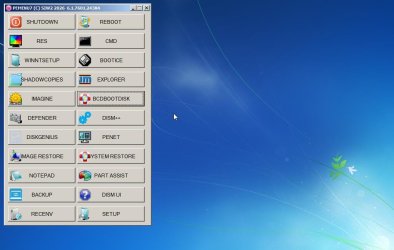
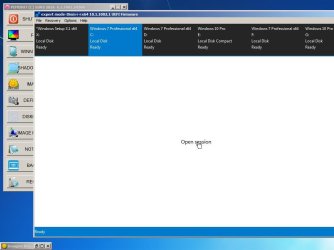
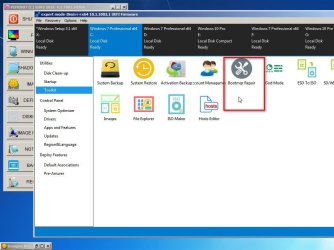
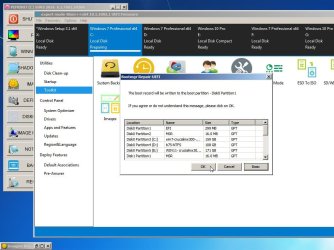
you can borrow my simple boot media

:ar: RECDISC7B.iso

it includes lots of useful tools and supports usb3 and nvme

Captured_000.jpg

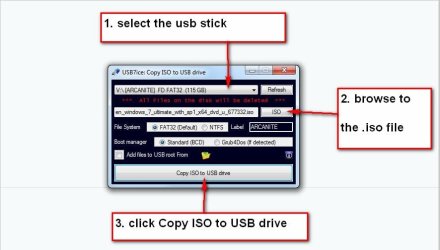
could burn the above to a cd or extract it to usb stick using this :ar: View attachment Usb7ice.zip

usb7ice.JPG

- - - Updated - - -

************************************************************************************************************************


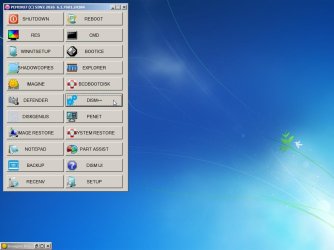
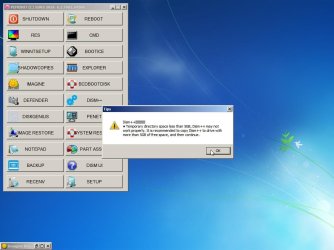
Here is one example of the included tools

Captured_001.jpg

Captured_002.jpg

Captured_003.jpg

Captured_004.jpg

Captured_005.jpg

Captured_006.jpg
 

My Computers

System One System Two

  • Computer type
    PC/Desktop
    OS
    7 X64
    CPU
    i5 8400
    Motherboard
    gigabyte b365m ds3h
    Memory
    2x8gb 3200mhz
    Hard Drives
    various
    PSU
    pure power 11 400w cm
    Case
    Coolermaster
    Cooling
    cryorig m9i
  • Computer type
    PC/Desktop
    OS
    7x64
    CPU
    g5400
    Motherboard
    ga b365m ds3h
    Memory
    8gb ddr4 2400
    PSU
    xfx pro 450w
Thanks to SIW2, yes the only disc I leave connected is the DVD, always remove unwanted SSD's. I

I'm wondering if it is Macrium thats the cause, because If I clone a disc, disconnect it and replace it with the clone one, I can see the files on it but it will not boot, a windows repair boot up tells me the disc is not compatible - I just can't work that out, I get the same response if I put a pre-cloned disc in, one that been done at an earlier time.

You'd think a cloned disc would work straight off when swapped over, I know never to have two 'bootables'. I did update the APU last January, I can't see that being the cause...... other than that the good drive shows no signs of anything, all I want is to clone it.

What I was planning was either doing a quickie of an install or trying re-install or change Cloner, I'm stumped, I've tried two SSD's.

Dave


Dave
 

My Computer

Computer type
PC/Desktop
Computer Manufacturer/Model Number
custom build
OS
win7 x64
CPU
Trinity A6-5600K
Motherboard
Gigabyte GA-F2A88X-D3H
Memory
8Gb
Graphics Card(s)
APU
Hard Drives
Western Digital
Antivirus
NoD32
Browser
Firefox
You need to boot the media in the same mode as the installed os either bios or efi
 

My Computers

System One System Two

  • Computer type
    PC/Desktop
    OS
    7 X64
    CPU
    i5 8400
    Motherboard
    gigabyte b365m ds3h
    Memory
    2x8gb 3200mhz
    Hard Drives
    various
    PSU
    pure power 11 400w cm
    Case
    Coolermaster
    Cooling
    cryorig m9i
  • Computer type
    PC/Desktop
    OS
    7x64
    CPU
    g5400
    Motherboard
    ga b365m ds3h
    Memory
    8gb ddr4 2400
    PSU
    xfx pro 450w
Haven't used Macrium, so can't suggest the reason for the issue you have. But if you are looking just to get the backup disk operational, you could simply try creating a Windows ImageBackup and restoring it to the new disk. It will only work if you can shrink the existing disk to fit the new smaller one. You can expand it back once you have done the system image. I have done that quite a few times now, just changing to SSDs so I don't bother with cloning software just to get a bit for bit copy.
 

My Computers

System One System Two

  • OS
    Windows 7 Home Premium 64 bit
  • Computer type
    PC/Desktop
Getting there at last.
I was blaming Macrium - wrong! I borrowed a Sat ock 2REU3 stand-a-lone dublicator, the result was still same. So I set to shoe all hidden files and coppied the boot folder and got....
BOOTMGR image is corrupt. The system cannot boot. BOOTMGR image is corrupt. The system cannot boot. The Windows Boot Manager is incompatible with this system.


No physical memory is available at the location required for the Windows Boot
Manager. The system can not continue.
BOOTMGR image is corrupt. The system cannot boot. The file is possibly corrupt. The file header checksum does not match the computed checksum.
Boot Parameters size (0x%lx) is too big
BTAPENT ‚ B "   @ €     
TRAP %lx
DEBUG TRAP ================== DOUBLE FAULT ================================

===== STACK SEGMENT OVERRUN or NOT PRESENT FAULT ===============

============== GENERAL PROTECTION FAULT ========================

=================== PAGE FAULT =======================

I don't know of anyway to fix this, but look's like a re-installation job, funny it says it won't boot BUT IT DOES, I'm using it righ noe and the working drive says exactly the same thing - THAT bugs me.

So I've been copying corrupt data. I'll await any advice before closing this this and marking it as solved.

Thank you to everyone, Dave
 

My Computer

Computer type
PC/Desktop
Computer Manufacturer/Model Number
custom build
OS
win7 x64
CPU
Trinity A6-5600K
Motherboard
Gigabyte GA-F2A88X-D3H
Memory
8Gb
Graphics Card(s)
APU
Hard Drives
Western Digital
Antivirus
NoD32
Browser
Firefox
Getting there at last.
I was blaming Macrium - wrong! I borrowed a Sat ock 2REU3 stand-a-lone dublicator, the result was still same. So I set to shoe all hidden files and coppied the boot folder and got....
BOOTMGR image is corrupt. The system cannot boot. BOOTMGR image is corrupt. The system cannot boot. The Windows Boot Manager is incompatible with this system.


No physical memory is available at the location required for the Windows Boot
Manager. The system can not continue.
BOOTMGR image is corrupt. The system cannot boot. The file is possibly corrupt. The file header checksum does not match the computed checksum.
Boot Parameters size (0x%lx) is too big
BTAPENT ‚ B " @ €
TRAP %lx
DEBUG TRAP ================== DOUBLE FAULT ================================

===== STACK SEGMENT OVERRUN or NOT PRESENT FAULT ===============

============== GENERAL PROTECTION FAULT ========================

=================== PAGE FAULT =======================

I don't know of anyway to fix this, but look's like a re-installation job, funny it says it won't boot BUT IT DOES, I'm using it righ noe and the working drive says exactly the same thing - THAT bugs me.

So I've been copying corrupt data. I'll await any advice before closing this this and marking it as solved.

Thank you to everyone, Dave


where does that message come from ?
 

My Computers

System One System Two

  • Computer type
    PC/Desktop
    OS
    7 X64
    CPU
    i5 8400
    Motherboard
    gigabyte b365m ds3h
    Memory
    2x8gb 3200mhz
    Hard Drives
    various
    PSU
    pure power 11 400w cm
    Case
    Coolermaster
    Cooling
    cryorig m9i
  • Computer type
    PC/Desktop
    OS
    7x64
    CPU
    g5400
    Motherboard
    ga b365m ds3h
    Memory
    8gb ddr4 2400
    PSU
    xfx pro 450w
That message came right out the horses mouth...! I was right up to mi' ears I was.

Came from the 'Reserve MBR' file, I un-hid hidden operating system and extention windows files, think it was the boot folder, geesh I wasn't typing 'that lot', I was scrolling down and came to that bit.... THAT rang a big clanger, turned out all my doing.

Using Macrium 8, I never ever realized I had to resize the drives - I spent a good few days wondering where the extra partition was coming from, lol. For some reason the os just stopped booting after a clone, even a clone I did yonks ago wouldn't boot, no doubt I was cloning with faulty clones so to speak.

All sorted now, I cloned a smaller sized disc and a larger and they booted., mind you I did start up repairs along the way. So for fun I did a clone on a larger SSD without re-sizing - no boot was the reply.

Thank you very much for all the help, sorry for that, ya' can call me a time waster.
Cheers, Dave.

- - - Updated - - -

Just a warning...!!!!!!
Never EVER modify or alter anything at all in these hidden folders, no harm looking at em' or copying them to a folder 'say on the desktop (like I did). Better to mention that.

Dave
 
Last edited:

My Computer

Computer type
PC/Desktop
Computer Manufacturer/Model Number
custom build
OS
win7 x64
CPU
Trinity A6-5600K
Motherboard
Gigabyte GA-F2A88X-D3H
Memory
8Gb
Graphics Card(s)
APU
Hard Drives
Western Digital
Antivirus
NoD32
Browser
Firefox
Cloned drives before with ease using Macrium 8.... this time have great difficulty I just can't and won't boot, the SSD's hold the same data. First time I use a SATA adapter to USB then I tried hooking to an internal SATA drive umpteen times and alway's get the same result 0xc000000e error.
A windows start up disc don't wanna know?

Just like the working 'Reserve' drive it doesn't show the files when given a drive letter but indicates loaded, my guess theres something awry in the boot department. Has anyone any ideas??

Thanks Dave.

Hello,
This problem is super common with cloned drives and I have had this issue before.
What you can do is boot off your Windows 7 Installation media, click "Repair your computer" and run startup repair. It will fix all problems automatically. If that doesn't work, open the command prompt on your installation media in the repair menu and type the following commands:
bootrec /fixmbr
bootrec /fixboot
bootrec /scanos
bootrec /rebuldbcd
 

My Computers

System One System Two

  • Computer type
    PC/Desktop
    Computer Manufacturer/Model Number
    Custom Build
    OS
    Windows XP Media Center Edition 2002 SP3 32bit
    CPU
    Core 2 Quad Q9650 3.00GHz
    Motherboard
    GIGABYTE GA-P35-DS3 Rev 2.0 (Award BIOS version F14)
    Memory
    4GB DDR2
    Graphics Card(s)
    SAPPHRIE ATI HD 3870 GDDR4
    Sound Card
    Creative Sound Blaster Audigy SB0090
    Monitor(s) Displays
    Sony SDM-HS75 17'' 75Hz VGA LCD Monitor
    Screen Resolution
    1280x1024 72Hz
    Hard Drives
    36GB Western Digital WDC360ADFD Raptor 10k RPM Mechanical Hard Disk (OS DRIVE)
    1TB Western Digital WDC10EARS 5400RPM Mechanical Hard Disk
    PSU
    Be Quiet! 700W ATX PSU
    Case
    Extrema Unknown Model
    Cooling
    Scythe Samurai Z LGA775 Cooler
    Keyboard
    Microsoft Wireless Keyboard 3000
    Mouse
    Microsoft Wheel Mouse Optical USB-PS/2 Compatible (BLACK)
    Internet Speed
    200Mbit/s FTTH (COSMOTE Fiber Plan)
    Antivirus
    Common Sense
    Browser
    Firefox
    Other Info
    Additional Expansions:

    Sweex/MosChip MCS98xx ECP Parallel PCI Card
    Creative SoundBlaster Audigy SB0090 Sound Card
    MosChip MCS9865 2x RS-232 Serial PCI Card

    Disk Drives:

    Sony OptiArc AD-5240S DVD-RW (SATA)
    Sony MPF920 Floppy Diskette Drive (Manufactured Jun. 2007)
  • Computer type
    Laptop
    System Manufacturer/Model Number
    HP Compaq 6710b
    OS
    Windows XP Professional 32bit SP3
    CPU
    Intel Core 2 Duo T7500 2.20GHz
    Motherboard
    HP Stock
    Memory
    Hynix 4GB DDR2
    Graphics Card(s)
    Mobile Intel Express 965 Chipset Graphics
    Sound Card
    SoundMAX Intergrated Digital HD Audio
    Monitor(s) Displays
    HP LCD Panel
    Screen Resolution
    1280x800
    Hard Drives
    500GB CRUCIAL BX500 SSD SATA
    PSU
    HP ED465AA AC Adapter + Stock HP Battery
    Case
    Stock
    Cooling
    Stock
    Keyboard
    Aftermarket, Replaced
    Mouse
    Microsoft Optical Mouse USB (with PS/2 Adapter)
    Internet Speed
    5-50 Megabits/sec. (Wi-Fi FTTH)
    Browser
    Firefox
    Antivirus
    None
    Other Info
    With a Genuine Docking Station.
Back
Top