Sending mail from the Outbox on WLM 2012

Lynbrook

New member
Local time
9:35 AM
Messages
6
Hi
I am using Windows Live Mail 2012 on Windows 7 64 bit. The program is set up to transfer finished mail to the Outbox before sending, to give me time to check it.

However, when I open the Outbox the mail is there waiting to be sent BUT after a minute or so it sends itself without any input from me. This means there is sometimes not enough time to check over a long email before it is sent. This does not happen every time and the delay between arriving in the Outbox and being sent varies from a few seconds to a few minutes. The program should allow mail to stay in the Outbox until I press the "send" button and not to be sent when WLM thinks its time is up!

Is this a fault with the system or is there some delay function that I have forgotten to set?

Thanks
 

My Computer My Computer

At a glance

Windows 7 Home 64 bitIntel Core i7 - 860 Quad Core12 GB1GB NVIDIA GEFORCE GTS250 PCI Express
Computer type
PC/Desktop
Computer Manufacturer/Model Number
PC Specialist custom built
OS
Windows 7 Home 64 bit
CPU
Intel Core i7 - 860 Quad Core
Motherboard
ASUS P7H55D-M EVO
Memory
12 GB
Graphics Card(s)
1GB NVIDIA GEFORCE GTS250 PCI Express
Hard Drives
1 TB Serial ATA Hard Drive
Antivirus
Bitdefender
Browser
Firefox
Hi Lynbrook, welcome to Seven Forums.

GB.jpg
Click image to enlarge it.
 

My Computer My Computer

At a glance

Win7 H.Prem. 32bit+SP1
Computer Manufacturer/Model Number
Look in my Signature.
OS
Win7 H.Prem. 32bit+SP1
Hi Roderunner
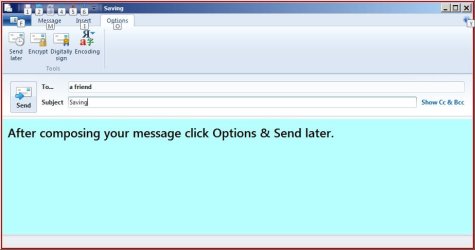
Thanks for your reply, but I'm afraid it doesn't solve the problem. When you click on "send later" in Options the message is sent to the Outbox, so it gets me back to the same positiion I was in before.
Thanks anyway
 

My Computer My Computer

At a glance

Windows 7 Home 64 bitIntel Core i7 - 860 Quad Core12 GB1GB NVIDIA GEFORCE GTS250 PCI Express
Computer type
PC/Desktop
Computer Manufacturer/Model Number
PC Specialist custom built
OS
Windows 7 Home 64 bit
CPU
Intel Core i7 - 860 Quad Core
Motherboard
ASUS P7H55D-M EVO
Memory
12 GB
Graphics Card(s)
1GB NVIDIA GEFORCE GTS250 PCI Express
Hard Drives
1 TB Serial ATA Hard Drive
Antivirus
Bitdefender
Browser
Firefox
Hi Lynbrook,

RR.jpg
 

My Computer My Computer

At a glance

Win7 H.Prem. 32bit+SP1
Computer Manufacturer/Model Number
Look in my Signature.
OS
Win7 H.Prem. 32bit+SP1
Thanks again Roderunner. Yes, the method you suggest is fine and I will probably use it. But it would still be nice to know why messages get sent automatically from the Outbox (and at random times) whilst I am still reading them.
Must be Gremlins in the system!
Cheers.
 

My Computer My Computer

At a glance

Windows 7 Home 64 bitIntel Core i7 - 860 Quad Core12 GB1GB NVIDIA GEFORCE GTS250 PCI Express
Computer type
PC/Desktop
Computer Manufacturer/Model Number
PC Specialist custom built
OS
Windows 7 Home 64 bit
CPU
Intel Core i7 - 860 Quad Core
Motherboard
ASUS P7H55D-M EVO
Memory
12 GB
Graphics Card(s)
1GB NVIDIA GEFORCE GTS250 PCI Express
Hard Drives
1 TB Serial ATA Hard Drive
Antivirus
Bitdefender
Browser
Firefox
Its just the way WLM is designed and if these options in red box are ticked or not.

RR.JPG
 

My Computer My Computer

At a glance

Win7 H.Prem. 32bit+SP1
Computer Manufacturer/Model Number
Look in my Signature.
OS
Win7 H.Prem. 32bit+SP1
Hi
The "send and receive messages at start up" box is ticked but the "send messages immediately" is not. This means that when I send an email I get a message which says that the email will be placed in the "Outbox" and will be sent when I send or receive the next email.
I've always taken this to mean that it will be sent when I next send any message as this involves me hitting the "send and receive" button. Anything in the Outbox will then of course go out. But perhaps it means that anything in the Outbox will be sent when any new email comes in. I've not checked this out, but it may be the case.
 

My Computer My Computer

At a glance

Windows 7 Home 64 bitIntel Core i7 - 860 Quad Core12 GB1GB NVIDIA GEFORCE GTS250 PCI Express
Computer type
PC/Desktop
Computer Manufacturer/Model Number
PC Specialist custom built
OS
Windows 7 Home 64 bit
CPU
Intel Core i7 - 860 Quad Core
Motherboard
ASUS P7H55D-M EVO
Memory
12 GB
Graphics Card(s)
1GB NVIDIA GEFORCE GTS250 PCI Express
Hard Drives
1 TB Serial ATA Hard Drive
Antivirus
Bitdefender
Browser
Firefox
As you have the "send and receive messages at start up" ticked, any message in the Out box will be sent on opening WLM. Only items in the 'Draft' box will remain till you send them. Items in the 'Out' box may also be sent on closing WLM.
 

My Computer My Computer

At a glance

Win7 H.Prem. 32bit+SP1
Computer Manufacturer/Model Number
Look in my Signature.
OS
Win7 H.Prem. 32bit+SP1

My Computer My Computer

At a glance

Win7 H.Prem. 32bit+SP1
Computer Manufacturer/Model Number
Look in my Signature.
OS
Win7 H.Prem. 32bit+SP1
Thanks Roderunner for your very comprehensive reply. I've looked all through your settings and they are largely the same as my own.
I'm not in fact new to WLM, I've been using it for a few years (yes, I have got the latest version) but it's only recently (the last few months or so) that I've been having any problems. It's unfortunate that the problem is intermittent, which doesn't help when you try to find a solution. All the comments that you have made during this thread have been taken on board but, as far as I can say, the problem still remains. I cannot say when it will next happen - but I know it will.
I think from now on I will not leave messages in the Outbox before sending but will put them, as you suggested, into the Drafts folder. It's too risky leaving them in the Outbox while I re-read them as I don't know when WLM will suddenly decide to send them, with no input from me.
I may have to live with this as a WLM glitch specific just to me, as no one else I've spoken to seems to have the same problem.
Thanks for all your help though.
 

My Computer My Computer

At a glance

Windows 7 Home 64 bitIntel Core i7 - 860 Quad Core12 GB1GB NVIDIA GEFORCE GTS250 PCI Express
Computer type
PC/Desktop
Computer Manufacturer/Model Number
PC Specialist custom built
OS
Windows 7 Home 64 bit
CPU
Intel Core i7 - 860 Quad Core
Motherboard
ASUS P7H55D-M EVO
Memory
12 GB
Graphics Card(s)
1GB NVIDIA GEFORCE GTS250 PCI Express
Hard Drives
1 TB Serial ATA Hard Drive
Antivirus
Bitdefender
Browser
Firefox
A few days ago, I had a minor problem when writing an email (using the latest version). After a few lines were done the cursor would vanish, clicking on the page to replace it only made it vanish again. I tried the same on my AOL & Hotmail accounts, it still occurred.
So I composed the email in Notepad, then copied & pasted into WLM. Never found why it happened And has not occurred again.
-
This might be an option for you. Compose using Notepad & save as who its to be sent to. ETC.
 

My Computer My Computer

At a glance

Win7 H.Prem. 32bit+SP1
Computer Manufacturer/Model Number
Look in my Signature.
OS
Win7 H.Prem. 32bit+SP1
Thanks Roderunner. I'll keep it in mind but I've not had that problem, yet!
 

My Computer My Computer

At a glance

Windows 7 Home 64 bitIntel Core i7 - 860 Quad Core12 GB1GB NVIDIA GEFORCE GTS250 PCI Express
Computer type
PC/Desktop
Computer Manufacturer/Model Number
PC Specialist custom built
OS
Windows 7 Home 64 bit
CPU
Intel Core i7 - 860 Quad Core
Motherboard
ASUS P7H55D-M EVO
Memory
12 GB
Graphics Card(s)
1GB NVIDIA GEFORCE GTS250 PCI Express
Hard Drives
1 TB Serial ATA Hard Drive
Antivirus
Bitdefender
Browser
Firefox
Back
Top