Ok, here's the revised RedistMv.bat file: Download
View attachment RedistMv.bat
You can run it or just move all of the files dated 11/07/2007 8:00 AM to a safe place until you're certain there aren't any hooks to those files. You'd know fairly quickly - things won't work well that rely on the files, I don't think there will be any issues though ... very few programs of that era were x64 and the misplaced files are from a 2005 msvcrt x64 install.
The batch file creates a folder in your Downloads folder named zMSvcrt2005 and moves the misplaced files on c:\ to that folder. If moving the files from C:\ causes other issues, just COPY everything in %USERPROFILE%\Downloads\zMSvcrt2005 back to C:\
Adobe updater: You're not alone! See:
search results
Acrobat Help /
Update errors | Windows simply states uninstall / reinstall.
A more interesting approach states that different versions of Acrobat and Reader installed on the same machine causes a conflict. Their solution was to
uninstall Reader, afterwards Adobe updater worked without the issue reoccurring.
There are a few other references that state - just turn off notifications. I would probably suggest, at a minimum, checking that "Do not show this msg again" box.
There was an issue a while back with Adobe flash options: check for update. For changes to that option to "stick", you had to launch the flash control panel with elevated privileges (Run as Administrator). If there is a control panel for Adobe Standard, you might try configuring it as admin. Turn off auto updates, restart the machine, turn on auto updates.
Personally, I disable, uninstall, or turn off ALL auto updaters and manually check for updates.
If you don't get anywhere with the above suggestions, I suggest a new SevenForums thread for that issue (or wait on Adobe's response)
Bill
.

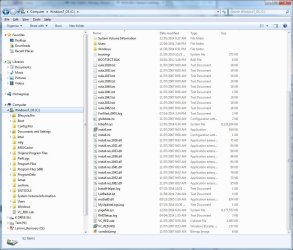

 I downloaded your bat file and it told me everything I needed to know. Since I also reinstalled the redists on my laptop, I'll try moving those files now and see what happens.
 (and so is my wife since this is primarily her machine)
