Solved IE 11 'This page can't be displayed... Turn on TLS 1.0...'

MarkMck

New member
Local time
9:54 AM
Messages
2
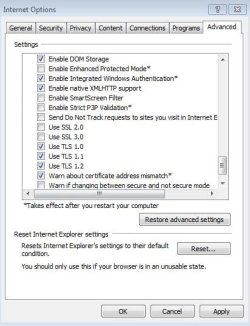
Currently using IE 11.0.18 with settings in Security Tab set to Default [Enable Protected Mode, checked] and 'Internet Options; Advanced' also using the default settings [See Attachment 2]. Using Windows Firewall and Microsoft Security Essentials. I have not 'messed' with either of them other than keeping everything current. OS is also up to date [Win 7 Home Premium, SP1, 64 bit]

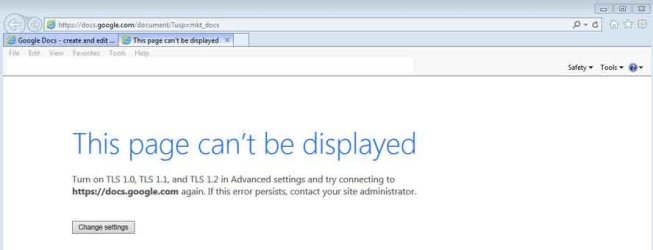
When attempting to open https://docs.google.com/document/?usp=mkt_docs I receive a 'This page can't be displayed...' message [Attachment 1]. Odd message due to the requested TLS features being selected in the Advanced Tab.

Changing Advanced settings, by also 'ticking' the 'Use SSL 2.0' option, the Google Doc web page will open.

With 'SSL 2.0' deselected and using 'SSL 3.0' IE gives a 'This website uses an insecure connection' warning message.

Would like to avoid using the SSL 2.0 'workaround' if possible. So is there something else I may be missing? I guess I'm willing to accept that this is 'normal' behavior if that is indeed the case...

Thanks
 

Attachments
  • AdvSettings.JPG
    AdvSettings.JPG
    44.9 KB · Views: 20
  • IEScreen.jpg
    IEScreen.jpg
    14.1 KB · Views: 0

My Computer My Computer

At a glance

Windows 7 Home Premium 64 bit
Computer type
PC/Desktop
Computer Manufacturer/Model Number
Custom Build
OS
Windows 7 Home Premium 64 bit
Hi and welcome to SevenForums,
http://www.sevenforums.com/news/367145-april-2015-security-updates-internet-explorer.html

As you have discovered it's an issue :)
I would suggest to try another browser
Your link just took me to a google sign in page but I'm sure after that I'd get the message as you describe because I have the ssl's unchecked as well but that was me manually unchecking them a long time ago seeing if any sites required ssl
None so far except possibly the google doc's.. gmail does not require ssl to be checked in ie10 which is what I use.
Cheers.
 

My Computer My Computer

At a glance

Win-7-Pro64bit 7-H-Prem-64biti7-5930K 2nd i9-9940x both water blocked VRM'...Trident-z 3200C14 2nd Trident-z 3600C16EVGA 1080ti ftw3 2nd Titan Xp both water blocked
Computer type
PC/Desktop
Computer Manufacturer/Model Number
Custom assembled by me :}
OS
Win-7-Pro64bit 7-H-Prem-64bit
CPU
i7-5930K 2nd i9-9940x both water blocked VRM's too
Motherboard
ASUS SABERTOOTH X99 2nd ASUS x299 Apex
Memory
Trident-z 3200C14 2nd Trident-z 3600C16
Graphics Card(s)
EVGA 1080ti ftw3 2nd Titan Xp both water blocked
Sound Card
Built-in Realtek
Monitor(s) Displays
1-AOC G2460PG 24"G-Sync 144Hz/ 2nd 1-ASUS VG248QE 24" 144Hz
Screen Resolution
1920 x 1080 144Hz
Hard Drives
2-Samsung M.2 Evo & Evo Plus
2-Samsung 850 EVO 500GB SSD's/ 3-2.5 W.D. Black 1tb-&3-1tb/3-3.5 WD Black 1tb hdd's
PSU
EVGA SuperNOVA 1000-P2 2nd 1200-P2
Case
2-Corsair Obsidian Series 450D Black ATX Mid Tower
Cooling
Custom water loops
Keyboard
Logitech G710+/ 2nd Logitech G910
Mouse
2-RedDragon M901 Perdition 16400 dpi Gaming mouse = wired
Internet Speed
Comcast Ping 19ms 89.31mbps download speed 6.12mbps upload
Antivirus
Malwarebytes Pro/ Superantispyware Pro
Browser
FireFox & Pale moon
Other Info
2nd ASUS X299 Apex/Intel i9-9940x with Custom water loop/7H-Prem-x64/Corsair 450D case/Ram Trident-z 3600C16 4x8gb / Samsung970Evo plus 500gb SSD/Dual ssd EZ swap evo/PSU EVGA SuperNova 1200w-P2 80+Platinum/GPU Titan Xp /8-ML-140 on push-pull on 2-280GTX rads
Thanks for the help. Guess I'll have to consider it a 'feature' for the moment until the SSL 3.0 issue gets resolved....

Appreciate it...
 

My Computer My Computer

At a glance

Windows 7 Home Premium 64 bit
Computer type
PC/Desktop
Computer Manufacturer/Model Number
Custom Build
OS
Windows 7 Home Premium 64 bit
No problem I guess Google is fishing here and wanting others to use Chrome is why the compatibility is not there,
Chrome is supposed to of already made adjustments so there's a clash in how to apply the vulnerabilities of ssl.. in general between the two big dogs :)
Cheers.
 

My Computer My Computer

At a glance

Win-7-Pro64bit 7-H-Prem-64biti7-5930K 2nd i9-9940x both water blocked VRM'...Trident-z 3200C14 2nd Trident-z 3600C16EVGA 1080ti ftw3 2nd Titan Xp both water blocked
Computer type
PC/Desktop
Computer Manufacturer/Model Number
Custom assembled by me :}
OS
Win-7-Pro64bit 7-H-Prem-64bit
CPU
i7-5930K 2nd i9-9940x both water blocked VRM's too
Motherboard
ASUS SABERTOOTH X99 2nd ASUS x299 Apex
Memory
Trident-z 3200C14 2nd Trident-z 3600C16
Graphics Card(s)
EVGA 1080ti ftw3 2nd Titan Xp both water blocked
Sound Card
Built-in Realtek
Monitor(s) Displays
1-AOC G2460PG 24"G-Sync 144Hz/ 2nd 1-ASUS VG248QE 24" 144Hz
Screen Resolution
1920 x 1080 144Hz
Hard Drives
2-Samsung M.2 Evo & Evo Plus
2-Samsung 850 EVO 500GB SSD's/ 3-2.5 W.D. Black 1tb-&3-1tb/3-3.5 WD Black 1tb hdd's
PSU
EVGA SuperNOVA 1000-P2 2nd 1200-P2
Case
2-Corsair Obsidian Series 450D Black ATX Mid Tower
Cooling
Custom water loops
Keyboard
Logitech G710+/ 2nd Logitech G910
Mouse
2-RedDragon M901 Perdition 16400 dpi Gaming mouse = wired
Internet Speed
Comcast Ping 19ms 89.31mbps download speed 6.12mbps upload
Antivirus
Malwarebytes Pro/ Superantispyware Pro
Browser
FireFox & Pale moon
Other Info
2nd ASUS X299 Apex/Intel i9-9940x with Custom water loop/7H-Prem-x64/Corsair 450D case/Ram Trident-z 3600C16 4x8gb / Samsung970Evo plus 500gb SSD/Dual ssd EZ swap evo/PSU EVGA SuperNova 1200w-P2 80+Platinum/GPU Titan Xp /8-ML-140 on push-pull on 2-280GTX rads
Back
Top