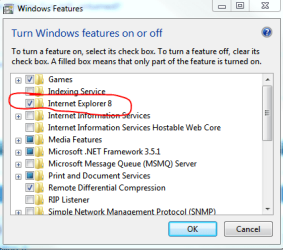
Apologies if I've posted this before. I thought I'd posted it an hour ago, but now I can't find it on the forum. Here's my query again:
When I do a search in IE 8 and then right click to open a hyperlink in a new tab, I get 'Connecting...' but it never connects.
I've trawled the web looking for solutions. So far I've:
- disabled all add-ons
- opened IE8 in No Add-Ons mode
- turned off Windows search in Services
- started in Safe Mode
- turned off Avast and Windows Firewall
- run regsvr32 actxprxy.dll in an elevated cmd prompt
- run the list of regsvr32 re-registers suggested by KnowOne in http://www.sevenforums.com/browsers-mail/27436-internet-explorer-8-bug.html
(Three of these would not run; I got an error message saying 'the module shdocvw.dll was loaded but the entry-point Dllregisterserver was not found. make sure that [file] is a valid dll file and then try again.')
Whatever combination I try, IE won't connect in a new tab - unless I follow one suggestion I found and click in the address bar and hit Enter. Then it does connect.
I can't find anything else to try. The one thing I'm not prepared to do is a clean install of W7 x64 - because I've had this problem since the day I installed the retail version, two months ago. That was a completely clean install. (I didn't have the problem in the RC or the beta.)
Are there stones I've left unturned?
Mary
When I do a search in IE 8 and then right click to open a hyperlink in a new tab, I get 'Connecting...' but it never connects.
I've trawled the web looking for solutions. So far I've:
- disabled all add-ons
- opened IE8 in No Add-Ons mode
- turned off Windows search in Services
- started in Safe Mode
- turned off Avast and Windows Firewall
- run regsvr32 actxprxy.dll in an elevated cmd prompt
- run the list of regsvr32 re-registers suggested by KnowOne in http://www.sevenforums.com/browsers-mail/27436-internet-explorer-8-bug.html
(Three of these would not run; I got an error message saying 'the module shdocvw.dll was loaded but the entry-point Dllregisterserver was not found. make sure that [file] is a valid dll file and then try again.')
Whatever combination I try, IE won't connect in a new tab - unless I follow one suggestion I found and click in the address bar and hit Enter. Then it does connect.
I can't find anything else to try. The one thing I'm not prepared to do is a clean install of W7 x64 - because I've had this problem since the day I installed the retail version, two months ago. That was a completely clean install. (I didn't have the problem in the RC or the beta.)
Are there stones I've left unturned?
Mary
My Computer
At a glance
Windows 7x64 + XP Modei7-74012 GB DDR3Sapphire Radeon HD 4870
- Computer Manufacturer/Model Number
- self-built
- OS
- Windows 7x64 + XP Mode
- CPU
- i7-740
- Motherboard
- Asus P6T Deluxe
- Memory
- 12 GB DDR3
- Graphics Card(s)
- Sapphire Radeon HD 4870
- Sound Card
- on board
- Monitor(s) Displays
- Eizo 30" CG301; Dell 20" 2007FP,
- Screen Resolution
- Eizo: 2560x1600; Dell: 1600x1024
- Hard Drives
- 3 x WD Velociraptors, 320 GB
2 x Seagate Barracuda 1.5 GB
- PSU
- Zalman ZM850
- Case
- Coolermaster ATCS 840
- Cooling
- Swiftech H20-220 watercooling kit
- Keyboard
- Logitech G11
- Mouse
- Logitech cordless
- Internet Speed
- slow broadband