Can't Right-Click Desktop

Akira Cheyenne

New member
Local time
1:46 AM
Messages
4
I have Windows 7 Ultimate on Toshiba Satellite. I can't remember, but I did something, saw "disable right-click" and afterwords, I couldn't right click the desktop. The icons are gone, and I can't drag a select box. The wallpaper still shows, and I can right-click everything else but that. I've tried changing the registry, but I've had no luck. What can I do to fix this?
 

My Computer

Computer Manufacturer/Model Number
Toshiba Satellite
OS
Windows 7 Ultimate 64-bit
CPU
Intel mobile core 2 Duo T5750 @2.00GHz
Motherboard
Intel GM965 Chipset
Memory
4.0GB DDR2
Graphics Card(s)
Mobile Intel 965 Express Chipset
Sound Card
RealTek High Definition Audio
Monitor(s) Displays
Generic PnP Monitor
Hard Drives
500GB Toshiba IDE
Hello Akira, and welcome to Seven Forums.

You can do a system restore using a restore point dated before you made this change to undo it.

Hope this helps,
Shawn
 

My Computer

Computer type
PC/Desktop
Computer Manufacturer/Model Number
Self built custom
OS
64-bit Windows 11 Pro for Workstations
CPU
Intel i7-8700K OC'd to 5 GHz
Motherboard
ASUS ROG Maximus XI Formula Z390
Memory
64 GB (4x16GB) G.SKILL TridentZ RGB DDR4 3600 MHz
Graphics Card(s)
ASUS ROG-STRIX-GTX1080TI-O11G-GAMING
Sound Card
Integrated
Monitor(s) Displays
2 x Samsung Odyssey G7 27"
Screen Resolution
2560x1440
Hard Drives
1TB Samsung 990 PRO M.2,
4TB Samsung 990 PRO PRO M.2,
TerraMaster F8 SSD Plus NAS
PSU
Seasonic Prime Titanium 850W
Case
Thermaltake Core P3
Cooling
Corsair Hydro H115i
Keyboard
Logitech wireless K800
Mouse
Logitech MX Master 4
Internet Speed
2 Gb/s Download and 100 Mb/s Upload
Antivirus
Malwarebyte Anti-Malware Premium
Browser
Google Chrome
Other Info
Logitech Z625 speaker system,
Logitech BRIO 4K Pro webcam,
HP Color LaserJet Pro MFP M477fdn,
APC SMART-UPS RT 1000 XL - SURT1000XLI,
Galaxy S23 Plus phone
Hello Akira, and welcome to Seven Forums.

You can do a system restore using a restore point dated before you made this change to undo it.

Hope this helps,
Shawn

Here's the problem - This started before I upgraded. This happened while I had Vista Home Premium 64-bit.
I installed 7, hoping it would fix the problem, but no luck.
 

My Computer

Computer Manufacturer/Model Number
Toshiba Satellite
OS
Windows 7 Ultimate 64-bit
CPU
Intel mobile core 2 Duo T5750 @2.00GHz
Motherboard
Intel GM965 Chipset
Memory
4.0GB DDR2
Graphics Card(s)
Mobile Intel 965 Express Chipset
Sound Card
RealTek High Definition Audio
Monitor(s) Displays
Generic PnP Monitor
Hard Drives
500GB Toshiba IDE
Did you use some sort of all in one tweaking type program to disable this?
 
Last edited:

My Computer

Computer type
PC/Desktop
Computer Manufacturer/Model Number
Self built custom
OS
64-bit Windows 11 Pro for Workstations
CPU
Intel i7-8700K OC'd to 5 GHz
Motherboard
ASUS ROG Maximus XI Formula Z390
Memory
64 GB (4x16GB) G.SKILL TridentZ RGB DDR4 3600 MHz
Graphics Card(s)
ASUS ROG-STRIX-GTX1080TI-O11G-GAMING
Sound Card
Integrated
Monitor(s) Displays
2 x Samsung Odyssey G7 27"
Screen Resolution
2560x1440
Hard Drives
1TB Samsung 990 PRO M.2,
4TB Samsung 990 PRO PRO M.2,
TerraMaster F8 SSD Plus NAS
PSU
Seasonic Prime Titanium 850W
Case
Thermaltake Core P3
Cooling
Corsair Hydro H115i
Keyboard
Logitech wireless K800
Mouse
Logitech MX Master 4
Internet Speed
2 Gb/s Download and 100 Mb/s Upload
Antivirus
Malwarebyte Anti-Malware Premium
Browser
Google Chrome
Other Info
Logitech Z625 speaker system,
Logitech BRIO 4K Pro webcam,
HP Color LaserJet Pro MFP M477fdn,
APC SMART-UPS RT 1000 XL - SURT1000XLI,
Galaxy S23 Plus phone
Don't need to clean install

Click start and in the search/run box type group policy

you will see Group Policy Editor I think and click on that...

You will need to look through there cause I am not on that system now, but in there there is a Policy to disable the right click function. Just disable it and log off and back on.. or reboot if needed.
 

My Computer

Computer Manufacturer/Model Number
Self Built
OS
Win 7 Ultimate 32bit
CPU
C2D E6600 2.4Ghz
Motherboard
Intel D965WH
Memory
4G Kingston KHX5400D2
Graphics Card(s)
EVGA GTX 570 HD SC (012-P3-1573-KR)
Sound Card
On-Board
Monitor(s) Displays
Samsung 226BW
Screen Resolution
1680 x 1050
Hard Drives
2 x 250 Seagate Barracuda
2 x 500 Seagate Barracuda (Raid1)
PSU
Corsair TX750W
Case
In-Win C589
Cooling
Stock Intel Cooling
Okay, something's wrong with the search box. I think I need to work on the indexing, but is there another way to get to the "group policy"
 

My Computer

Computer Manufacturer/Model Number
Toshiba Satellite
OS
Windows 7 Ultimate 64-bit
CPU
Intel mobile core 2 Duo T5750 @2.00GHz
Motherboard
Intel GM965 Chipset
Memory
4.0GB DDR2
Graphics Card(s)
Mobile Intel 965 Express Chipset
Sound Card
RealTek High Definition Audio
Monitor(s) Displays
Generic PnP Monitor
Hard Drives
500GB Toshiba IDE
Search through the start menus... you should see Group Policy Editor there.
 

My Computer

Computer Manufacturer/Model Number
Self Built
OS
Win 7 Ultimate 32bit
CPU
C2D E6600 2.4Ghz
Motherboard
Intel D965WH
Memory
4G Kingston KHX5400D2
Graphics Card(s)
EVGA GTX 570 HD SC (012-P3-1573-KR)
Sound Card
On-Board
Monitor(s) Displays
Samsung 226BW
Screen Resolution
1680 x 1050
Hard Drives
2 x 250 Seagate Barracuda
2 x 500 Seagate Barracuda (Raid1)
PSU
Corsair TX750W
Case
In-Win C589
Cooling
Stock Intel Cooling
I can't find it anywhere. I've searched through every subfolder. I just finished searching through Microsoft Management Console to see if the right-click problem was in there, but I found nothing.
 

My Computer

Computer Manufacturer/Model Number
Toshiba Satellite
OS
Windows 7 Ultimate 64-bit
CPU
Intel mobile core 2 Duo T5750 @2.00GHz
Motherboard
Intel GM965 Chipset
Memory
4.0GB DDR2
Graphics Card(s)
Mobile Intel 965 Express Chipset
Sound Card
RealTek High Definition Audio
Monitor(s) Displays
Generic PnP Monitor
Hard Drives
500GB Toshiba IDE
ok,, hold on,, I will fire up my VM. brb

Ok,, try this,,,,

Go into Computer
then C:\Windows\System32\gpedit.msc

Doble click it

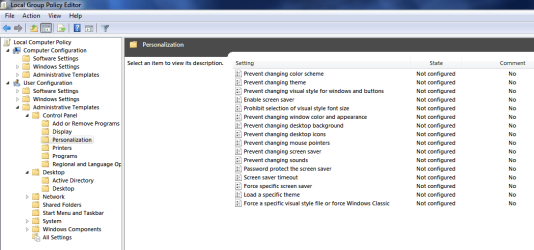
In the Local Group Policy Editor

User Configuration / Administrative Template / Windows Components / Windows Explorer

"Remove Windows Explorers Default Context Menu"

IF that is set to not configured, then you have a different problem here.
Otherwise, set it to Not Configured and the log off or reboot
 

My Computer

Computer Manufacturer/Model Number
Self Built
OS
Win 7 Ultimate 32bit
CPU
C2D E6600 2.4Ghz
Motherboard
Intel D965WH
Memory
4G Kingston KHX5400D2
Graphics Card(s)
EVGA GTX 570 HD SC (012-P3-1573-KR)
Sound Card
On-Board
Monitor(s) Displays
Samsung 226BW
Screen Resolution
1680 x 1050
Hard Drives
2 x 250 Seagate Barracuda
2 x 500 Seagate Barracuda (Raid1)
PSU
Corsair TX750W
Case
In-Win C589
Cooling
Stock Intel Cooling

My Computer

Computer type
PC/Desktop
Computer Manufacturer/Model Number
Self built custom
OS
64-bit Windows 11 Pro for Workstations
CPU
Intel i7-8700K OC'd to 5 GHz
Motherboard
ASUS ROG Maximus XI Formula Z390
Memory
64 GB (4x16GB) G.SKILL TridentZ RGB DDR4 3600 MHz
Graphics Card(s)
ASUS ROG-STRIX-GTX1080TI-O11G-GAMING
Sound Card
Integrated
Monitor(s) Displays
2 x Samsung Odyssey G7 27"
Screen Resolution
2560x1440
Hard Drives
1TB Samsung 990 PRO M.2,
4TB Samsung 990 PRO PRO M.2,
TerraMaster F8 SSD Plus NAS
PSU
Seasonic Prime Titanium 850W
Case
Thermaltake Core P3
Cooling
Corsair Hydro H115i
Keyboard
Logitech wireless K800
Mouse
Logitech MX Master 4
Internet Speed
2 Gb/s Download and 100 Mb/s Upload
Antivirus
Malwarebyte Anti-Malware Premium
Browser
Google Chrome
Other Info
Logitech Z625 speaker system,
Logitech BRIO 4K Pro webcam,
HP Color LaserJet Pro MFP M477fdn,
APC SMART-UPS RT 1000 XL - SURT1000XLI,
Galaxy S23 Plus phone
Thanks Brink.
 

My Computer

Computer Manufacturer/Model Number
Self Built
OS
Win 7 Ultimate 32bit
CPU
C2D E6600 2.4Ghz
Motherboard
Intel D965WH
Memory
4G Kingston KHX5400D2
Graphics Card(s)
EVGA GTX 570 HD SC (012-P3-1573-KR)
Sound Card
On-Board
Monitor(s) Displays
Samsung 226BW
Screen Resolution
1680 x 1050
Hard Drives
2 x 250 Seagate Barracuda
2 x 500 Seagate Barracuda (Raid1)
PSU
Corsair TX750W
Case
In-Win C589
Cooling
Stock Intel Cooling

Attachments

  • gpedit.PNG
    gpedit.PNG
    24 KB · Views: 506
Last edited by a moderator:

My Computer

Computer Manufacturer/Model Number
MacBook Pro
OS
Lion
CPU
i5
Memory
4GB
Graphics Card(s)
Intel
Screen Resolution
1200x800
Hard Drives
Seagate FreeAgent GO 250GB Ext. HDD
ha,, I bet that is where I messed up my PC and forgot about those.
I couldn't change my wallpaper fro a while, but decided to reload because of that and other little things.

that's what I get for toying though.
 

My Computer

Computer Manufacturer/Model Number
Self Built
OS
Win 7 Ultimate 32bit
CPU
C2D E6600 2.4Ghz
Motherboard
Intel D965WH
Memory
4G Kingston KHX5400D2
Graphics Card(s)
EVGA GTX 570 HD SC (012-P3-1573-KR)
Sound Card
On-Board
Monitor(s) Displays
Samsung 226BW
Screen Resolution
1680 x 1050
Hard Drives
2 x 250 Seagate Barracuda
2 x 500 Seagate Barracuda (Raid1)
PSU
Corsair TX750W
Case
In-Win C589
Cooling
Stock Intel Cooling
i just upgraded to windows 7 ultimate and have a similar problem... i can right click everything other than the desktop. and actually... it appears that it is thinking about right clicking, but isn't responding right away. like there is a lag on right click options, but only for the desktop. everything else responds right away.

i went thru the group policy editor and everything matches what has been suggested already.

addition: also i cant double click to open the recycle bin. same thing it appears to be thinking about it, and several seconds later it will pop up. like it's lagging behind.
 

My Computer

OS
Windows 7
hmmm... just restarted and it all appears to be working again. if anyone has seen this problem let me know if there is a fix. otherwise it appears that all is ok.
 

My Computer

OS
Windows 7
Back
Top