BSOD, 0x0000001a and 0x0000004e

It's a Corsair HX650.

I know the basic specs, CPU, GPU, motherboard, RAM etc. It is the other stuff I have had trouble filling in. Like I have no idea what size the fans are? That kind of detail.

Anyway, I have had a look inside and tried to fill it out more accurately - and it came a little bit lower 492w min and 542w recommended.
 

My Computer My Computer

At a glance

Windows 7 Home
Computer type
PC/Desktop
Computer Manufacturer/Model Number
Custom
OS
Windows 7 Home
Antivirus
AVG
Browser
Chrome
Yeah, its getting worse. I just tried to play something, it was okay for 10-15 minutes then I had several intermittent black screens 'Display driver nvlddmkm stopped responding and has successfully recovered.' Eventually it just got stuck and I had to force a reset.

According to MSI, the temps were very low 39-41 degrees.
 

My Computer My Computer

At a glance

Windows 7 Home
Computer type
PC/Desktop
Computer Manufacturer/Model Number
Custom
OS
Windows 7 Home
Antivirus
AVG
Browser
Chrome
It sounds like the GPU is defective :( .
Maybe you can try a different slot on the motherboard but I doubt it will make a difference :\ .
 

My Computer My Computer

At a glance

Windows 10Intel Core i5 3570K16GB 1600Mhz G.SkillGigabyte GTX 970 G1-Gaming
Computer type
PC/Desktop
OS
Windows 10
CPU
Intel Core i5 3570K
Motherboard
Asus P8Z77V-PRO
Memory
16GB 1600Mhz G.Skill
Graphics Card(s)
Gigabyte GTX 970 G1-Gaming
PSU
Seasonic 1000W Platinum
Case
Fractal Design Define R4
Cooling
Noctua NH-D14
I suspect you are probably right. Any tests I can perform to conclusively prove it?

The only other thing that might be relevant, is I have had some problems with Realtek sound, which I think is a known driver conflict with Nvidia cards.
 

My Computer My Computer

At a glance

Windows 7 Home
Computer type
PC/Desktop
Computer Manufacturer/Model Number
Custom
OS
Windows 7 Home
Antivirus
AVG
Browser
Chrome
Do you have any spare known good parts?
If you don't and you can't borrow you can try a known good driver version release.

Please follow this detailed quote and update the driver.

Install the 314.22 WHQL only.

  • Uninstall All nvidia items in Control Panel > Programs and features
    • 3D Vision Control Driver
    • 3D Vision Driver
    • Graphics Driver
    • HD Audio Driver
    • PhysX
    • nvidia Update
    (Are you using nvidia chipset drivers? If so, dont uninstall anything other than those are listed).
  • Now follow Drivers - Clean Left over Files after Uninstalling
  • Boot normally now. Download 314.22 WHQL. While installing, Select Custom (Advanced) install. In the next page, follow this settings:


Please update the Realtek driver.
Description | Version | Update | File Size | Download
64bits Vista, Windows7, Windows8, Windows8.1 Driver only (Executable file) | R2.72 | 2013/10/29 | 105419k | Choose a server

Test the RAM as well in order to cover all corners:
Testing the RAM:

Test and Diagnose RAM Issues with Memtest86+:
   Tip

  • :info: Pay close attention to part 3 of the tutorial "If you have errors"
  • :tip: Test the RAM with Memtest86+ for at least 7-10 passes. It may take up to 22 passes to find problems. Make sure to run it once after the system has been on for a few hours and is warm, and then also run it again when the system has been off for a few hours and is cold.
When done with the testing procedure take a picture and upload it here.
 

My Computer My Computer

At a glance

Windows 10Intel Core i5 3570K16GB 1600Mhz G.SkillGigabyte GTX 970 G1-Gaming
Computer type
PC/Desktop
OS
Windows 10
CPU
Intel Core i5 3570K
Motherboard
Asus P8Z77V-PRO
Memory
16GB 1600Mhz G.Skill
Graphics Card(s)
Gigabyte GTX 970 G1-Gaming
PSU
Seasonic 1000W Platinum
Case
Fractal Design Define R4
Cooling
Noctua NH-D14
Thanks YoYo. I will run memtest overnight and get back with the results. Also got a few cans of compressed air on the way so I can give the case a proper clean tomorrow.
 

My Computer My Computer

At a glance

Windows 7 Home
Computer type
PC/Desktop
Computer Manufacturer/Model Number
Custom
OS
Windows 7 Home
Antivirus
AVG
Browser
Chrome
Thanks :), keep us informed.
 

My Computer My Computer

At a glance

Windows 10Intel Core i5 3570K16GB 1600Mhz G.SkillGigabyte GTX 970 G1-Gaming
Computer type
PC/Desktop
OS
Windows 10
CPU
Intel Core i5 3570K
Motherboard
Asus P8Z77V-PRO
Memory
16GB 1600Mhz G.Skill
Graphics Card(s)
Gigabyte GTX 970 G1-Gaming
PSU
Seasonic 1000W Platinum
Case
Fractal Design Define R4
Cooling
Noctua NH-D14
Didn't get a chance to run MemTest.

I did however, reseat the GPU and blow some dust out the case and fans, particularly the CPU cooler. The card itself, is watercooled so I didn't anticipate that getting rid of a bit of dust would help.

However, I ran FurMark there for 40 minutes, with no problems - it reached 67-68 degrees and stayed there for quite a while. Prior to this, it would always crash within 10 minutes around 50 degrees.

So whether thats rolling the drivers back or having a fiddle inside the case, it seems to be better for now. :p
 

My Computer My Computer

At a glance

Windows 7 Home
Computer type
PC/Desktop
Computer Manufacturer/Model Number
Custom
OS
Windows 7 Home
Antivirus
AVG
Browser
Chrome
Great news :), keep updating as things evolve!
 

My Computer My Computer

At a glance

Windows 10Intel Core i5 3570K16GB 1600Mhz G.SkillGigabyte GTX 970 G1-Gaming
Computer type
PC/Desktop
OS
Windows 10
CPU
Intel Core i5 3570K
Motherboard
Asus P8Z77V-PRO
Memory
16GB 1600Mhz G.Skill
Graphics Card(s)
Gigabyte GTX 970 G1-Gaming
PSU
Seasonic 1000W Platinum
Case
Fractal Design Define R4
Cooling
Noctua NH-D14
I am back again. :(

I have attached a fresh dump and I am off to run memtest now.
 

My Computer My Computer

At a glance

Windows 7 Home
Computer type
PC/Desktop
Computer Manufacturer/Model Number
Custom
OS
Windows 7 Home
Antivirus
AVG
Browser
Chrome
Any updates, how did it go?
 

My Computer My Computer

At a glance

Windows 10Intel Core i5 3570K16GB 1600Mhz G.SkillGigabyte GTX 970 G1-Gaming
Computer type
PC/Desktop
OS
Windows 10
CPU
Intel Core i5 3570K
Motherboard
Asus P8Z77V-PRO
Memory
16GB 1600Mhz G.Skill
Graphics Card(s)
Gigabyte GTX 970 G1-Gaming
PSU
Seasonic 1000W Platinum
Case
Fractal Design Define R4
Cooling
Noctua NH-D14
I ran MemTest for 16 hours or something and it failed; as this was the second memory failure in less than a year and everything is still under guarantee, I sent the whole system back for the manufacturer to have a look at. As I suspect there might be more to it than just memory failure.
 

My Computer My Computer

At a glance

Windows 7 Home
Computer type
PC/Desktop
Computer Manufacturer/Model Number
Custom
OS
Windows 7 Home
Antivirus
AVG
Browser
Chrome
Thanks for the update :) .
If you feel the issue is solved please mark the thread as so.

P.S.
Be sure to update on their findings :) .
 

My Computer My Computer

At a glance

Windows 10Intel Core i5 3570K16GB 1600Mhz G.SkillGigabyte GTX 970 G1-Gaming
Computer type
PC/Desktop
OS
Windows 10
CPU
Intel Core i5 3570K
Motherboard
Asus P8Z77V-PRO
Memory
16GB 1600Mhz G.Skill
Graphics Card(s)
Gigabyte GTX 970 G1-Gaming
PSU
Seasonic 1000W Platinum
Case
Fractal Design Define R4
Cooling
Noctua NH-D14
OK, I am back. :/ They replaced the memory and did whatever bench testing they do and it ran fine for them.

However, within two hours of me using it I have had a crash.

There is also a number of items in event viewer:

Faulting application name: Explorer.EXE, version: 6.1.7601.17567, time stamp: 0x4d672ee4
Faulting module name: SHELL32.dll, version: 6.1.7601.18222, time stamp: 0x51f1ddfa
Exception code: 0xc0000005
Fault offset: 0x000000000009a809
Faulting process id: 0x848
Faulting application start time: 0x01cefd101aa88a48
Faulting application path: C:\Windows\Explorer.EXE
Faulting module path: C:\Windows\system32\SHELL32.dll
Report Id: 8a946bd5-6903-11e3-828e-14dae90f7e20

Possible Memory Leak. Application (C:\Windows\System32\svchost.exe -k LocalServiceNetworkRestricted) (PID: 1164) has passed a non-NULL pointer to RPC for an [out] parameter marked [allocate(all_nodes)]. [allocate(all_nodes)] parameters are always reallocated; if the original pointer contained the address of valid memory, that memory will be leaked. The call originated on the interface with UUID ({3f31c91e-2545-4b7b-9311-9529e8bffef6}), Method number (20). User Action: Contact your application vendor for an updated version of the application.

which I have never encountered before and don't really understand.

Would really appreciate your help. :(
 

My Computer My Computer

At a glance

Windows 7 Home
Computer type
PC/Desktop
Computer Manufacturer/Model Number
Custom
OS
Windows 7 Home
Antivirus
AVG
Browser
Chrome
I also have this coming up in the event viewer fairly regularly.

Code Integrity determined that the page hashes of an image file are not valid. The file could be improperly signed without page hashes or corrupt due to unauthorized modification. The invalid hashes could indicate a potential disk device error.

File Name: \Device\HarddiskVolume1\Windows\System32\sxs.dll

And Windows Explorer crashed again, seemingly random.

Here is what I have done so far -

1. Sfc / scanow - no issues to report.
2. Scanned the C drive for problems, which came up clear.
3. Malware-Antibytes scan. TDSS Killer scan, both fine.
 

My Computer My Computer

At a glance

Windows 7 Home
Computer type
PC/Desktop
Computer Manufacturer/Model Number
Custom
OS
Windows 7 Home
Antivirus
AVG
Browser
Chrome
OK, I am back. :/ They replaced the memory and did whatever bench testing they do and it ran fine for them.

However, within two hours of me using it I have had a crash.
What did you have running during that time?

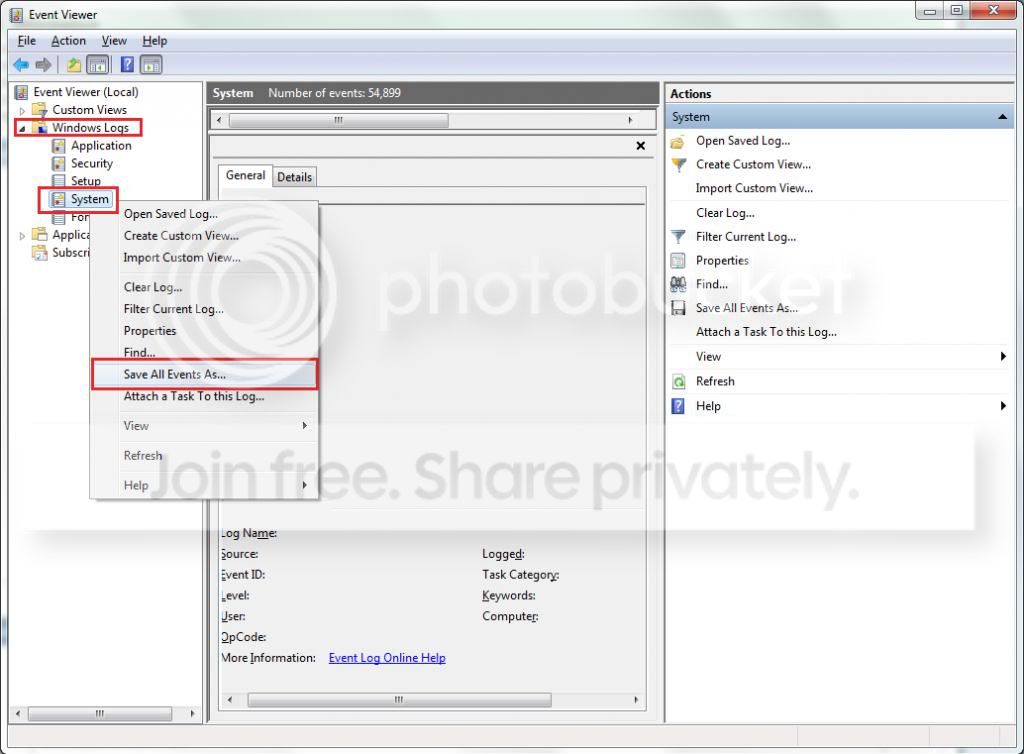
Please export and upload your system event log.

  1. :orb: Start → type eventvwr → hit Enter.
  2. Toggle open the triangle to the left of Windows Logs, right-click on System and choose Save All Events As...
  3. syseventvwrlog1_zps5b0a5395.jpg
  4. A dialogue box will pop up asking you to name the file and select the save directory, name the file the same as your Seven Forums user-name and save it to the desktop.
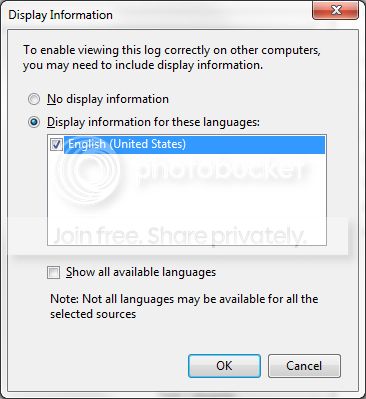
  5. A second dialogue box will appear asking you to select the Display Information, select Display information for these languages and check the box next to English (if you don't have English automatically offered check the box at the bottom to display additional languages - Show all available languages and check English).
  6. syseventvwrlog2_zpsdafa4dba.jpg
  7. Wait a few moments until the cursor returns to normal. The file will now be on your desktop (given it's the directory it was saved to) UserName.evtx, next to it there will be a folder called LocaleMetaData select both the .evtx file as well as the folder and compress them using Winrar / 7zip and attach it in your next post.


The bug check is again a TDR, you can see back in post #16.
This is what I usually post to try and troubleshoot a TDR, some of it we already gone through
but a long time has passed since as well.
Code:
VIDEO_TDR_FAILURE (116)
Attempt to reset the display driver and recover from timeout  failed.
What you're experiencing is called a TDR (Timeout Detection Recovery) is not a bugcheck in the true sense in that something
has went terribly wrong in the kernel which forced the machine to crash.
"Display driver xxxxx stopped responding and was recovered"

Timeout Detection & Recovery (TDR) = "Display Driver Stopped Responding and was Recovered" is a useful feature that started in Vista and is also in W7 that allows the OS to try and recover from a video timeout so that the system does not crash to a bluescreen. Symptoms included a screen flash with the TDR message appearing one or more times or the screen blinking out to black. If the system cannot recover it will crash (Stop Error 116 typical). The issue is that the video card is not responding as expected. The solution is in the: why?

There is no one-size-fits-all solution to TDR errors. But the problem is usually found in the local environment (your computer). Finding the cause is a matter of checking every possible cause and uncovering the culprit through a simple process of elimination. By methodically running down a checklist of diagnostic procedures you should be able to find the cause and can correct it.

There are numerous reports of hardware solutions to TDR's. The most common are:

  • Poor Cooling
  • Problems with the power supply
  • Overclocking Issues
  • Bad System memory or incorrect memory timings
  • Defective PC Components


:ar: Please roll-back your nVidia drivers to a known stable release:

   Note
- Don't install GeForce Experience -

Install the 314.22 WHQL only.

  • Uninstall All nvidia items in Control Panel > Programs and features
    • 3D Vision Control Driver
    • 3D Vision Driver
    • Graphics Driver
    • HD Audio Driver
    • PhysX
    • nvidia Update
    (Are you using nvidia chipset drivers? If so, dont uninstall anything other than those are listed).
  • Now follow Drivers - Clean Left over Files after Uninstalling
  • Boot normally now. Download 314.22 WHQL. While installing, Select Custom (Advanced) install. In the next page, follow this settings:


:ar: Reset the BIOS back to default:
   Note
Write down the current value of the SATA Mode!
Its either AHCI or IDE.
After resetting the CMOS go back and verify the value for SATA Mode is what it was
when the OS was installed.

If any component is overclocked reset it back to stock speeds!


What is the make, model and age of your PSU?
Fill out this form and post back the result:


:ar: Test for thermals and stability:

  • Download HWinfo and post a Screenshot of the sensors window, one at idle and another while putting load on the PC using Prime95 for the CPU side and Furmark for the GPU.
    • Before running Prime95 make sure to enable Round-off checking (see 1st post under the tutorial).
       Note
    It is not mandatory to run both tests simultaneously, although possible as long as the temperatures are under constant monitoring.


:ar: Testing the RAM:

Test and Diagnose RAM Issues with Memtest86+:

   Tip

  • :info: Pay close attention to part 3 of the tutorial "If you have errors"
  • :tip: Test the RAM with Memtest86+ for at least 7-10 passes. It may take up to 22 passes to find problems. Make sure to run it once after the system has been on for a few hours and is warm, and then also run it again when the system has been off for a few hours and is cold.
When done with the testing procedure take a picture and upload it here.

:ar: This will help you to determine where the issue is origination from (if any):
First run it with all the existing/installed RAM modules. If it comes with no error, all is good.

But if it starts showing errors, Stop testing. Errors/red lines means one or more RAM is faulty. But the fault may occur due to a faulty DIMM slot, too, which is a motherboard component. Using memtest86+, you can discriminate between a faulty RAM and a faulty motherboard.

How? Say you have two RAM sticks and two DIMM slots. You obtained errors at the test with all RAM sticks installed. Now, remove all the sticks but one. Test it in all the available slots, one by one. Continue the same procedure for all the available sticks.
How to make the inference that is it a RAM issue or it is a motherboard issue? Suppose you have got the result like that:
test|Slot1|Slot2
RAM1| Error | Error
RAM2|Good|Good
It is a RAM, a bad RAM.

But if you have got a result like that:
test|Slot1|Slot2
RAM1| Error |Good
RAM2| Error |Good
It is a motherboard issue. The particular slot is bad.

Post back with the results.
 

My Computer My Computer

At a glance

Windows 10Intel Core i5 3570K16GB 1600Mhz G.SkillGigabyte GTX 970 G1-Gaming
Computer type
PC/Desktop
OS
Windows 10
CPU
Intel Core i5 3570K
Motherboard
Asus P8Z77V-PRO
Memory
16GB 1600Mhz G.Skill
Graphics Card(s)
Gigabyte GTX 970 G1-Gaming
PSU
Seasonic 1000W Platinum
Case
Fractal Design Define R4
Cooling
Noctua NH-D14
  • Like
Reactions: Arc
Thanks YoYo. At the time, I was running DayZ and it crashed after around an hour and a half of playing. At the time, the GPU temperature was about 70 degrees.

The system seems stable enough, I have not stopped using it in terms of doing day to day tasks. But I have not played any games since the crash.

The rest of the errors that I have seen in the Event Viewer, haven't really manifested themselves in anything as of yet. Except the two cases of 'Windows Explorer' crashing, which was then restarted and was ran fine. The MSE error in event viewer appears everytime I boot. I guess I should probably try a reinstall.

Anyway, I have attached the log you requested and will work through the rest of your post.
 

My Computer My Computer

At a glance

Windows 7 Home
Computer type
PC/Desktop
Computer Manufacturer/Model Number
Custom
OS
Windows 7 Home
Antivirus
AVG
Browser
Chrome
Hi I found this,
Code:
The description for Event ID 17 from source mv91xx cannot be found. Either the component that raises this event is not installed on your local computer or the installation is corrupted. You can install or repair the component on the local computer.

If the event originated on another computer, the display information had to be saved with the event.

The following information was included with the event: 

0


  1. :orb: Start menu type: devmgmt.msc (Hit enter).
  2. Take a screenshot and attach it in your next post.

Other than that I don't see something out of the ordinary, yet the log has been reset on the 18th.
 

My Computer My Computer

At a glance

Windows 10Intel Core i5 3570K16GB 1600Mhz G.SkillGigabyte GTX 970 G1-Gaming
Computer type
PC/Desktop
OS
Windows 10
CPU
Intel Core i5 3570K
Motherboard
Asus P8Z77V-PRO
Memory
16GB 1600Mhz G.Skill
Graphics Card(s)
Gigabyte GTX 970 G1-Gaming
PSU
Seasonic 1000W Platinum
Case
Fractal Design Define R4
Cooling
Noctua NH-D14
Is there anything you want me to expand in device manager?
 

My Computer My Computer

At a glance

Windows 7 Home
Computer type
PC/Desktop
Computer Manufacturer/Model Number
Custom
OS
Windows 7 Home
Antivirus
AVG
Browser
Chrome
I'm looking for entries with yellow triangle/exclamation points, if you have any of those then double clicking them and taking a screenshot of the General Tab would also help.
 

My Computer My Computer

At a glance

Windows 10Intel Core i5 3570K16GB 1600Mhz G.SkillGigabyte GTX 970 G1-Gaming
Computer type
PC/Desktop
OS
Windows 10
CPU
Intel Core i5 3570K
Motherboard
Asus P8Z77V-PRO
Memory
16GB 1600Mhz G.Skill
Graphics Card(s)
Gigabyte GTX 970 G1-Gaming
PSU
Seasonic 1000W Platinum
Case
Fractal Design Define R4
Cooling
Noctua NH-D14
Back
Top