BSOD While gaming

ViiperzOMighty

New member
Local time
7:00 PM
Messages
8
I recently built my own custom PC specifically for gaming (You may be able to check the specs on my profile on something). I recently got a BSOD and would just like some insight into what's causing it and how I can stop it.
Problem signature:
Problem Event Name: BlueScreen
OS Version: 6.1.7601.2.1.0.768.3
Locale ID: 2057

Additional information about the problem:
BCCode: 1e
BCP1: 0000000000000000
BCP2: 0000000000000000
BCP3: 0000000000000000
BCP4: 0000000000000000
OS Version: 6_1_7601
Service Pack: 1_0
Product: 768_1

Files that help describe the problem:
C:\Windows\Minidump\020114-6349-01.dmp
C:\Users\Rhys\AppData\Local\Temp\WER-11793-0.sysdata.xml
 
Last edited:

My Computer

Computer type
PC/Desktop
Computer Manufacturer/Model Number
Custom Build
OS
Windows 7 Home Premium x64
CPU
AMD FX 8350
Motherboard
Asus M5a99X EVO R2.0
Memory
8GB Patriot Viper 1600Mhz
Graphics Card(s)
1x XFX Radeon R9 290
Screen Resolution
3840x1080
Hard Drives
120GB Samsung Evo SSD
1TB Seagate Barracuda HDD
Case
Corsair 500R
Cooling
Corsair H60
Keyboard
Corsair K95
Mouse
Razer Spectre
Antivirus
Kaspersky
Browser
Google Chrome
Hello ViiperzOMighty, and welcome to Seven Forums.

Please read the instructions here: Blue Screen of Death (BSOD) Posting Instructions, and post back with the needed information. One of our BSOD experts should be by later when able to further help. :)
 

My Computer

Computer type
PC/Desktop
Computer Manufacturer/Model Number
Self built custom
OS
64-bit Windows 11 Pro for Workstations
CPU
Intel i7-8700K OC'd to 5 GHz
Motherboard
ASUS ROG Maximus XI Formula Z390
Memory
64 GB (4x16GB) G.SKILL TridentZ RGB DDR4 3600 MHz
Graphics Card(s)
ASUS ROG-STRIX-GTX1080TI-O11G-GAMING
Sound Card
Integrated
Monitor(s) Displays
2 x Samsung Odyssey G7 27"
Screen Resolution
2560x1440
Hard Drives
1TB Samsung 990 PRO M.2,
4TB Samsung 990 PRO PRO M.2,
TerraMaster F8 SSD Plus NAS
PSU
Seasonic Prime Titanium 850W
Case
Thermaltake Core P3
Cooling
Corsair Hydro H115i
Keyboard
Logitech wireless K800
Mouse
Logitech MX Master 4
Internet Speed
2 Gb/s Download and 100 Mb/s Upload
Antivirus
Malwarebyte Anti-Malware Premium
Browser
Google Chrome
Other Info
Logitech Z625 speaker system,
Logitech BRIO 4K Pro webcam,
HP Color LaserJet Pro MFP M477fdn,
APC SMART-UPS RT 1000 XL - SURT1000XLI,
Galaxy S23 Plus phone
Added required files.
 

My Computer

Computer type
PC/Desktop
Computer Manufacturer/Model Number
Custom Build
OS
Windows 7 Home Premium x64
CPU
AMD FX 8350
Motherboard
Asus M5a99X EVO R2.0
Memory
8GB Patriot Viper 1600Mhz
Graphics Card(s)
1x XFX Radeon R9 290
Screen Resolution
3840x1080
Hard Drives
120GB Samsung Evo SSD
1TB Seagate Barracuda HDD
Case
Corsair 500R
Cooling
Corsair H60
Keyboard
Corsair K95
Mouse
Razer Spectre
Antivirus
Kaspersky
Browser
Google Chrome
Unfortunately files are missing, so I'm not getting the full picture.
Please run the SFDT again and let it run its course it can take 15min at times to collect all the data necessary. If you choose to follow OPTION ONE there should be eight files generated not including the dumps.

None the less it appears that the issue is with the mining software you're using,
does the BSOD's happen when it is not running?

Is the GPU(s?) overclocked?
Other possible causes are Kaspersky and/or the AMD GPU drivers, but I would like to start with
cgminer.exe first.

Code:
BugCheck 3B, {c0000094, fffff8801204986e, fffff8800df487c0, 0}

Probably caused by : atikmdag.sys ( atikmdag+9d086e )

EXCEPTION_CODE: (NTSTATUS) 0xc0000094 - {EXCEPTION}  [COLOR=Red][U]Integer division by zero[/U][/COLOR].

PROCESS_NAME:  cgminer.exe

FOLLOWUP_IP: 
atikmdag+9d086e
fffff880`1204986e f7f1            [COLOR=Blue]div     eax,ecx[/COLOR]

2: kd> r @eax
Last set context:
eax=608f3d00
2: kd> r @ecx
Last set context:
ecx=0
 

My Computer

Computer type
PC/Desktop
OS
Windows 10
CPU
Intel Core i5 3570K
Motherboard
Asus P8Z77V-PRO
Memory
16GB 1600Mhz G.Skill
Graphics Card(s)
Gigabyte GTX 970 G1-Gaming
PSU
Seasonic 1000W Platinum
Case
Fractal Design Define R4
Cooling
Noctua NH-D14
Unfortunately files are missing, so I'm not getting the full picture.
Please run the SFDT again and let it run its course it can take 15min at times to collect all the data necessary. If you choose to follow OPTION ONE there should be eight files generated not including the dumps.

None the less it appears that the issue is with the mining software you're using,
does the BSOD's happen when it is not running?

Is the GPU(s?) overclocked?
Other possible causes are Kaspersky and/or the AMD GPU drivers, but I would like to start with
cgminer.exe first.

Code:
BugCheck 3B, {c0000094, fffff8801204986e, fffff8800df487c0, 0}

Probably caused by : atikmdag.sys ( atikmdag+9d086e )

EXCEPTION_CODE: (NTSTATUS) 0xc0000094 - {EXCEPTION}  [COLOR=Red][U]Integer division by zero[/U][/COLOR].

PROCESS_NAME:  cgminer.exe

FOLLOWUP_IP: 
atikmdag+9d086e
fffff880`1204986e f7f1            [COLOR=Blue]div     eax,ecx[/COLOR]

2: kd> r @eax
Last set context:
eax=608f3d00
2: kd> r @ecx
Last set context:
ecx=0
Thankyou for the reply. For starters, no my GPU is not overclocked right now. As for blue screening whilst mining, that's never happened. Though I do blue screen if I use "q" to quit CGMiner.
 

My Computer

Computer type
PC/Desktop
Computer Manufacturer/Model Number
Custom Build
OS
Windows 7 Home Premium x64
CPU
AMD FX 8350
Motherboard
Asus M5a99X EVO R2.0
Memory
8GB Patriot Viper 1600Mhz
Graphics Card(s)
1x XFX Radeon R9 290
Screen Resolution
3840x1080
Hard Drives
120GB Samsung Evo SSD
1TB Seagate Barracuda HDD
Case
Corsair 500R
Cooling
Corsair H60
Keyboard
Corsair K95
Mouse
Razer Spectre
Antivirus
Kaspersky
Browser
Google Chrome
Though I do blue screen if I use "q" to quit CGMiner.
This sounds awfully familiar to similar issues I've encountered with regards to a division by zero.

What about?
Unfortunately files are missing, so I'm not getting the full picture.
Please run the SFDT again and let it run its course it can take 15min at times to collect all the data necessary. If you choose to follow OPTION ONE there should be eight files generated not including the dumps.
 

My Computer

Computer type
PC/Desktop
OS
Windows 10
CPU
Intel Core i5 3570K
Motherboard
Asus P8Z77V-PRO
Memory
16GB 1600Mhz G.Skill
Graphics Card(s)
Gigabyte GTX 970 G1-Gaming
PSU
Seasonic 1000W Platinum
Case
Fractal Design Define R4
Cooling
Noctua NH-D14
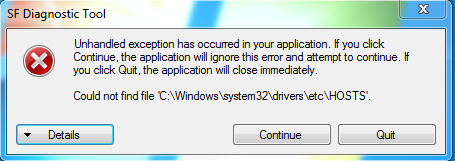
03a0e6e580f8df9e2481a5790a5872e3.png

I received this error after running the Diagnostic Tool again.
 

My Computer

Computer type
PC/Desktop
Computer Manufacturer/Model Number
Custom Build
OS
Windows 7 Home Premium x64
CPU
AMD FX 8350
Motherboard
Asus M5a99X EVO R2.0
Memory
8GB Patriot Viper 1600Mhz
Graphics Card(s)
1x XFX Radeon R9 290
Screen Resolution
3840x1080
Hard Drives
120GB Samsung Evo SSD
1TB Seagate Barracuda HDD
Case
Corsair 500R
Cooling
Corsair H60
Keyboard
Corsair K95
Mouse
Razer Spectre
Antivirus
Kaspersky
Browser
Google Chrome

My Computer

Computer type
PC/Desktop
OS
Windows 10
CPU
Intel Core i5 3570K
Motherboard
Asus P8Z77V-PRO
Memory
16GB 1600Mhz G.Skill
Graphics Card(s)
Gigabyte GTX 970 G1-Gaming
PSU
Seasonic 1000W Platinum
Case
Fractal Design Define R4
Cooling
Noctua NH-D14

My Computer

Computer type
PC/Desktop
Computer Manufacturer/Model Number
Custom Build
OS
Windows 7 Home Premium x64
CPU
AMD FX 8350
Motherboard
Asus M5a99X EVO R2.0
Memory
8GB Patriot Viper 1600Mhz
Graphics Card(s)
1x XFX Radeon R9 290
Screen Resolution
3840x1080
Hard Drives
120GB Samsung Evo SSD
1TB Seagate Barracuda HDD
Case
Corsair 500R
Cooling
Corsair H60
Keyboard
Corsair K95
Mouse
Razer Spectre
Antivirus
Kaspersky
Browser
Google Chrome
Thanks for the added files :) .

I feel the issue is with the software itself, but there is no harm in trying the latest driver.
:ar: Please update the GPU driver:

:ar: Look for an update / patch for the mining software.


Afterwards try inducing the same bugcheck by quitting the software and report back.
 

My Computer

Computer type
PC/Desktop
OS
Windows 10
CPU
Intel Core i5 3570K
Motherboard
Asus P8Z77V-PRO
Memory
16GB 1600Mhz G.Skill
Graphics Card(s)
Gigabyte GTX 970 G1-Gaming
PSU
Seasonic 1000W Platinum
Case
Fractal Design Define R4
Cooling
Noctua NH-D14

My Computer

Computer type
PC/Desktop
Computer Manufacturer/Model Number
Custom Build
OS
Windows 7 Home Premium x64
CPU
AMD FX 8350
Motherboard
Asus M5a99X EVO R2.0
Memory
8GB Patriot Viper 1600Mhz
Graphics Card(s)
1x XFX Radeon R9 290
Screen Resolution
3840x1080
Hard Drives
120GB Samsung Evo SSD
1TB Seagate Barracuda HDD
Case
Corsair 500R
Cooling
Corsair H60
Keyboard
Corsair K95
Mouse
Razer Spectre
Antivirus
Kaspersky
Browser
Google Chrome

My Computer

Computer type
PC/Desktop
OS
Windows 10
CPU
Intel Core i5 3570K
Motherboard
Asus P8Z77V-PRO
Memory
16GB 1600Mhz G.Skill
Graphics Card(s)
Gigabyte GTX 970 G1-Gaming
PSU
Seasonic 1000W Platinum
Case
Fractal Design Define R4
Cooling
Noctua NH-D14

My Computer

Computer type
PC/Desktop
Computer Manufacturer/Model Number
Custom Build
OS
Windows 7 Home Premium x64
CPU
AMD FX 8350
Motherboard
Asus M5a99X EVO R2.0
Memory
8GB Patriot Viper 1600Mhz
Graphics Card(s)
1x XFX Radeon R9 290
Screen Resolution
3840x1080
Hard Drives
120GB Samsung Evo SSD
1TB Seagate Barracuda HDD
Case
Corsair 500R
Cooling
Corsair H60
Keyboard
Corsair K95
Mouse
Razer Spectre
Antivirus
Kaspersky
Browser
Google Chrome
Did it bugcheck again?, no dumps are present in the file uploaded.
The driver seem to still be Version 13.250.18.0, where on AMD's webpage it reads;
Code:
Display Driver ver. 13.251
Did you install 13.12?
 

My Computer

Computer type
PC/Desktop
OS
Windows 10
CPU
Intel Core i5 3570K
Motherboard
Asus P8Z77V-PRO
Memory
16GB 1600Mhz G.Skill
Graphics Card(s)
Gigabyte GTX 970 G1-Gaming
PSU
Seasonic 1000W Platinum
Case
Fractal Design Define R4
Cooling
Noctua NH-D14
Back
Top