Blue screen of death - no downloads or changes to computer recently

CHRISX

New member
Member
VIP
Local time
11:25 PM
Messages
117
Location
LONDON UK
Hello All,

My Computer has suffered a BSOD several times during a 30 minute period today - I kept turning it off, waiting a few minutes and then starting it up again trying both Safe Mode with Networking and just Safe Mode - the Computer was only staying on for about 3 or 4 minutes before the BSOD occurred again.

There were 2 other BSOD`s that occurred during the last 2 - 3 weeks but after restarting my Computer I thought that those were nothing serious as the Computer then stayed working for over a week each time - the BSOD`s today do look serious as my Computer will not stay on for more that a few minutes before going to BSOD.

I have not downloaded any new Programs or installed any new Software during the last 6 Months.

I had a previous BSOD problem with my Computer in December last year which the BSOD Expert Member Axe0 helped me with - He diagnosed from the Dump files at that time that there were conflicts with the various Computer Scanning programs that I had installed on my Computer and I uninstalled most of them taking his advice.

I now run Microsoft Security Essentials as my Anti-Virus program and I did not reinstall any of the Computer Scanning Programs that Member Axe0 advised me to remove from my Computer earlier in the year when he helped me on this thread:

Blue screen shutdown happened but there have been no new downloads or


This morning I managed to get the DM Log Collector to run on and it created the Dump Files in a Folder named Collected Files which I then turned into a Zip File but when I tried to upload that file to this thread I received a message that it was slightly over the upload limit at 2.03MB [Upload limit is 2 MB] so it did not upload.

What do I need to remove from the Zip file to make it small enough to upload but still show Members the necessary information to hopefully be able to identify the probable cause of the BSOD ?- is it possible to delete items without damaging the Zip file ?

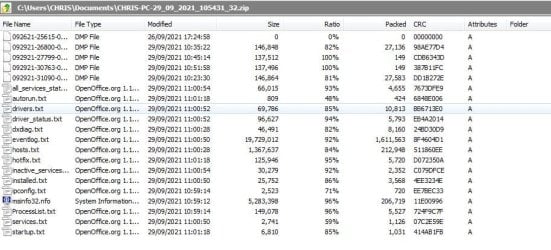
I have created a screenshot of the contents of the Zip file and attached it to this message.

I wanted to ask advice about this rather than just delete one of the items to lower the Folder size to less than 2 MB.


I would really appreciate some help with this problem please as my Computer is vital for my Life needs - some of which are Food shopping deliveries / online shopping and communicating with Family and Friends.

I am retired on a pension and my finances would not allow me to just buy a new Computer

Thanks in advance of your help.

Chris
 

Attachments
  • CHRISX - ACER COMPUTER DUMP FILES ETC. - SCREENSHOT OF ZIP FILE CONTENTS - FILE TOO BIG TO UPLOA.JPG
    CHRISX - ACER COMPUTER DUMP FILES ETC. - SCREENSHOT OF ZIP FILE CONTENTS - FILE TOO BIG TO UPLOA.JPG
    81.9 KB · Views: 0
Last edited:

My Computer My Computer

At a glance

WINDOWS 7 HOME PREMIUM
Computer type
PC/Desktop
Computer Manufacturer/Model Number
ACER 3800
OS
WINDOWS 7 HOME PREMIUM
Keyboard
LOGITECH WIRELESS
Mouse
LOGITECH WIRELESS
Internet Speed
2.5Mbps
Antivirus
AVAST 2025 FREE VERSION
Browser
FIREFOX OR GOOGLE CHROME
The eventlog file is the largest file, you could extract the zip file, open the eventlog.txt file and the remove the oldest event logs (say the oldest 20 event logs or so), zip the files again and check the size. If the size is still too high, remove some more oldest events.

Note that this may be a bit time consuming, because opening the eventlog as well as editing it might take some time. I don't know any program that allows you to edit this file in a short period of time without lagging because of the sheer volume there is to load.
 

My Computer My Computer

At a glance

Windows 10 Proi5-650016GB DDR4 2133 Crucial Ballistix Sport LTMSI GeForce GTX 1060 GAMING X 6G
Computer type
PC/Desktop
Computer Manufacturer/Model Number
Custom build
OS
Windows 10 Pro
CPU
i5-6500
Motherboard
Gigabyte B150-HD3P-CF
Memory
16GB DDR4 2133 Crucial Ballistix Sport LT
Graphics Card(s)
MSI GeForce GTX 1060 GAMING X 6G
Sound Card
Intel Display Audio
Monitor(s) Displays
Liyama ProLite XB2483HSU-B2
Screen Resolution
1920 x 1080
Hard Drives
Crucial MX200 500GB & Toshiba DT01ACA300 3TB
PSU
Corsair RM550x
Case
Fractal Design Define S
Cooling
Cooler Master TX3 i
Keyboard
Func KB-460 (MX Red)
Mouse
Corsair Gaming M65 RGB
Antivirus
Bitdefender Total Security 2016 + MBAM Pro + MBAE Pro
Browser
Google Chrome
Other Info
Creative Sound Blaster Tactic3D Rage V2 headset
For your upload problem:

Option 1:
- Use 7zip ( Download )

7wbHMT8.png


Option 2:
- Use an upload service like these and paste the generated link:

Gofile - Free file sharing and storage platform
Free Decentralized Cloud Storage
Send Big Files up to 5GB Securely. Tresorit Send: Secure, Fast & Free
Anonymous File Upload - AnonFiles
Wormhole - Simple, private file sharing
 

My Computers My Computers

  • At a glance

    Windows 7 Ultimate 64-bit SP1Intel Core 2 Quad Q6700 @ 2.66GHz4.00GB Single-Channel DDR2 @ 399MHz2047MB NVIDIA GeForce GT 710 (ASUStek Compute...
    Computer type
    PC/Desktop
    OS
    Windows 7 Ultimate 64-bit SP1
    CPU
    Intel Core 2 Quad Q6700 @ 2.66GHz
    Motherboard
    ECS MCP73PVT-SM
    Memory
    4.00GB Single-Channel DDR2 @ 399MHz
    Graphics Card(s)
    2047MB NVIDIA GeForce GT 710 (ASUStek Computer Inc)
    Sound Card
    Realtek High Definition Audio
    Monitor(s) Displays
    HP 21kd
    Screen Resolution
    1920x1080@60Hz
    Hard Drives
    149GB Western Digital WDC WD1600AABS-61PRA0 ATA Device (SATA )
    4000GB Seagate ST4000DM004-2U9104 ATA Device (SATA )
    931GB TOSHIBA External USB 3.0 USB Device (USB (SATA) )
    Antivirus
    None. Don't Need it.
    Browser
    Librewolf Portable
    Other Info
    It's a very old system.
  • Computer type
    PC/Desktop


Hello diz,

Thank You very much for replying to my thread.

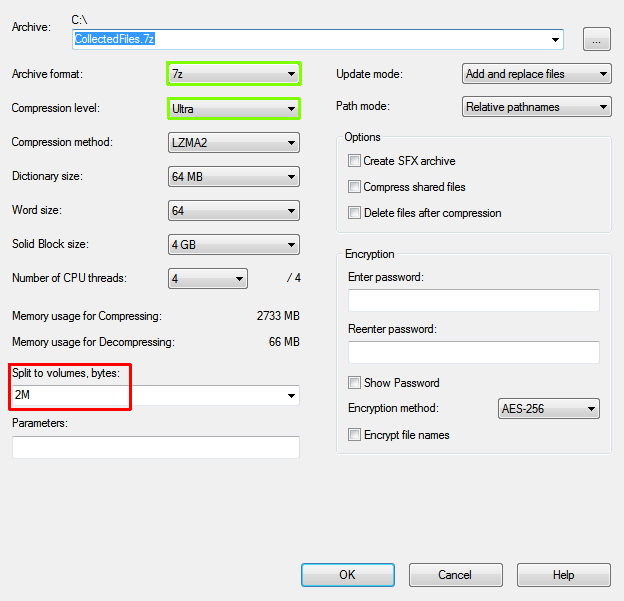
I already have 7zip on my Computer but I could not find out how to open it to show the display that you showed in your message - with the facility to set a 2 MB limit on a File size - when I opened the program it displayed a long list of some of the items that I have on my Computer - I could not see how to open the `Settings` display that you showed in your reply to me - I would be interested to learn how to do that if it is not too technical to explain ?

I have uploaded the Zip File with the contents that are showing in the Screenshot attached to my previous message to Gofile as you suggested - here is the link to it:

Gofile - Free file sharing and storage platform

I hope that will allow You or Member axe0 to view the Dump Files etc. and hopefully they will show what might have caused the recent BSOD events.

Thanks again for your interest in my Computer`s BSOD problem I really appreciate it.

Chris

Hello again axe0,

Thank You very much for responding I hope that you will not mind that I have taken what seemed to be the easiest method of making the Dump Files etc. accessible to Member diz and You.

Thanks again for all of the help that you gave me previously and for your interest and help with this BSOD problem I really appreciate it.

Chris


P.S: I am not trying to complicate my request for help by posting these further details - I just thought that the new 27.5MB Zip file described below - automatically created by the DM Log Collector might have some significance to the cause of the recent BSOD`s:


When I saw the replies earlier from Members axe0 and diz I looked on my Computer for the CollectedFiles File so that I could try to see how to change the overall size of the Files / size of the Zip File using the 7zip program as Member diz suggested,

I could not find a `CollectedFiles` File so I decided to run the DM Log Collector again - this did not produce a CollectedFiles file it produced a Zip File named SFdebugFiles.zip - there is still not a `CollectedFiles` file on my Computer and the new SFdebugFiles.zip file size is 27.5 MB.

I thought that I had created the Zip file two days ago from a CollectedFiles file but it may also have been from a `SFdebugFiles` file as I found another one dated 29/09/2021 - unless the Zip file creation created that file name and removed a CollectedFiles file if it did exist ?

I had remembered that when I had my previous BSOD problem running the DM Log Collector did produce a `CollectedFiles` file which then had to be turned into a Zip File to upload to the Forum and from memory I thought that it only contained Dump Files ?

Now I have another 27.5MB Zip file which was automatically created by the DM Log Collector I wonder why the contents are approximately 12 times larger than the Zip file produced by the DM Log Collector two days ago ?

Is it worth also uploading that 27.5MB Zip File to Gofile so that Members can look at it ?

Chris
 
Last edited:

My Computer My Computer

At a glance

WINDOWS 7 HOME PREMIUM
Computer type
PC/Desktop
Computer Manufacturer/Model Number
ACER 3800
OS
WINDOWS 7 HOME PREMIUM
Keyboard
LOGITECH WIRELESS
Mouse
LOGITECH WIRELESS
Internet Speed
2.5Mbps
Antivirus
AVAST 2025 FREE VERSION
Browser
FIREFOX OR GOOGLE CHROME
... I would be interested to learn how to do that if it is not too technical to explain ? ...
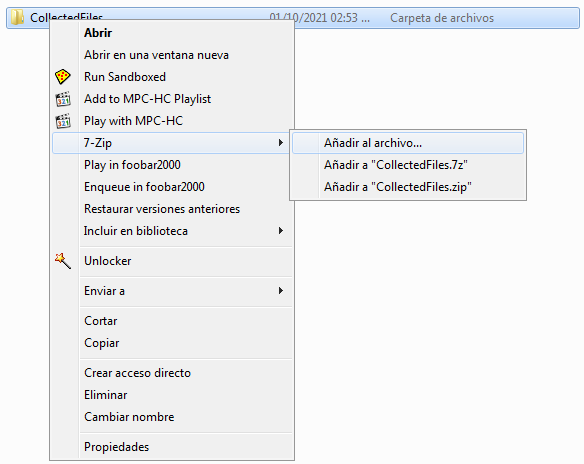
Just right click on your folder you want to compress, and you will see "7zip" as cascade option. Choose "Add to file..." <- with the three dots.

DqhJamN.png


If you don't see that option you can enable at the 7zip settings.

-------------
Your file in "GoFile" is not set to public, I get this message : "This file is not public." , when I try to download it.
 

My Computers My Computers

  • At a glance

    Windows 7 Ultimate 64-bit SP1Intel Core 2 Quad Q6700 @ 2.66GHz4.00GB Single-Channel DDR2 @ 399MHz2047MB NVIDIA GeForce GT 710 (ASUStek Compute...
    Computer type
    PC/Desktop
    OS
    Windows 7 Ultimate 64-bit SP1
    CPU
    Intel Core 2 Quad Q6700 @ 2.66GHz
    Motherboard
    ECS MCP73PVT-SM
    Memory
    4.00GB Single-Channel DDR2 @ 399MHz
    Graphics Card(s)
    2047MB NVIDIA GeForce GT 710 (ASUStek Computer Inc)
    Sound Card
    Realtek High Definition Audio
    Monitor(s) Displays
    HP 21kd
    Screen Resolution
    1920x1080@60Hz
    Hard Drives
    149GB Western Digital WDC WD1600AABS-61PRA0 ATA Device (SATA )
    4000GB Seagate ST4000DM004-2U9104 ATA Device (SATA )
    931GB TOSHIBA External USB 3.0 USB Device (USB (SATA) )
    Antivirus
    None. Don't Need it.
    Browser
    Librewolf Portable
    Other Info
    It's a very old system.
  • Computer type
    PC/Desktop

My Computer My Computer

At a glance

W7 home premium 32bit/W7HP 64bit/w10 tp insid...E5300 dual core3gbNvidia Geforce 7100 Nforce 630i
Computer type
PC/Desktop
Computer Manufacturer/Model Number
medionl/Aspire 6930G/acer x55a
OS
W7 home premium 32bit/W7HP 64bit/w10 tp insider ring
CPU
E5300 dual core
Motherboard
medion MS7366
Memory
3gb
Graphics Card(s)
Nvidia Geforce 7100 Nforce 630i
Monitor(s) Displays
avixc
Internet Speed
n (isp resticted to 72)
Antivirus
mse/pands
Browser
palemoon
Other Info
Belkin Fd7050 n USB using Railink RT2870 drivers, more upto date
Hi Chris,
thats a really old comp, might be worthwhile running this tool to check the state of your hard drive, copy/paste the results
SeaTools for DOS and Windows - How to Use

Hello torchwood,

Thank You very much for replying to me.

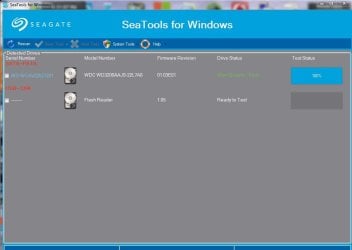
I downloaded the Seatools for Windows Hard Drive Scanner and ran one of the Tests on my Computer but after the display showed various tests had been carried out - display showing 100% and no further motion during the next few minutes - there were no Results displayed.

I have attached a Screenshot of the onscreen display at end of the Tests just to show you that I did run one of the Tests.

I am sure that I must be missing something - could you advise me how to find the Test results ?

Thanks again for your interest and help with this.

Chris

P.S: I did not select a Test for the Flash Reader because I don`t even know what that could be - can you please let me know ?

I don`t have anything externally connected to my Computer.

P.P.S: I ran another one of the Seatools for Windows Tests TWICE - the Short Drive Self Test - it failed both times at 10% as shown on the second Screenshot.

- -

- - - Updated - - -

Hello torchwood - please accept my apology - my message to diz has been put into my reply to You 6 times this afternoon - every time that I edit it out and try again the same thing has happened - and again this time:

Hello All,

I was trying to reply to member diz this afternoon but my message kept being added to my reply to Member torchwood - this happened 6 times - I had to keep going to my message to torchwood and editing out my message to diz.

I even tried closing the Forum website and logging back in to try to submit my reply to diz - again my message was put into my message to torchwood - my message to torchwood had been submitted it was definitely not still Open / being composed at any of those 5 times.

Has any Member experienced this before ?

Chris


MEMBER diz HERE IS MY REPLY TO YOU:

Just right click on your folder you want to compress, and you will see "7zip" as cascade option. Choose "Add to file..." <- with the three dots.

-------------
Your file in "GoFile" is not set to public, I get this message : "This file is not public." , when I try to download it.


DqhJamN.png


If you don't see that option you can enable at the 7zip settings.


Hello again diz,

Thank You very much for explaining the 7zip procedure for reducing File sizes - unfortunately it did not work for me:

I am attaching the 7zip onscreen display showing that I selected the settings that you suggested in your first message to me - to reduce the File size to the 2MB required to be able to upload it to the Forum.

However when I then clicked on O.K. I received an error message which stated - Not implemented - Screenshot attached below.

I did look on the 7zip Help facility but I could not see anything that might have caused this to not work - I did try changing the Compression from Ultra to Maximum because I read that Ultra might be a more complicated process but Maximum setting did not work either - I got another Error message.

Any suggestions ?

Thanks again for your help I really appreciate it.

Chris
 

Attachments

  • 7zip FILE SIZE REDUCTION TO 2 MB ATTEMPT - MY SETTINGS SCREENSHOT - PRODUCED ERROR MESSAGE .JPG
    7zip FILE SIZE REDUCTION TO 2 MB ATTEMPT - MY SETTINGS SCREENSHOT - PRODUCED ERROR MESSAGE .JPG
    45.5 KB · Views: 8
  • 7zip FILE SIZE REDUCTION TO 2 MB ERROR MESSAGE - SCREENSHOT.JPG
    7zip FILE SIZE REDUCTION TO 2 MB ERROR MESSAGE - SCREENSHOT.JPG
    11.2 KB · Views: 9
Last edited:

My Computer My Computer

At a glance

WINDOWS 7 HOME PREMIUM
Computer type
PC/Desktop
Computer Manufacturer/Model Number
ACER 3800
OS
WINDOWS 7 HOME PREMIUM
Keyboard
LOGITECH WIRELESS
Mouse
LOGITECH WIRELESS
Internet Speed
2.5Mbps
Antivirus
AVAST 2025 FREE VERSION
Browser
FIREFOX OR GOOGLE CHROME
Just upload the zip file to onedrive, google drive, dropbox or any other similar service you prefer and post a share link. No need to use any fancy tools lik 7zip either, a simple .zip file suffices.
 

My Computer My Computer

At a glance

Windows 10 Proi5-650016GB DDR4 2133 Crucial Ballistix Sport LTMSI GeForce GTX 1060 GAMING X 6G
Computer type
PC/Desktop
Computer Manufacturer/Model Number
Custom build
OS
Windows 10 Pro
CPU
i5-6500
Motherboard
Gigabyte B150-HD3P-CF
Memory
16GB DDR4 2133 Crucial Ballistix Sport LT
Graphics Card(s)
MSI GeForce GTX 1060 GAMING X 6G
Sound Card
Intel Display Audio
Monitor(s) Displays
Liyama ProLite XB2483HSU-B2
Screen Resolution
1920 x 1080
Hard Drives
Crucial MX200 500GB & Toshiba DT01ACA300 3TB
PSU
Corsair RM550x
Case
Fractal Design Define S
Cooling
Cooler Master TX3 i
Keyboard
Func KB-460 (MX Red)
Mouse
Corsair Gaming M65 RGB
Antivirus
Bitdefender Total Security 2016 + MBAM Pro + MBAE Pro
Browser
Google Chrome
Other Info
Creative Sound Blaster Tactic3D Rage V2 headset
Here are the dump files etc. - i managed to get the file size reduced

PLEASE SEE THE FILE CONTAINING MY COMPUTER`S DUMP FILES ETC. RIGHT AT THE BOTTOM OF THIS VERY LONG MESSAGE IN WHICH ARE MERGED MY REPLIES TO OTHER MEMBERS SOMEHOW DONE AUTOMATICALLY BY THE FORUM


Hello All,

Thanks for your patience - I finally managed to get the Computer Dump Files etc. File that was created by the DM Log Collector reduced in size to smaller than the 2MB upload limit required by the Forum File upload facility.

I had to run the DM Log Collector again to create a new SFdebugFile / overwrite the previous 2 files and use Member diz`s suggestion to use 7zip to reduce the Zip File size to be able to upload it to the Forum

Hopefully it will now attach so that the Forum BSOD Expert Members can view the details and hopefully see a probable cause for my Computer`s recent BSOD events.

Thanks to Members who are helping me.

Chris

Dump Files etc. attached.

- - - Updated - - -

THIS REPLY TO MEMBER axe0 HAS BEEN PUT INTO MY PREVIOUS MESSAGE [ABOVE]:


Just upload the zip file to onedrive, google drive, dropbox or any other similar service you prefer and post a share link. No need to use any fancy tools lik 7zip either, a simple .zip file suffices.


Hello again axe0,

Thanks for your interest I really value your help.

Yesterday I looked at Onedrive, Dropbox and Googledrive to see if any would be useful for uploading the Dump Files etc. File.

I thought that 2 of them seemed to be Subscription based [?] - one of them had a 15GB Free facility and that had Files from my Computer from 2014, 2015, 2016 and 2018 that to my almost certain knowledge I had never deliberately or knowingly uploaded onto any such Program - however I might have tried opening the Program at those points to just try and see if it would have been useful so perhaps those Files were uploaded then without me knowing that it was happening.

I could not see how to just SIMPLY upload a File to any of them and generate a link that I could post on here or send to someone for others to access - perhaps this is because somethings that are obvious to people with more experience in Computing are just not obvious to me as I have very limited knowledge in Computing ?

Back to the Dump Files:

When I ran the DM Log Collector at the time of posting my thread about the recent BSOD`s on here it produced a Zip File that was over the 2MB upload limit for the Forum File upload facility so it would not upload for BSOD Expert Members such as yourself to be able to view the Dump Files etc.

The last few replies to me were trying to advise me on how to reduce the File containing the Dump Files etc. to below the 2MB Forum Upload Limit so that I could get the Dump Files etc. onto the Forum.

Now that I have managed to get the File size reduced and uploaded / attached below could You please do me a great favour and view the Dump Files etc. when you have time to hopefully diagnose what might have caused the recent BSOD`s on my Computer - I would really appreciate your help.

Chris

- - - Updated - - -

SCREENSHOTS OF THE SEATOOLS FOR WINDOWS HARD DRIVE SCANNING PROGRAM MISSING FROM PREVIOUS REPLY TO MEMBER torchwood:

Hello again torchwood,

Sorry that the Seatools for Windows screenshots that I mentioned in my previous reply to You were missing from that message - in the various processes of trying to edit out the messages to Member diz I also had to keep editing out the screenshots that I was attaching to my messages to him - obviously I also edited out the screenshots of the Seatools program that I attached to my reply to you - when I noticed that it was too late to edit the message and re-attach them.

I downloaded the Seatools for Windows Hard Drive Scanner and ran one of the Tests on my Computer but after the display showed various tests had been carried out - display showing 100% and no further motion during the next few minutes - there were no Results displayed.

One of the screenshots shows that another of the Tests failed [twice] at the 10% stage.

Screenshots attached.
Chris

- - - Updated - - -

Hello All,

I am wondering why ALL of my messages / replies to Members are now being inserted into previous replies ?

If this is something new to the Forum I cannot see that this is a good thing because I am wondering whether that this could result in some readers missing something that I wrote because the resulting very long sections of messages might seem too much / irritating to fully read ?

I know that this was not happening in December, January, February and March when my previous thread ran to many messages.

Chris
 

Attachments

  • CHRIS-PC-01_10_2021_164629_07.zip
    CHRIS-PC-01_10_2021_164629_07.zip
    1.7 MB · Views: 1
  • SEATOOLS FOR WINDOWS SCANNING PROGRAM - SCREENSHOT OF TESTING ACER COMPUTER HARD DRIVE ON SATURD.JPG
    SEATOOLS FOR WINDOWS SCANNING PROGRAM - SCREENSHOT OF TESTING ACER COMPUTER HARD DRIVE ON SATURD.JPG
    45.1 KB · Views: 0
  • SEATOOLS FOR WINDOWS - SCREENSHOT OF SHORT TEST FAILING AT 10 PERCENT.JPG
    SEATOOLS FOR WINDOWS - SCREENSHOT OF SHORT TEST FAILING AT 10 PERCENT.JPG
    44.4 KB · Views: 1

My Computer My Computer

At a glance

WINDOWS 7 HOME PREMIUM
Computer type
PC/Desktop
Computer Manufacturer/Model Number
ACER 3800
OS
WINDOWS 7 HOME PREMIUM
Keyboard
LOGITECH WIRELESS
Mouse
LOGITECH WIRELESS
Internet Speed
2.5Mbps
Antivirus
AVAST 2025 FREE VERSION
Browser
FIREFOX OR GOOGLE CHROME
The logs seem incomplete, I suggest following the instructions in this post to circumvent the incomplete logs.
 

My Computer My Computer

At a glance

Windows 10 Proi5-650016GB DDR4 2133 Crucial Ballistix Sport LTMSI GeForce GTX 1060 GAMING X 6G
Computer type
PC/Desktop
Computer Manufacturer/Model Number
Custom build
OS
Windows 10 Pro
CPU
i5-6500
Motherboard
Gigabyte B150-HD3P-CF
Memory
16GB DDR4 2133 Crucial Ballistix Sport LT
Graphics Card(s)
MSI GeForce GTX 1060 GAMING X 6G
Sound Card
Intel Display Audio
Monitor(s) Displays
Liyama ProLite XB2483HSU-B2
Screen Resolution
1920 x 1080
Hard Drives
Crucial MX200 500GB & Toshiba DT01ACA300 3TB
PSU
Corsair RM550x
Case
Fractal Design Define S
Cooling
Cooler Master TX3 i
Keyboard
Func KB-460 (MX Red)
Mouse
Corsair Gaming M65 RGB
Antivirus
Bitdefender Total Security 2016 + MBAM Pro + MBAE Pro
Browser
Google Chrome
Other Info
Creative Sound Blaster Tactic3D Rage V2 headset
The logs seem incomplete, I suggest following the instructions in this post to circumvent the incomplete logs.

Hello axe0,

Thank You very much for viewing the Zip file that I attached to my previous message - Sorry that it did not contain the full information that You needed to see what might have caused the latest BSOD events on my Computer.

I have Copied & Pasted one of the Command Prompt commands that you gave me in my other BSOD thread from last year into the Command Prompt facility and created a Zip file from the CollectedFiles file that the process produced - hopefully the attached Zip file will contain the information that you need to see.

Thanks again for your help I really appreciate it.

Chris
 

Attachments

My Computer My Computer

At a glance

WINDOWS 7 HOME PREMIUM
Computer type
PC/Desktop
Computer Manufacturer/Model Number
ACER 3800
OS
WINDOWS 7 HOME PREMIUM
Keyboard
LOGITECH WIRELESS
Mouse
LOGITECH WIRELESS
Internet Speed
2.5Mbps
Antivirus
AVAST 2025 FREE VERSION
Browser
FIREFOX OR GOOGLE CHROME
Here's my opinion, it would be good if you get a new computer. As you hopefully know, Windows 7 is officially not supported anymore so updates to fix problems aren't going to be developed anymore. I'm aware that a move may be a challenging task when you're so used to Windows 7, but in my biased opinion in the long term it is worth it. It would not be smart to attempt to upgrade the operating system without getting a new computer as you would risk experiencing various problems, some consider doing this with old computers because they believe it's cheaper but in my opinion it's not worth the efforts.

Having said that, I noticed there are a few drivers involved in the crashes that I am unable to trace back to a particular installed program or hardware component which can happen for different reasons, but a concern I have is that these drivers cannot be updated or reinstalled anymore. I would normally suggest updating them and see how it goes, but if one of these drivers is contributing to or are causing the crashes, then there's nothing else I can suggest but a removal of whichever program or hardware component it belongs to and hoping that resolves the problem.
Code:
ATTEMPTED_SWITCH_FROM_DPC (b8)
A wait operation, attach process, or yield was attempted from a DPC routine.
This is an illegal operation and the stack track will lead to the offending
code and original DPC routine.
Arguments:
Arg1: 83d7dd00, Original thread which is the cause of the failure
Arg2: 865b2020, New thread
Arg3: 83d73fd0, Stack address of the original thread
Arg4: 00000000

Debugging Details:
------------------

*** WARNING: Unable to verify timestamp for SbFw.sys
*** WARNING: Unable to verify timestamp for pssdklbf.sys
Unable to load image \SystemRoot\system32\DRIVERS\SBFWIM.sys, Win32 error 0n2
*** WARNING: Unable to verify timestamp for SBFWIM.sys
Unable to load image \SystemRoot\system32\DRIVERS\e1y6232.sys, Win32 error 0n2
*** WARNING: Unable to verify timestamp for e1y6232.sys
 

My Computer My Computer

At a glance

Windows 10 Proi5-650016GB DDR4 2133 Crucial Ballistix Sport LTMSI GeForce GTX 1060 GAMING X 6G
Computer type
PC/Desktop
Computer Manufacturer/Model Number
Custom build
OS
Windows 10 Pro
CPU
i5-6500
Motherboard
Gigabyte B150-HD3P-CF
Memory
16GB DDR4 2133 Crucial Ballistix Sport LT
Graphics Card(s)
MSI GeForce GTX 1060 GAMING X 6G
Sound Card
Intel Display Audio
Monitor(s) Displays
Liyama ProLite XB2483HSU-B2
Screen Resolution
1920 x 1080
Hard Drives
Crucial MX200 500GB & Toshiba DT01ACA300 3TB
PSU
Corsair RM550x
Case
Fractal Design Define S
Cooling
Cooler Master TX3 i
Keyboard
Func KB-460 (MX Red)
Mouse
Corsair Gaming M65 RGB
Antivirus
Bitdefender Total Security 2016 + MBAM Pro + MBAE Pro
Browser
Google Chrome
Other Info
Creative Sound Blaster Tactic3D Rage V2 headset
Here's my opinion, it would be good if you get a new computer. As you hopefully know, Windows 7 is officially not supported anymore so updates to fix problems aren't going to be developed anymore. I'm aware that a move may be a challenging task when you're so used to Windows 7, but in my biased opinion in the long term it is worth it. It would not be smart to attempt to upgrade the operating system without getting a new computer as you would risk experiencing various problems, some consider doing this with old computers because they believe it's cheaper but in my opinion it's not worth the efforts.

Having said that, I noticed there are a few drivers involved in the crashes that I am unable to trace back to a particular installed program or hardware component which can happen for different reasons, but a concern I have is that these drivers cannot be updated or reinstalled anymore. I would normally suggest updating them and see how it goes, but if one of these drivers is contributing to or are causing the crashes, then there's nothing else I can suggest but a removal of whichever program or hardware component it belongs to and hoping that resolves the problem.
Code:
ATTEMPTED_SWITCH_FROM_DPC (b8)
A wait operation, attach process, or yield was attempted from a DPC routine.
This is an illegal operation and the stack track will lead to the offending
code and original DPC routine.
Arguments:
Arg1: 83d7dd00, Original thread which is the cause of the failure
Arg2: 865b2020, New thread
Arg3: 83d73fd0, Stack address of the original thread
Arg4: 00000000

Debugging Details:
------------------

*** WARNING: Unable to verify timestamp for SbFw.sys
*** WARNING: Unable to verify timestamp for pssdklbf.sys
Unable to load image \SystemRoot\system32\DRIVERS\SBFWIM.sys, Win32 error 0n2
*** WARNING: Unable to verify timestamp for SBFWIM.sys
Unable to load image \SystemRoot\system32\DRIVERS\e1y6232.sys, Win32 error 0n2
*** WARNING: Unable to verify timestamp for e1y6232.sys

Hello axe0,

Thank You very much for viewing the Dump files etc. and trying to identify which program the Drivers that have caused the BSOD problems on my Computer are associated with.

Obviously if You cannot identify the Programs I certainly would not be able to - I take it that the Code in your message is to show me what you found ?

While this thread has been on the Forum I have been trying to search to see if there were any other methods of investigating Computer / Hard Drive problems and I have recently ran both CheckDisk and SFC /scannow just to see if they produced any results relating to problems that might be relevant to my Computer - also I had read that they carried out repairs if problems were found.

The SFC - System File Checker did produce results that showed there were some Corrupted Files that could not automatically be repaired - I managed to find the CBS.log file where those results were listed and I managed to turn it into a Zip File which I have attached here.

Would You do me a favour and look through that please - I would really appreciate it:

The sections where the Corrupted files are identified are very easy to see on the pages:

The first un-repairable files are at about a third of the way down page 2 - the next few are about half way down page 6 - next few near bottom of page 7 and last few at bottom of page 11.

This is just in case any of the files are related to what you have already seen - if not I hope that these files are either not vital for running the Computer or are not important enough to cause serious problems ?

If I could afford to buy a new Computer I would definitely do so.

I think that I mentioned previously that I am retired on a basic pension so unless my Computer becomes totally useless I cannot afford to buy a new one.

If it does become unusable I would have to get into unwanted debt to buy one because I could not be without one for at least online Grocery shopping / getting my Food and household essentials delivered as I am Housebound with a severe Back problem and problems with both knees.

Thanks again for your help axe0 I really appreciate it.

Chris
 

Attachments

Last edited:

My Computer My Computer

At a glance

WINDOWS 7 HOME PREMIUM
Computer type
PC/Desktop
Computer Manufacturer/Model Number
ACER 3800
OS
WINDOWS 7 HOME PREMIUM
Keyboard
LOGITECH WIRELESS
Mouse
LOGITECH WIRELESS
Internet Speed
2.5Mbps
Antivirus
AVAST 2025 FREE VERSION
Browser
FIREFOX OR GOOGLE CHROME
Hi Chris,
The SFC unrepairable errors relate to an Intel Bluetooth device.
Options
uninstall the device and its driver,
download/run the Intel driver updater
turn off driver updates and then uninstall the related KB

note, this update was issued to resolve problems with the device when it resumed from sleep/hibernation, so it might be handy to reset those power options
 

My Computer My Computer

At a glance

W7 home premium 32bit/W7HP 64bit/w10 tp insid...E5300 dual core3gbNvidia Geforce 7100 Nforce 630i
Computer type
PC/Desktop
Computer Manufacturer/Model Number
medionl/Aspire 6930G/acer x55a
OS
W7 home premium 32bit/W7HP 64bit/w10 tp insider ring
CPU
E5300 dual core
Motherboard
medion MS7366
Memory
3gb
Graphics Card(s)
Nvidia Geforce 7100 Nforce 630i
Monitor(s) Displays
avixc
Internet Speed
n (isp resticted to 72)
Antivirus
mse/pands
Browser
palemoon
Other Info
Belkin Fd7050 n USB using Railink RT2870 drivers, more upto date
The usual options you find online, SFC, chkdsk, and some other options are usually bad options in that they have literally no effect at all for the problems you specifically have.

I do not intend to say that those options are crap by themselves, they are incredibly effective and powerful tools when they are used for the right problems. This BSOD problem is not a problem where they can be effective, otherwise I would have suggested them.

Those online 'tutorials' are generic and the options are assembled based on what others have reported, but from what I have seen they are complete time wasters and ineffective as they suggest so many useless things. In the end they might suggest something that is a little closer to the actual cause, but for some reason they still mess it up there.
 

My Computer My Computer

At a glance

Windows 10 Proi5-650016GB DDR4 2133 Crucial Ballistix Sport LTMSI GeForce GTX 1060 GAMING X 6G
Computer type
PC/Desktop
Computer Manufacturer/Model Number
Custom build
OS
Windows 10 Pro
CPU
i5-6500
Motherboard
Gigabyte B150-HD3P-CF
Memory
16GB DDR4 2133 Crucial Ballistix Sport LT
Graphics Card(s)
MSI GeForce GTX 1060 GAMING X 6G
Sound Card
Intel Display Audio
Monitor(s) Displays
Liyama ProLite XB2483HSU-B2
Screen Resolution
1920 x 1080
Hard Drives
Crucial MX200 500GB & Toshiba DT01ACA300 3TB
PSU
Corsair RM550x
Case
Fractal Design Define S
Cooling
Cooler Master TX3 i
Keyboard
Func KB-460 (MX Red)
Mouse
Corsair Gaming M65 RGB
Antivirus
Bitdefender Total Security 2016 + MBAM Pro + MBAE Pro
Browser
Google Chrome
Other Info
Creative Sound Blaster Tactic3D Rage V2 headset
Hi Chris,
The SFC unrepairable errors relate to an Intel Bluetooth device.
Options
uninstall the device and its driver,
download/run the Intel driver updater
turn off driver updates and then uninstall the related KB

note, this update was issued to resolve problems with the device when it resumed from sleep/hibernation, so it might be handy to reset those power options
Hello torchwood,

Please excuse me if I am misunderstanding what You meant about a Bluetooth device.

I have never owned any Bluetooth devices so there have never been any connected to my Computer.

Do You mean a Bluetooth facility that is already within my Computer`s Intel Processor ?

If so because of my lack of knowledge in Computing I cannot even think about trying to find out how to uninstall anything related to my Computer`s Intel Processor.

I cannot risk totally ruining the Computer because of making a serious error as it is vital for arranging online Food shopping deliveries etc. because I am Housebound.

Thanks for your interest and for trying to help me with this.

Chris

- - - Updated - - -

The usual options you find online, SFC, chkdsk, and some other options are usually bad options in that they have literally no effect at all for the problems you specifically have.

I do not intend to say that those options are crap by themselves, they are incredibly effective and powerful tools when they are used for the right problems. This BSOD problem is not a problem where they can be effective, otherwise I would have suggested them.

Those online 'tutorials' are generic and the options are assembled based on what others have reported, but from what I have seen they are complete time wasters and ineffective as they suggest so many useless things. In the end they might suggest something that is a little closer to the actual cause, but for some reason they still mess it up there.
Hello again axe0,

Thanks for your reply.

I know that if the CheckDisk and SFC /scannow scanning facilities could have been useful in identifying my Computer`s BSOD causes that You would have suggested running them.

I had previously read about running them regularly to try and keep errors on a Computer`s Hard Drive from building up - I ran them recently just to try and check the Hard Drive for ANY errors / corrupted files.

The reason why I wondered if the System File Checker results might be useful regarding my Computer`s BSOD problem causes was that I thought that they might have given clues related to the programs for the Drivers that had contributed to the BSOD events / crashes which you told me could not be associated with a particular program when you viewed the Dump files etc.

Thanks again for all of your time when viewing the Dump Files etc. and for your help in trying to resolve my Computer BSOD problems I have really appreciated it.

Chris
 

My Computer My Computer

At a glance

WINDOWS 7 HOME PREMIUM
Computer type
PC/Desktop
Computer Manufacturer/Model Number
ACER 3800
OS
WINDOWS 7 HOME PREMIUM
Keyboard
LOGITECH WIRELESS
Mouse
LOGITECH WIRELESS
Internet Speed
2.5Mbps
Antivirus
AVAST 2025 FREE VERSION
Browser
FIREFOX OR GOOGLE CHROME
BSOD crashes are almost always caused by third party software, not by Windows itself. SFC checks system files that are protected, as in not even an administrator can fiddle with them. Even if system files scanned by SFC were to be corrupted that are somehow connected to wifi for example (one of the drivers is a network adapter driver), it does not give any indication whatsoever as to what program or hardware component is causing BSOD crashes.
 

My Computer My Computer

At a glance

Windows 10 Proi5-650016GB DDR4 2133 Crucial Ballistix Sport LTMSI GeForce GTX 1060 GAMING X 6G
Computer type
PC/Desktop
Computer Manufacturer/Model Number
Custom build
OS
Windows 10 Pro
CPU
i5-6500
Motherboard
Gigabyte B150-HD3P-CF
Memory
16GB DDR4 2133 Crucial Ballistix Sport LT
Graphics Card(s)
MSI GeForce GTX 1060 GAMING X 6G
Sound Card
Intel Display Audio
Monitor(s) Displays
Liyama ProLite XB2483HSU-B2
Screen Resolution
1920 x 1080
Hard Drives
Crucial MX200 500GB & Toshiba DT01ACA300 3TB
PSU
Corsair RM550x
Case
Fractal Design Define S
Cooling
Cooler Master TX3 i
Keyboard
Func KB-460 (MX Red)
Mouse
Corsair Gaming M65 RGB
Antivirus
Bitdefender Total Security 2016 + MBAM Pro + MBAE Pro
Browser
Google Chrome
Other Info
Creative Sound Blaster Tactic3D Rage V2 headset
BSOD crashes are almost always caused by third party software, not by Windows itself. SFC checks system files that are protected, as in not even an administrator can fiddle with them. Even if system files scanned by SFC were to be corrupted that are somehow connected to wifi for example (one of the drivers is a network adapter driver), it does not give any indication whatsoever as to what program or hardware component is causing BSOD crashes.
Hello axe0,

Thanks very much for the explanation and for all of your time and expertise when helping me with this thread and my previous BSOD problem.

I have resigned myself to just hoping that I do not get a BSOD on my Computer that renders it unusable / cannot be resolved.

I do have another problem which I have posted on the Back Up and Restore section of the Forum - I tried to create a System Image / Full Back Up onto a new / unused External Hard Drive but both failed.

I know that You might not be interested in reading about it but just in case I posted the thread here:

https://www.sevenforums.com/backup-...back-up-error-re-shadow-copy.html#post3498079


Thanks again for all of your help.

Chris
 

My Computer My Computer

At a glance

WINDOWS 7 HOME PREMIUM
Computer type
PC/Desktop
Computer Manufacturer/Model Number
ACER 3800
OS
WINDOWS 7 HOME PREMIUM
Keyboard
LOGITECH WIRELESS
Mouse
LOGITECH WIRELESS
Internet Speed
2.5Mbps
Antivirus
AVAST 2025 FREE VERSION
Browser
FIREFOX OR GOOGLE CHROME
Back
Top