- Local time
- 5:29 AM
- Messages
- 35,002
As Carrona.org says:
[FONT="]STOP 0x0000007B: INACCESSIBLE_BOOT_DEVICE [/FONT]
[FONT="]What may resist the access to the boot files? If we list the possibilities up, out job becomes sort of easier. So let us list those possibilities up. [/FONT]
[/FONT]
[FONT="]Generally there are three possible storage controller modes available, viz[/FONT]
[FONT="]In this case, boot into the BIOS setup. Notice very minutely what is set as the controller mode, and remember it*. Now apply the other mode available. Save the change and exit from BIOS setup. [/FONT]
[FONT="]Now try to boot to the computer. If it still does not boot, apply the other remaining mode. See how it goes.[/FONT]
[FONT="]If windows fail to boot with all the available storage controller modes, then storage controller is not the reason behind the issue. Apply the initial mode back (that you need to remember* properly) and shift to the next possibility.
[/FONT]
If the HDD/SSD containing the boot files is not accessible due to boot sequence error, that is also to be rectified within BIOS setup.
The file system on the HDD also may cause such a BSOD. Disc Check Commands are useful to detect those problems and attempts for possible recovery.
It may be very hard in this case where windows refuses to boot. But if it is anyhow to possible to boot to System Recovery Options, then it may be attempted to detect the failing device driver.
Boot to System Recovery Options . Try Safe Mode with Command Prompt. In the command prompt .... enter the command ....
If so, boot to System Recovery Options once again. Try Enable Boot Logging. It will create a file named ntbtlog.txt. Collect it and upload it. If you cannot do it within windows, Boot with a live Linux disc and collect it in a USB stick, use the usb stick in another computer and upload it. Some of the members of the SevenForums will check your upload and guide you to the next.
A virus or a malware, a rootkit or a bootkit (boot sector virus) may cause such a BSOD. In this case it is needed to scan the system with a bootable virus scanner.
There are a few of such scanners available. Windows Defender Offline is a good one to do this job.
It may be seen that the boot files are not accessible because the right partition is not marked as active. To know the partitions and flags, it is best to use the Partition Wizard bootable CD.
In this case what is needed to do is ….
A failing hard drive is the most common cause of a stop 0x7B or a stop 0xED BSOD. In order to detect it, a bootable disc check tool is needed.
Seatools for DOS is the best way to test the HDD in such a situation.
It is better to take the long test using Seatools For DOS.
If errors are detected, the HDD is needed to be replaced.
[FONT="]STOP 0x0000007B: INACCESSIBLE_BOOT_DEVICE [/FONT]
[FONT="]Usual causes:[/FONT][FONT="] Hard drive, File system, Boot sequence errors, Device driver, and Virus infection (in particular check the MBR)[/FONT]
[FONT="]STOP 0x000000ED: UNMOUNTABLE_BOOT_VOLUME [/FONT]
[FONT="]Usual causes:[/FONT][FONT="] Hard drive problem, File system problem, Improper boot parameters[/FONT]
Troubleshooting stop 0x7B and stop 0xED are different from those other bugchecks, because crash dumps are not obtained in these two cases, as there two bugchecks don’t allow to computer to boot up; neither in normal mode nor in safe mode. And that is why specific troubleshooting strategy is required for those cases.
Tip
If The computer is failing to boot without showing stop 0x7B or oxED, it is suggested to follow Troubleshooting Windows 7 Failure to Start.
Information
Tools needed:
- To perform a clean reinstall: The windows installation DVD.
- To check the partitions and flags: Partition Wizard bootable CD.
- To scan the computer for virus: Windows Defender Offline.
- To test the HDD: Seatools for DOS.
- [FONT="]Changed storage/SATA controller mode;[/FONT]
- [FONT="]Boot sequence error;[/FONT]
- [FONT="]File system problem;[/FONT]
- [FONT="]A problematic device driver;[/FONT]
- [FONT="]Virus infection;[/FONT]
- [FONT="]Improper boot parameters; and[/FONT]
- [FONT="]Hard drive failure.[/FONT][FONT="]
* If the HDD is not failing, then the easiest way to solve these two BSODs is to perform a Clean Reinstall.
[/FONT][FONT="]
[/FONT]
[/FONT]
1
Changed storage/SATA controller mode:
[FONT="]Generally there are three possible storage controller modes available, viz[/FONT]
- [FONT="]IDE/ATA/SATA[/FONT]
- [FONT="]AHCI[/FONT]
- [FONT="]RAID[/FONT]
[FONT="]In this case, boot into the BIOS setup. Notice very minutely what is set as the controller mode, and remember it*. Now apply the other mode available. Save the change and exit from BIOS setup. [/FONT]
[FONT="]Now try to boot to the computer. If it still does not boot, apply the other remaining mode. See how it goes.[/FONT]
[FONT="]If windows fail to boot with all the available storage controller modes, then storage controller is not the reason behind the issue. Apply the initial mode back (that you need to remember* properly) and shift to the next possibility.
[/FONT]
[FONT="]
[/FONT]
http://www.sevenforums.com/bsod-hel...kly-moves-different-screen-2.html#post3107296
Information
All the board manufacturers use different BIOS setups. So it is not a unique process to change between the storage controller modes. As an example, here is how to change them in a Gigabyte motherboard:
Information
- [FONT="]Press the “delete” key during POST to boot into BIOS setup. [/FONT]
- [FONT="]Go to Peripherals > SATA Configuration
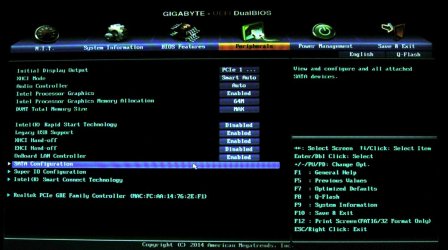
[/FONT] - [FONT="]Double Click on SATA mode selection gives the option to shift between modes.

[/FONT]
http://www.sevenforums.com/bsod-hel...kly-moves-different-screen-2.html#post3107296
2
Boot sequence error:
If the HDD/SSD containing the boot files is not accessible due to boot sequence error, that is also to be rectified within BIOS setup.
3
File system problem:
The file system on the HDD also may cause such a BSOD. Disc Check Commands are useful to detect those problems and attempts for possible recovery.
- Open a Command Prompt at Boot.
- Run Chkdsk from Command Prompt (Option Two of How to Run Disk Check in Windows 7)
4
A problematic device driver:
It may be very hard in this case where windows refuses to boot. But if it is anyhow to possible to boot to System Recovery Options, then it may be attempted to detect the failing device driver.
Boot to System Recovery Options . Try Safe Mode with Command Prompt. In the command prompt .... enter the command ....
- start msconfig
- Click the "startup" tab. Click "Disable all" > Apply > OK.
- Click on "services" tab. Check the "Hide all Microsoft Services"; Click "Disable all" > Apply > OK
If so, boot to System Recovery Options once again. Try Enable Boot Logging. It will create a file named ntbtlog.txt. Collect it and upload it. If you cannot do it within windows, Boot with a live Linux disc and collect it in a USB stick, use the usb stick in another computer and upload it. Some of the members of the SevenForums will check your upload and guide you to the next.
5
Virus infection:
A virus or a malware, a rootkit or a bootkit (boot sector virus) may cause such a BSOD. In this case it is needed to scan the system with a bootable virus scanner.
There are a few of such scanners available. Windows Defender Offline is a good one to do this job.
Information
In a very little few cases it is seen that after a bootkit infection and its removal the 100 MB System Reserved Partition is converted to a logical volume. In such a case the point 6, Improper Boot Parameters will be applicable.
6
Improper boot parameters:
It may be seen that the boot files are not accessible because the right partition is not marked as active. To know the partitions and flags, it is best to use the Partition Wizard bootable CD.
In this case what is needed to do is ….
- If the 100 MB System Reserved partition is not a primary partition, convert the System Reserved Partition to a primary partition
- Mark the System Reserved partition as active
- Run Startup Repair for three separate times, with restarts in between every single run to recreate the boot files in that location. (http://www.sevenforums.com/tutorials/105541-startup-repair-run-3-separate-times.html)
Information
For some OEM computers, the recovery partition is the active partition by default. In this case it is to make it sure that the active flag is there.
7
Hard drive failure:
A failing hard drive is the most common cause of a stop 0x7B or a stop 0xED BSOD. In order to detect it, a bootable disc check tool is needed.
Seatools for DOS is the best way to test the HDD in such a situation.
It is better to take the long test using Seatools For DOS.
If errors are detected, the HDD is needed to be replaced.
Last edited:
My Computer
- Computer type
- PC/Desktop
- Computer Manufacturer/Model Number
- Self Assembled
- OS
- Microsoft Windows 10 Pro Insider Preview 64-bit
- CPU
- Intel(R) Core(TM) i3-4130 CPU @ 3.40GHz
- Motherboard
- Gigabyte Technology Co., Ltd. B85M-D3H
- Memory
- Corsair Vengence 4GB x2 (8.00GB Dual-Channel DDR3 @ 798MHz)
- Graphics Card(s)
- 2047MB GeForce GTS 450 (ZOTAC International)
- Sound Card
- Onboard (Realtek High Definition Audio)
- Monitor(s) Displays
- LG Flatron E2040T
- Screen Resolution
- 1600x900
- Hard Drives
- Western Digital 1 TB
Seagate 500 GB
- PSU
- Corsair VS550
- Case
- Cooler Master K380
- Cooling
- Cooler Master Seidon 120V Plus
- Keyboard
- Logitech MK260r
- Mouse
- Logitech MK260r
- Internet Speed
- PMPL Broadband
- Antivirus
- Windows Defender + MBAM
- Browser
- Firefox
- Other Info
- Dell Studio 15" Laptop

 Got a chance to test it: