
CLR20r3 - Program has stopped working

KS17

New member
Just recently I've been having some difficulties with an error that has shown itself on two programs so far, but no others. The first is Puush, and it's screenshot is here:
SWhAdDNLMG5zdGFuVGlWep_CTT9TfFYWs5Nj3cMnjnG40qTEnwZ9ha1ryqSKyfsc.png

Originally I thought my computer was having problems with just Puush, but I found another program that this happens to. It's FileHippo.com's update checker. Here is the screenshot of that one:
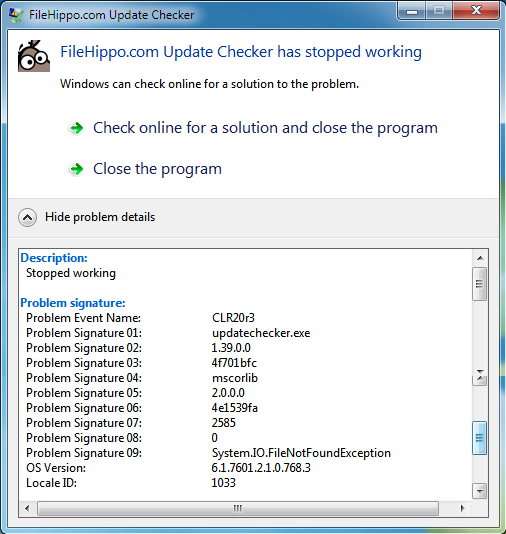
kfDIB.png


I've tried everything I could think of, and everything I could find online. My next step I might try is to uninstall every .NET Framework on my PC, and then re-install. I'm starting to believe the problem lies somewhere with .NET Framework, but I could be totally wrong.
If anybody has any suggestions, they would be much appreciated. If I don't find a fix soon, I might go ahead with the .NET Framework wipe and see if that helps.
Thanks in advance for any responses.
 

My Computer

Computer Manufacturer/Model Number
Desktop
OS
MS Windows 7 Home Premium 64-bit SP1
CPU
Intel Core i5 2500K @ 3.30GHz
Motherboard
Gigabyte Technology Co., Ltd. P67A-D3-B3 (Socket 1155)
Memory
16.0 GB Dual-Channel DDR3 @ 798MHz (11-11-11-28)
Graphics Card(s)
1024MB GeForce GTX 560 Ti (Gigabyte)
Sound Card
High Definition Audio Device
Monitor(s) Displays
S22B350 (1920x1080@60Hz)
Screen Resolution
1920x1080
Hard Drives
488GB Western Digital WDC WD5000AAKX-001CA0 ATA Device (SATA)
PSU
Corsair 650W
Keyboard
Logitech HID-compliant Unifying keyboard
Mouse
Logitech HID-compliant Unifying Mouse
Totally wiped .NET Framework off my computer, and did a fresh download and install, still didn't solve the problem. Looks like I'll need someone else's opinion now, mine isn't working...
 

My Computer

Computer Manufacturer/Model Number
Desktop
OS
MS Windows 7 Home Premium 64-bit SP1
CPU
Intel Core i5 2500K @ 3.30GHz
Motherboard
Gigabyte Technology Co., Ltd. P67A-D3-B3 (Socket 1155)
Memory
16.0 GB Dual-Channel DDR3 @ 798MHz (11-11-11-28)
Graphics Card(s)
1024MB GeForce GTX 560 Ti (Gigabyte)
Sound Card
High Definition Audio Device
Monitor(s) Displays
S22B350 (1920x1080@60Hz)
Screen Resolution
1920x1080
Hard Drives
488GB Western Digital WDC WD5000AAKX-001CA0 ATA Device (SATA)
PSU
Corsair 650W
Keyboard
Logitech HID-compliant Unifying keyboard
Mouse
Logitech HID-compliant Unifying Mouse
Please provide us with your Event Viewer administrative logs by following these steps:
  1. Click Start Menu
  2. Type eventvwr into Search programs and files (do not hit enter)
  3. Right click eventvwr.exe and click Run as administrator
  4. Expand Custom Views
  5. Click Administrative Events
  6. Right click Administrative Events
  7. Save all Events in Custom View As...
  8. Save them in a folder where you will remember which folder and save as Errors.evtx
  9. When asked, save the display information in English.
  10. Go to where you saved Errors.evtx
  11. Create a new folder by right clicking in a blank area within the folder Errors.evtx is saved in. You could also click New Folder at the top of the directory under the directory path box.
  12. Name the new folder Errors.
  13. Place Errors.evtx and the LocaleMetaData folder into the new Errors folder.
  14. Right click the Errors folder -> send to -> compressed (zipped) folder
  15. Upload the .zip file here.


Please upload your msinfo32.nfo file. To get this: Start Menu -> Type msinfo32 into the Search programs and files box -> When it opens, go to File, Save -> Save as msinfo32.nfo and save in a place you will remember -> Let it finish the process of gathering and saving the system info -> Right click the .nfo file, click send to compressed (zipped) folder -> Upload the .zip file here.
 

My Computer

Computer Manufacturer/Model Number
HP Pavilion e9110t
OS
Windows 7 Home Premium 64 Bit
CPU
Intel(R) Core(TM)2 Quad CPU Q9550 @ 2.83GHz
Motherboard
Pegatron IPIEL-LA3
Memory
6.00 GB Hundai HMT125U6BFR8C-H9
Graphics Card(s)
ATI Radeon HD 4850
Sound Card
Realtek High Definition Audio/ATI High Definition Audio
Monitor(s) Displays
Acer AL2216W
Screen Resolution
1680x1050
Hard Drives
Hitachi HDP725050GLA360 ATA Device 500 GB
PSU
Unknown/installed by HP
Case
HP generic case
Cooling
Intel Stock Cooling
Keyboard
HP Keyboard
Mouse
HP Mouse
Internet Speed
Download: 19.15 Mbps Upload: 1.67 Mbps
Other Info
Network Adapter Realtek RTL8168D/8111D Family PCI-E Gigabit Ethernet NIC (NDIS 6.20)
Network Adapter 802.11n Wireless PCI Express Card LAN Adapter
ks,

Submit following:
Install CCleaner:
CCleaner - PC Optimization and Cleaning - Free Download

list of STARTUP PROGRAMS

CCleaner | Tools
icon | Startup button | Windows tab |
click on Save to text file button (bottom right side) |
accept Startup.txt as file name | SAVE button

list of SCHEDULED TASKS

CCleaner | Tools
icon | Startup button | Scheduled Tasks tab |
click on Save to text file button (bottom right side) |
enter Scheduled Tasks as File name | Save button

List of INSTALLED PROGRAMS

CCleaner | Tools
icon | Uninstall button |
click on Save to text file button (bottom right side) |
accept install.txt as File name | Save button


UPLOAD the startup.txt file
UPLOAD the Scheduled Tasks.txt file
UPLOAD the install.txt file.

HOW TO UPLOAD
Post a File or Screenshot in Seven Forums
=================================================

Now that you have CCleaner installed, then:

Update your SevenForums System Specs
User CP (located on the top menu bar) |
Your Profile | Edit System Spec
(left-hand column)

To gather info, use Speccy (my favorite) or SIW or System Info

Add the word laptop or desktop or netbook to the
“system manufacturer” block, for example,
Toshiba Satellite L305D notebook.

Provide full windows version info, for example:
MS Windows 7 Ultimate SP1 64-bit

Use the “Other Info” block for Optical Reader,
Mouse, touchpad, wifi adapter, speakers, monitor, etc

Scroll down and click on SAVE CHANGES.
========================================================
thanks,
ks (karlsnooks)
 

My Computer

Computer Manufacturer/Model Number
Toshiba Satellite S875D-S7239 laptop
OS
MS Windows 7 Ultimate SP1 64-bit
CPU
AMD A10-4600M
Motherboard
AMD Pumori (Socket FT1)
Memory
6.00 GB Dual-Channel DDR3 @ 798MHz (11-11-12-28)
Graphics Card(s)
AMD Radeon HD 7660G
Sound Card
High Definition Audio Device
Monitor(s) Displays
Generic PnP Monitor (1600x900@60Hz)
Screen Resolution
1600x900@60Hz
Hard Drives
SSD 119GB Corsair CSSD-V128GB2 ATA Device
Keyboard
Standard PS/2 Keyboard
Mouse
HP Wireless Optical Mobile Mouse Model FHA-3410
Internet Speed
What the local pub, local coffee shop offers.
Other Info
Optical Drive:MATSHITA BD-CMB UJ160B ATA Device


Also have an Asus ha1002xp netbook with Win 7 Ultimate installed.
Please provide us with your Event Viewer administrative logs by following these steps:
  1. Click Start Menu
  2. Type eventvwr into Search programs and files (do not hit enter)
  3. Right click eventvwr.exe and click Run as administrator
  4. Expand Custom Views
  5. Click Administrative Events
  6. Right click Administrative Events
  7. Save all Events in Custom View As...
  8. Save them in a folder where you will remember which folder and save as Errors.evtx
  9. When asked, save the display information in English.
  10. Go to where you saved Errors.evtx
  11. Create a new folder by right clicking in a blank area within the folder Errors.evtx is saved in. You could also click New Folder at the top of the directory under the directory path box.
  12. Name the new folder Errors.
  13. Place Errors.evtx and the LocaleMetaData folder into the new Errors folder.
  14. Right click the Errors folder -> send to -> compressed (zipped) folder
  15. Upload the .zip file here.


Please upload your msinfo32.nfo file. To get this: Start Menu -> Type msinfo32 into the Search programs and files box -> When it opens, go to File, Save -> Save as msinfo32.nfo and save in a place you will remember -> Let it finish the process of gathering and saving the system info -> Right click the .nfo file, click send to compressed (zipped) folder -> Upload the .zip file here.
Thanks for the reply. I tried to get the event viewer working, but it just won't work. Here's a picture of the screen when it loads up, maybe it'll help on the problem or you'll know how to get it working:
QYNRJ.png

In the meantime, I attached the msinfo32 file to this response.


ks,

Submit following:
Install CCleaner:
CCleaner - PC Optimization and Cleaning - Free Download

list of STARTUP PROGRAMS

CCleaner | Tools
icon | Startup button | Windows tab |
click on Save to text file button (bottom right side) |
accept Startup.txt as file name | SAVE button

list of SCHEDULED TASKS

CCleaner | Tools
icon | Startup button | Scheduled Tasks tab |
click on Save to text file button (bottom right side) |
enter Scheduled Tasks as File name | Save button

List of INSTALLED PROGRAMS

CCleaner | Tools
icon | Uninstall button |
click on Save to text file button (bottom right side) |
accept install.txt as File name | Save button


UPLOAD the startup.txt file
UPLOAD the Scheduled Tasks.txt file
UPLOAD the install.txt file.

HOW TO UPLOAD
Post a File or Screenshot in Seven Forums
=================================================

Now that you have CCleaner installed, then:

Update your SevenForums System Specs
User CP (located on the top menu bar) |
Your Profile | Edit System Spec
(left-hand column)

To gather info, use Speccy (my favorite) or SIW or System Info

Add the word laptop or desktop or netbook to the
“system manufacturer” block, for example,
Toshiba Satellite L305D notebook.

Provide full windows version info, for example:
MS Windows 7 Ultimate SP1 64-bit

Use the “Other Info” block for Optical Reader,
Mouse, touchpad, wifi adapter, speakers, monitor, etc

Scroll down and click on SAVE CHANGES.
========================================================
thanks,
ks (karlsnooks)
Thanks for replying. Attached you will find all the text documents you asked for, and I have updated my specs as of now. Hope this will help you to help me. Thanks again.
 

My Computer

Computer Manufacturer/Model Number
Desktop
OS
MS Windows 7 Home Premium 64-bit SP1
CPU
Intel Core i5 2500K @ 3.30GHz
Motherboard
Gigabyte Technology Co., Ltd. P67A-D3-B3 (Socket 1155)
Memory
16.0 GB Dual-Channel DDR3 @ 798MHz (11-11-11-28)
Graphics Card(s)
1024MB GeForce GTX 560 Ti (Gigabyte)
Sound Card
High Definition Audio Device
Monitor(s) Displays
S22B350 (1920x1080@60Hz)
Screen Resolution
1920x1080
Hard Drives
488GB Western Digital WDC WD5000AAKX-001CA0 ATA Device (SATA)
PSU
Corsair 650W
Keyboard
Logitech HID-compliant Unifying keyboard
Mouse
Logitech HID-compliant Unifying Mouse
actually, I find very alarming that the event viewer is missing.

My gut reaction is that you need to wipe the disk clean using DiskPart's Clean All command from a Win 7 DVD or Win 7 System Repair Disc and then to make a 100%clean install.

perhaps Writhziden will have a less drastic solution.
 

My Computer

Computer Manufacturer/Model Number
Toshiba Satellite S875D-S7239 laptop
OS
MS Windows 7 Ultimate SP1 64-bit
CPU
AMD A10-4600M
Motherboard
AMD Pumori (Socket FT1)
Memory
6.00 GB Dual-Channel DDR3 @ 798MHz (11-11-12-28)
Graphics Card(s)
AMD Radeon HD 7660G
Sound Card
High Definition Audio Device
Monitor(s) Displays
Generic PnP Monitor (1600x900@60Hz)
Screen Resolution
1600x900@60Hz
Hard Drives
SSD 119GB Corsair CSSD-V128GB2 ATA Device
Keyboard
Standard PS/2 Keyboard
Mouse
HP Wireless Optical Mobile Mouse Model FHA-3410
Internet Speed
What the local pub, local coffee shop offers.
Other Info
Optical Drive:MATSHITA BD-CMB UJ160B ATA Device


Also have an Asus ha1002xp netbook with Win 7 Ultimate installed.
I do have some less drastic possible solutions, but they would probably take longer to implement overall than doing what Karl suggested... I think Karl's main concern is malicious items (virus/malware/etc) have overridden the event viewer logs. That may make it difficult to remove the problem without doing quite a few different steps. I am no security expert, so I would have to recommend you starting a new thread in our security forum on SevenForums: System Security - Windows 7 Forums. They will have to go through a very in depth analysis of the system and make sure it is cleaned out, which will take a number of days. Then you would probably need to do a http://www.sevenforums.com/tutorials/3413-repair-install.html to get Windows up and running as it is supposed to. No guarantees the repair install would resolve the problems, either, in which case you would have to http://www.sevenforums.com/tutorials/1649-clean-install-windows-7-a.html anyway.

It is your call which way to proceed, KS17. I honestly think Karl's solution is the faster and the safer of the two. The clean all would make sure no remnants of the malicious item(s) remain.
 

My Computer

Computer Manufacturer/Model Number
HP Pavilion e9110t
OS
Windows 7 Home Premium 64 Bit
CPU
Intel(R) Core(TM)2 Quad CPU Q9550 @ 2.83GHz
Motherboard
Pegatron IPIEL-LA3
Memory
6.00 GB Hundai HMT125U6BFR8C-H9
Graphics Card(s)
ATI Radeon HD 4850
Sound Card
Realtek High Definition Audio/ATI High Definition Audio
Monitor(s) Displays
Acer AL2216W
Screen Resolution
1680x1050
Hard Drives
Hitachi HDP725050GLA360 ATA Device 500 GB
PSU
Unknown/installed by HP
Case
HP generic case
Cooling
Intel Stock Cooling
Keyboard
HP Keyboard
Mouse
HP Mouse
Internet Speed
Download: 19.15 Mbps Upload: 1.67 Mbps
Other Info
Network Adapter Realtek RTL8168D/8111D Family PCI-E Gigabit Ethernet NIC (NDIS 6.20)
Network Adapter 802.11n Wireless PCI Express Card LAN Adapter
I'd be content with doing the clean install, but are there any tutorials and such that I could see to make it easier? Also, I would really like to dodge losing all my files and stuff. Drivers and that too if possible, but I doubt it. Will I need an external hard drive to save files? I also have several games installed that would be a pain to reinstall... Any chances that these could all be saved? Those are really my main worry, documents and files are easy to save... Thanks again for the help both of you.

EDIT: Nvm the tutorials, I see you did post a link to one writhziden
 

My Computer

Computer Manufacturer/Model Number
Desktop
OS
MS Windows 7 Home Premium 64-bit SP1
CPU
Intel Core i5 2500K @ 3.30GHz
Motherboard
Gigabyte Technology Co., Ltd. P67A-D3-B3 (Socket 1155)
Memory
16.0 GB Dual-Channel DDR3 @ 798MHz (11-11-11-28)
Graphics Card(s)
1024MB GeForce GTX 560 Ti (Gigabyte)
Sound Card
High Definition Audio Device
Monitor(s) Displays
S22B350 (1920x1080@60Hz)
Screen Resolution
1920x1080
Hard Drives
488GB Western Digital WDC WD5000AAKX-001CA0 ATA Device (SATA)
PSU
Corsair 650W
Keyboard
Logitech HID-compliant Unifying keyboard
Mouse
Logitech HID-compliant Unifying Mouse

My Computer

Computer Manufacturer/Model Number
HP Pavilion e9110t
OS
Windows 7 Home Premium 64 Bit
CPU
Intel(R) Core(TM)2 Quad CPU Q9550 @ 2.83GHz
Motherboard
Pegatron IPIEL-LA3
Memory
6.00 GB Hundai HMT125U6BFR8C-H9
Graphics Card(s)
ATI Radeon HD 4850
Sound Card
Realtek High Definition Audio/ATI High Definition Audio
Monitor(s) Displays
Acer AL2216W
Screen Resolution
1680x1050
Hard Drives
Hitachi HDP725050GLA360 ATA Device 500 GB
PSU
Unknown/installed by HP
Case
HP generic case
Cooling
Intel Stock Cooling
Keyboard
HP Keyboard
Mouse
HP Mouse
Internet Speed
Download: 19.15 Mbps Upload: 1.67 Mbps
Other Info
Network Adapter Realtek RTL8168D/8111D Family PCI-E Gigabit Ethernet NIC (NDIS 6.20)
Network Adapter 802.11n Wireless PCI Express Card LAN Adapter
Thanks writhziden, I might have to try this out one time, I'm not very confident that wasting time doing other things will help. Clean reinstall is the way to go I guess.
 

My Computer

Computer Manufacturer/Model Number
Desktop
OS
MS Windows 7 Home Premium 64-bit SP1
CPU
Intel Core i5 2500K @ 3.30GHz
Motherboard
Gigabyte Technology Co., Ltd. P67A-D3-B3 (Socket 1155)
Memory
16.0 GB Dual-Channel DDR3 @ 798MHz (11-11-11-28)
Graphics Card(s)
1024MB GeForce GTX 560 Ti (Gigabyte)
Sound Card
High Definition Audio Device
Monitor(s) Displays
S22B350 (1920x1080@60Hz)
Screen Resolution
1920x1080
Hard Drives
488GB Western Digital WDC WD5000AAKX-001CA0 ATA Device (SATA)
PSU
Corsair 650W
Keyboard
Logitech HID-compliant Unifying keyboard
Mouse
Logitech HID-compliant Unifying Mouse

My Computer

Computer Manufacturer/Model Number
HP Pavilion e9110t
OS
Windows 7 Home Premium 64 Bit
CPU
Intel(R) Core(TM)2 Quad CPU Q9550 @ 2.83GHz
Motherboard
Pegatron IPIEL-LA3
Memory
6.00 GB Hundai HMT125U6BFR8C-H9
Graphics Card(s)
ATI Radeon HD 4850
Sound Card
Realtek High Definition Audio/ATI High Definition Audio
Monitor(s) Displays
Acer AL2216W
Screen Resolution
1680x1050
Hard Drives
Hitachi HDP725050GLA360 ATA Device 500 GB
PSU
Unknown/installed by HP
Case
HP generic case
Cooling
Intel Stock Cooling
Keyboard
HP Keyboard
Mouse
HP Mouse
Internet Speed
Download: 19.15 Mbps Upload: 1.67 Mbps
Other Info
Network Adapter Realtek RTL8168D/8111D Family PCI-E Gigabit Ethernet NIC (NDIS 6.20)
Network Adapter 802.11n Wireless PCI Express Card LAN Adapter
Well I'm going to have to grab another hard drive before I do this. One question for you, after the cleaning, I would end up not using an external HD, so if I were to buy an internal hard drive, would I be able to do the same backing up and everything? I just feel then afterwards I would be able to make use of it as my current 500GB one is starting to fill up. Thanks :geek:
 

My Computer

Computer Manufacturer/Model Number
Desktop
OS
MS Windows 7 Home Premium 64-bit SP1
CPU
Intel Core i5 2500K @ 3.30GHz
Motherboard
Gigabyte Technology Co., Ltd. P67A-D3-B3 (Socket 1155)
Memory
16.0 GB Dual-Channel DDR3 @ 798MHz (11-11-11-28)
Graphics Card(s)
1024MB GeForce GTX 560 Ti (Gigabyte)
Sound Card
High Definition Audio Device
Monitor(s) Displays
S22B350 (1920x1080@60Hz)
Screen Resolution
1920x1080
Hard Drives
488GB Western Digital WDC WD5000AAKX-001CA0 ATA Device (SATA)
PSU
Corsair 650W
Keyboard
Logitech HID-compliant Unifying keyboard
Mouse
Logitech HID-compliant Unifying Mouse
Internal or external--the wise approach is to never put your backup on the same physical drive of the backup.

In other words, if you have a Disk #0 and a Disk #1 then you backup #0 to #1 but never to itself.

If a physical disk fails, then you want to be able to use your backup.

I prefer external backup devices as this gives me the greatest flexibility.
 

My Computer

Computer Manufacturer/Model Number
Toshiba Satellite S875D-S7239 laptop
OS
MS Windows 7 Ultimate SP1 64-bit
CPU
AMD A10-4600M
Motherboard
AMD Pumori (Socket FT1)
Memory
6.00 GB Dual-Channel DDR3 @ 798MHz (11-11-12-28)
Graphics Card(s)
AMD Radeon HD 7660G
Sound Card
High Definition Audio Device
Monitor(s) Displays
Generic PnP Monitor (1600x900@60Hz)
Screen Resolution
1600x900@60Hz
Hard Drives
SSD 119GB Corsair CSSD-V128GB2 ATA Device
Keyboard
Standard PS/2 Keyboard
Mouse
HP Wireless Optical Mobile Mouse Model FHA-3410
Internet Speed
What the local pub, local coffee shop offers.
Other Info
Optical Drive:MATSHITA BD-CMB UJ160B ATA Device


Also have an Asus ha1002xp netbook with Win 7 Ultimate installed.
Internal or external--the wise approach is to never put your backup on the same physical drive of the backup.

In other words, if you have a Disk #0 and a Disk #1 then you backup #0 to #1 but never to itself.

If a physical disk fails, then you want to be able to use your backup.

I prefer external backup devices as this gives me the greatest flexibility.

Hmm, I don't think I full understand what you mean here. There's no way I'll be purchasing two separate hard drives, so do you mean back up my drive onto itself? Can that be done? It's already half full... Otherwise I was thinking of just testing the new hard drive to make sure it works before I back everything up, and then go ahead with the clean reinstall... Just want to make sure I'm not missing anything, would hate to lose all my programs and games and have to reinstall... I also don't have an unlimited internet plan for the next 3 months.
 

My Computer

Computer Manufacturer/Model Number
Desktop
OS
MS Windows 7 Home Premium 64-bit SP1
CPU
Intel Core i5 2500K @ 3.30GHz
Motherboard
Gigabyte Technology Co., Ltd. P67A-D3-B3 (Socket 1155)
Memory
16.0 GB Dual-Channel DDR3 @ 798MHz (11-11-11-28)
Graphics Card(s)
1024MB GeForce GTX 560 Ti (Gigabyte)
Sound Card
High Definition Audio Device
Monitor(s) Displays
S22B350 (1920x1080@60Hz)
Screen Resolution
1920x1080
Hard Drives
488GB Western Digital WDC WD5000AAKX-001CA0 ATA Device (SATA)
PSU
Corsair 650W
Keyboard
Logitech HID-compliant Unifying keyboard
Mouse
Logitech HID-compliant Unifying Mouse
I'm recommending that you use an external drive as a backup drive.

Never backup a drive onto itself.
 

My Computer

Computer Manufacturer/Model Number
Toshiba Satellite S875D-S7239 laptop
OS
MS Windows 7 Ultimate SP1 64-bit
CPU
AMD A10-4600M
Motherboard
AMD Pumori (Socket FT1)
Memory
6.00 GB Dual-Channel DDR3 @ 798MHz (11-11-12-28)
Graphics Card(s)
AMD Radeon HD 7660G
Sound Card
High Definition Audio Device
Monitor(s) Displays
Generic PnP Monitor (1600x900@60Hz)
Screen Resolution
1600x900@60Hz
Hard Drives
SSD 119GB Corsair CSSD-V128GB2 ATA Device
Keyboard
Standard PS/2 Keyboard
Mouse
HP Wireless Optical Mobile Mouse Model FHA-3410
Internet Speed
What the local pub, local coffee shop offers.
Other Info
Optical Drive:MATSHITA BD-CMB UJ160B ATA Device


Also have an Asus ha1002xp netbook with Win 7 Ultimate installed.
Ah okay, but I still think I'll be going with an internal... I won't be able to put the external to use after backing up. The internal I would be able to use. Thanks for the advice though, hopefully everything will be smooth with an internal anyways.
 

My Computer

Computer Manufacturer/Model Number
Desktop
OS
MS Windows 7 Home Premium 64-bit SP1
CPU
Intel Core i5 2500K @ 3.30GHz
Motherboard
Gigabyte Technology Co., Ltd. P67A-D3-B3 (Socket 1155)
Memory
16.0 GB Dual-Channel DDR3 @ 798MHz (11-11-11-28)
Graphics Card(s)
1024MB GeForce GTX 560 Ti (Gigabyte)
Sound Card
High Definition Audio Device
Monitor(s) Displays
S22B350 (1920x1080@60Hz)
Screen Resolution
1920x1080
Hard Drives
488GB Western Digital WDC WD5000AAKX-001CA0 ATA Device (SATA)
PSU
Corsair 650W
Keyboard
Logitech HID-compliant Unifying keyboard
Mouse
Logitech HID-compliant Unifying Mouse
Back
Top