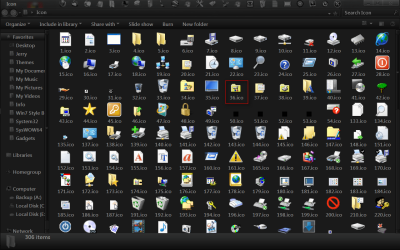
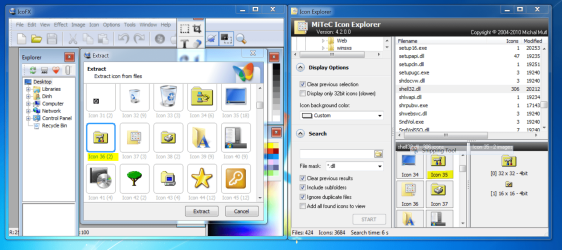
I created a new folder on desktop then right click->Property->Customize
and try to change Icon to icon#35 of shell32.dll according to IconExplorer4.2 which is a folder with
a tool picture on it. When I click on Apply the Folder Icon changed to a Control Panel icon which is icon #21 in shell32.dll. Can somebody try this out for me if it's the same on your system. I have 2 PC's both running Windows 7 Ultimate X64 and both behave the same way.
Thanks.
Please look at the picture of the Icon I want to change.

and try to change Icon to icon#35 of shell32.dll according to IconExplorer4.2 which is a folder with
a tool picture on it. When I click on Apply the Folder Icon changed to a Control Panel icon which is icon #21 in shell32.dll. Can somebody try this out for me if it's the same on your system. I have 2 PC's both running Windows 7 Ultimate X64 and both behave the same way.
Thanks.
Please look at the picture of the Icon I want to change.
My Computer
- Computer type
- PC/Desktop
- Computer Manufacturer/Model Number
- custom build
- OS
- win 7 ultimate x64
- CPU
- Intel(R) Core(TM) i7-4790K @4.7GHZ
- Motherboard
- Z97A GAMING 7
- Memory
- 16.00 GB
- Graphics Card(s)
- NVIDIA GeForce GTX 260
- Sound Card
- X-fi titanium
- Monitor(s) Displays
- 24" Dual HP
- Hard Drives
- (1) ST5000DM000-1FK178 (2) SAMSUNG MZHPV256HDGL-00000 (3) ST2000DM001-1CH164 (4) Samsung SSD 840 EVO 120GB (5) Samsung SSD 850 EVO 500GB
- PSU
- 850W Antec
- Case
- 1200 Antec
- Cooling
- Water
- Keyboard
- Logitech
- Mouse
- Logitech
- Internet Speed
- 35/12
- Antivirus
- None
- Browser
- Firefox