
"WindowsImageBackup": can it be inside a folder? => Yes.
according to this "WindowsImageBackup": can it be inside a folder? Solved - Page 2 - Windows 7 Forums you can't change the location of the Folder WindowsImageBackup but i can assure you that this is possible: with shared folders.
right now i am developing the perfect tower-server for an office and fulfill all my dreams in it: raid0 and gigabyte x870e with 2 nvmes each 4 tb making an 8 tb array on 2 m.2 slots backup on 3 s-ata hdds each 8 tb and i have installed windows server 2025 on the array, installed the feature "windows server backup" in server-manager (also updated firebird v2.5.3 to v2.5.9 and maybe one day upgrade it to firebird v3 or even v4 with the help of firebirdforum.de, firebird db is used by an x-ray-program, have to put a dental-office-program in a docker-container running on hyper-v in the future and maybe upgrading postgres13/16 (used by the dental-office-program) to postgres17 too it's so exciting every success i can reach, howeverrr) and could successfully avoid the -backuptarget of wbadmin start backup of the root of any of these s-ata hdds (called the A:, B: and E: hehe i know what A: and B: where for but in the end nobody uses floppy anymore even if I connect the 34-pin floppy slot to the onboard USB with something like this of the super-old PC case which still has a floppy drive,

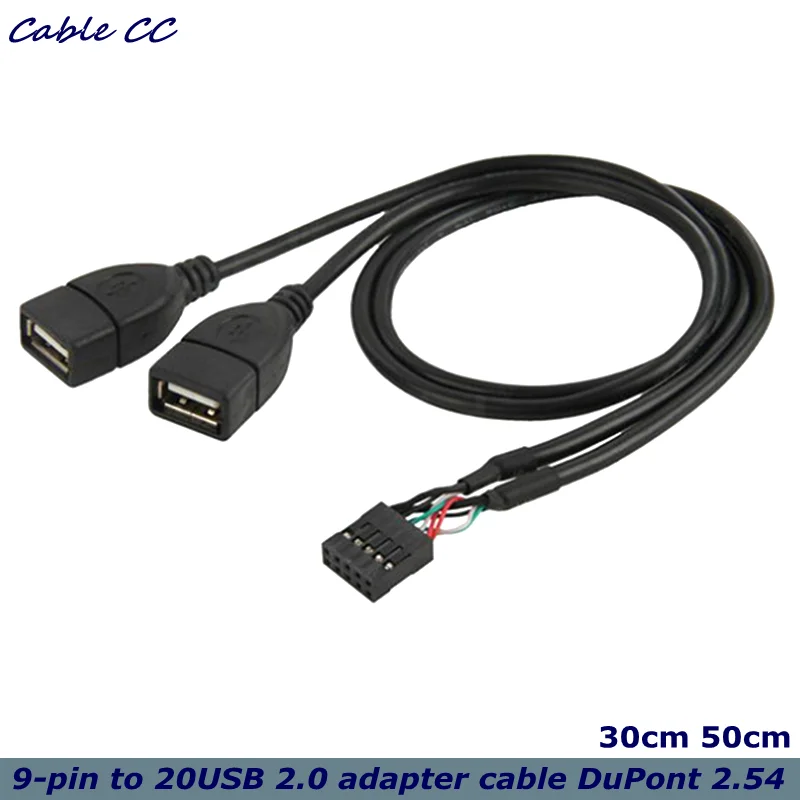
also reused the super-old power-supply 650 W with 2 of these nice adapters)

but instead create a folder named like FULLBACKUP-MO&MI-CAUTION-DO-NOT-CHANGE and SHARE IT and write a command in CMD like
which hopefully can also be used as a task for MOnday and WEdnesday (Mittwoch) at 6 PM for the scheduler. (don't forget the quotes "...")
c:\ is 120 gb and the rest of the 8 tb PCIe5 NVMe crucial t700 belongs to D:\.
if i use wbadmin GUI, it would hide the HDD therefore making it invisible and waste the free space by not being accessable. we had discovered it in the previous server. i felt disappointed but learned from my mistakes.
you can also copy the path of the shared folder in context-menu => properties => tab "sharing" => right click on the path, select all, copy. as far as i know if the command is just wbadmin start backup -allCritical -quiet -backupTarget:blablabla ... then -vssCopy is included right? "If parameters are specified, it creates a Volume Shadow Copy Service (VSS) copy backup ..." wbadmin start backup | Microsoft Learn meaning if i keep it simple like wbadmin start backup -allCritical -quiet -backupTarget:blablabla and refuse on -vssFull then -vssCopy will be added.
- - - Updated - - -
followed this: How to Schedule Windows Server Backup | Practical365 How to Schedule Windows Server Backup | Practical365
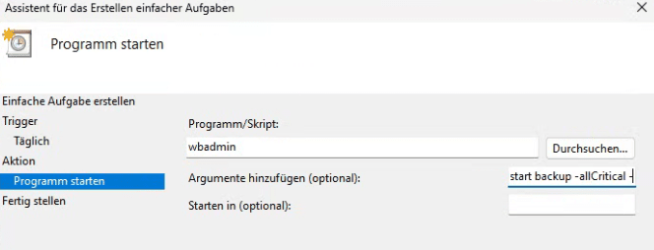
only wbadmin has to be written, while start backup -allCritical etc. inside arguments(?)
- - - Updated - - -
i have to understand VSS, i slowly get it. Volumeschattenkopie-Dienst (VSS) | Microsoft Learn Volumeschattenkopie-Dienst (VSS) | Microsoft Learn
according to this "WindowsImageBackup": can it be inside a folder? Solved - Page 2 - Windows 7 Forums you can't change the location of the Folder WindowsImageBackup but i can assure you that this is possible: with shared folders.
right now i am developing the perfect tower-server for an office and fulfill all my dreams in it: raid0 and gigabyte x870e with 2 nvmes each 4 tb making an 8 tb array on 2 m.2 slots backup on 3 s-ata hdds each 8 tb and i have installed windows server 2025 on the array, installed the feature "windows server backup" in server-manager (also updated firebird v2.5.3 to v2.5.9 and maybe one day upgrade it to firebird v3 or even v4 with the help of firebirdforum.de, firebird db is used by an x-ray-program, have to put a dental-office-program in a docker-container running on hyper-v in the future and maybe upgrading postgres13/16 (used by the dental-office-program) to postgres17 too it's so exciting every success i can reach, howeverrr) and could successfully avoid the -backuptarget of wbadmin start backup of the root of any of these s-ata hdds (called the A:, B: and E: hehe i know what A: and B: where for but in the end nobody uses floppy anymore even if I connect the 34-pin floppy slot to the onboard USB with something like this of the super-old PC case which still has a floppy drive,
also reused the super-old power-supply 650 W with 2 of these nice adapters)
but instead create a folder named like FULLBACKUP-MO&MI-CAUTION-DO-NOT-CHANGE and SHARE IT and write a command in CMD like
Code:
wbadmin start backup -allCritical -quiet -backupTarget:"\\THE-FIRST-15-CHARACTERS-OF-THE-PC-name-somehow-the-remaining-characters-aren't-necessary-not-even-in-capital-letters\fullbackup-mo&mi-caution-do-not-change" -include:D:c:\ is 120 gb and the rest of the 8 tb PCIe5 NVMe crucial t700 belongs to D:\.
if i use wbadmin GUI, it would hide the HDD therefore making it invisible and waste the free space by not being accessable. we had discovered it in the previous server. i felt disappointed but learned from my mistakes.
you can also copy the path of the shared folder in context-menu => properties => tab "sharing" => right click on the path, select all, copy. as far as i know if the command is just wbadmin start backup -allCritical -quiet -backupTarget:blablabla ... then -vssCopy is included right? "If parameters are specified, it creates a Volume Shadow Copy Service (VSS) copy backup ..." wbadmin start backup | Microsoft Learn meaning if i keep it simple like wbadmin start backup -allCritical -quiet -backupTarget:blablabla and refuse on -vssFull then -vssCopy will be added.
- - - Updated - - -
followed this: How to Schedule Windows Server Backup | Practical365 How to Schedule Windows Server Backup | Practical365
only wbadmin has to be written, while start backup -allCritical etc. inside arguments(?)
- - - Updated - - -
i have to understand VSS, i slowly get it. Volumeschattenkopie-Dienst (VSS) | Microsoft Learn Volumeschattenkopie-Dienst (VSS) | Microsoft Learn
My Computer
At a glance
Windows 10 64bit
- Computer type
- PC/Desktop
- OS
- Windows 10 64bit

