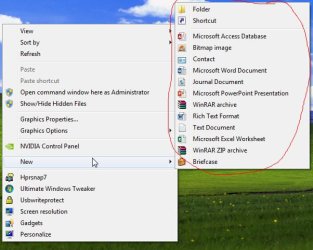
M muiacir New member Member VIP Local time 5:10 AM Messages 161 Aug 29, 2012 #1 hi guys. i have a question. how can i add wordpad and a program to "new" option of right click menui mean the menu at the picture below) Attachments Snap2.jpg 43.1 KB · Views: 15 My Computer My Computer OSwindows 7 ultimate x64
hi guys. i have a question. how can i add wordpad and a program to "new" option of right click menui mean the menu at the picture below)
Bare Foot Kid R.I.P. August 13th 2014 SF Team Local time 6:10 AM Messages 22,809 Location The Lowcountry Aug 29, 2012 #2 Hello mate, have a look at this this tutorial linked below. Advanced Context Menu My Computer My Computer Computer Manufacturer/Model Number* BFK Customs *OSW 7 64-bit UltimateCPUIntel Q9550 YorkfieldMotherboardASUS P5Q ProMemory8GB Dominator 8500C5DGraphics Card(s)ATI : XFX 5870Sound CardRealtek HD Audio 7-1Monitor(s) Displays1x 47" LCD HDMI & 3x 26" LCD HDMIScreen Resolution1920x1080P & 1920x1200Hard Drives1x 80GB Intel X25-M G2 SSD : 1x 500GB & 1x 640GB WD Caviar Black(s)PSUCorsair 620HXCaseCooler Master RC-690CoolingTuniq Tower 120, 2x 140mm and 3x 120mm case fansKeyboardMicrosoft 500MouseRazer Diamondback 3GInternet Speed14 Mb/sOther Info1x Koutech 3Gb/s SATA HDD Hot Swap Rack
M muiacir New member Member VIP Thread Starter Local time 5:10 AM Messages 161 Aug 29, 2012 #3 thnaks my friend.but the tutorial suggest a program that create "open++ menu" in context menu.my question is to add wordpad and a program to "new" menu of context menu(i inserted a picture in my post) My Computer My Computer OSwindows 7 ultimate x64
thnaks my friend.but the tutorial suggest a program that create "open++ menu" in context menu.my question is to add wordpad and a program to "new" menu of context menu(i inserted a picture in my post)
Bare Foot Kid R.I.P. August 13th 2014 SF Team Local time 6:10 AM Messages 22,809 Location The Lowcountry Aug 29, 2012 #4 Here you go mate, scroll down to go through the tutorials about the context menu. http://www.sevenforums.com/tutorials/257-windows-7-tutorial-index.html#post1066 My Computer My Computer Computer Manufacturer/Model Number* BFK Customs *OSW 7 64-bit UltimateCPUIntel Q9550 YorkfieldMotherboardASUS P5Q ProMemory8GB Dominator 8500C5DGraphics Card(s)ATI : XFX 5870Sound CardRealtek HD Audio 7-1Monitor(s) Displays1x 47" LCD HDMI & 3x 26" LCD HDMIScreen Resolution1920x1080P & 1920x1200Hard Drives1x 80GB Intel X25-M G2 SSD : 1x 500GB & 1x 640GB WD Caviar Black(s)PSUCorsair 620HXCaseCooler Master RC-690CoolingTuniq Tower 120, 2x 140mm and 3x 120mm case fansKeyboardMicrosoft 500MouseRazer Diamondback 3GInternet Speed14 Mb/sOther Info1x Koutech 3Gb/s SATA HDD Hot Swap Rack
Here you go mate, scroll down to go through the tutorials about the context menu. http://www.sevenforums.com/tutorials/257-windows-7-tutorial-index.html#post1066
M muiacir New member Member VIP Thread Starter Local time 5:10 AM Messages 161 Aug 29, 2012 #5 thanks again my friend but i read all of them before but can not find anything realted to my question. My Computer My Computer OSwindows 7 ultimate x64
thanks again my friend but i read all of them before but can not find anything realted to my question.
koolkat77 New member Guru VIP Local time 4:10 PM Messages 14,164 Sep 1, 2012 #6 See if this thread helps. :ar: http://www.sevenforums.com/customization/64181-wordpad-right-click.html My Computer My Computer Computer typePC/DesktopComputer Manufacturer/Model NumberSelf assembledOSWindows 10 Home 64BitCPUIntel Core i5 10400 @ 2.90GHzMotherboardIntel Corporation DG41WV (PROCESSOR)Memory8.00GB Single-Channel Unknown @ 1329MHz (16-20-20-38)Sound CardRealtek High Definition AudioMonitor(s) DisplaysDELL E170SScreen Resolution1280x1024 pixelsHard Drives931GB TOSHIBA DT01ACA100 (SATA) 238GB TEAM TM8PS7256G (SATA SSD)CaseNothing FancyCoolingFansKeyboardA4 Tech Co LTDMouseA4 Tech Co Ltd/LogitechInternet Speed25 Mbps
See if this thread helps. :ar: http://www.sevenforums.com/customization/64181-wordpad-right-click.html

 i mean the menu at the picture below)